 ZeroThreat Wins Bronze Stevie® Award in Tech Startup of the Year Read more

All Blogs
Web Application Security Checklist: Key Actions You Must Take

Quick Summary: Web apps are important for organizations, but they are also on the hitlist of attackers. So, securing web apps is vital to protect them from cybercriminals. But what can you do about it? The complete web app security checklist in this article helps build a robust security shield to prevent cybersecurity risks. Check out the key factors you must consider to ensure top-notch security for web apps.
Today, web apps are a major target of attackers due to ease of access and a wider attack surface. So, protecting them becomes a priority for organizations. However, as the threat landscape is evolving day by day, you need stronger security measures to defend your web app against these rising threats.
But how can you ensure the best security of your web app? This article will delve into this topic by providing a comprehensive web app security checklist. Web app security isn’t about adding some common features, but it entails many techniques and best practices to improve its security posture.
In addition, regular web app security scanning is essential to assess the current security posture, find weaknesses, and eliminate hidden gaps to mitigate potential security risks. With these measures, you can ensure optimal security for your web application and avoid data breaches or cyberattacks.
Boost Web App Security by 10X by Discovering Hidden Loopholes that Attackers Can Exploit Let’s Find Them
On This Page
- Quick Glance at Web App Security Checklist
- Overview of Web App Security
- Importance of Web App Security
- Web App Security Checklist
- ZeroThreat for Web Application Security
- To Wrap Up
Web Application Security Checklist: Quick Glance
| Checklist | Purpose | Quick Tip |
|---|---|---|
| Implement Strong Authentication Mechanisms | Prevent unauthorized access | Use MFA and strong password policies |
| Enforce Role-Based Access Control (RBAC) | Restrict access based on user roles | Follow least-privilege principle |
| Secure User Sessions Against Hijacking | Protect active user sessions | Use secure, HttpOnly cookies |
| Validate and Sanitize All User Inputs | Prevent injection and malicious input | Apply allowlists and escape characters |
| Protect Applications From SQL Injection (SQLi) | Safeguard database integrity | Use parameterized queries |
| Prevent Cross-Site Scripting (XSS) Vulnerabilities | Stop malicious scripts from running | Encode output and use CSP |
| Enable HTTPS and Enforce Secure Data Transmission | Ensure safe data in transit | Apply TLS and redirect HTTP to HTTPS |
| Leverage Dynamic Application Security Testing (DAST) | Detect vulnerabilities in real-time | Scan running apps regularly |
| Secure APIs and Exposed Endpoints | Protect data and logic exposed via APIs | Authenticate and validate requests |
| Monitor and Log Application Security Events | Track attacks and suspicious behavior | Centralize logs and set alerts |
| Configure Secure Error Handling and Responses | Prevent info leaks through errors | Display generic errors, log details |
| Perform Regular Penetration Testing | Find exploitable weaknesses before attackers | Combine automated and manual testing |
| Apply Secure Configuration Across Servers | Harden infrastructure to reduce attack surface | Disable unused services and patch regularly |
A Quick Overview of Web Application Security
Web application security is all about protecting your web apps from cyberattacks that target business logic, data, and user interactions. It involves securing code, APIs, servers, and databases against common threats. These threats include SQL injection, cross-site scripting, broken authentication, and access control issues.
The goal of web app security is to prevent data breaches, service abuse, and unauthorized access. Effective web application security combines secure coding, regular testing, and real-time monitoring.
Practices like input validation, proper authentication, and least-privilege access reduce the risk of attacks. You can implement such practices by performing vulnerability assessments or pentesting. Together, both of these approaches support web app security against cyber threats.
Why is Web Application Security So Important?
Web application security is critical because modern apps handle sensitive data and face constant attacks. A single vulnerability can lead to data breaches, financial loss, and trust issues. Strong security helps protect users, meet compliance needs, and reduce long-term risk.
Avoid Data Breaches
Today, the average cost of a data breach stands at $4.88 billion. It shows how expensive data breaches are. So, you need stronger security measures to protect your web app from evolving threats like Cross-Site Scripting, CSRF, SQL Injection, and more.
Protecting against these threats requires robust web app security. Your defense strategy plays a pivotal role in minimizing potential threats and reducing the chances of cybersecurity incidents that lead to costly data breaches.
Protect Sensitive Data
Every web application handles some sort of sensitive data that needs strong protection against data theft, hacking, ransomware, and other cyber threats. Web app security helps build a strong security shield that prevents these threats and secures your app against sensitive data exposure.
For example, strong access controls, data encryption, and password hashing are some web app security techniques that help protect sensitive data. They make your data inaccessible to unauthorized users and protect against potential data breaches.
Prevent Reputational Damage
Data loss isn’t the only thing you face with cybersecurity incidents; and it also results in heavy reputational damage. Users of your web application provide their data because they trust it. If there is a data breach incident, this information is exposed to an untrusted party.
It will break users’ trust in your application and spoil your reputation in the market. Besides, your organization will also face legal consequences with heavy fines or penalties.
Security Compliances
Web apps must comply with some necessary standards and regulations like GDPR, PCI DSS, ISO 27001, and more. You need to implement top-notch web application security to achieve the required compliance.
Gain Deep Insights into the Threat Landscape with ZeroThreat’s Web Security Audits Identify Web App Risks
13 Step Web Application Security Checklist
There is a wide range of web app security risks like SQL injection, Cross-Site Scripting, CSRF, session hijacking, and more. Weak application security is the primary reason for the occurrence of these cybersecurity risks.
By following this web application security checklist, you can ensure that your web app is secured against any malicious attempt.
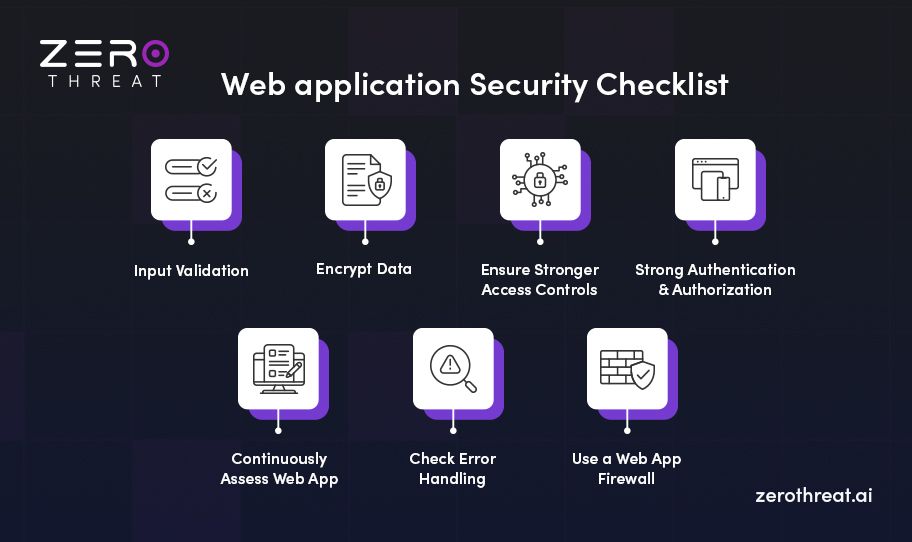
1. Implement Strong Authentication Mechanisms
Strong authentication ensures only legitimate users can access your web application. Weak login controls are one of the most common entry points for attackers. Implementing secure authentication reduces the risk of account takeovers, credential abuse, and unauthorized access.
- Enforce strong password policies with minimum length and complexity rules
- Enable multi-factor authentication (MFA) for all sensitive accounts
- Protect login endpoints from brute-force attacks using rate limiting
- Store passwords using secure hashing algorithms like bcrypt or Argon2
- Implement account lockout or CAPTCHA after multiple failed login attempts
- Regularly review and rotate credentials for privileged users
2. Enforce Role-Based Access Control (RBAC)
Role-Based Access Control ensures users can only access features and data required for their role. Without proper RBAC, users may gain excessive privileges, increasing the risk of data exposure and unauthorized actions across the application.
- Define clear roles based on job functions and responsibilities
- Grant permissions using the principle of least privilege
- Restrict access to sensitive features at both UI and API levels
- Validate user roles on every request, not just at login
- Avoid hardcoding roles and permissions in application logic
- Regularly audit and update roles as business needs change
3. Secure User Sessions Against Hijacking
Session hijacking allows attackers to take over active user sessions and act as legitimate users. Securing session management helps protect user accounts, sensitive data, and application integrity from unauthorized access.
- Use secure, random session identifiers that cannot be guessed
- Set session cookies with Secure, HttpOnly, and SameSite attributes
- Enforce session expiration after inactivity and logout events
- Regenerate session IDs after login and privilege changes
- Prevent session fixation by invalidating old sessions
- Monitor abnormal session behavior to detect hijacking attempts
4. Validate and Sanitize All User Inputs
User input is one of the most common attack vectors in web applications. Proper input validation and sanitization help prevent attackers from injecting malicious data that can compromise application logic or backend systems.
- Validate inputs on both client and server sides
- Apply allowlists to accept only expected input formats and values
- Sanitize inputs to remove or escape harmful characters
- Enforce strict data type and length checks for all fields
- Validate headers, cookies, query parameters, and request bodies
- Reject and log unexpected or malformed input for security review
5. Protect Applications from SQL Injection (SQLi)
SQL injection allows attackers to manipulate backend databases through malicious inputs. A successful SQLi attack can expose sensitive data, bypass authentication, or even allow full database control. Protection against SQL injection is essential for maintaining data integrity and application trust.
- Use prepared statements and parameterized queries for all database operations
- Avoid building SQL queries using direct user input
- Apply input validation as an additional defense layer
- Use least-privilege database accounts with restricted permissions
- Disable detailed database error messages in production environments
- Regularly test applications for SQL injection vulnerabilities
6. Prevent Cross-Site Scripting (XSS) Vulnerabilities
Cross-site scripting allows attackers to inject malicious scripts into web pages viewed by other users. These attacks can steal session data, hijack accounts, or manipulate application behavior. Preventing XSS is essential to protect users and maintain application credibility.
- Encode output based on the context where data is rendered
- Validate and sanitize all user-supplied input before processing
- Avoid rendering untrusted data directly in HTML or JavaScript
- Implement Content Security Policy (CSP) to restrict script execution
- Use secure frameworks that provide built-in XSS protection
- Regularly test pages and inputs for XSS vulnerabilities
7. Enable HTTPS and Enforce Secure Data Transmission
Secure data transmission protects information as it travels between users and your web application. Without HTTPS, sensitive data like credentials and session tokens can be intercepted or altered.
- Enable HTTPS across the entire application using TLS encryption
- Redirect all HTTP traffic to HTTPS automatically
- Use strong TLS configurations and disable weak ciphers
- Protect cookies with the Secure flag to prevent exposure
- Encrypt sensitive data during API and third-party communications
- Regularly monitor certificate validity and renew before expiry
8. Leverage Dynamic Application Security Testing (DAST)
Dynamic Application Security Testing helps identify security vulnerabilities in a running web application. It simulates real-world attacks to uncover issues that static code reviews may miss. DAST is crucial for finding exploitable flaws before attackers do.
- Scan live applications to detect runtime security weaknesses
- Identify issues like SQL injection, XSS, and authentication flaws
- Integrate a DAST tool into CI/CD pipelines for continuous testing
- Run scans after major updates or feature releases
- Prioritize and fix high-risk findings based on impact
- Combine DAST with manual testing for deeper coverage
9. Secure APIs and Exposed Endpoints
APIs power modern web applications by exposing data and core functionality to users and systems. When APIs are poorly secured, attackers can exploit endpoints to access unauthorized data or perform restricted actions. Securing exposed APIs is critical to prevent abuse, data leakage, and logic-based attacks.
- Enforce strong authentication and authorization for all API requests
- Validate request parameters and payloads strictly
- Implement rate limiting and throttling to prevent abuse
- Protect APIs against broken object level authorization (BOLA)
- Secure API communication using HTTPS and token-based authentication
- Monitor API usage to detect suspicious or abnormal behavior
10. Monitor and Log Application Security Events
Monitoring and logging security events help you detect attacks, misuse, and abnormal behavior in real time. Without proper visibility, security incidents can go unnoticed until damage is done. Effective logging strengthens incident response and supports long-term security analysis.
- Log authentication attempts, access failures, and privilege changes
- Capture API activity and sensitive user actions for audit trails
- Centralize logs to prevent tampering and simplify analysis
- Set up alerts for suspicious patterns and repeated failures
- Retain logs securely to support investigations and compliance needs
- Regularly review logs to identify trends and hidden threats
11. Configure Secure Error Handling and Responses
Improper error handling can expose sensitive system details to attackers. Stack traces, database errors, or debug messages often reveal information that helps attackers plan further attacks. Secure error handling reduces information leakage while maintaining a good user experience.
- Display generic error messages to users without revealing internal details
- Log detailed error information securely for internal analysis
- Disable debug and verbose error modes in production environments
- Handle exceptions gracefully to prevent application crashes
- Validate error responses returned by APIs and backend services
- Regularly test error scenarios to ensure secure behavior
12. Perform Regular Penetration Testing
Penetration testing evaluates your web application from an attacker’s perspective to uncover actual security gaps. It helps identify weaknesses in authentication, authorization, APIs, and business logic that scanning tools often miss. Regular penetration testing provides real insight into how secure your application actually is.
- Conduct penetration tests after major releases or infrastructure changes
- Test authentication, authorization, APIs, and business logic flows
- Combine an automated pentesting tool with manual testing for deeper coverage
- Prioritize fixing high-risk findings based on impact and exploitability
- Re-test applications to verify remediation effectiveness
- Use findings to improve long-term security controls and processes
13. Apply Secure Configuration Across Servers
Secure server configuration reduces the attack surface that supports your web application. Misconfigured servers can expose sensitive services, files, or administrative access to attackers. Applying security hardening across servers ensures that the infrastructure does not become a weak link in your application's security.
- Disable unused services, ports, and default accounts
- Apply security hardening for web servers, databases, and OS layers
- Keep server software and dependencies up to date with patches
- Restrict administrative access using strong authentication controls
- Enforce secure file permissions and directory access rules
- Regularly audit server configurations for changes or security misconfigurations
How ZeroThreat Supports Web Application Security
ZeroThreat helps you secure your web applications with an automated testing approach that fits modern development needs. It puts continuous security testing at the start of your SDLC, so vulnerabilities are found early and fixed fast. That means better defense, fewer breaches, and stronger confidence in your security posture.
ZeroThreat supports web application security in several practical ways:
- Automated Pentesting & DAST: It continuously scans running apps and APIs to uncover real‑world vulnerabilities, including OWASP Top 10 and business logic flaws.
- Fast, Accurate Scanning: Scans finish in minutes with 99.9% accuracy, so teams focus on real issues.
- Authenticated Coverage: ZeroThreat can test protected parts of your app, including login areas and MFA flows.
- Detailed Remediation Reports: It generates actionable remediation guidance with code examples and clear fix steps, helping developers resolve issues quickly.
- Compliance‑Ready Insights: Findings map to standards like GDPR, PCI‑DSS, and ISO 27001 to support compliance readiness.
- Seamless DevSecOps Integration: ZeroThreat integrates into CI/CD pipelines, issue trackers, and workflows with minimal setup required.
Reduce Your Attack Surface with AI-Powered Vulnerability Scanning with ZeroThreat Start for Free
To Wrap Up
As an essential digital asset, securing web apps is crucial for organizations. However, as cyber threats become more complex and widespread, protecting web apps becomes extremely challenging. You need robust security measures to ensure stronger protection against these threats.
However, regular security testing is also important to ensure the current security measures are sufficient to protect your web app from cyber threats. Here, you can take advantage of ZeroThreat to evaluate your web app for a wide range of vulnerabilities and strengthen your security posture.
It is a robust web app and API security testing tool that can scan even complex web apps in minutes and discover various security loopholes. It identifies vulnerabilities with zero false positives, helping you focus on remediating the actual security risks.
Try it for free to get more information.
Frequently Asked Questions
Which tools are useful for web application security testing?
ZeroThreat is the most powerful tool for web app security audits. It offers 10X faster scanning speed, detects vulnerabilities with zero false positives, identifies zero-day vulnerabilities, seamlessly integrates into your SDLC, and offers dozens of other benefits.
What does the security of a web application mean?
What does WAF stand for in web app security?


Explore ZeroThreat
Automate security testing, save time, and avoid the pitfalls of manual work with ZeroThreat.