 ZeroThreat Wins Bronze Stevie® Award in Tech Startup of the Year Read more

All Blogs
Advanced Authorization Testing in Multi-Role Web Applications
Quick Overview: This blog covers how authorization works in multi-role web applications and why it often breaks in real-world systems. Explains the importance of authorization testing, common failure points, and practical RBAC testing steps. It also shows how ZeroThreat’s AI pentesting capability can detect complex access control flaws.
Web application security continues to evolve with automation and AI, but one problem stays stubbornly at the top: flawed authorization logic. According to the OWASP Top 10: 2025 report, access control issues remain the most critical security risk, with broken access control present in 94% of tested applications.
This issue matters severely more for web applications having defined access controls for multiple roles. When authorization gaps exist, authenticated users can breach permissions, access sensitive data, and perform actions outside their intended scope.
In API-driven and SaaS environments, these flaws can easily become the reason behind privilege escalation, creating serious business, legal, and data protection risks. That’s the reason authorization must be prioritized in web applications, especially the ones with role-based access controls.
If you want to dive more into this topic, continue reading this blog as we learn about the common reasons behind the failure of RBAC, the challenges of testing multi-role applications, and how you can test your application. Additionally, we’ll explore how ZeroThreat’s AI-driven web app pentesting can automate the whole testing procedure.
Secure your multi-role applications with 99.9% accurate testing today. Start for FREE
On This Page
- Understanding Authorization in Multi-Role Web Applications
- Importance of Authorization Testing in Multi-Role Web Applications
- Common Reasons Authorization Fails in Multi-Role Web Apps
- Challenges of Testing Authorization in Web Apps Having Multiple-Roles
- How to Perform Role-Based Authorization Testing in Web Applications
- ZeroThreat for Role-Based Authorization Testing
- Summing Up
Understanding Authorization in Multi-Role Web Applications
Authorization controls what a logged-in user can actually do inside an application. In multi-role web applications, this control becomes layered and complex. Different users have different responsibilities. That means different permissions. If this logic breaks, the entire security model collapses.
In reality authorization answers one question for every user: “Is this user allowed to perform this action on this resource?”
Authorization is the next required security consideration after authentication.
- Authentication (AuthN) = Who are you?
- Authorization (AuthZ) = What are you allowed to do?
In real applications, authorization controls:
- Access to pages
- API endpoints
- Data records
- File downloads
- Admin panels
- Business actions like refunds, edits, exports
If these checks fail, users may access data they shouldn’t see. Or perform actions they should never control.
In a multi-role environment, authorization isn't just a "yes" or "no" check. It’s a complex web of rules:
- Vertical Access: Can a regular user perform an admin action?
- Horizontal Access: Can User A see User B’s private profile?
- Contextual Access: Can an editor change a post, but only if they are the original author?
If these checks aren't hardcoded at the object level, your website can end up with a BOLA vulnerability in APIs, which is currently the biggest risk in the industry.
Importance of Authorization Testing in Multi-Role Web Applications
In multi-role web applications, authorization defines the boundaries between users, data, and actions. Authorization testing is required to ensure those boundaries are not broken by any user.
Let’s understand the reasons behind its importance:
1. Stopping Privilege Escalation
The primary reason to prioritize this testing is to prevent privilege escalation, which is a globally recognized security risk.
Vertical Escalation
- The vertical threat occurs when a lower-level user, such as a guest or a regular user, finds a way to perform actions reserved for a higher-level role like an admin.
- Example: Can a low-privilege user jump up to a high-privilege role? (Guest to Admin).
Horizontal Escalation
- Horizontal escalation happens when a user accesses private data or resources belonging to another user who holds the same rank or role.
- Example: Can a user access resources of the same level? (Customer A seeing Customer B’s credit card digits).
Testing ensures these boundaries remain strict, and that users are limited to their intended permissions.
2. Catching Critical Flaws Like IDOR
Insecure Direct Object Reference (IDOR) is a classic example of broken object level authorization in APIs. It occurs when an application provides direct access to objects based on user-supplied input.
For example, if you can see your own profile at app.com/api/users/101, a simple test is to change that ID to 102. If the system shows you someone else's private data, you've found an IDOR. Because multi-role apps handle thousands of these "Object IDs," manual and advanced automated testing are the only ways to ensure that User 101 is truly restricted to Object 101.
3. Validating Complex RBAC Logic
In a multi-role environment, you are essentially managing a complex web of permissions known as Role-Based Access Control (RBAC). Authorization testing is the only way to verify that the application is correctly enforcing "who can do what" across every single feature. It focuses on verifying whether the user role protection is actually working when an attacker tries to bypass it.
4. Aligning with Global Security Standards
If the web application handles sensitive data, testing becomes a must for compliance. Standards like OWASP Top 10 place BOLA and Broken Access Control at the very top of their list.
- Compliance: Frameworks like PCI DSS, GDPR, and HIPAA require proof that you are protecting user data from unauthorized access.
- Audit Readiness: Regular authorization testing provides a "paper trail" showing that you’ve proactively looked for flaws and fixed them.
By aligning with these standards, you build a credible, professional-grade application that partners and users can trust.
Common Reasons Authorization Fails in Multi-Role Web Apps
Authorization fails because of assumptions, complexity, or inconsistent enforcement of controls. In multi-role web applications, the access model is layered, so the chances of subtle mistakes are quite high.
Below are the most common reasons authorization breaks in real-world applications.
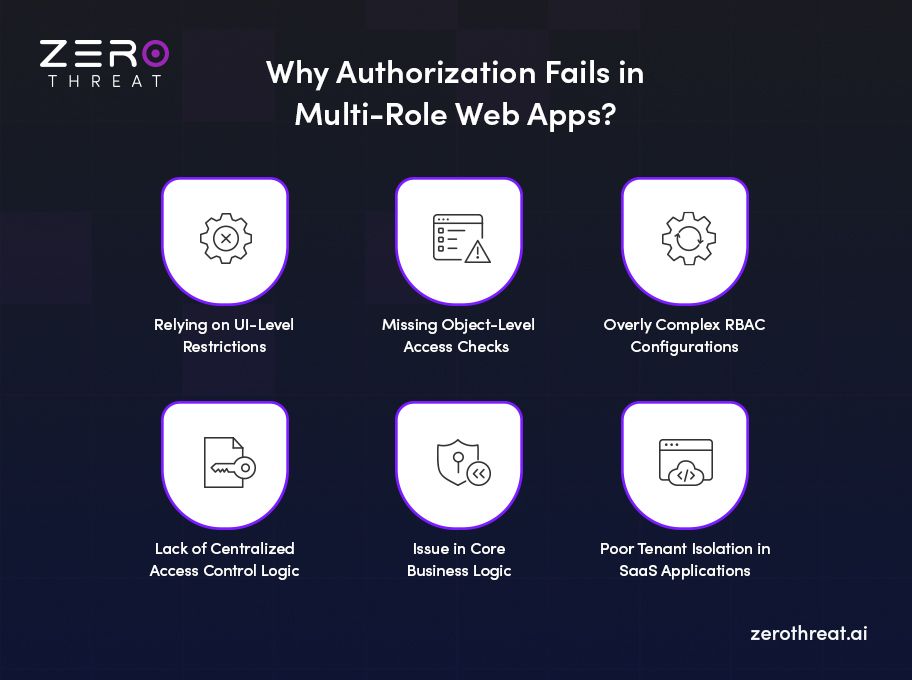
1. Relying on UI-Level Restrictions
One of the biggest mistakes is assuming that hiding a feature makes it secure. Developers often:
- Hide admin buttons from regular users
- Disable menu options
- Restrict navigation links
But the backend API may still process the request if called directly. Attackers do not depend on the UI. They send crafted requests directly to the server. If server-side validation is missing, the restriction is meaningless.
2. Missing Object-Level Access Checks
Multi-role apps often validate who the user is, but fail to validate what specific data they can access.
For example:
- The system checks that the user is logged in.
- It does not check whether the user owns the requested resource.
This leads to issues like IDOR, where modifying an object ID exposes another user’s data.
Object-level authorization must verify:
- Ownership
- Tenant association
- Role-based permission for that specific resource
Skipping this step is one of the most common access control failures.
3. Overly Complex RBAC Configurations
Role-Based Access Control looks simple at first. But as applications scale, RBAC becomes complex.
Common complexity drivers include:
- Role hierarchies
- Inherited permissions
- Temporary access grants
- Feature-based access toggles
- Multi-tenant restrictions
Over time, roles may accumulate permissions they were never meant to have. Without continuous validation, RBAC logic becomes hard to track, and even a small misconfiguration in access control can turn into a major reason behind sensitive data exposure.
4. Lack of Centralized Access Control Logic
When authorization checks are scattered across the codebase, problems arise. For example:
- Some endpoints validate roles.
- Others implement custom logic.
- Some rely on middleware, others do not.
This inconsistency leads to blind spots. You need to have centralized authorization logic enforcement for consistent controls.
5. Issue in Core Business Logic
Sometimes authorization breaks not because of security misconfiguration, but because of flawed business rules.
Examples:
- A “manager” can edit reports but unintentionally gains approval rights.
- A user can duplicate objects that carry over restricted attributes.
- Role downgrades do not immediately revoke active sessions.
These issues happen when business workflows are not evaluated from a security perspective. Authorization testing must simulate real workflows, not just endpoint access.
6. Poor Tenant Isolation in SaaS Applications
In multi-tenant systems, authorization must enforce strict separation between organizations.
Failures occur when:
- Tenant IDs are not validated properly
- Queries do not filter data by tenant
- Shared resources are not scoped correctly
A single missing tenant check can expose data across accounts. Multi-tenant SaaS systems require both role validation and tenant validation, and skipping either of them creates serious exposure risks.
Identify BOLA and broken access control flaws using ZeroThreat. Run Authorization Testing
Challenges of Testing Authorization in Web Apps Having Multiple-Roles
Testing authorization in multi-role web applications is not straightforward. As roles increase, so does the complexity of validation. Below are the key challenges security teams face when testing role-based access control systems.
Role and Permission Complexity
Multi-role systems often have layered permission structures. Roles may inherit permissions or have conditional access based on context. Mapping who can do what becomes difficult as the system grows. During testing, understanding the intended permission model itself becomes a challenge before validation even begins.
Hidden Object-Level Access Issues
Function-level checks are usually easier to test. Object-level access control is much harder to validate. A user may be allowed to access a feature but not specific records within it. Testing every possible object reference across roles requires detailed scenario mapping and careful request manipulation.
Inconsistent Enforcement Across APIs
Modern web applications rely heavily on APIs. Sometimes the UI enforces role restrictions properly, but backend APIs lack consistent checks. Testing must go beyond visible workflows and include direct API calls. Identifying endpoints that behave differently across versions or services adds another layer of complexity.
Cross-Tenant Access Testing in SaaS
In multi-tenant applications, roles exist within tenant boundaries. Testing must verify not only role permissions but also tenant isolation. Attempting cross-tenant data access safely and systematically can be complex. A missed validation in tenant filtering can lead to severe exposure.
Dynamic Role Changes and Session Handling
Users may receive temporary role upgrades or permission changes. Testing how the system handles these updates during active sessions is challenging. Sometimes permissions are cached, and changes do not apply immediately. This creates windows where access control behaves unpredictably.
Overlapping Business Logic and Access Rules
Authorization logic is often tied closely to business workflows. For example, approval rights may depend on status, ownership, or hierarchy. Testing requires understanding business rules, not just technical endpoints. Misinterpreting business logic can lead to incomplete security validation.
Limited Visibility Into Backend Authorization Logic
Security teams often do not have full insight into how authorization is implemented internally. Middleware checks, microservice validations, or policy engines may operate behind the scenes. Without proper documentation, identifying where and how checks occur becomes challenging.
Automation Limitations in Authorization Testing
Traditional automated scanning tools focus on injection or input validation issues. Authorization flaws often require context-aware testing and role switching. Automating this process accurately requires careful setup and custom scripting. Without structured automation, gaps may remain undetected.
How to Perform Role-Based Authorization Testing in Web Applications
Role-based authorization testing needs clarity on roles, permissions, workflows, and backend enforcement before you begin testing. Below is a practical step-by-step approach used in real-world security testing.
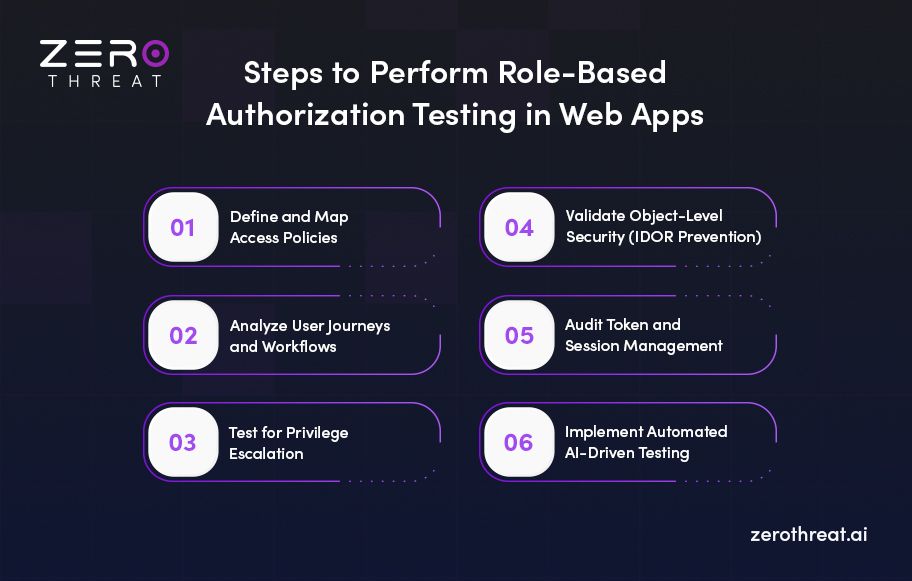
Step 1: Define and Map Access Policies
The foundation of authorization testing is a clear understanding of your Role-Based Access Control (RBAC) framework. Before testing begins, you must define the specific roles (e.g., administrator, employee, partner, or contractor) and the responsibilities associated with each.
- Establish boundaries: Determine which systems and data points are necessary for each role to function.
- Create a permissions matrix: Document which roles have "read," "write," or "delete" permissions across various application modules.
Note: Preparation gives you the required context of overall controls and business logic; without it, authorization testing becomes guesswork.
Step 2: Analyze User Journeys and Workflows
Testing should not be performed in isolation; it must account for real-world user journeys and business logic.
- Map auth flows: Examine how users move from login to sensitive areas of the application.
- Identify logic flaws: Look for vulnerabilities caused by flawed workflows where a user might bypass a required step to gain unauthorized access.
Step 3: Test for Privilege Escalation
One of the most critical steps is identifying vulnerabilities that allow users to elevate their permissions.
- Vertical Escalation: Test whether a lower-privileged user (like a standard viewer) can access administrative endpoints or perform restricted actions.
- Horizontal Escalation: Verify that a user cannot access the data or resources of another user with the same privilege level.
- Granular Validation: Perform deep testing to identify misconfigurations in access control that might be hidden within complex application layers.
Step 4: Validate Object-Level Security (IDOR Prevention)
Insecure Direct Object References (IDOR), also known as Broken Object Level Authorization (BOLA), occur when an application provides direct access to objects based on user-supplied input.
- Analyze references: Check if changing a unique identifier (like a user ID or order number) in a URL or API request allows unauthorized access to another user's data.
- Enforce access controls: Ensure the application explicitly validates that the requesting user has the right to access that specific object.
Step 5: Audit Token and Session Management
Modern web applications often rely on tokens for authorization. Testing must ensure these tokens are handled securely.
- JWT Authentication Testing: If your application uses JSON Web Tokens (JWT), you must verify signature integrity, claim validation, and proper expiration handling to prevent token manipulation.
- Session Monitoring: Identify risks related to session hijacking or unauthorized access through compromised sessions.
- MFA Bypass Checks: Ensure that Multi-Factor Authentication (MFA) implementations cannot be bypassed to gain unauthorized entry.
Step 6: Implement Automated AI-Driven Testing
Manual penetration testing can be time-consuming and prone to human error. Utilizing automated, attacker-style testing can significantly enhance your coverage.
- Scale with AI: Use an AI-driven authorization testing tool to identify complex logic abuse and broken authorization across both web apps and APIs (REST and GraphQL).
- Continuous Testing: Integrate continuous testing in CI/CD pipelines to ensure that new code deployments do not introduce fresh authorization vulnerabilities.
By following these steps, you can validate the web application's authorization logic, so that you can act on your security as required.
ZeroThreat for Role-Based Authorization Testing
Modern multi-role applications require more than basic scanning. They require structured, role-aware authorization validation. ZeroThreat’s AI-driven automated penetration testing is designed to detect real-world access control weaknesses across complex web environments.
ZeroThreat supports multi-role authorization testing by:
- Simulating different user roles and comparing responses automatically
- Detecting vertical and horizontal privilege escalation
- Verifying object-level access for IDOR vulnerabilities
- Validating API-level authorization enforcement
- Identifying cross-tenant data exposure in SaaS applications
Instead of relying on surface-level checks, ZeroThreat analyzes backend behavior and permission logic at scale. It continuously tests role boundaries, endpoint access, and sensitive actions. Plus, it offers AI-powered remediation steps, simplifying the process of fixing vulnerabilities.
Need expert help securing complex role-based web applications? Talk to Our Team
Summing Up
Advanced authorization testing in multi-role web applications is critical to preventing privilege escalation, IDOR, and cross-role data exposure. As applications scale and the number of roles increases, access control logic grows complex. Without a structured testing approach, even small misconfigurations can expose sensitive data or administrative functionality
Strong authorization protects user trust, business logic, and regulatory compliance. Platforms like ZeroThreat strengthen this process by automating multi-role authorization testing across dynamic web applications. Its agentic AI pentesting with widely adopted attack templates from Burp and Nuclei helps security teams identify logic flaws early, validate access controls, and reduce manual effort.
Frequently Asked Questions
Why are backend authorization checks more important than UI restrictions?
Backend authorization checks are critical because attackers can bypass the UI and send requests directly to the server. Hiding buttons or disabling features in the interface does not prevent unauthorized API access. Only server-side validation can enforce role and object-level permissions, which are required for actual access controls.
Why is authorization testing essential before major feature releases?
How do you test RBAC?
Can ZeroThreat detect complex multi-role authorization logic flaws?
How is authorization different from authentication?


Explore ZeroThreat
Automate security testing, save time, and avoid the pitfalls of manual work with ZeroThreat.