 ZeroThreat Wins Top InfoSec Innovators 2026 Award for Penetration Testing Read more


All Blogs
How to Detect and Test the CWE/SANS Top 25 Vulnerabilities in Web Applications
Quick Overview: Every year, the same handful of coding mistakes cause most of the breaches you read about. The CWE/SANS Top 25 names them. This guide walks through how to actually test for each one in a web app, and how to prove a finding is real before you raise the alarm.
Attackers do not think in CWE identifiers. They think in openings: an input that slips into a database query, a request nobody checked for ownership, an admin function sitting wide open because someone assumed no one would guess the URL. The CWE/SANS Top 25 is really just the industry writing down which of those openings keep turning into breaches.
The 2025 edition, published by MITRE and CISA, was built from 39,080 CVE records disclosed between June 2024 and June 2025. If you have tested web apps for any length of time, the top of the list will feel familiar: cross-site scripting, SQL injection, and cross-site request forgery still hold the top three spots, and Missing Authorization jumped five places to number four. The ranking reshuffles every year. It rarely surprises anyone who does this work.
Knowing which vulnerabilities matter is only the starting point. Identifying them in a live application requires a different level of testing. This is where AI pentesting for web applications helps uncover weaknesses that conventional vulnerability checks may overlook. A ranking highlights the risks, but it doesn't explain how to uncover them. This guide breaks the CWE/SANS Top 25 into five practical vulnerability categories and examines each one through a pentester's lens: where it occurs, how to identify it using real HTTP requests, and how to validate whether the result represents an exploitable weakness or a false positive.
Ready to put your application's weakest points to the test? Sign Up for FREE
On This Page
- What is the CWE/SANS Top 25?
- How to Prepare a Web Application for CWE Vulnerability Testing
- How to Detect and Test Each CWE Top 25 Weakness
- Manual vs Automated Web Application Pentesting
- How to Prioritize CWE Top 25 Findings by Exploitability and Business Risk
- How ZeroThreat Detects CWE/SANS Top 25 Vulnerabilities
- Conclusion
What is the CWE/SANS Top 25?
The CWE/SANS Top 25 is an annual ranking of the 25 most dangerous application weakness types, published by MITRE with support from CISA, and scored from real CVE data and known exploitation. It names the recurring coding and design mistakes, such as cross-site scripting or missing authorization, that produce the largest share of serious vulnerabilities each year.
Here is the distinction that trips people up. A CWE is a weakness type, the root cause. A CVE is one specific vulnerability in one specific product. A single weakness type, say CWE-89 (SQL injection), sits behind thousands of individual CVEs. MITRE picks the 25 types that matter most out of more than 900 in the catalog, scoring each on two things: how often it shows up in CVE records, and how much damage those records do.
What about the "CWE/SANS" part? That name is a bit of history that stuck. SANS co-published the earliest versions of the list, and the label lived on as a search term even though MITRE and CISA now produce it on their own. If you came here searching for "CWE/SANS Top 25," the current official title is the 2025 CWE Top 25 Most Dangerous Software Weaknesses. Same list, newer name.
For a security team, the real value is as a testing benchmark. Before a CWE vulnerability assessment even begins, the list answers a practical question: out of everything that could be wrong with this app, which weakness classes have the strongest track record of causing damage, and therefore deserve a test case every single time?
OWASP Top 10 vs CWE Top 25
The OWASP Top 10 and the CWE Top 25 measure different things: the CWE Top 25 ranks individual weakness types, while the OWASP Top 10 ranks broad risk categories, each of which contains many CWEs.
They are not rivals, and you do not have to pick one. The OWASP Top 10 is built for the big picture: program design, threat modeling, and training. It sorts web application risk into ten themes. The CWE Top 25 is built for the finding in front of you: triage, remediation, and procurement questions. One OWASP category like "Broken Access Control" expands into several CWE entries, including Missing Authorization (CWE-862), Incorrect Authorization (CWE-863), and Authorization Bypass Through User-Controlled Key (CWE-639). Reach for OWASP to decide what to cover, and the CWE Top 25 to label what each finding actually is.
How to Prepare a Web Application for CWE Vulnerability Testing
Here is the uncomfortable truth: preparation decides whether you can test half this list at all. Point an unauthenticated scanner at a login page and the highest-ranked weaknesses, the authorization ones especially, stay completely invisible. So learning how to detect CWE vulnerabilities in web applications really starts well before your first payload goes out.
Map The Full Attack Surface, Including Client-side Routes
Write down every input, parameter, API endpoint, and workflow. The surface that scanners miss most often is hiding in client-side JavaScript: routes, API paths, and parameters that only appear in bundled JS and never get linked from server-rendered HTML. Crack those bundles open and read them, or you will test a slice of the app and call it the whole thing. This is the everyday difference between attack surface coverage and vulnerability coverage. You cannot pentest what you never found.
Provision Authenticated, Multi-role Accounts
Set up at least two accounts per role, plus accounts in separate tenants or organizations. Testing Missing Authorization, Incorrect Authorization, and IDOR-style bypasses comes down to one move: comparing what user A can do against what user B is supposed to be allowed to do. Without that second account, these CWEs are simply untestable.
Combine Automated Testing with Manual Validation
Automation is fast at breadth, such as fuzzing thousands of parameters, and weak at logic. Manual testing is the mirror image. Use automation to surface candidates, then put human judgment on the ones that need it, especially the multi-step and business-logic flaws that no signature will ever catch.
Choose a Safe Environment
Test in staging when you can. When you have to touch production, hold back destructive payloads and skip denial-of-service style checks against live systems. Agree on scope and timing with the owners first, every time.
How to Detect and Test Each CWE Top 25 Weakness
This is the heart of it: how to test the CWE Top 25 vulnerabilities, grouped into five categories. Each category explains how its weakness class occurs, once. Then every CWE gets the same four beats: where to look, how to test it with an example request, how to confirm it is real, and a one-line fix. The payloads below use harmless markers on purpose. Run them only against systems you are authorized to test.
1) Injection and Input Handling (CWE-79 · 89 · 78 · 77 · 94 · 20)
Injection comes down to one root cause: untrusted input gets mixed into a command, query, or markup that an interpreter then runs. The cure is almost always the same shape, too. Keep data and code apart. These six weaknesses crowd the top of the list, with XSS at number one and SQL injection right behind it.
CWE-79: Cross-Site Scripting (XSS)
Where to look: anything that reflects a value back into a page, stores it and shows it later, or writes it into the DOM with client-side script. Search boxes, comments, profile fields, URL fragments.
How to test for SQL injection and cross-site scripting is easier than its reputation suggests. First, start with a unique, harmless marker, not a live script. For reflected and stored XSS, submit a canary and watch whether it comes back rendered without encoding:
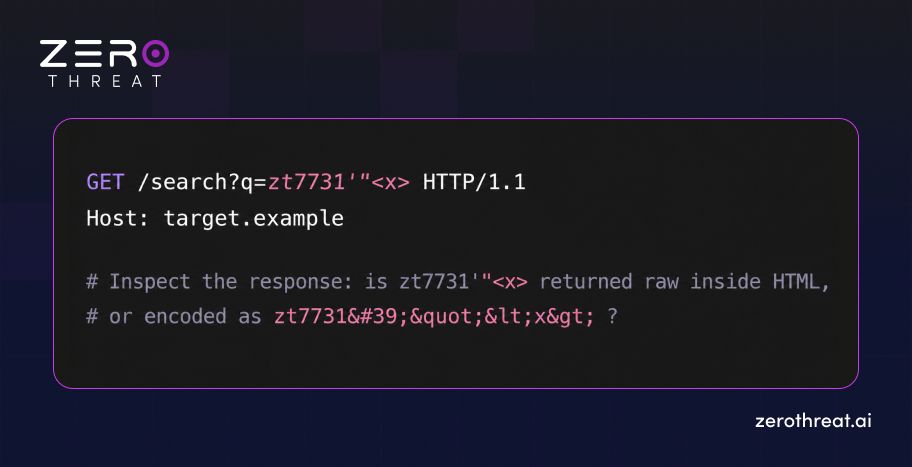
If the marker lands unencoded inside an HTML, attribute, or script context, step up to a context-appropriate proof such as <img src=x onerror=alert(document.domain)>. For DOM-based XSS, forget the server response and trace sources like location.hash through to sinks like innerHTML in the JavaScript itself.
Confirm: Script execution in the application's own origin, which you see when the payload fires.
Fix: Context-aware output encoding plus a Content Security Policy, laid out well in the OWASP XSS Prevention Cheat Sheet.
CWE-89: SQL Injection
Where to look: Any parameter that filters, sorts, or looks something up. IDs, search terms, filters, login fields.
Test: Chase a behavioral difference rather than trusting error strings, which modern apps often hide. A boolean pair is the cleanest tell:
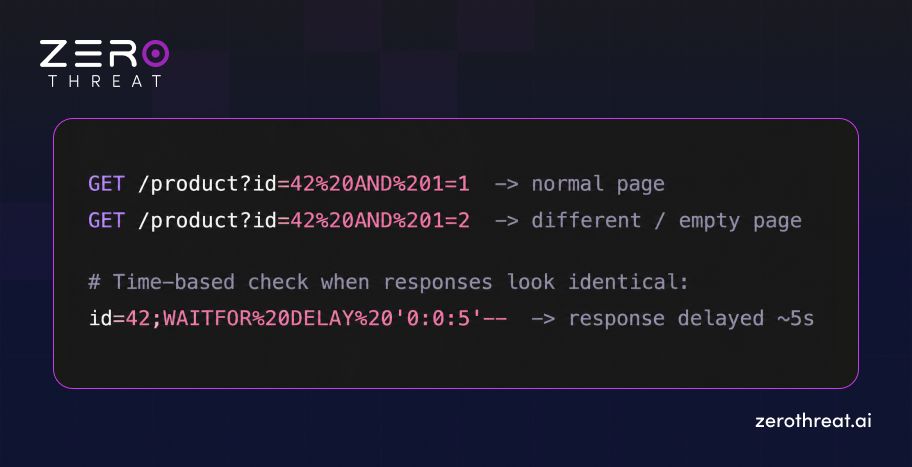
Confirm: A reliable, repeatable difference tied to the logic you injected. The boolean pair diverges, or the delay tracks the seconds you asked for.
Fix: Parameterized queries and prepared statements, and never concatenate input straight into SQL.
CWE-78 & CWE-77: OS Command and Command Injection
Where to look: Features that shell out. Ping and network tools, file conversion, archive handling, admin utilities.
Test: Append a command separator and a measurable side effect, for example ; sleep 5 or | ping -c 5 collaborator, and watch for the delay or an out-of-band callback.
Confirm: The side effect actually fires, through a timed delay or a DNS or HTTP hit you control. OS Command Injection (CWE-78) carried the most entries in CISA's Known Exploited Vulnerabilities Catalog of any weakness on the 2025 list, so treat any hit as critical.
Fix: Skip the shell entirely; use native APIs and strict allowlists.
CWE-94: Code Injection
Where to look: Template engines, server-side rendering, anything that evaluates expressions (eval, template interpolation, deserialized expressions).
Test: Send a language expression such as ${77} or #{77} and check whether the response hands back 49.
Confirm: The expression was evaluated, not just echoed.
Fix: Never evaluate user input; stick to logic-less templates.
CWE-20: Improper Input Validation
Where to look: This one is the root cause hiding behind many of the others, so test it as a property of every input: unexpected types, out-of-range numbers, oversized payloads, wrong encodings.
Test: Send a string where a number belongs, a negative quantity, or a deeply nested JSON object, and watch for crashes, logic errors, or a check that quietly got skipped.
Confirm: The app accepts and acts on input it should have turned away.
Fix: Validate type, length, format, and range on the server, against an allowlist.
Don't stop at CWE detection. Validate the attack behind the weakness. Start AI Pentesting
2) Authentication, Authorization, and Access Control (CWE-862 · 863 · 284 · 639 · 306 · 352)
This category is about who is allowed to do what, and it is where automated scanners run out of road. The "vulnerability" is a missing or wrong decision, not a malformed input, so there is nothing for a signature to match on. Missing Authorization climbed to number four in 2025, its highest ever. This is exactly why you set up all those extra accounts.
CWE-862: Missing Authorization & CWE-863: Incorrect Authorization
Where to look: Every endpoint that returns or changes data.
Test: Capture a request made as a privileged user, then replay it as a lower-privileged user, or with no session at all. For CWE-863, push on role boundaries: can an "editor" reach an "admin" function?
Confirm: The second account gets back data, or performs an action, it never should have.
Fix: Enforce authorization server-side on every request, and default to deny.
CWE-639: Authorization Bypass Through User-Controlled Key (IDOR)
Where to look: Any request carrying an object identifier: /invoice?id=1043, /api/users/5001.
Test: Swap the identifier for one you do not own and see whether the object comes back.
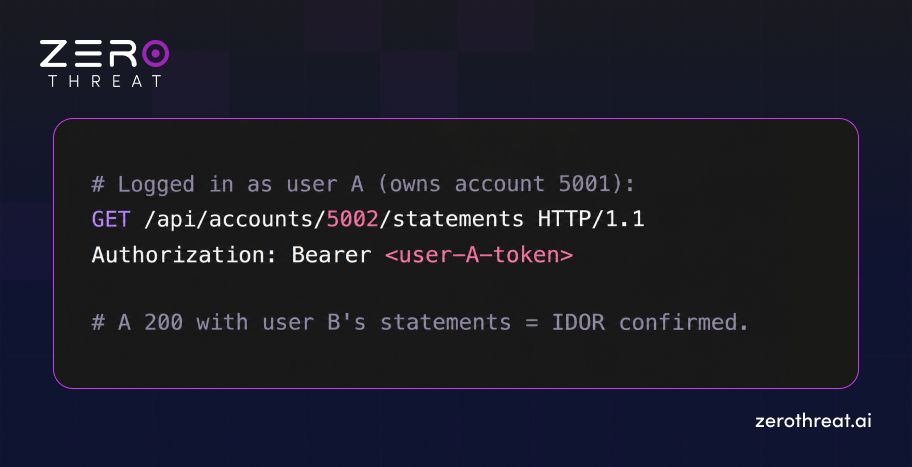
Confirm: Cross-user access using your own valid session. Fix: check object ownership on every access. Unguessable identifiers raise the cost of enumeration, but they are not an authorization control.
CWE-306: Missing Authentication for Critical Function
Where to look: Admin panels, internal APIs, debug endpoints, and setup routines that quietly assume nobody will find them.
Test: Request sensitive functions with no session token at all.
Confirm: The function runs unauthenticated.
Fix: Require authentication on every non-public function, and never lean on an unguessable URL as your gate.
CWE-352: Cross-Site Request Forgery (CSRF)
Where to look: State-changing requests (password change, email update, fund transfer) that ride on a session cookie alone.
Test: Build a form that fires the request from another origin and see whether it goes through without a valid anti-CSRF token.
Confirm: The action completes when triggered cross-origin.
Fix: Anti-CSRF tokens and SameSite cookies.
3) File Handling, Deserialization, and Server-Side Requests (CWE-22 · 434 · 502 · 918)
This category turns the server's own trust against it: its filesystem, its object parsing, and its ability to reach out and make requests. Path Traversal and Deserialization both carry heavy known-exploited counts, so they are far from theoretical.
CWE-22: Path Traversal
Where to look: Parameters that name a file. Downloads, templates, avatars, log viewers.
Test: Inject traversal sequences such as ../../../../etc/passwd and their encoded cousins (%2e%2e%2f).
Confirm: File contents from outside the intended directory come back to you.
Fix: Resolve the canonical path and confirm it stays inside an allowed base directory.
CWE-434: Unrestricted Upload of File with Dangerous Type
Where to look: Every upload. Profile images, documents, bulk imports. Test: upload a file with an executable extension or a polyglot (an image with script appended), then try to reach it.
Confirm: The uploaded file gets served and executed, or lands in a web-reachable path.
Fix: Validate content type by inspection, store outside the webroot, and serve with a non-executable disposition.
CWE-502: Deserialization of Untrusted Data
Where to look: Cookies, tokens, hidden fields, or API bodies carrying serialized objects (Java, .NET, PHP, Python pickle, or signed blobs).
Test: Identify the format, then submit a modified or crafted object and watch what happens.
Confirm: The manipulated object changes server behavior or pulls in code paths it should not.
Fix: Avoid native deserialization of untrusted data; use signed, schema-validated formats such as JSON.
CWE-918: Server-Side Request Forgery (SSRF)
Where to look: Features that fetch a URL for you. Webhooks, URL previews, PDF generators, image importers.
Test: Aim the parameter at an internal address or a controlled collaborator, including cloud metadata endpoints like 169.254.169.254; PortSwigger's SSRF guide catalogs the bypasses worth trying.
Confirm: The server makes the request you dictated, shown by an out-of-band callback or an internal response leaking back.
Fix: Allowlist destinations, block internal ranges, and validate the resolved address.
4) Information Exposure and Resource Limits (CWE-200 · 770)
These two are less about kicking the door in and more about what leaks out, and what happens when nobody sets a ceiling.
CWE-200: Exposure of Sensitive Information
Where to look: Error messages, API responses that over-share fields, debug headers, source maps, directory listings.
Test: Trigger errors on purpose, inspect full API payloads for fields the UI never shows, and request common sensitive paths.
Confirm: Data such as internal IDs, stack traces, keys, or other users' fields comes back.
Fix: Return only what the client needs, and strip diagnostic detail out of production responses.
CWE-770: Allocation of Resources Without Limits or Throttling
Where to look: Endpoints that take counts, sizes, or page parameters; expensive operations; unauthenticated APIs.
Test: Ask for very large page sizes, deeply nested payloads, or high-frequency calls, and watch resource use, without running a real denial-of-service against production.
Confirm: The app happily accepts unbounded work.
Fix: Enforce rate limits, pagination caps, and payload-size limits.
5) Memory Safety in the Web Stack (CWE-787 · 125 · 416 · 120 · 121 · 122 · 476)
Seven of the 25 are memory-safety bugs: Out-of-bounds Write, Out-of-bounds Read, Use After Free, the three buffer overflows, and NULL Pointer Dereference. Now for the most important honest limit in all of CWE vulnerability detection. These almost never live in your application's business logic, and you usually cannot reach them through HTTP requests at all.
So where do they actually show up in a web stack? In native web servers and proxies, in image, video, PDF, and document parsers, in compression libraries, and in native modules or C/C++ extensions sitting behind your application. A malformed file handed to an image processor is a far more realistic trigger than any crafted URL.
How to test them: Software vulnerability testing for this family leans on fuzzing malformed inputs into parsers and native endpoints, runtime instrumentation such as AddressSanitizer in a test build, and component-level analysis of the third-party libraries in your dependency tree.
Confirm: A crash, a memory-access violation, or a sanitizer report, which you then triage for exploitability.
Fix: Keep native dependencies patched, prefer memory-safe languages for new components, and compile with modern memory protections.
Scale your vulnerability testing without scaling manual effort. Choose Now
Manual vs Automated Web Application Pentesting: Which Method Finds Which CWE?
No single method finds every CWE: SAST reads source code and catches injection and memory-safety patterns early, DAST tests the running application and catches reflected and server-side flaws, and manual or authenticated pentesting catches the authorization and business-logic weaknesses that both automated methods miss.
Why does this matter so much? Because the hardest weaknesses on the list are precisely the ones automated scanning handles worst:
- Behind Authentication and Complex Workflows: A scanner that cannot log in or follow a multi-step flow never reaches the vulnerable state in the first place.
- Business-logic and Authorization Flaws: There is no malformed input to match on, so pattern-based tools stay quiet while the hole sits wide open.
- False Positives: Pattern matching flags code that looks wrong but is never actually reachable or exploitable.
- Multi-step Exploitation: A weakness that only appears when you chain three requests is invisible to single-request probing.
- API Visibility: Endpoints referenced only in client-side JavaScript never get tested.
Choosing well means matching the method to the weakness class, not hoping one tool does everything. The matrix below maps each of the 25 weaknesses to the method most likely to find it. And when you are weighing up tools, our guides on the top DAST tools and how to choose a vulnerability scanner go deeper on the selection criteria.
| Weakness Class (CWEs) | Best Primary Method | Why |
|---|---|---|
| Injection: XSS, SQLi, OS/command, code (79, 89, 78, 77, 94) | DAST + manual | Reflected behavior is observable at runtime; manual confirms context and impact |
| Improper input validation (20) | SAST + DAST | Visible in code and by fuzzing inputs |
| Authorization: 862, 863, 284, 639 | Authenticated manual pentest | Requires comparing roles and accounts; no input signature to match |
| Missing authentication (306) | Authenticated DAST + manual | Needs awareness of which functions should be protected |
| CSRF (352) | DAST + manual | Token presence is detectable; impact needs confirmation |
| Path traversal, file upload (22, 434) | DAST + manual | Observable through crafted requests and uploads |
| Deserialization, SSRF (502, 918) | Manual + DAST (out-of-band) | Often needs crafted objects and callback confirmation |
| Information exposure, resource limits (200, 770) | DAST + manual | Visible in responses and under load |
| Memory safety (787, 125, 416, 120, 121, 122, 476) | SAST + fuzzing + SCA | Rarely reachable by HTTP; needs code, instrumentation, dependency analysis |
How to Validate Vulnerabilities Found by Vulnerability Scanners
A vulnerability scanner result is a lead, not a finding. Treat it like one. Confirming how to validate vulnerabilities detected by automated scanners comes down to four steps:
- Reproduce the exact request the scanner flagged, by hand, and confirm the behavior repeats.
- Confirm Impact: Show the weakness actually does something, such as returning another user's data or executing an injected payload, instead of just matching a signature.
- Rule Out False Positives: Check that the code path is reachable and the input is not quietly sanitized downstream.
- Record Proof: Capture the request, the response, and a reproducible step list. A finding without evidence will not survive its first contact with a skeptical developer.
How to Prioritize CWE Top 25 Findings by Exploitability and Business Risk
A weakness ranking tells you what tends to be dangerous across the whole industry. It does not tell you which of your findings to fix first. Vulnerability identification and remediation only works when priority reflects your application, not a generic chart. Weigh each finding against:
- Reachability: Is the vulnerable code exposed to untrusted users, or buried behind controls that already stop it cold?
- Authentication Requirements: A flaw reachable with no login outranks one that needs admin access.
- Privilege and Data Boundaries: What does a successful exploit actually reach, and whose data is on the other side?
- Chained Impact: A low-severity info leak that feeds an SSRF that reaches cloud credentials is a critical chain, not three minor tickets.
- Business Impact: The same technical flaw matters far more on a payment flow than on a marketing page.
This is why a good vulnerability assessment report sorts findings by exploitability and business context, not by CVSS score alone. Handing a team 300 undifferentiated "high" findings helps no one decide what to touch on Monday morning.
How ZeroThreat Detects CWE/SANS Top 25 Vulnerabilities
Everything above describes the work. ZeroThreat’s AI pentesting for identifying web application vulnerabilities is built to do that work the way a sharp tester would, at the speed and coverage a release cycle actually demands. Its engine lines up neatly with the families in this guide.
- JS route extraction pulls endpoints and parameters out of client-side JavaScript, so the routes most scanners never discover finally get tested. That single step closes the coverage gap that makes authorization and API weaknesses so easy to miss.
- Complex UI flow testing drives multi-step journeys the way a real user would, no pre-written scripts required, so weaknesses buried deep inside a workflow actually get reached.
- Authorization testing compares behavior across roles, accounts, and tenants, which is what catches Missing Authorization (CWE-862), Incorrect Authorization (CWE-863), Improper Access Control (CWE-284), and IDOR-style bypasses (CWE-639). For instance, it replays an object request across accounts to see whether one user can read another's records.
- Proof-based exploit validation confirms a weakness by demonstrating it, such as firing a safe XSS payload or diverging a SQL injection boolean test, so your team gets validated findings instead of a pile of pattern matches to sift through.
- Zero-day and attack-chain discovery connects individual weaknesses into exploitable paths, say an input-validation gap that enables an SSRF reaching an internal service, rather than reporting each one in isolation.
- Production-safe testing runs without the destructive side effects that usually keep manual testers off live systems.
- Business-aware prioritization ranks findings by remediation urgency: fix immediately, within 7 days, within 30 days, or within 90 days, so the issues that can really hurt you surface first.
- Risk-based reporting gives security teams the full attack path, impact, and priority, while application teams get reproduction steps, affected endpoints, parameters, evidence, and remediation guidance.
In practice, that means ZeroThreat covers the testable majority of the CWE Top 25 across web apps and APIs, proves what it finds, and tells you what to fix first.
Move from vulnerability awareness to validated security findings. Choose Now
Conclusion
Testing against the CWE/SANS Top 25 pays off most when it stops being a once-a-year event and becomes part of every release. These weaknesses persist for a simple reason: they get reintroduced faster than they get fixed. The teams that stay ahead are the ones that test continuously, prove what they find, and feed fixes straight back into development. Wiring that testing into CI/CD, rather than bolting it on the week before an audit, is what turns the list from a report you skim into a habit you keep.
That is exactly the model ZeroThreat is built for: continuous, business-aware pentesting that discovers the full attack surface, proves which weaknesses are genuinely exploitable, and prioritizes fixes by real impact across your web apps and APIs. You can start AI pentesting free and run your first validated test against the weaknesses that matter most.
Frequently Asked Questions
Which CWE Top 25 weaknesses matter most for web applications?
For web applications, the injection and authorization weaknesses matter most: Cross-Site Scripting (CWE-79), SQL Injection (CWE-89), CSRF (CWE-352), Missing Authorization (CWE-862), and IDOR (CWE-639). These are directly reachable over HTTP and appear in the highest positions of the 2025 list, making them the first weaknesses to build test cases for.
Which CWE Top 25 weaknesses are most exploited in the wild?
What tools are used to detect web application vulnerabilities?
Can AI penetration testing tools detect CWE vulnerabilities?
Does the CWE Top 25 apply to APIs?
What is the difference between CWE, CVE, and CVSS?
Does CWE Top 25 testing support PCI DSS or ISO 27001 compliance?
How often should you test for CWE Top 25 weaknesses?


Explore ZeroThreat
Automate security testing, save time, and avoid the pitfalls of manual work with ZeroThreat.