 ZeroThreat Wins Top InfoSec Innovators 2026 Award for Penetration Testing Read more

All Blogs
How to Choose a Vulnerability Scanner: Key Factors, Questions to Ask, and Best Tools

Quick Summary: Looking for a vulnerability scanning tool? Choosing the right tool can be difficult with so many options out there. You need to consider many factors like coverage, accuracy, speed, and more. We will provide useful tips in this article that will help you pick the right vulnerability scanner. Keep reading for an informed decision making.
Vulnerabilities are a major risk factor for businesses today, irrespective of size. Considering the facts, even Verizon’s DBIR report finds that 31% of breaches now start with software vulnerabilities. It clearly shows they are the biggest threat to your data security and integrity.
Here comes the role of a vulnerability scanner. It helps you discover security weaknesses in your web apps, APIs, and other digital assets. It conducts thorough security testing and detects a wide range of vulnerabilities.
Choosing the right vulnerability assessment tool is a critical step in detecting and remediating vulnerabilities. A good tool will offer quality scanning, accurate results, and ease of testing. But how to choose a vulnerability scanner that fits your needs? In this article, we will find an answer to this question. Keep reading to make the right choice.
Skip the manual scanning wait. Get validated vulnerability results in under thirty minutes. Let’s Scan
On This Page
- Why Choosing the Right Vulnerability Scanner is Important
- How to Select the Right Vulnerability Scanner
- Top Vulnerability Assessment Tools for Businesses
- Questions to Ask Before Choosing a Vulnerability Scanner
- Mistakes to Avoid in Choosing Vulnerability Scanner
- How ZeroThreat Simplifies Vulnerability Scanning
- Wrapping Up
Why Choosing the Right Vulnerability Scanner is Important
Choosing the right vulnerability scanner directly affects how well your organization identifies and prioritizes security risks. An ineffective scanner can miss exploitable vulnerabilities, generate excessive false positives, or fail to support modern applications and APIs. This leads to wasted security efforts, delayed remediation, and increased exposure to cyber threats.
Selecting a modern, context-aware scanner is essential for several reasons:
- Real Risk Identification: Modern tools go beyond basic signature matching to discover hidden shadow APIs and complex broken access control issues.
- Pipeline Efficiency: High-signal reporting ensures that only confirmed, actionable vulnerabilities enter your CI/CD workflow.
- Accelerated Remediation: Developers receive clear exploit evidence and exact payloads, allowing them to patch code faster.
Ultimately, a precise vulnerability assessment tool transforms security from a one time project to a continuous practice. It provides the clear visibility needed to protect your digital attack surface without disrupting development and deployment.
How to Select the Right Vulnerability Scanner: Key Factors to Consider
Since security testing is a critical process to ensure the integrity and safety of data, choosing the right vulnerability assessment tool is vital. By considering the following factors, you will be able to make the right decision.
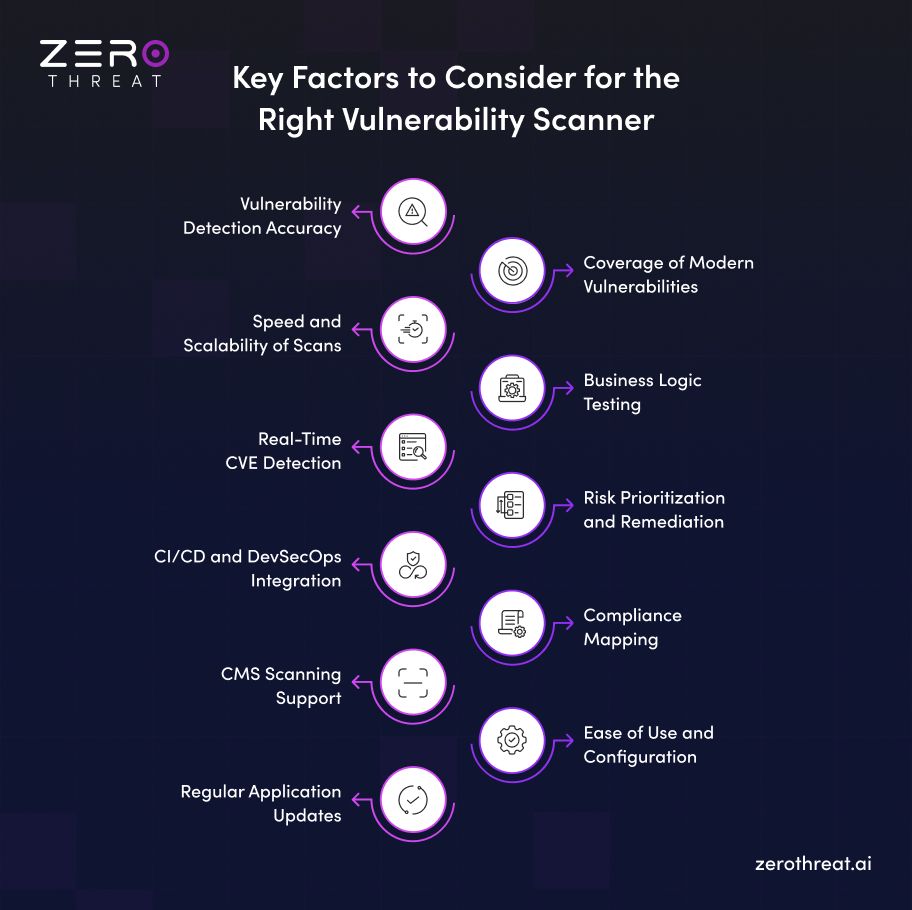
1. Vulnerability Detection Accuracy
Detection accuracy should be your top priority. A scanner must identify real vulnerabilities while minimizing false positives and false negatives. Reliable findings help security teams focus on genuine risks, reduce manual verification, and remediate vulnerabilities faster without wasting time on inaccurate or misleading results.
2. Coverage of Modern Vulnerabilities
Modern applications face a wide range of threats beyond traditional security flaws. Choose a vulnerability scanner that can detect OWASP Top 10 risks, API vulnerabilities, cloud misconfigurations, authentication issues, and newly disclosed CVEs. Broader coverage helps ensure critical security gaps are not overlooked.
3. Speed and Scalability of Scans
Security testing should keep pace with your development cycle. A scanner that delivers fast results and scales across multiple applications, APIs, and environments enables continuous testing without disrupting releases. This helps organizations identify vulnerabilities early while supporting business growth and larger attack surfaces.
4. Business Logic Testing
Many high-impact attacks exploit flaws in application workflows rather than technical vulnerabilities. Consider a scanner that can identify business logic vulnerabilities, such as authorization bypasses, workflow manipulation, and abuse of application functionality. This provides deeper security coverage than traditional signature-based scanning alone.
5. Real-Time CVE Detection
New vulnerabilities are disclosed every day, and attackers often exploit them within hours. Choose a vulnerability scanner that continuously updates its detection capabilities for newly published CVEs. Real-time coverage helps your security team identify emerging risks quickly instead of waiting for the next scheduled update.
6. Risk Prioritization and Remediation
Not every vulnerability requires the same level of attention. A good scanner should prioritize findings based on exploitability, business impact, and severity instead of relying only on CVSS scores. It should also provide clear remediation guidance so developers can fix vulnerabilities faster and with greater confidence.
7. CI/CD and DevSecOps Integration
Security testing should fit naturally into your development workflow. Select a scanner that integrates with CI/CD pipelines, version control systems, and developer tools. Automated scanning during every build helps identify vulnerabilities early, reducing remediation costs and preventing security issues from reaching production.
8. Compliance Mapping
If your organization follows security standards, your scanner should simplify compliance efforts. Look for a solution that maps findings to frameworks such as PCI DSS, ISO 27001, HIPAA, GDPR, OWASP Top 10, and CWE. This makes audit preparation easier while helping teams demonstrate their security posture with confidence.
9. CMS Scanning Support
Many organizations rely on content management systems such as WordPress, Drupal, and Joomla to power business-critical websites. Choose a vulnerability scanner that can identify CMS-specific vulnerabilities, insecure plugins, outdated themes, and configuration issues. This helps protect one of the most frequently targeted parts of your web infrastructure.
10. Ease of Use and Configuration
A vulnerability scanner should be simple to deploy and manage without requiring extensive setup or specialized expertise. An intuitive interface, guided configuration, and well-organized reports allow security teams and developers to start scanning quickly, interpret findings accurately, and focus more on remediation than tool management.
11. Regular Application Updates
Threats evolve constantly, so your vulnerability scanner should evolve with them. Choose a solution that receives regular updates for vulnerability signatures, detection techniques, and supported technologies. Frequent updates ensure the scanner remains effective against newly discovered attack methods, emerging technologies, and the latest security risks.
Eliminate each vulnerability by hunting them down with ZeroThreat’s AI-powered vulnerability scanner. Run Advanced Scan
Top Vulnerability Assessment Tools for Businesses
There are many popular vulnerability scanners available in the market today and they offer a wide range of features. You can use these scanners to discover vulnerabilities like OWASP top 10, CWE 25, and more. These tools are suitable for a variety of use cases and cybersecurity requirements. Many of these tools are free and some of them have both paid and free versions. Let’s check out these tools.
Here's the comparison table:
| Tool | Coverage | Auth Scans | Automation | CI/CD Ready | Reporting | Best For |
|---|---|---|---|---|---|---|
| ZeroThreat | Web apps, APIs (REST/GraphQL), business logic | Native, multi-role | AI-driven, agentic validation | Native (GitHub, GitLab, Azure, CircleCI) | Proof-based, compliance-mapped | Teams wanting continuous, low-false-positive pentesting |
| ZAP | Web apps | Manual setup required | Semi-automated | Plugin-based | Basic HTML/XML reports | Budget teams and beginners learning DAST |
| Burp Suite | Web apps, manual testing | Yes, configurable | Manual-heavy, scripted extensions | Limited (via extensions) | Detailed, technical | Manual pentesters and security researchers |
| OpenVAS | Network infrastructure | Limited | Scheduled scans | Minimal | Technical, less polished | Network-focused vulnerability management |
| Nessus | Network, cloud, compliance | Yes | Scheduled, policy-based | Limited native support | Compliance-focused, detailed | IT teams doing infrastructure audits |
| Acunetix | Web apps, APIs | Yes | Automated scanning | Moderate integrations | Clear, developer-friendly | Mid-size teams scanning web applications |
| Nexpose | Network, endpoints | Yes | Automated with Rapid7 InsightVM | Moderate | Risk-scored, prioritized | Enterprises managing large network assets |
Questions to Ask Before Choosing a Vulnerability Scanner
Before comparing vendors, it is important to understand whether a vulnerability scanner aligns with your security goals, technology stack, and operational requirements. Asking the right questions helps you identify solutions that provide accurate results, meaningful coverage, and long-term value.
- What types of vulnerabilities can the scanner detect?
- Does it support web applications, APIs, cloud environments, and CMS platforms?
- How does the scanner reduce false positives and false negatives?
- Can it perform authenticated and unauthenticated scans?
- How easy is the platform to configure and manage?
- Does it detect business logic vulnerabilities?
- How quickly does it add coverage for newly disclosed CVEs?
- Can it scale across multiple applications and environments?
- Does it integrate with existing CI/CD pipelines and DevSecOps workflows?
- What remediation guidance is provided for identified vulnerabilities?
- Does it support compliance frameworks such as PCI DSS, HIPAA, and GDPR?
- What reporting and risk prioritization capabilities are available?
- Is deployment available in cloud, on-premises, or hybrid environments?
- What level of customer support and technical assistance is offered?
Common Mistakes to Avoid When Choosing a Vulnerability Assessment Tool
You shouldn’t make a choice in a hurry, especially when it involves critical decisions like choosing a tool for security assessment. Yet, businesses make some mistakes in their choices. In this section, we are going to discuss some common mistakes that you should avoid when choosing a vulnerability assessment tool.
Focus More on Cost or Features
Avoid focusing solely on costs or features. You can end up picking a tool that is either expensive or basic. An expensive tool might be overbudgeted and a cheap one may lack quality and features. So, look for a balanced tool.
Mismatched Features
Often, businesses pick a tool that doesn’t align with their requirements in order to save costs. So, you must specify your requirements clearly and then look for options that match those needs.
Neglect Performance Impact
Advanced and continuous scanning comes at the cost of performance. So, you must carefully evaluate your choice to minimize the impact and ensure optimal scheduled scanning.
Miss All Quality Aspects
Don’t focus on a single quality aspect like wider scanning coverage or lower false positives. Look for a tool that offers high scanning quality with lower false positives and negatives, depth of scanning, better coverage, and clear reporting.
Missing Compliance Goals
Make sure that your vulnerability scanner offers features and reporting that align with your compliance goals.
ZeroThreat for AI-Powered Vulnerability Scanning
ZeroThreat approaches vulnerability scanning differently than legacy tools. Instead of flagging patterns and leaving your team to figure out what's real, its AI engine validates exploitability first. Every finding comes with validated proof, not maybe.
The platform covers 130,000 plus security checks across web apps and APIs, mapped to OWASP Top 10, CWE/SANS Top 25, and real-time CVE feeds. It scans authenticated flows, SPAs, and REST, GraphQL, and SOAP endpoints natively, catching business logic flaws like BOLA and workflow bypass that signature-based scanners routinely miss.
Its detection accuracy sits at 99.9%, with near-zero false positives, so your team spends time fixing issues instead of chasing noise. Plus, it provides production-safe scanning means you can run it on live environments without disrupting traffic or triggering outages.
For teams under compliance pressure, ZeroThreat generates audit-ready reports mapped to PCI DSS, HIPAA, GDPR, and ISO 27001. It also integrates into CI/CD pipelines, including GitHub Actions, GitLab, and Azure DevOps, so scanning becomes part of your release process, not an afterthought.
Need help choosing the right vulnerability scanner? Talk to our security experts today.Talk to an Expert
Wrapping Up: Selecting a Scanner That Fits Your Security Needs
Choosing the right vulnerability scanner requires more than comparing feature lists. Focus on detection accuracy, vulnerability coverage, automation, scalability, and actionable reporting. A well-chosen solution helps your team identify real risks, prioritize remediation, and strengthen security without slowing development.
The best vulnerability scanner should fit your applications, workflows, and long-term security goals. Evaluate vendors carefully, ask practical questions, and choose a platform that supports continuous testing, modern architectures, and evolving threats while reducing manual effort and unnecessary security noise.
If you are looking for an AI-powered vulnerability scanner that combines accurate detection, exploit validation, and continuous security testing, ZeroThreat is built for modern application security. Start your free trial today and experience smarter vulnerability scanning with confidence.
Frequently Asked Questions
Which tool is good for scanning vulnerabilities?
A vulnerability scanner is good when it offers the lowest false positives, is not dependent on technology, scans complex applications, and more.
What are various types of vulnerability scanning tools?
What is the limitation of vulnerability scanners?


Explore ZeroThreat
Automate security testing, save time, and avoid the pitfalls of manual work with ZeroThreat.