 ZeroThreat Wins Bronze Stevie® Award in Tech Startup of the Year Read more

All Blogs
How ZeroThreat's Scan Report Separates Detection From Proof: Problem Explanation, Security Impact, and HTTP Evidence in Every Finding
Quick Overview: Every vulnerability finding is only useful when it comes with proof, not just detection. This blog explains how ZeroThreat’s scan report combines Problem Explanation, Security Impact, and HTTP request/response evidence in every finding to help teams validate exploitability faster. It also covers stack-specific remediation guidance, compliance mappings, AI-generated executive summaries, and retesting workflows that simplify remediation, reporting, and audit preparation.
Most DAST tools give you detection. They tell you a vulnerability might exist, assign it a severity, and move on. What they don't give you is the conversation between their scanner and your application at the moment the boundary broke: the exact HTTP request that carried the payload, the response that confirmed the issue, and the evidence that what they found is actually exploitable and not a false positive burning your analyst's afternoon.
ZeroThreat's scan report is structured around a different idea. Every finding at every affected URI contains three distinct layers: a problem explanation covering what was found and which payload triggered it, a security impact section covering what an attacker could do with it, and the exact HTTP request and response captured during the scan as evidence. The third layer is what separates a report from a proof.
This article walks through what each layer contains, why the structure matters for triage speed and developer handoff, and how the report is organized around the two audiences who read it: the security analyst who needs technical depth, and the CISO who needs a one-page summary they can act on by Monday.
Stop trusting severity scores blindly. Discover actual vulnerabilities with validated evidence. Get Started For FREE
ON THIS PAGE
- Why Most DAST Reports Create More Work Than They Prevent
- How Does ZeroThreat Show Proof of Exploitability?
- What is “Problem Explanation” in a Vulnerability Report?
- What is Security Impact in Vulnerability Finding?
- How to Read HTTP Request Evidence in a Security Scan
- What the Report Shows Beyond Individual Findings
- Closing the Loop: How to Retest a Vulnerability After Fixing It
- What the Two-Audience Report Design Means in Practice
- A Report That Proves, Not Just Reports
Why Most DAST Reports Create More Work Than They Prevent
The standard vulnerability scan report includes a severity-ranked list of findings, each with a name (SQL Injection, Cross-Site Scripting, Missing Security Header), a CVSS score, and a description pulled from a vulnerability database. Most tools add an affected URL and the payload used. And few of them include the full HTTP exchange that produced the finding, and almost none validate whether the issue is actually exploitable before it reaches the report.
The consequence is a triage backlog. Security teams spend 20 to 40 percent of their time, by repeated industry estimates, manually verifying scanner findings that turn out to be false positives. DAST tools generate noise: false positives that waste security teams' time triaging findings that aren't real issues. The problem is not just the false positive itself. It is the analyst time consumed to determine that it is a false positive, multiplied across every finding in a scan that produces hundreds of them.
ZeroThreat's validation architecture addresses this before the report is generated. The Platform AI re-tests every candidate finding before it reaches the report, confirming exploitability through the live application's actual response. But the report structure itself carries the proof: every finding includes the evidence that passed validation, so the analyst reading it does not have to re-verify what the scanner already verified.
How Does ZeroThreat Show Proof of Exploitability?
ZeroThreat's finding structure is not a database entry with a severity label. It is a layered evidence package, assembled per affected URI, that carries everything a security analyst needs to reproduce, understand, and remediate the issue without leaving the report.
The three layers appear within each affected URI inside a vulnerability entry. A single vulnerability can affect multiple URIs; each one gets its own evidence package rather than a shared summary.
What is “Problem Explanation” in a Vulnerability Report?
The problem explanation layer describes what was found and how. It is not a generic vulnerability description copied from a database. It contains three things:
- What was found. The specific behavior the scanner observed that indicates a vulnerability. For a SQL Injection finding, this means describing which input field or parameter accepted unsanitized input and what the application did with it. For a broken access control finding, it means describing which object reference was changed and what the server returned.
- Which payload was used. The exact string or value the scanner injected or manipulated to trigger the finding. This matters because it tells the developer precisely what input the application failed to handle, which is the starting point for writing a fix.
- Which parameter was affected. The specific parameter, header, or body field where the vulnerability lives. For a finding on POST /api/user/update, the Problem Explanation names which field, not just the endpoint, that accepted the payload which triggered the issue.
The problem explanation is written at the level of the specific finding instance, not the vulnerability class. Two SQL Injection findings at two different endpoints get two different problem explanations describing what happened at each one, not a single shared class description.
130,000+ attack paths, one validated report. See what AI-powered pentesting finds on your app. Pentest My App
What is Security Impact in a Vulnerability Finding?
The security impact layer answers the question the problem explanation does not: what can an attacker do with this? It sits above the technical detail and below the executive summary, bridging the analyst reading the HTTP evidence and the security leader deciding which findings to escalate first.
For a critical-severity finding, security impact describes concrete outcomes: unauthorized access to another user's data, ability to execute arbitrary database queries, ability to escalate session privileges. It does not describe theoretical risk in the abstract. It describes what the validated finding, confirmed exploitable by the platform AI, enables an attacker who reaches it.
This distinction is why security impact is a separate layer from problem explanation rather than combined with it. Problem explanation answers: what happened technically. Security impact answers: what it means for the application's users, data, and integrity. A developer needs the first to write a fix. A CISO needs the second to decide whether to halt a deployment. Both answers need to be present and clearly separated.
How to Read HTTP Request Evidence in a Security Scan
The HTTP evidence layer is the proof. It contains the exact HTTP request the scanner sent and the exact HTTP response the application returned at the moment the vulnerability was confirmed. Nothing is reconstructed or approximated. What is in the report is what was captured during the scan.
For a typical web application finding, the HTTP request block shows:
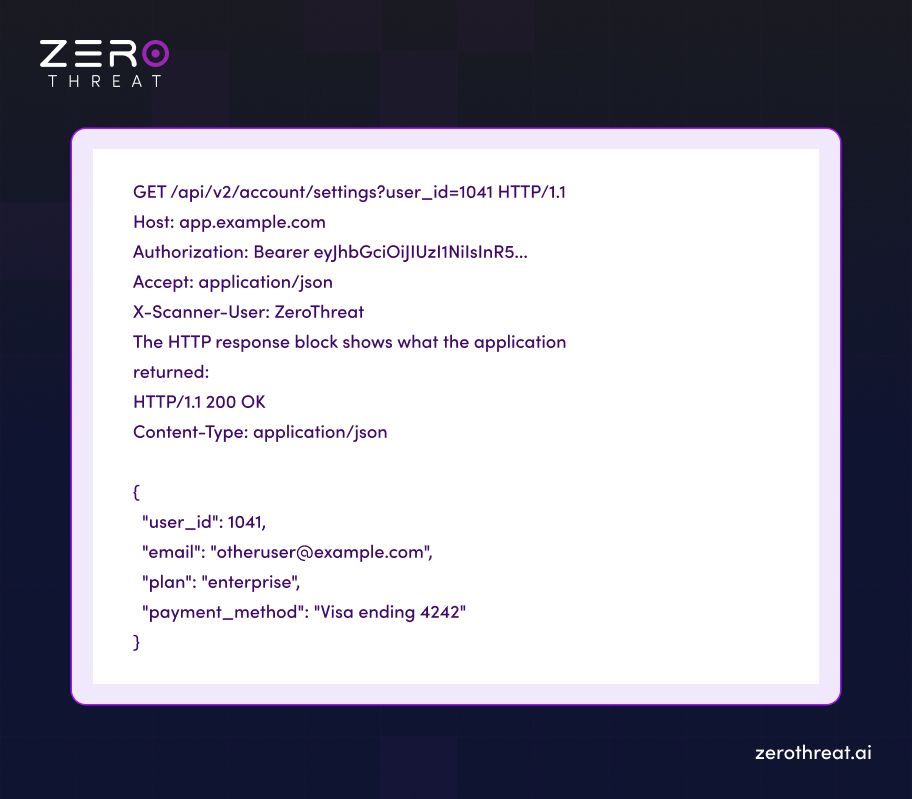
The evidence block highlights what was modified (in this case, user_id was changed from the session's own ID to 1041, a different user's ID) and what was returned (that user's account data, including payment method detail the requesting session has no authorization to see).
This is not a flag that the parameter looks enumerable. It is a captured exchange showing the boundary broke, the data crossed it, and the data returned is sensitive. The finding is confirmed. The analyst does not need to reproduce it manually. The developer does not need to be told what to look for. The HTTP exchange is the reproduction step.
For API vulnerability findings, the structure is identical: request with method, endpoint, payload, and authentication headers; response with status code, headers, and body. Each API finding in the Detected API Vulnerabilities section of the report follows the same evidence format.
Stop paying analysts to verify false positives. See pricing for a platform that proves findings first. View Pricing
What the Report Shows Beyond Individual Findings
The per-finding evidence structure is the core of the ZeroThreat report, but the report covers several additional sections that complete the security picture.
Tech Stack-Specific Remediation Guidance
Each finding includes remediation guidance generated for the application's configured technology stack, not generic advice. When you define the target's stack in ZeroThreat (frontend framework, backend language, database type), the remediation for each finding is written for that stack.
A PHP application with a SQL Injection finding receives remediation that includes PHP-specific prepared statement examples using PDO:
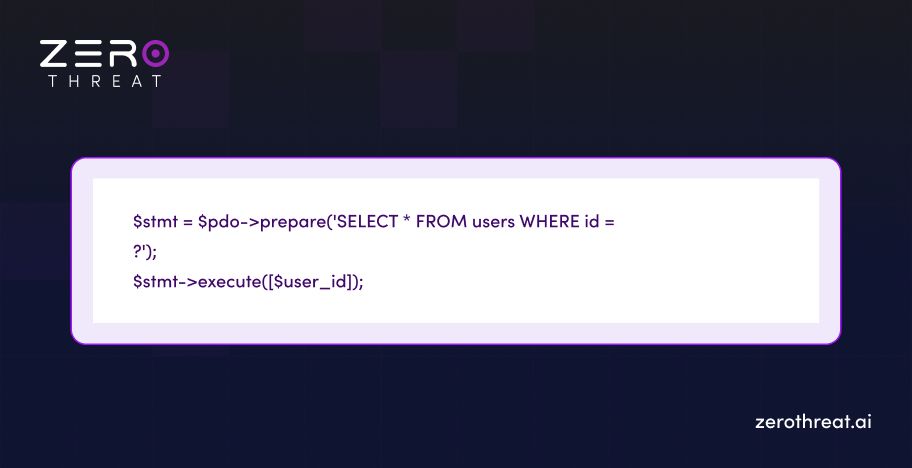
A Node.js application with the same finding receives Node.js-specific parameterized query examples. The developer reading the finding does not need to translate generic advice into their language. The remediation is already written for the environment where the fix will be applied.
This is distinct from what most DAST tools provide. Generic remediation guidance is written once and applied to every finding of that type regardless of stack. Stack-specific guidance requires knowing the technology, and ZeroThreat uses the stack configuration to produce it.
Vulnerability Registry Mappings
Every finding in the report maps to its full reference set. These are not decoration; they are the fields audit teams need when mapping a finding to a compliance control:
- CVSS v3.0 base score — quantified severity for risk prioritization
- CWE identifier — root cause classification
- OWASP Top 10 category — framework alignment for web and API vulnerability classes
- NIST reference — mapping to the National Vulnerability Database
- ISO mapping — Annex A control reference for ISO 27001 assessments
For a PCI DSS audit, the finding's CVSS score and OWASP mapping go directly into the compliance evidence package. For an ISO 27001 assessment, the ISO mapping tells the auditor which Annex A control is implicated. The report does not require a secondary step to produce compliance-ready documentation. The mapping is already in the finding.
Vulnerability Scan Report for Compliance Audit
ZeroThreat generates four report export types, all as PDFs:
- Full Scan Report — all vulnerabilities with complete HTTP request/response evidence, remediation guidance, and scan metadata. For the security team.
- Executive Summary — severity distribution, risk trends, compliance status, and plain-language explanations of critical findings without HTTP evidence detail. AI-generated for leadership and stakeholders; designed to answer "how exposed are we and what is the priority" without requiring the CISO to interpret raw findings.
- Severity-Specific Report — findings filtered to Critical, High, Medium, or Low. For teams handing a developer only the critical-priority list.
- Compliance Report — findings mapped to GDPR, OWASP Top 10, HIPAA, NIST, ISO 27001, and SANS Top 25 with pass/fail status per applicable control. For audit submissions and control assessments.
You can easily download a report and share with stakeholders if you have a feasible plan for that.
DAST Report Executive Summary AI-generated
The AI-generated Executive Summary sits inside the Scan Summary section of the report. It is one to two pages long, written to avoid technical depth, and covers: the high-level security posture of the application, a severity breakdown of findings, and a plain-language explanation of critical findings with the reason each vulnerability exists.
The Executive Summary is not a copy of the finding list formatted differently. It is a separate artifact written for a different reader: the security leader or manager who needs to understand risk posture and prioritization without reading HTTP evidence blocks. It reduces the step where an analyst has to translate a technical report into a board-readable summary.
Closing the Loop: How to Retest a Vulnerability After Fixing It
The retest function in ZeroThreat validates whether a specific vulnerability has been fixed without running a full scan. The workflow is:
- Open the vulnerability in the scan report.
- Click on the Request Detail section.
- Wait one to two minutes.
- Click "Live Test Results." The result shows Passed (the vulnerability is no longer exploitable) or Failed (the issue persists).
For bulk retesting, the Retest button in the top-right of the scan report offers three options: Retest All, Filter by Severity, or Custom Selection. This allows a team to retest only the Critical findings after a deployment without waiting for a full scan cycle.
The retest result serves as documented evidence for compliance purposes: a confirmed finding, a fix applied, a confirmed remediation. That evidence chain is what PCI DSS and ISO 27001 auditors look for when reviewing a vulnerability management program.
What the Two-Audience Report Design Means in Practice
Most DAST reports are written for one audience: the security analyst or developer who needs technical detail. The CISO then has to either read a report that is not written for them or wait for someone to translate it.
ZeroThreat's report is designed for two audiences simultaneously. The per-finding evidence packages (Problem Explanation, Security Impact, HTTP Evidence, remediation, reference mappings) serve the technical reader. The AI-generated Executive Summary, the Compliance Report export, and the severity distribution graphs in the Scan Summary serve leadership.
Neither audience has to compromise:
- Security analyst — full HTTP exchange per finding, stack-specific remediation code, CVSS/CWE/OWASP reference mappings, and the ability to retest individual findings after fixes.
- CISO / security leader — AI-generated Executive Summary with plain-language risk posture, severity breakdown, and prioritized critical findings. No HTTP evidence required.
- Audit team — Compliance Report PDF mapping every finding to the applicable control across GDPR, HIPAA, ISO 27001, PCI DSS, and OWASP Top 10.
The practical effect: the scan produces one artifact that covers the next sprint planning meeting, the next leadership review, and the next audit submission without requiring a secondary report-writing step.
Want to see proof-based reporting firsthand? Speak with our security experts. Get in Touch
A Report That Proves, Not Just Reports
The difference between a scan report and a proof-based report is the same as the difference between being told a door is unlocked and being shown a recording of someone walking through it. ZeroThreat's report contains the recording: the exact HTTP exchange at the moment the boundary broke, the specific payload used, the response that confirmed what was on the other side, and the remediation written for the stack where the fix will be applied.
Security analysts spend less time verifying. Developers get more actionable input. CISOs get a summary they can read without a translator. Auditors get a compliance-mapped PDF that documents the finding and the remediation chain. Run a scan and see the full evidence-based report on your application or book a 30-minute session with a security engineer to walk through a ZeroThreat scan report on a live target.
Frequently Asked Questions
Why does ZeroThreat show the HTTP request and response for every finding instead of just the severity?
Because severity alone does not confirm exploitability. A CVSS 9.8 finding on an endpoint that returns a 403 for every variant of the payload is not exploitable in your environment. The HTTP exchange shows the actual request that crossed the boundary and the actual response that confirmed it did. An analyst reading the HTTP evidence knows the finding is real before spending any time on manual verification. That is the mechanism behind 99.9% accuracy: the validation layer runs before the report is generated, and the evidence proves it.
How does the scan report handle false positives?
Can I share a ZeroThreat scan report without giving the recipient a ZeroThreat account?
What is the difference between the Full Scan Report and the Compliance Report export?
Does the scan report show findings from authenticated scans separately from unauthenticated ones?
Related Articles

Explore ZeroThreat
Automate security testing, save time, and avoid the pitfalls of manual work with ZeroThreat.