 ZeroThreat Wins Top InfoSec Innovators 2026 Award for Penetration Testing Read more

All Blogs

Quick Overview: False positives can consume valuable security resources and make it harder to identify genuine threats. This guide explains what false positives are, why they occur, how they affect businesses, the difference between false positives and false negatives, practical ways to reduce them, and how AI, exploit validation, and modern security testing improve detection accuracy.
Have you ever been alarmed by something that looked serious, only to realize moments later that there was no real danger? That is exactly what we call a false alarm.
The same thing happens in cybersecurity. Instead of a false alarm, security teams call it a false positive. It occurs when a security tool incorrectly flags a legitimate activity, application, or vulnerability as a threat, even though no actual security risk exists.
At first, a false positive may seem harmless. In reality, it can slow incident response, overwhelm teams with noise, and make it harder to identify genuine threats that need to be prioritized.
According to recent industry research, 46% of security alerts turn out to be false positives, depending on the organization's security maturity. Another 73% of security teams identify false positives as their biggest detection challenge, highlighting the growing impact of alert fatigue on modern security operations.
So, how can organizations reduce false positives without missing real vulnerabilities?
In this guide, you'll learn what false positives are, why they occur, how they affect businesses, and the best practices for minimizing, and know about ZeroThreat's AI-powered automated pentesting tool that enables security teams to detect flaws with near-zero false positives.
Tired of chasing alerts that lead nowhere? Sign up and experience near-zero false positives firsthand. Get Started Free
Table of Contents
- What is a False Positive in Cybersecurity?
- How to Calculate False Positives?
- Why Do Security Tools Generate False Positives?
- False Positives vs False Negatives: What's the Difference?
- Common Examples of False Positives in Application Security
- Real-World Impact of False Positive Vulnerabilities on Businesses
- How Exploit Validation Improves Security Testing Accuracy
- How AI Reduces False Positives in Modern Security Testing
- Best Practices for Minimizing False Positives
- ZeroThreat for Detecting Vulnerabilities with Near-Zero False Positives
- To Wrap Up
What is a False Positive in Cybersecurity?
In cybersecurity, a false positive happens when a security tool incorrectly identifies a safe file, user activity, application, or network event as a security threat.
For example, a vulnerability scanner may report a critical vulnerability that cannot actually be exploited, or an antivirus program may quarantine a legitimate application because its behavior resembles malware. In both cases, the alert turns out to be incorrect.
False positives are common across security solutions such as vulnerability scanners, intrusion detection systems (IDS), SIEM platforms, endpoint detection and response (EDR), web application security testing (WAST), and API security testing. They are often caused by signature-based detection, limited context, or outdated detection rules.
While false positives do not indicate a real attack, they still consume valuable time and resources. Security teams must investigate every alert to confirm whether it is genuine, making accurate threat detection and validated security findings essential for an efficient cybersecurity program.
How to Calculate False Positives?
Let’s learn the process of calculating false positives step-by-step:
1. Understand the Terminology
- True Positive: Correctly predicted positive cases.
- False Positive: Incorrectly anticipated positive cases (the ones you are trying to calculate).
- True Negative: Correctly predicted negative cases.
- False Negative: Incorrectly anticipated negative cases.
2. Obtain the Confusion Matrix
The confusion matrix is a table that summarizes the performance of a classification model. It includes TP, FP, TN, and FN.
Example of a confusion matrix:
| Column 1 | Column 2 | Column 3 |
|---|---|---|
| Actual Positive | Actual Negative | |
| Predicted Positive | TP | FP |
| Predicted Negative | FN | TN |
3. Calculate False Positives
From the confusion matrix the number of false positives is directly provided. It’s the count of cases where the model predicted positive, but the actual outcome was negative.
Formula:
False Positives (FP)=Number of instances where the model predicted Positive, and the actual was Negative
4. Calculate False Positive Rate
If you also want to calculate the False Positive Rate (FPR), which measures the proportion of actual negatives that were incorrectly classified as positive, you can use this formula:

This allows you to know how often the model incorrectly labels negative cases as positive.
Example of Calculation:
Suppose you have the following confusion matrix:
| Actual Positive | Actual Negative | |
|---|---|---|
| Predicted Positive | 50 | 10 |
| Predicted Negative | 5 | 100 |
- True Positives (TP): 50
- False Positives (FP): 10
- True Negatives (TN): 100
- False Negatives (FN): 5
To calculate false positives:
False Positives (FP) = 10
To calculate false positive rate:

So, the false positive rate is more or less 9.1%.
These calculations make it easier for you to understand the efficiency of your model’s performance and where it might make mistakes, especially in distinguishing between classes.
Replace guesswork with exploit validation and uncover security risks attackers can actually exploit with 99.9% accuracy. Explore Automated Pentesting
Why Do Security Tools Generate False Positives?
Security tools generate false positives because they analyze patterns, rules, signatures, and behavior instead of fully understanding application context. When legitimate activity resembles a known attack, the tool may incorrectly flag it as a security risk.
Core Causes of False Positives:
- Signature-Based Detection: Many security tools rely on predefined signatures and detection rules. If legitimate software matches a known attack pattern, it can trigger an incorrect security alert.
- Limited Application Context: Vulnerability scanners may identify a potential weakness without understanding application logic, exploitability, or compensating controls, leading to findings that are not actually exploitable.
- Behavior That Resembles Threat: Normal user actions, automated scripts, or system processes can sometimes mimic attacker behavior, causing intrusion detection systems and EDR solutions to raise unnecessary alerts.
- Outdated Threat Intelligence: Old vulnerability databases, stale detection signatures, or outdated CVE mappings may continue flagging issues that have already been patched or are no longer relevant.
- Misconfigured Security Policies: Overly aggressive detection rules, incorrect thresholds, or poorly tuned SIEM and IDS configurations often increase alert volume and generate unnecessary false positives.
- Incomplete Asset Visibility: When security tools lack complete knowledge of assets, software versions, or configurations, they may incorrectly assess risks and report vulnerabilities that do not exist.
- Generic Scanning Techniques: Some automated scanners prioritize broad coverage over contextual validation. As a result, they report potential vulnerabilities based on patterns instead of confirmed exploitability.
- Rapidly Changing Environments: Frequent code deployments, cloud infrastructure updates, API changes, and configuration modifications can temporarily confuse detection engines until policies and baselines are updated.
False Positives vs. False Negatives: What's the Difference?
| Aspect | False Positive | False Negative |
|---|---|---|
| Definition | A legitimate activity is incorrectly identified as a security threat. | A real security threat is incorrectly identified as safe and goes undetected. |
| What It Means | The tool raises an alert when no actual risk exists. | The tool fails to raise an alert for a genuine attack or vulnerability. |
| Impact | Wastes time investigating alerts that are not real. | Allows attackers or vulnerabilities to remain unnoticed. |
| Risk Level | Reduces operational efficiency and increases alert fatigue. | Creates a direct security risk because real threats are missed. |
| Example | A vulnerability scanner reports an exploitable SQL injection that cannot actually be exploited. | A web application contains an exploitable SQL injection, but the scanner fails to detect it. |
| Effect on Security Teams | Teams spend time validating unnecessary findings. | Teams remain unaware of threats until they are exploited or discovered later. |
| Primary Challenge | Too many incorrect alerts can reduce trust in security tools. | Missed detections can lead to data breaches, service disruption, or compliance failures. |
| How to Reduce It | Improve detection accuracy through contextual analysis, exploit validation, rule tuning, and AI-assisted security testing. | Increase test coverage, use multiple detection techniques, continuously update threat intelligence, and perform regular security assessments. |
Common Examples of False Positives in Application Security
False positives in application security show up across scanners, WAFs, and pentesting tools, often flagging safe code, standard functions, or normal traffic as active threats.
1. SQL-Like Syntax in Legitimate Queries
Scanners often flag database queries that follow normal SQL syntax as injection attempts, even when the input is sanitized correctly. This happens because the pattern resembles known attack strings, not because the query is actually unsafe.
2. Encoded Data Mistaken for Malicious Payloads
Base64 or URL-encoded data used for legitimate purposes, like session tokens or file uploads, sometimes trips detection rules built to catch obfuscated attacks. The tool sees encoding, not the harmless data hiding behind it.
3. Third-Party Scripts Flagged as XSS
Analytics tags, chat widgets, and other third-party JavaScript often inject dynamic content the same way a cross-site scripting attack would. Scanners without proper context treat trusted vendor scripts as active threats.
4. Standard Error Messages Flagged as Information Disclosure
Generic error pages that mention file paths or stack traces sometimes trigger information disclosure alerts, even when the details are harmless. The scanner reacts to the presence of technical text, not its actual sensitivity.
5. Automated Bot Traffic Mistaken for Attacks
Legitimate crawlers, monitoring tools, and API integrations sometimes generate rapid, repeated requests that resemble brute force or scraping attempts. Without behavior analysis, security tools flag this normal automation as malicious activity.
Real-World Impact of False Positive Vulnerabilities on Businesses
False positive vulnerabilities cost businesses more than wasted alerts. They drain security budgets, slow remediation cycles, and create real operational and reputational risk across teams.
- Wasted Security Resources: Analysts spend hours triaging alerts that turn out to be non-issues. That time comes directly out of budget meant for real threat detection, incident response, and proactive vulnerability management across the environment.
- Alert Fatigue: Constant false alarms wear down security teams over time. Analysts start treating every alert with less urgency, which increases the chance that a genuine exploit slips through unnoticed during triage.
- Delayed Remediation: When teams chase false positives, real vulnerabilities sit unpatched longer. This widens the attack surface and gives threat actors more time to exploit unresolved security gaps.
- Increased Operational Costs: False positives pull developers away from building product to verify flagged code. This slows release cycles and adds unplanned overhead to already tight engineering timelines.
- Damaged Stakeholder Trust: Repeated false alarms make leadership question the reliability of security reporting. Over time, this erodes confidence in the security team's findings, even when a real threat surfaces.
- Compliance Reporting Risks: Inaccurate vulnerability data skews compliance audits and risk assessments. This creates blind spots in frameworks like PCI DSS or SOC 2, where accurate reporting is non-negotiable.
Fewer false positives, better ROI on your security spend. See which plan fits your team. Explore Plans
How Exploit Validation Improves Security Testing Accuracy
Traditional security testing often reports potential vulnerabilities based on patterns, signatures, or known attack indicators. Exploit validation takes the next step by confirming whether a reported finding can actually be exploited in the target environment. This helps separate real security risks from false positives.
Instead of relying only on theoretical detection, exploit validation uses controlled and evidence-based testing to verify exploitability. Security teams receive proof that a vulnerability is real, allowing them to prioritize remediation with greater confidence and reduce time spent investigating inaccurate alerts.
Validated findings also improve vulnerability management. Developers receive actionable evidence, such as successful exploit attempts or request and response details, making it easier to reproduce issues, understand business impact, and verify that fixes are effective after remediation.
By focusing on confirmed, exploitable vulnerabilities instead of every possible weakness, organizations reduce alert fatigue, improve remediation efficiency, and strengthen their overall application security program. Modern security testing increasingly emphasizes validated risk because accurate findings lead to faster decisions and more effective protection.
How AI Reduces False Positives in Modern Security Testing
Automated security tools primarily rely on signatures, predefined rules, and pattern matching to identify potential vulnerabilities. AI improves this process by analyzing application context, user behavior, and attack paths, helping security teams distinguish real threats from findings that are unlikely to be exploitable.
Modern AI-powered security testing also correlates data from multiple sources instead of evaluating each alert in isolation. It considers factors such as code flow, runtime behavior, asset context, and exploitability before assigning risk, resulting in fewer inaccurate alerts and more reliable security findings.
Another advantage is intelligent vulnerability triage. AI can prioritize findings based on business impact, likelihood of exploitation, and supporting evidence. This enables developers and security analysts to focus on vulnerabilities that require immediate attention instead of spending hours validating false positives.
AI delivers the best results when combined with exploit validation and human oversight. Rather than replacing security professionals, it enhances detection accuracy, reduces alert fatigue, and streamlines remediation. This creates a more efficient application security program with higher confidence in every reported finding.
Best Practices for Minimizing False Positives
Reducing false positives requires more than adjusting scanner settings. It involves improving detection accuracy, validating findings, and adding context so security teams can focus on vulnerabilities that present real business risk.
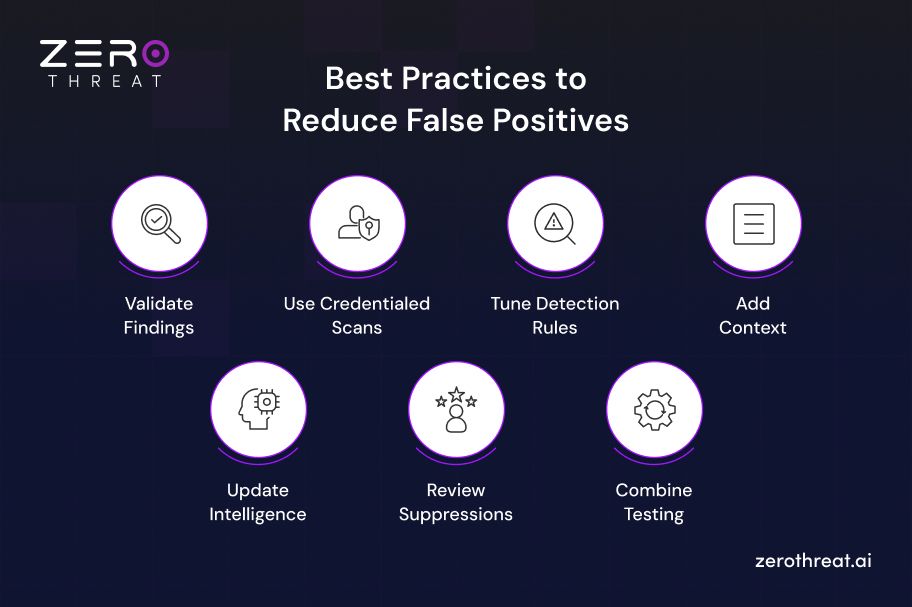
Validate Findings
Confirm high-risk vulnerabilities before assigning remediation tasks. Exploit validation, manual verification, and proof-of-concept testing help determine whether a reported issue is genuinely exploitable, reducing unnecessary investigation and improving confidence in security findings.
Use Credentialed Scans
Credentialed vulnerability scans collect accurate system information instead of relying on network observations or software banners. This improves asset visibility, detects applied patches correctly, and significantly reduces incorrect vulnerability reports.
Tune Detection Rules
Regularly review scanner configurations, detection policies, and security rules to match your environment. Removing irrelevant checks, updating plugins, and refining thresholds reduces noisy alerts while maintaining strong vulnerability detection coverage.
Add Context
Prioritize findings using application context, asset criticality, runtime behavior, and exploitability instead of severity scores alone. Context-aware vulnerability management helps separate theoretical risks from issues that can actually impact production systems.
Update Intelligence
Keep vulnerability databases, CVE feeds, detection signatures, and threat intelligence current. Updated security content improves detection accuracy, recognizes vendor patches, and prevents outdated rules from repeatedly generating false positive alerts.
Review Suppressions
Document every confirmed false positive and apply suppression rules with clear justification. Periodically review these exceptions to ensure they remain valid as applications, infrastructure, and security configurations evolve over time.
Combine Testing
Use multiple security testing approaches such as SAST, DAST, penetration testing, and runtime validation instead of relying on a single scanner. Cross-validation improves detection confidence and helps identify genuine vulnerabilities with greater accuracy.
ZeroThreat for Detecting Vulnerabilities with Near-Zero False Positives
ZeroThreat uses AI-powered automated pentesting with exploit validation, helping security teams focus on confirmed vulnerabilities instead of theoretical risks. This exploit validation process is what keeps ZeroThreat's false positive rate under 1%, enabling faster and more reliable remediation.
Its agentic AI analyzes application behavior, safely executes controlled attack workflows, and confirms whether a vulnerability is actually exploitable. Each finding is backed by reproducible proof, request and response evidence, and remediation guidance, giving security teams greater confidence in every result.
The platform runs 130K+ checks covering OWASP Top 10, and OWASP API Top 10. Plus, it evaluates application context, authenticated workflows, business logic, and real attack paths rather than relying only on signatures or pattern matching. This context-aware approach helps eliminate inaccurate alerts while uncovering vulnerabilities that traditional DAST tools often miss.
By reducing manual validation effort and prioritizing verified security risks, ZeroThreat enables organizations to strengthen application security without increasing operational overhead. Teams spend less time investigating false positives and more time fixing vulnerabilities that have a measurable impact on business risk.
Schedule a call with our experts to see how ZeroThreat achieves under 1% false positives. Book a Demo
To Wrap Up
False positives are more than inaccurate alerts. They slow security operations, increase investigation time, and make it harder to identify genuine vulnerabilities. Reducing them is essential for improving security efficiency and helping teams focus on risks that truly matter.
Improving detection accuracy requires more than better scanning. Exploit validation, contextual analysis, AI-assisted testing, and continuous security assessments help separate real threats from false alarms, allowing organizations to prioritize remediation with greater confidence and make informed security decisions.
That's exactly what ZeroThreat excels at; it performs AI-powered exploit validation and detects vulnerabilities with near-zero false positives, so every alert your team gets is worth fixing. Sign Up for ZeroThreat to experience faster, more accurate application security testing and context-aware vulnerability prioritization based on your business.
Frequently Asked Questions
Why are false positives in cybersecurity a problem?
False positives force security teams to investigate threats that do not actually exist. This increases alert fatigue, wastes analyst time, delays remediation, and can cause genuine vulnerabilities or attacks to be overlooked among large volumes of inaccurate findings.
Can AI reduce false positives?
How do penetration testers verify vulnerabilities?
What is vulnerability validation?
What tools reduce false positives in security testing?
What is proof-based security testing?


Explore ZeroThreat
Automate security testing, save time, and avoid the pitfalls of manual work with ZeroThreat.