 ZeroThreat Wins Bronze Stevie® Award in Tech Startup of the Year Read more

All Blogs
Playwright-Based Application Journey Testing: How ZeroThreat Tests Authenticated Workflows Like a Real Attacker
Quick Overview: Modern attackers do not stop at the login page, and neither should security testing. This blog explains what application journey testing is, why traditional DAST tools miss authenticated workflow vulnerabilities, how attackers abuse post-login paths, and how ZeroThreat uses Playwright-based testing to validate access controls, business logic, and authenticated attack paths with proof-based findings.
Your scanner finds 300 issues. Three of them are in your admin dashboard. The other 297 are on pages any anonymous visitor can reach. The three inside the dashboard are the ones that will be used against you.
Real attackers do not stop at the login page. They authenticate, hold session state, and move through your application the same way a legitimate user does, except they are actively probing every permission boundary, every state transition, and every multi-step flow while they walk. That sequence of authenticated steps is called an application journey, and it is where the most impactful, hardest-to-find vulnerabilities live. Broken access control has held the top position in the OWASP Top 10 since 2021. OWASP found access control failures in 94% of tested applications. Almost all of those failures only surface once you are inside the session.
This article is a technical walkthrough of how attackers move through authenticated workflows, what vulnerability class lives at each step, why conventional DAST tools cannot see most of it, and how ZeroThreat's Application Journeys capability, built on Playwright-driven browser automation, closes the gap with proof-based findings.
Turn your vulnerable authenticated journeys into airtight, secure pathways in minutes. Begin Free Trial
ON THIS PAGE
- What Application Journey Is (and How ZeroThreat Enables It)?
- Why Traditional DAST Tools Cannot Test Authenticated Journeys?
- How a Real Attacker Moves Through an Authenticated Workflow?
- Where Conventional Testing Misses This?
- How ZeroThreat Tests Application Journeys?
- What the Scan Report Shows for Authenticated Journey Testing?
- The Vulnerability Coverage That Application Journey Testing Reaches
- Setting Up an Application Journey Scan in ZeroThreat
- What "Realistic Test Data" Actually Means for Journey Testing
- If the Journey Is Not Tested, the Application Is Not Tested
What Application Journey Is (and How ZeroThreat Enables It with Playwright)?
An application journey is the ordered, stateful sequence of authenticated actions a user takes to accomplish something inside your application. Log in as a standard user. Land on a dashboard. Open a record. Submit a form. Trigger an approval. Export data. Each step depends on state accumulated in the previous one, and the server is supposed to enforce access rules at every boundary.
In ZeroThreat, Application Journeys is the feature name for Playwright-driven security testing of these authenticated flows. Instead of an HTTP crawler guessing at session state, a real Chromium browser executes the journey, holds the session, renders JavaScript, follows React Router navigation, and completes SSO or MFA login the same way a user does. The scanner sees exactly what an authenticated user, or an attacker who has just logged in, sees.
The journey is not a metaphor. It is the technical unit of attack surface that matters most for modern applications, because the vulnerabilities that cause real damage: data exfiltration, account takeover, privilege escalation, financial fraud, are almost exclusively reachable only from inside an authenticated session, often only after a specific sequence of prior steps.
A crawler sees URLs. An attacker sees a path. Playwright walks the path.
Why Traditional DAST Tools Cannot Test Authenticated Journeys?
Before getting into the attack model, it is worth being precise about why most scanners fail here. This is not a minor gap. It is a structural one, and it has four distinct causes.
Session State Loss Between Steps
A multi-step flow requires the scanner to hold the state earned in step two when it sends the request for step five. Most HTTP-level crawlers treat each URL as a stateless target. They request pages without the context of how the session got there, which means they either get redirected to the login screen or they reach an empty shell that looks like a valid response and test nothing real.
A checkout flow that requires items in cart, a verified email, and a confirmed address before reaching payment cannot be tested by a tool that jumps directly to the payment endpoint. The server silently rejects it, and the scanner logs the page as visited with no findings.
Client-Side Rendering Gaps
Single-page applications build their interface in the browser. The server returns a thin HTML shell and a JavaScript bundle; the actual UI state, routes, and API calls are constructed at runtime. An HTTP crawler that does not execute the page sees almost none of this. It cannot follow a navigation event that is triggered by a JavaScript click handler. It cannot map a React Router path that only exists after the application bootstraps. The SPA's authenticated interior is invisible to it.
Modern Authentication Barriers
Form login with a static username and password is the easy case. Most production applications now use at minimum one of: SSO via an external identity provider, MFA with a TOTP or push-based second factor, OTP delivered by email or SMS, or token-based sessions with short expiry windows. A scanner that cannot complete a real login through the identity provider cannot enter the session at all. Recording a static credential and replaying it does not work for SSO flows, and active sessions from MFA-based logins cannot be automated with stored credentials.
Signature Matching Cannot Detect Logic Flaws
The deepest problem. Signature-based scanners look for known payload responses: a SQL error in the body, a reflected string in the output, an unexpected 500 status. Business logic vulnerabilities do not produce those signals. An attacker skipping step three of a four-step approval flow and going directly to step four gets a valid 200 response. The application does exactly what the attacker asks. The bug is in what the application is supposed to prevent, and no payload reveals that. Only a tool that understands the intended workflow can test whether it is enforced.
Put your Playwright tests to work finding vulnerabilities attackers actually target. Run Playwright Security Test
How a Real Attacker Moves Through an Authenticated Workflow?
The following is the five-phase model of how authenticated attacks actually unfold in practice. Each phase is a testable step in an Application Journey scan.
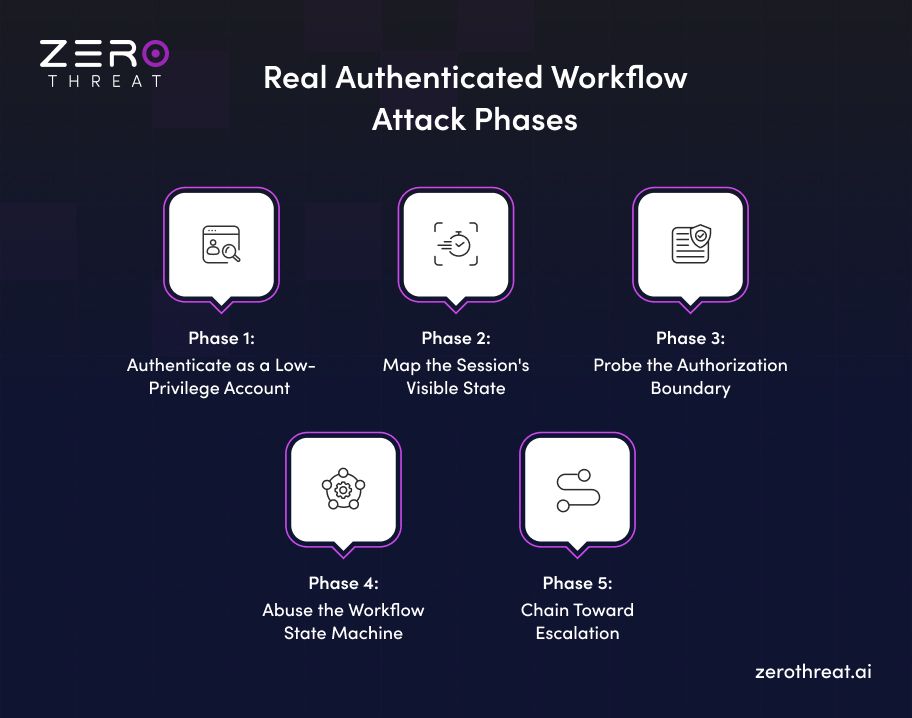
Phase 1: Authenticate as a Low-Privilege Account
The attacker starts with a legitimate, low-privilege session. Free tier, trial account, standard user role. Nothing elevated. The goal here is just to get inside and collect IDs.
From a testing standpoint, this phase establishes the baseline session. ZeroThreat records the login sequence through its Chrome Extension, supporting form-based login, SSO, MFA, CAPTCHA, and OTP flows depending on the method selected. The recorded sequence is stored and replayed for subsequent scans, so authenticated testing can be scheduled and automated via CI/CD without requiring a live session for each run (subject to the authentication method used).
Phase 2: Map the Session's Visible State
Once inside, the attacker reads everything the session returns: object IDs in URLs, user identifiers in API responses, record numbers in export links, document IDs in download paths. Sequential integers are the best case for an attacker. GUIDs are harder but not immune if the application exposes them in predictable contexts.
This is the reconnaissance phase of the authenticated journey. The attacker is not attacking anything yet. They are cataloguing the identifiers the application has handed them, because those identifiers are the handles for the next phase.
From a testing standpoint, ZeroThreat's authenticated scanner crawls the session's reachable surface in this phase, distinguishing between unauthenticated URLs and authenticated URLs in the Scanner section of the scan report. The crawled URIs view shows the full sitemap broken down by authentication state.
Phase 3: Probe the Authorization Boundary
With a list of object IDs in hand, the attacker starts changing them. Increment user_id=1042 to user_id=1043. Swap account_id=abc in a GET request for an account ID that appeared in a different user's email link. Call DELETE /api/documents/987 with the session token of a user who did not create document 987.
This phase tests whether the server enforces ownership, not just authentication. Authentication confirms you are logged in. Authorization confirms you are allowed to access this specific object. They are different checks, and applications routinely implement the first while forgetting the second.
What IDOR looks like at the HTTP level
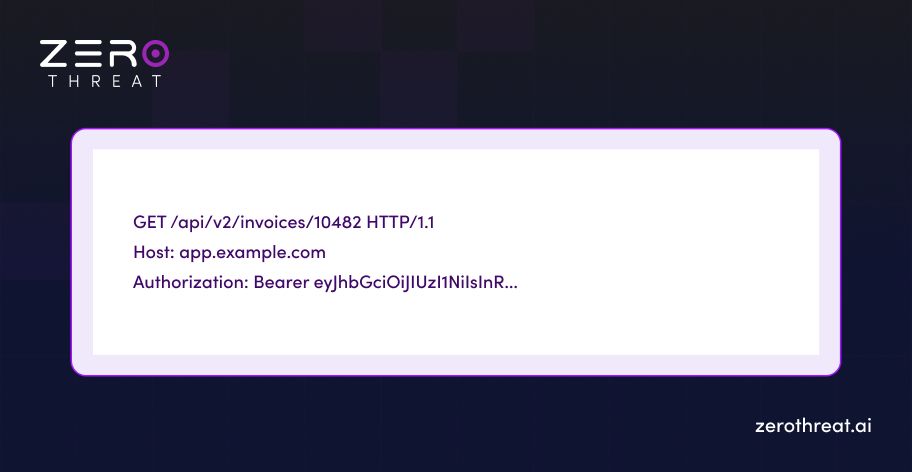
The attacker changes 10482 to 10481. If the server returns invoice data belonging to another account instead of a 403, the IDOR is confirmed. The identifier was used directly to access the database record without verifying that the session's owner matches the record's owner.
This maps to CWE-639: Authorization Bypass Through User-Controlled Key. In API contexts, the same flaw is BOLA (Broken Object Level Authorization), holding the top position in the OWASP API Security Top 10 (API1:2023). The web and API variants are the same underlying failure with different surface names.
ZeroThreat's authenticated and authorization testing covers this phase directly, testing access control enforcement on every object reference discovered during the authenticated crawl, and validating whether a boundary breach actually exposes data before flagging a finding.
Phase 4: Abuse the Workflow State Machine
Authorization boundary testing tells the attacker which objects they can reach. Workflow abuse tells them which states they can reach by violating the intended sequence. These are different attacks.
A multi-step flow is a state machine. The application expects transitions to happen in order: step A before step B, payment before fulfilment, verification before privilege grant. The enforcement question is always the same: is the sequence enforced on the server, or does the server assume the client will follow the intended UI flow and not verify that the prior step was completed?
The answer, consistently, is that server-side sequence enforcement is incomplete. The OWASP Testing Guide for workflow circumvention is explicit: attackers attempt to abuse workflows by skipping required steps, reordering requests, or manipulating state transitions to reach unauthorized or unintended application states. The common patterns are:
Step skipping: Directly invoking a later-stage endpoint without completing prerequisite steps. Submit the payment confirmation request without completing the payment itself. Trigger the "account upgraded" endpoint without passing through the payment processor.
Step reordering: Sending workflow requests in an order the application did not anticipate. In a multi-step form, submitting step four before step two to see if intermediate validation is server-enforced or only present in the UI.
Step replay: Repeating an action the application intends to be single-use. Apply a one-time discount twice. Trigger a refund twice. Cast a vote twice. These attacks exploit the assumption that the UI prevents resubmission without server-side enforcement of single-use constraints.
Parallel execution (race conditions): Sending two requests simultaneously to exploit a time-of-check to time-of-use window. A balance is checked, found sufficient, and deducted, but the check and deduction are not atomic. Two simultaneous withdrawal requests both pass the check before either deduction executes.
What step-skip abuse looks like at the HTTP level
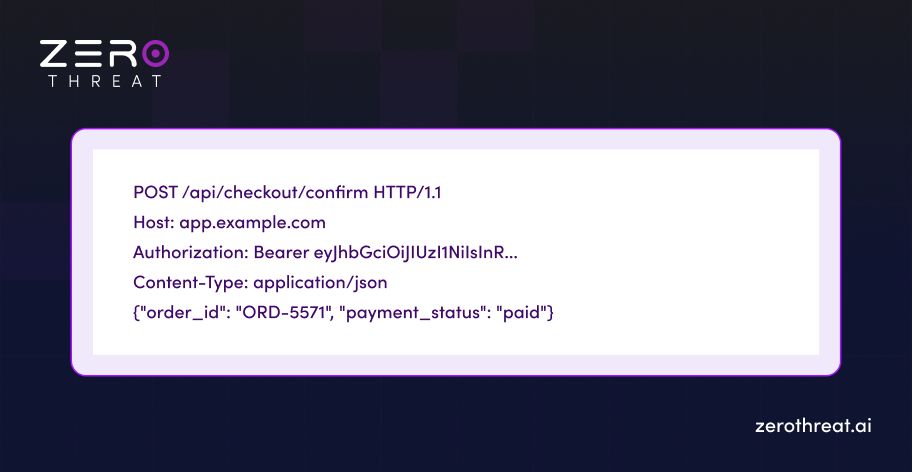
The attacker sends this request without having gone through the payment flow. If the server trusts the payment_status parameter from the client rather than verifying it against the payment processor's state record, the order is confirmed without payment. The application behaved exactly as intended. The logic was wrong.
ZeroThreat's business logic security testing targets this phase, probing workflow assumptions and state transition enforcement across the authenticated flow rather than looking for payload-triggered responses.
Phase 5: Chain Toward Escalation
Phases three and four produce individual findings. Phase five is about what those findings enable when chained. An IDOR on a user record exposes role flags. A writable role flag plus a step-skip on an admin action equals privilege escalation. A BOLA on an export endpoint plus a step-replay equals mass data exfiltration.
The chaining is what makes authenticated workflow vulnerabilities high-impact. A single low-severity finding in isolation becomes critical when it is the second link in a chain that ends at an admin action or a full account takeover.
Where Conventional Testing Misses This?
The five-phase model above requires a testing approach that can:
- Complete the actual authentication flow for the target application, not a simulation of it
- Hold and propagate session state across all five phases
- Execute JavaScript-heavy authenticated UIs and SPA routing
- Probe authorization boundaries at the object level across all discovered endpoints
- Test workflow state transitions for sequence enforcement, not just payload responses
- Validate that a candidate finding is actually exploitable before reporting it
Most DAST tools fail on requirements 2, 3, 4, and 5 entirely. Requirement 6, proof-based validation, most do not attempt.
The result is one of two outcomes. Either the tool cannot enter the authenticated session at all (requirement 1 fails), or it enters the session but cannot navigate the journey, so it tests a narrow slice of the authenticated surface and misses the majority of what is reachable. The scan report looks complete because the authenticated pages are listed. The coverage is not complete because the authenticated journey was never walked.
Eliminate expensive manual validation hours. Explore cost-effective plans with zero false positives. Check Out Pricing
How ZeroThreat Tests Application Journeys?
ZeroThreat's Application Journeys capability is built to walk the full five phases above with proof of exploitability at each step that produces a finding.
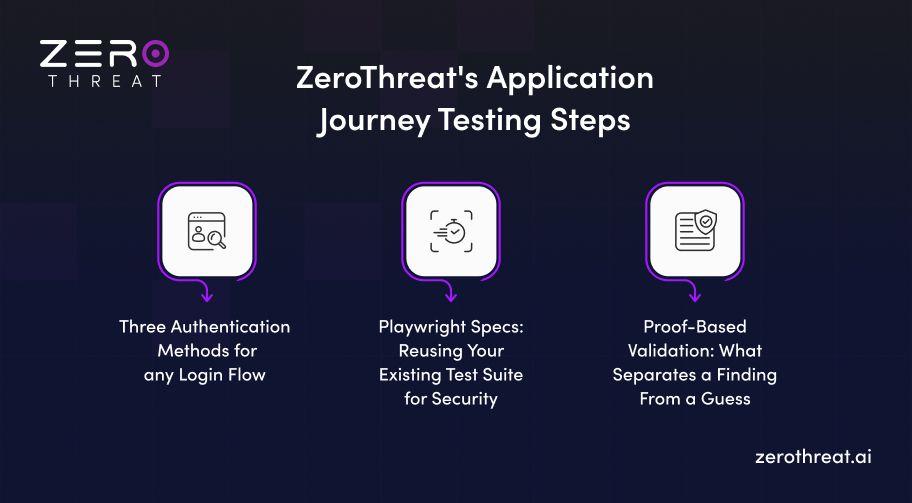
Three Authentication Methods for any Login Flow
ZeroThreat supports three authenticated scan methods, chosen based on the application's login type.
Scan with Login Sequence records the authentication flow via the Chrome Extension and stores it as a reusable template. ZeroThreat replays the login at scan time, navigates to authenticated pages, and tags the login, an authorized request, and the logout for the scanner to use as session anchors. This method supports form-based login and works for scheduled scans and CI/CD automation, because the credentials are stored and replayable. Not suitable for MFA or SSO.
Scan MFA App uses a live user session rather than stored credentials. The user completes the full authentication (including MFA, OTP, CAPTCHA, or SSO via Google, Azure, or any other identity provider) during the recording, and the scanner uses the resulting live token. Because the session is not reproducible without a live user, this method does not support scheduled or CI/CD scans. But it is the correct method for any application behind SSO or multi-factor authentication.
Scan Recorded Pages and Actions limits the scanner to the specific pages and actions visited during recording, without crawling beyond them. This is the right approach when you need to test a specific workflow section without covering the entire application, or when you want to focus scanner effort on a known high-risk flow.
All three methods run through the Chrome Extension, which captures the real browser interaction. This is the mechanism that makes session state preservation possible: the scanner uses the actual browser context, not a replayed HTTP request with a stolen cookie.
Playwright Specs: Reusing Your Existing Test Suite for Security
For applications where authenticated flows involve multi-step checkout processes, HR onboarding journeys, approval chains, support ticket escalations, or role-based feature access that automated crawling cannot navigate without prior workflow logic, ZeroThreat's Playwright-based security testing extends coverage by running your existing Playwright test suites through the security scanner.
The integration works by routing the existing Playwright project through ZeroThreat's proxy, which intercepts the real browser interactions and feeds them to the scanner engine. The configuration is minimal:
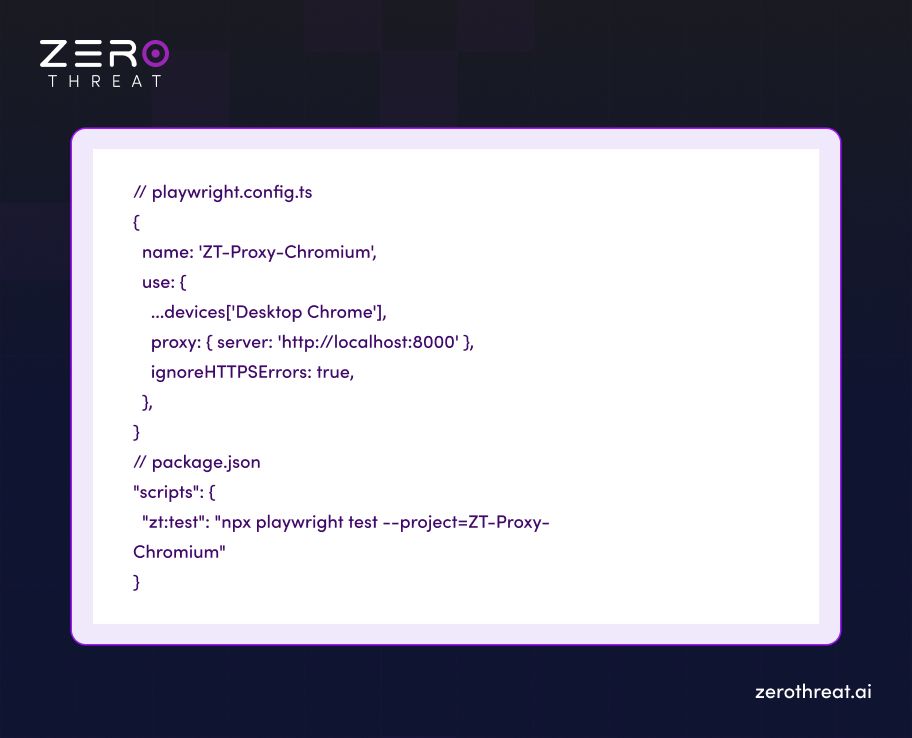
The team imports the Playwright project into ZeroThreat via GitHub integration or a ZIP upload, and the scanner executes the real business workflow during the scan. Each spec runs in the browser, the proxy captures every request and response, and the ZeroThreat scanner engine runs security tests against the full authenticated surface those specs expose.
The practical result: a multi-step checkout flow that requires a real item in cart, a valid shipping address, and a payment method before reaching confirmation is not simulated. It is executed. The scanner sees every API call the flow generates in production context, including the authorization checks that only fire once all preceding steps are complete.
Playwright Specs execution status (pass/fail and runtime per spec) is visible in the completed scan report and in the AI-Driven Penetration view during active scans.
This capability is available on Enterprise Cloud and Enterprise On-Prem plans.
Proof-Based Validation: What Separates a Finding From a Guess
Every phase of the journey model above can produce false candidates. An object ID that looks enumerable might return 403 for every value outside the session's scope. A workflow step that looks skippable might validate the prior state server-side with a check that is not visible in the HTTP request. A parameter that looks writable might be ignored.
ZeroThreat's Platform AI re-tests every candidate finding before it reaches the report. The validation layer confirms exploitability through demonstrable impact: the actual data exposed, the actual action taken, or the actual privilege achieved. A finding that says "IDOR on /api/invoices/{id}" includes the request, the response, and the evidence that another account's record was returned. Not a flag that the ID was enumerable. Proof that the boundary broke.
This is where 99.9% accuracy comes from. The validation layer does not eliminate findings generously; it confirms them strictly. The result is a report a security team can act on without spending analyst hours verifying that the 300 flagged items are real.
What the Scan Report Shows for Authenticated Journey Testing?
When an authenticated journey scan completes, the ZeroThreat scan report shows the full picture of what was reached and what was found.
The Crawled URIs view provides UnAuth URIs, Auth URIs, and new playwright discovered URIs.
Scan Summary shows Vulnerabilities by Request Type (AUTH, UNAUTH, API), so you can see immediately what proportion of findings came from authenticated versus unauthenticated coverage. A scan that shows all findings in the UNAUTH bucket is telling you the authenticated journey was not tested.
Web App Vulnerabilities are broken down by severity with full HTTP request and response evidence for each finding, the specific payload used, the exact parameter affected, and customized remediation guidance specific to the application's technology stack. For IDOR and broken access control findings, this includes the request that crossed the boundary and the response that confirmed it.
Executive Summary translates the technical findings into a one-to-two-page summary for security leadership, covering the high-level risk posture, severity breakdown, and plain-language explanation of critical findings without requiring the CISO to read the full technical report.
The Vulnerability Coverage That Application Journey Testing Reaches
To be precise about what Playwright-driven journey testing adds over both unauthenticated scanning and basic authenticated scanning:
| Vulnerability class | Unauthenticated scan | Authenticated journey scan |
|---|---|---|
| SQL Injection (login form) | Yes | Yes |
| XSS (public pages) | Yes | Yes |
| IDOR / Broken Object Level Authorization | No | Yes |
| Broken Access Control (post-login) | No | Yes |
| Privilege escalation | No | Yes |
| Business logic flaws (workflow abuse) | No | Yes |
| Sensitive data exposure behind login | No | Yes |
| Broken function-level authorization | No | Yes |
| Session fixation / session management flaws | Partial | Yes |
The bottom half of this table is the part attackers focus on. An unauthenticated scan covers the perimeter. An authenticated journey scan covers the application.
Setting Up an Application Journey Scan in ZeroThreat
The workflow is specific enough to be worth walking through concretely.
Step 1: Add and verify the target. Enter the application URL in ZeroThreat, then verify domain ownership with either the HTML file method (place /zero-threat.html at the root) or a DNS TXT record. Unverified targets cannot be scanned. This prevents unauthorized testing.
Step 2: Define the technology stack. Select the frontend and backend technologies for the target. This drives stack-specific CVE testing and produces remediation guidance tied to the actual language in use. If the application uses React on the frontend and Node.js on the backend, the remediation for an IDOR finding will include Node.js-specific patterns, not generic advice.
Step 3: Choose the authentication method. For form-based login, use Scan with Login Sequence. For SSO, MFA, or CAPTCHA flows, use Scan MFA App. In either case, the Chrome Extension records the login; ZeroThreat stores the sequence and tags the login request, an authorized request from inside the session, and the logout.
Step 4: Configure the scan profile. Select authenticated scan, set the content rendering type (Server-side for WordPress or PHP-based apps, Client-side for Angular, React, or Vue SPAs), and choose scope: Full Scan to cover the entire application, or Scan Recorded Pages and Actions to limit to a specific workflow. Enable Production Safe Scan if scanning a live environment to avoid destructive write operations. If Production Safe is enabled, one cannot use tech stack-based CVEs or Open Attack Coverage.
Step 5: For complex workflows, import Playwright Specs. If the target has multi-step flows that the crawler cannot navigate without existing test logic, connect the GitHub repository or upload a ZIP of the Playwright project. The scanner will execute the specs as part of the scan.
Step 6: Run, review, retest. The scan completes in minutes. Review findings in the scan report, starting with the AUTH and API vulnerability buckets. For any finding where a fix has been applied, use ZeroThreat's retest functionality to confirm remediation without running a full scan.
What "Realistic Test Data" Actually Means for Journey Testing?
ZeroThreat's documented best practices flag this explicitly: missing or limited test data restricts functionality and reduces scan coverage. For authenticated journey testing, this is not a minor caveat. It is the most common reason an authenticated scan covers less than it should.
A scanner navigating an e-commerce checkout flow with an empty cart cannot reach the payment step. A scanner in an HR application with no employees created cannot test the onboarding approval chain. A scanner in a SaaS product with no data in the account cannot follow the data export path.
The recommendation is to prepare a staging environment (not production) with representative datasets that simulate real application behavior across all the flows you want tested. Configure the scan to run against staging, with a rollback-capable database, so the scanner's write operations (form submissions, record creation) do not leave garbage data behind in a production system.
If production must be scanned, enable Production Safe Scan mode in the scan profile. This disables destructive payloads and avoids write operations, at the cost of some coverage.
Need guidance on securing business-critical workflows before attackers reach them? Connect With Us
If the Journey Is Not Tested, the Application Is Not Tested
An application where the authenticated interior has not been walked with session state, where the authorization boundary on every object reference has not been probed, and where the workflow state machine has not been run out of sequence is not a tested application. It is an application with a tested login page.
Real attackers log in and keep going. They hold the session, read the IDs, change them, skip the steps, and chain the results. The security program that does not test the same sequence is leaving the most impactful attack surface uncovered, and it will not find out until an attacker walks the same path and does not stop when they find something.
Start an application journey scan with ZeroThreat, or book a 30-minute session with a security engineer to walk through journey-based testing on your specific application architecture.
Frequently Asked Questions
What is the difference between authenticated scanning and application journey testing?
Authenticated scanning confirms you can log in and reach protected pages. Application journey testing goes further: it walks the stateful workflow inside the session, tests authorization at every object reference, probes workflow state transitions for sequence enforcement, and validates whether findings are actually exploitable. Authenticated scanning is the prerequisite; journey testing is the complete coverage.
Can ZeroThreat test SSO and MFA-protected applications?
Do I need to write Playwright tests from scratch to use ZeroThreat's Application Journeys?
What vulnerability classes does an authenticated journey scan find that an unauthenticated scan misses?
How does ZeroThreat prevent false positives in authenticated journey findings?
Related Articles

Explore ZeroThreat
Automate security testing, save time, and avoid the pitfalls of manual work with ZeroThreat.