 ZeroThreat Wins Bronze Stevie® Award in Tech Startup of the Year Read more

All Blogs
Is Automated Pentesting Safe to Run on Production? How ZeroThreat Tests Live Applications Securely
Quick Overview: Running automated pentesting on production is safe when the tool is built for it. This blog covers why traditional security testing tools are not suited for live environments, how ZeroThreat runs production-safe scans without downtime or data risk, the step-by-step setup process, key benefits, and answers to the most common questions security teams ask before testing in production.
Most security teams already know their production environment needs to be tested. What stops them is a very reasonable fear: what if the scan breaks something?
It is not a wrong concern. Traditional pentesting tools were built for staging environments. Run them on live applications, and you risk server overload, data corruption, and real downtime affecting real users. That fear has kept production pentesting off the table for years, even as threats continue to evolve.
So, is it actually safe to run automated penetration testing directly in production?
The honest answer is: it depends on the pentesting tool you are using.
Not every automated pentest tool is built the same way. Some are aggressive by design, firing high-volume payloads without any awareness of live user sessions, active workflows, or the actual state of your application. Those tools belong in isolated environments, not production.
On the other hand, ZeroThreat takes a different approach. It provides a built-in option for production-safe security testing to detect vulnerabilities in live applications without causing downtime, corrupting data, or disrupting users.
In this blog, we’ll understand what exactly ZeroThreat does that enables it to test production safely. We’ll cover the key benefits of using it for production-safe testing and how to run it.
Stop worrying about production crashes and start scanning with 99.9% accurate vulnerability assessments. Sign Up Now!
ON THIS PAGE
- Why Do Security Teams Avoid Testing in Production?
- Is Automated Pentesting Safe for Production Environments?
- How ZeroThreat Runs Production-Safe Automated Pentesting
- Benefits of Using ZeroThreat for Production-Safe Scan
- How to Run Production-Safe Penetration Test Using ZeroThreat
- Final Thoughts on Production-Safe Automated Pentesting
Why Do Security Teams Avoid Testing in Production?
Security professionals often hesitate to test live environments due to operational risks. While production holds the most critical assets, the fear of service disruptions and data integrity issues remains a major barrier.
Risk of System Downtime and Performance Lag
Traditional pentesting tools often overwhelm servers with high-volume request methods. This can lead to significant latency or complete service outages. For businesses, even brief downtime results in lost revenue and poor experience for active users.
Potential for Data Corruption and Integrity Issues
Aggressive security tests might accidentally modify or delete sensitive database records. Since live environments handle real transactions, any automated action triggering a destructive payload can corrupt business data. This risk makes teams stick to safe staging environments.
Concerns Over Sensitive Data Exposure
Testing in a live environment involves interacting with actual user roles and active data flows. Without strict safeguards, automated tools might inadvertently expose secrets or PII during a scan. Production-safe security testing maintains compliance, avoiding unnecessary interaction with live data.
Is Automated Pentesting Safe for Production Environments?
Yes, automated pentesting can be safe for production, but only when the tool is built with live environments in mind. Most security incidents from scans happen because teams use aggressive, exploit-first scanners that were designed for isolated test environments, not live applications.
The core risks are the payload behavior, request volume, and lack of application context that cause disruption. But if you are using an automated penetration testing tool that tests production through controlled exploit validation, non-intrusive testing, and context-aware simulation, the risk of testing a live application can be eliminated.
No downtime. No data corruption. No exposure.
Run your first production-safe pentest with ZeroThreat. Pentest Live Apps
How ZeroThreat Runs Production-Safe Automated Pentesting
ZeroThreat uses a non-intrusive validation approach to run automated pentesting on live applications without triggering any disruption or unusual behavior.
1. Context-Aware Analysis
Before executing a single test, ZeroThreat analyzes the application's authentication state, user roles, and request sequences. This gives the tool a clear picture of how the application behaves in its live state, so it only runs checks that are valid for that specific context.
2. Controlled Payload Selection
It does not fire a generic payload library at every endpoint. It selects and tailors attack payloads based on how each endpoint responds, what data it handles, and what the request structure looks like. Payloads that could cause instability or irreversible side effects are excluded from production scans entirely.
3. Non-Intrusive Validation
Rather than executing full exploits, ZeroThreat confirms whether a vulnerability is exploitable using read-only or reversible techniques. The goal is to validate real risk without triggering data modifications, deletions, or any action that would impact live users or active business workflows.
4. Rate Limiting Controls
The tool controls scan execution using rate limits, concurrency thresholds, and safety boundaries when testing live environments. If the system detects any risk of performance impact, testing activity is stopped to prevent unintended application behavior.
5. AI-Driven Findings Validation
Every finding goes through an AI validation layer before it is surfaced in the report. ZeroThreat prioritizes confirmed, exploitable vulnerabilities over theoretical issues. This significantly cuts down on false positives and saves security teams from chasing alerts that do not reflect real risk in the production environment.
6. Environment and Tenant Isolation
All scan activity runs in isolated execution contexts. There is strict separation between customer environments, scan sessions, and result data. This ensures that testing one application has zero interference with another environment, which is critical when running scans across multiple production systems or client accounts.
Benefits of Using ZeroThreat for Production-Safe Scan
ZeroThreat enables security teams to run continuous, automated pentesting on live applications without the operational risk that has traditionally made production testing off-limits.
- No Application Downtime During Scans: It uses controlled request rates and concurrency limits that keep your application fully functional while security testing runs in the background.
- Confirmed Vulnerabilities Only: Every finding is validated before it reaches your report. You get a clean list of real, exploitable issues instead of a flood of false positives to triage.
- Safe to Run on Live User Traffic: Scans are designed to coexist with real user sessions. Testing activity does not interfere with active workflows, authenticated sessions, or live business transactions.
- No Risk of Data Corruption: ZeroThreat avoids destructive payloads entirely in production mode. All validation techniques are non-intrusive, meaning your database and application state stay clean throughout.
- Continuous Security Coverage: You do not need to wait for a quarterly pentest window. It supports continuous automated scanning, so vulnerabilities are caught closer to when they are introduced.
- Fits Into Your DevSecOps Pipelines: ZeroThreat integrates with CI/CD workflows, allowing security testing to run automatically as part of your deployment process without requiring separate manual intervention.
- Built-In Audit-Ready Reporting: Reports are structured to meet compliance requirements under frameworks like PCI DSS and OWASP. Security and compliance teams both get what they need from a single scan output.
- Faster Remediation with Contextual Findings: Each vulnerability is reported with context about where it was found, how it was validated, and what the potential impact is. That detail cuts remediation time significantly.
Worried that you might lose your data while testing a live application? ZeroThreat won’t let that happen. Pentest Securely
How to Run Production-Safe Penetration Test Using ZeroThreat
Running a production-safe pentest in ZeroThreat takes only a few minutes to set up. Here is the full process from signing up and logging in to launching unauthenticated and authenticated scans.
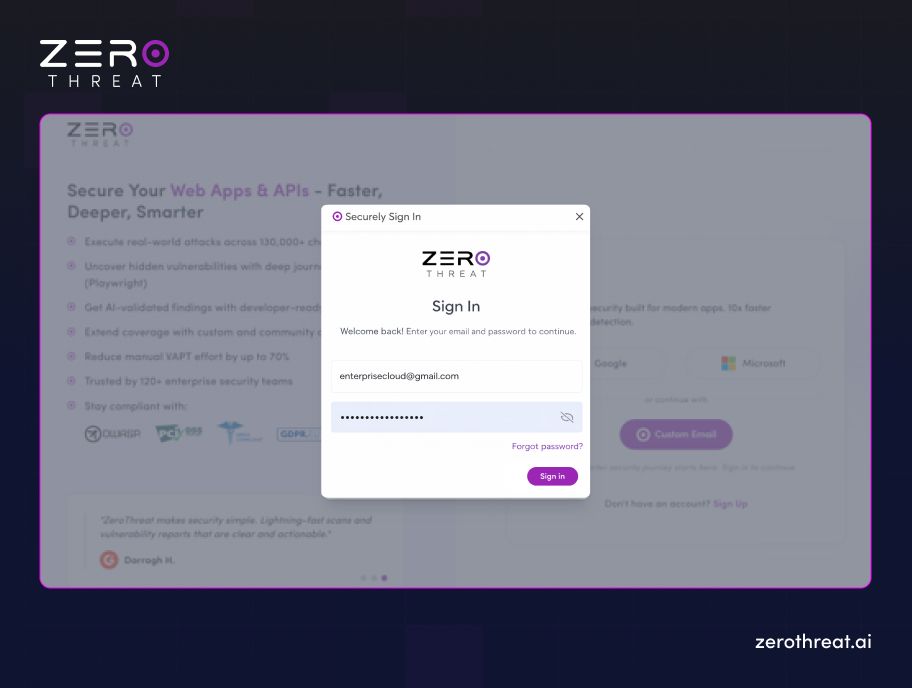
Step 1: Sign Up and Log In to Your Account
Firstly, create a ZeroThreat account if you don’t have one already, and if you have one, go to the ZeroThreat platform and log in with your credentials. Once you are in, you will land on the main dashboard, where you can add and verify the targets you want to test.
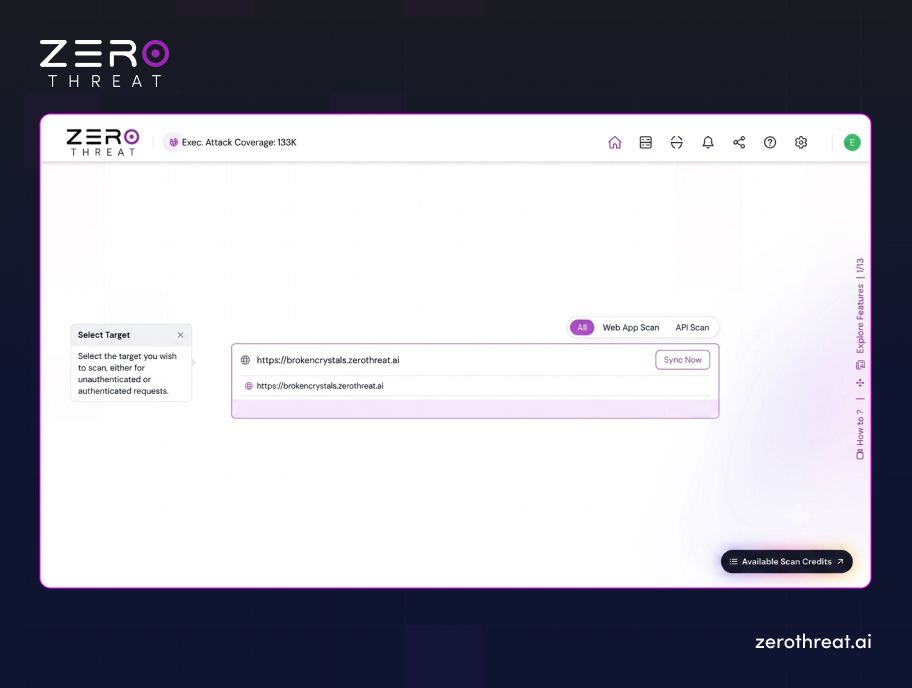
Step 2: Select Your Target
From the dashboard, add the target you want to scan. This is the live application you want to run the production-safe penetration test against. Make sure to verify the target before proceeding.
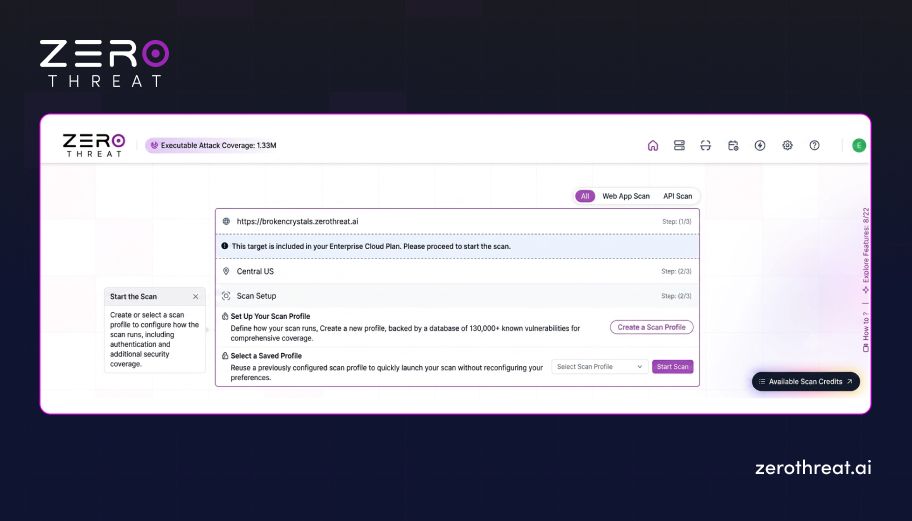
Step 3: Click "Create a Scan Profile"
Once inside your target, click on "Create a Scan Profile." This opens the Configure Scan Preferences popup, where you will define exactly how the scan should behave before it runs.
Step 4: Enable Production Safe Scan
At the top of the Configure Security Coverage pop-up, you will see the "Production-Safe Mode" toggle. Turn this on before selecting anything else. Enabling this ensures ZeroThreat avoids destructive actions, spammy dummy data creation, and unsafe payloads during the scan.
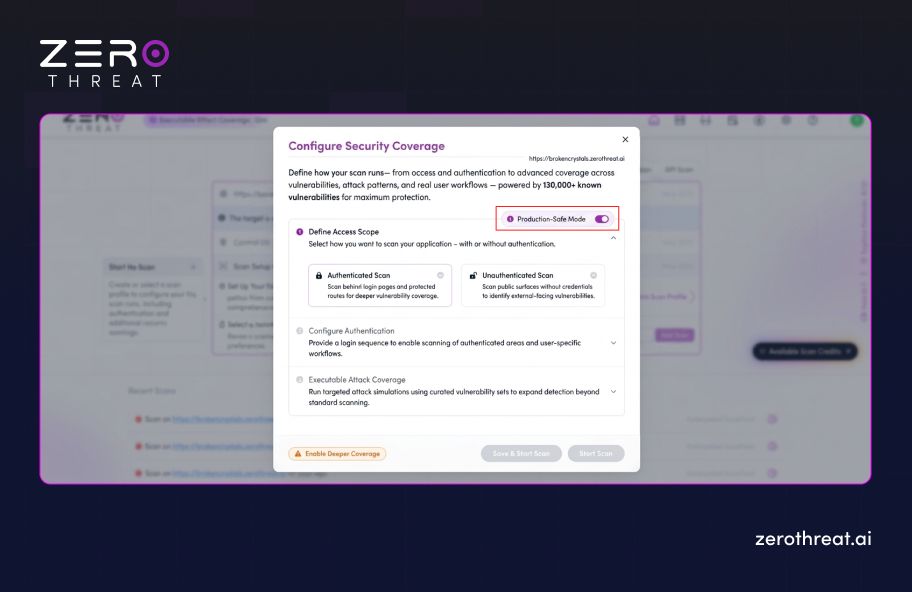
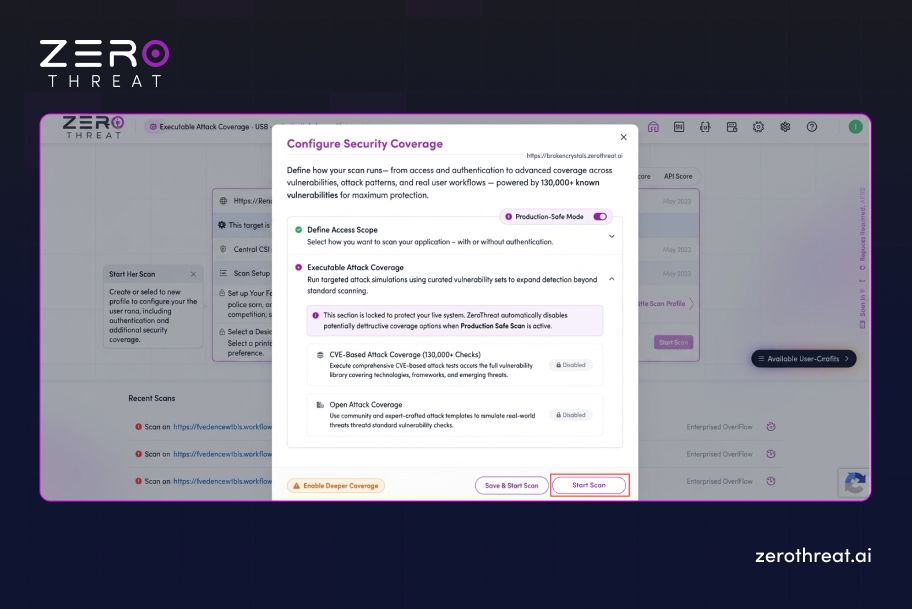
Note: Once Production Safe Scan is enabled, “Tech Stack Based Vulnerabilities” and “Prebuilt Attack Templates” are automatically disabled. This is intentional because those features involve broader and more aggressive checks that are not suitable for live environments.
Step 5: Choose Your Scan Type
Now select how you want to scan the target. You have two options here: Authenticated Scan and Unauthenticated Scan.
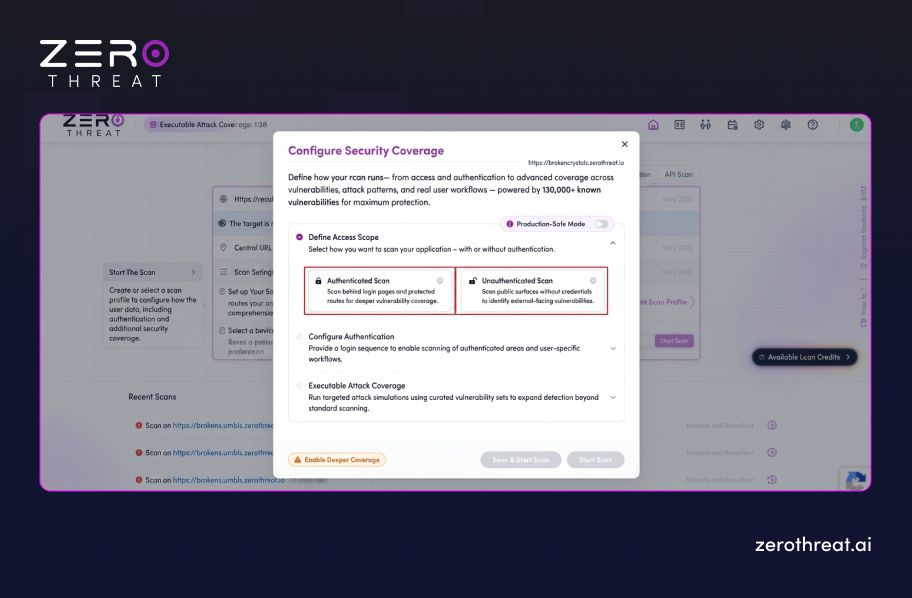
For an Authenticated Scan:
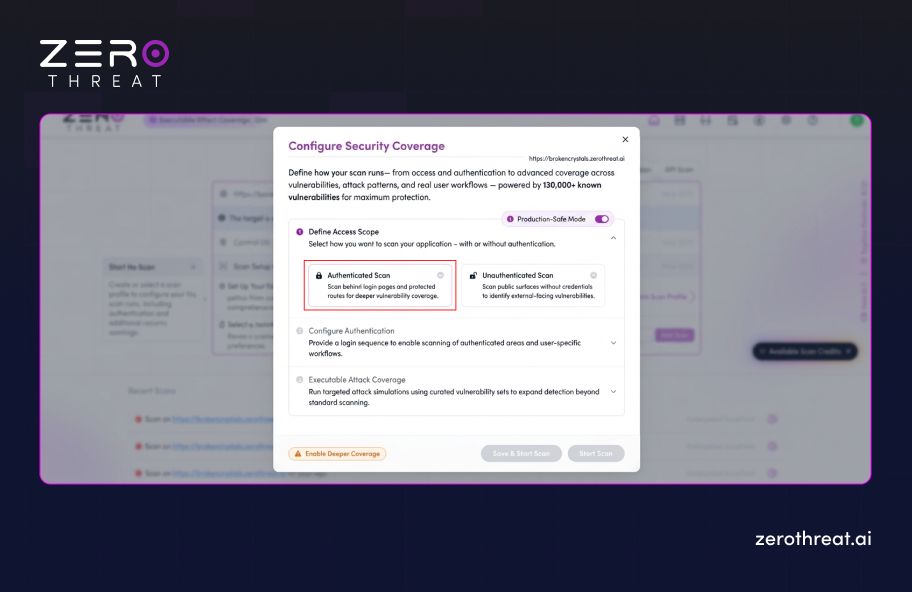
Choose "Authenticated Scan" under the scan type selection. You will then need to select a login sequence so ZeroThreat can access areas of the application that require a user to be logged in. You can select an existing login sequence or create a new one from the login sequence configuration. Authenticated scanning is important for production environments because most critical functionality sits behind login walls and would otherwise go untested.
For an Unauthenticated Scan:
Choose "Unauthenticated Scan" if you want to test only the publicly accessible areas of the application. This is a good starting point if you want to run a quick production-safe scan without setting up a login sequence first.
In the next steps, we will show you how to do both types of scans, you can choose the approach that suits your needs.
Step 6: Run Production-Safe Unauthenticated Scan
To run unauthenticated, all you need to do is select the “Unauthenticated Scan” (Scan public surfaces without credentials to identify external-facing vulnerabilities). Once done, click on the “Start Scan” and you will get a full vulnerability report with AI-powered remediation guidance and compliance alignment.
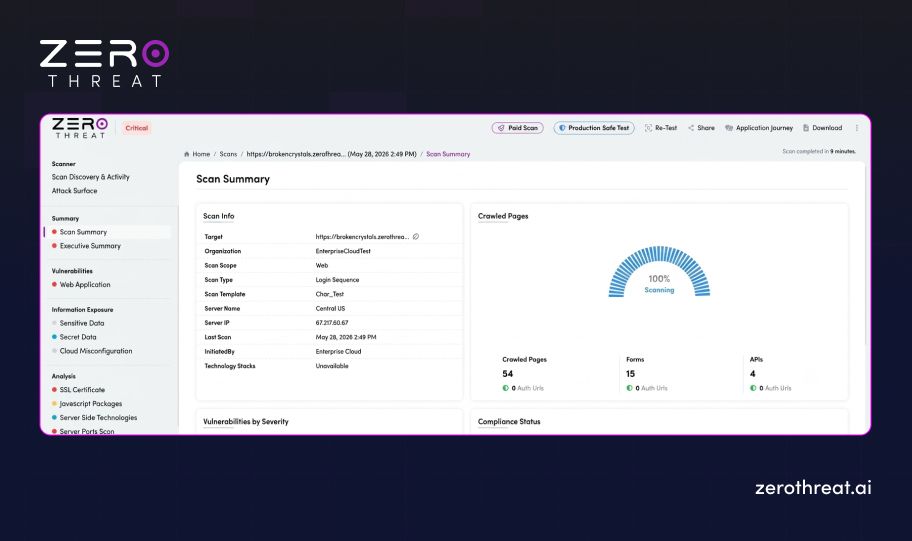
Here is the full Scan Summary you will get at the end of an unauthenticated scan:
Step 7: Run Production-Safe Authenticated Scan
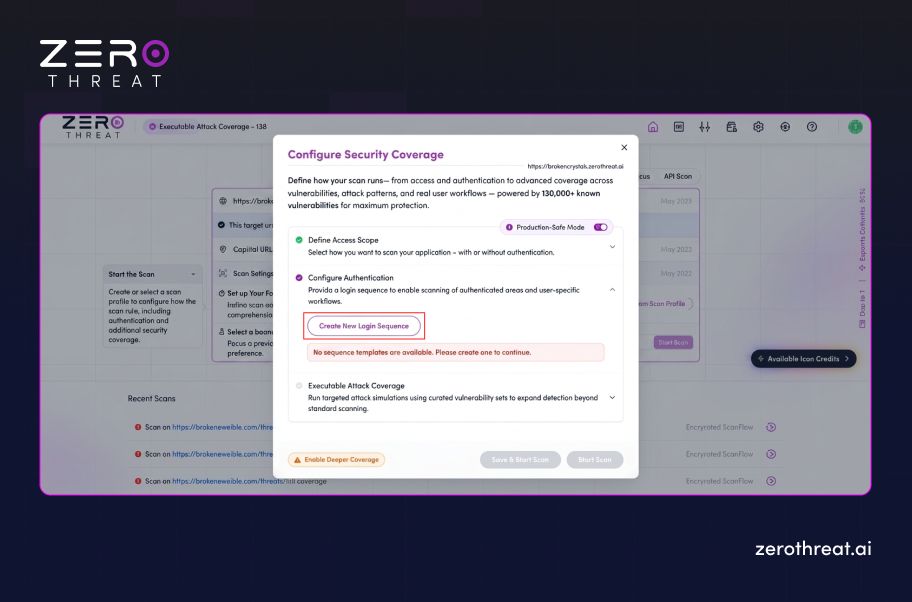
To run an authenticated scan, you will need to provide a login sequence to enable scanning of authenticated areas and user-specific workflows. Here is how you can run an authenticated scan:
1. Select the “Authenticated Scan” option after keeping the “Production-Safe Mode” toggle on.
2. After that you will need to Configure Authentication, which you can do by providing a login sequence. To do that first, click on the “Create New Login Sequence”.
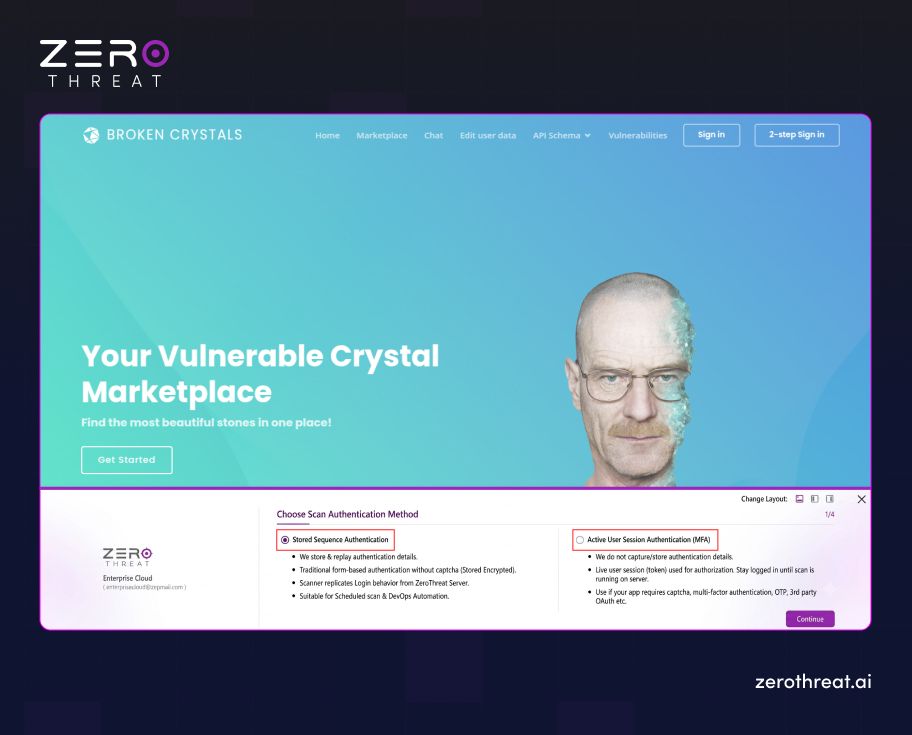
3. A new tab will open with the website you want to test. Here you can choose from the two scan authentication methods: Stored Sequence Authentication and Active User Session Authentication (MFA).
4. After that, you have the option to perform a “Full Scan” or “Scan Recorded Pages & Actions”. Here, we’ll move forward with a specific scanning page by clicking on the “Start Recording” button.
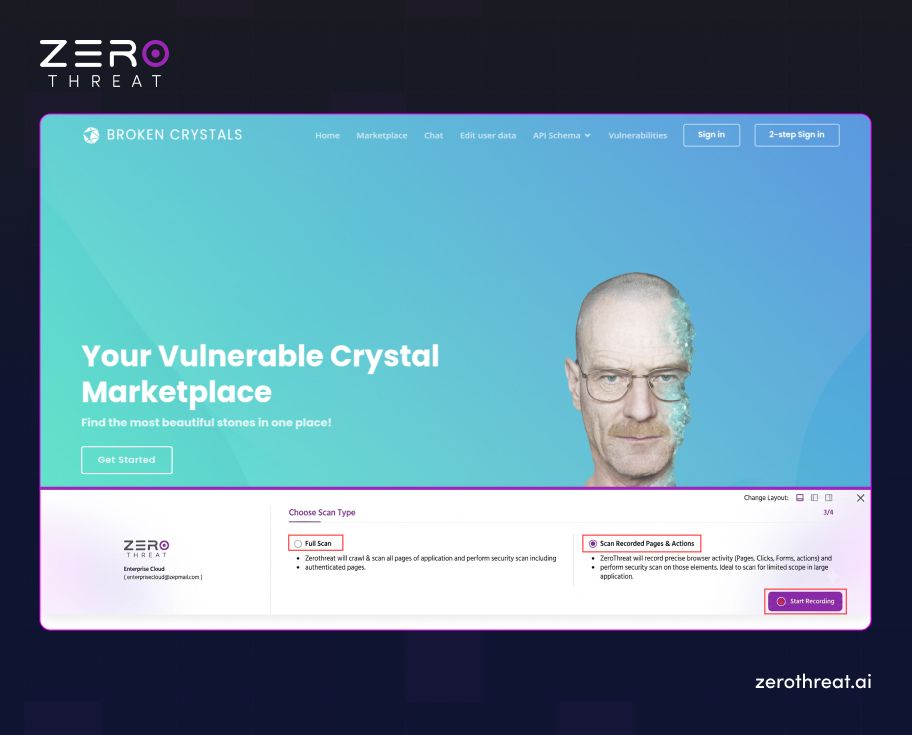
5. Once the recording is started, simply go to the pages and features you want to test, and stop the recording after you have visited the pages you want to test.
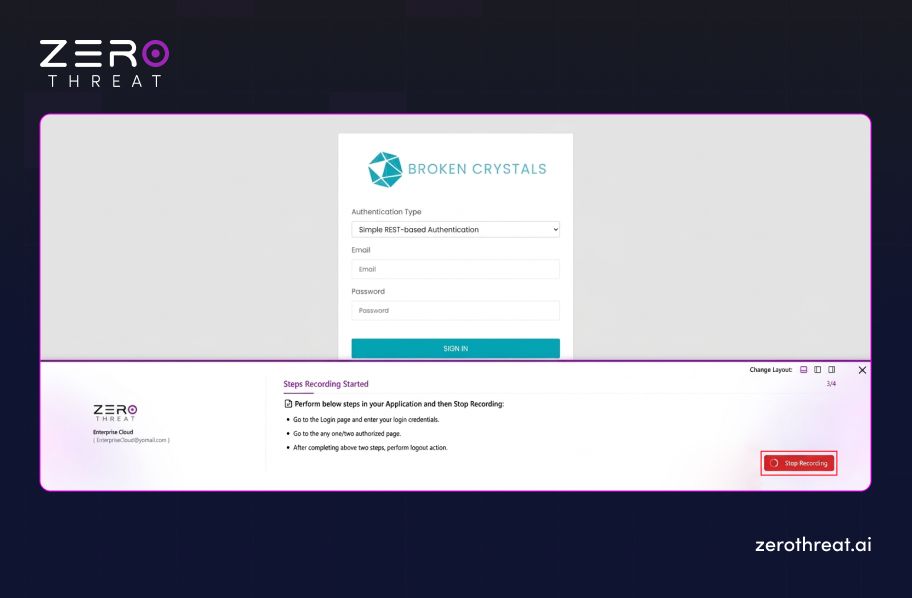
6. Give the current recording a login sequence name; you can keep it based on the page you have recorded in that session and then click on “Save & Exit”. This will return you to the dashboard.
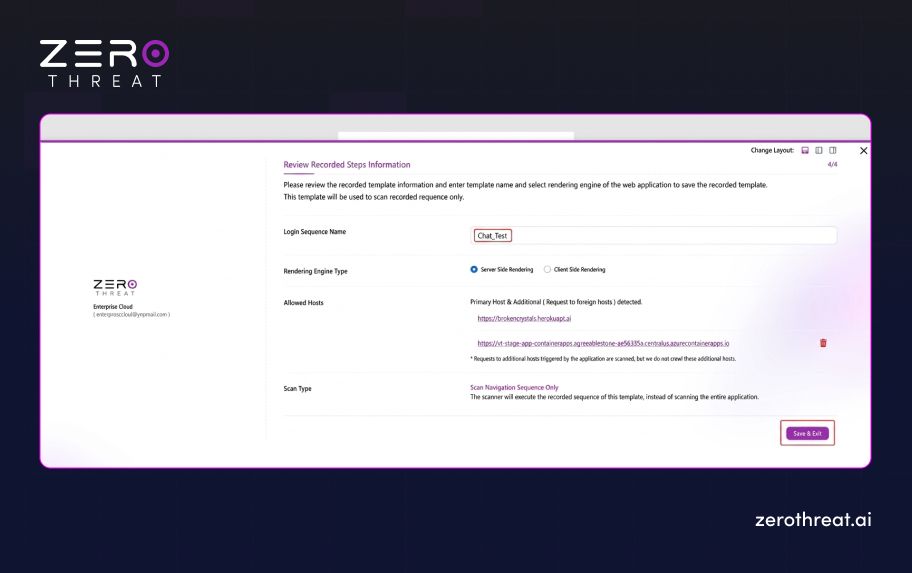
7. Add the URL you to test from the dashboard, choose the option of authenticated scan and select the login sequence we recorded in the previous step (Chat_Test).
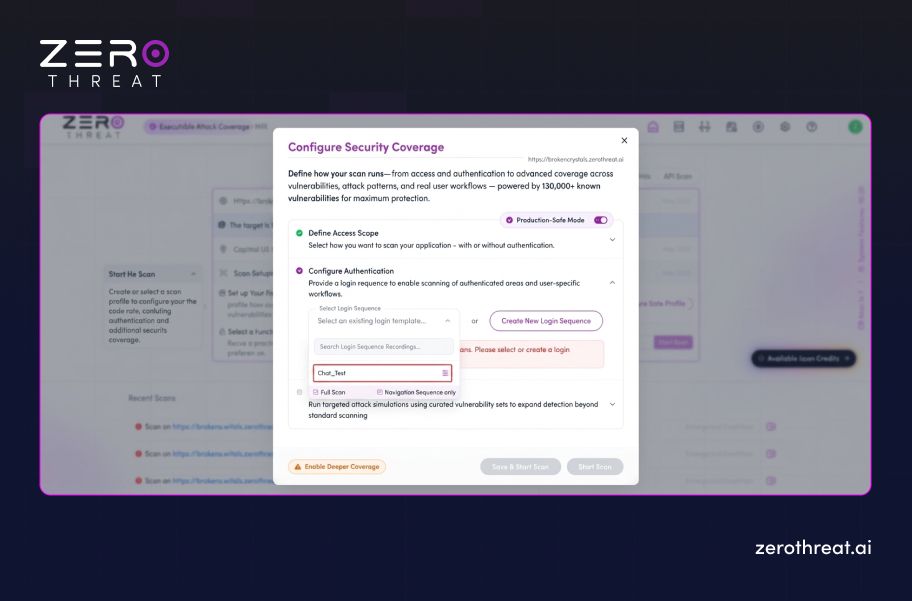
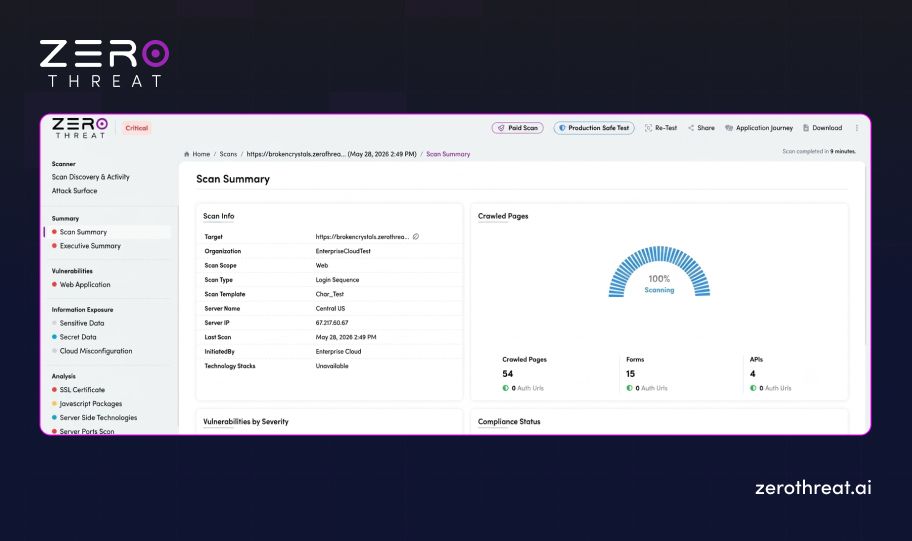
8. Once done, click on the “Start Scan” button, and you will be able to access the full vulnerability report of the pages you recorded in your login sequence (the time to test can vary from 0.5–2 hours).
Discuss how to test production systems safely without risking user data or compliance violations. Connect Us
Final Thoughts on Production-Safe Automated Pentesting
Production pentesting is no longer a question of whether it should be done. It is a question of how. The right tool makes the difference between a scan that finds real vulnerabilities and one that creates new problems.
The fear of downtime, data corruption, and disruption is valid when using the traditional pentest tools. But when you are using tools that can test the production environment safely with zero risk by design, using controlled techniques, it is completely okay to test in a live application.
Using ZeroThreat gives security teams a way to test continuously, confidently, and safely on live applications. That means fewer blind spots, faster remediation, and security coverage that actually reflects the environment attackers are targeting.
Frequently Asked Questions
Can automated pentesting crash production applications?
Yes, poorly configured automated pentesting can affect production systems if the tool uses aggressive payload injection, uncontrolled request rates, or unsafe exploit attempts. Modern production-safe pentesting platforms reduce this risk through rate limiting, controlled validation, and non-disruptive testing techniques.
Does automated pentesting affect application performance?
Can automated scans cause downtime?
How does ZeroThreat reduce scanning risk in production?
Should pentesting be done on staging or production?
Related Articles

Explore ZeroThreat
Automate security testing, save time, and avoid the pitfalls of manual work with ZeroThreat.