 ZeroThreat Wins Bronze Stevie® Award in Tech Startup of the Year Read more

All Blogs
Quick Summary: While vulnerability assessment tools are great solutions for threat reconnaissance and mitigation, finding the best one can be a tricky game. We have put together this blog to help CISOs and security professionals pick the best VA tools for their cybersecurity goals. It provides the important details to narrow down choices, understand pros and cons, compare options, and make the right choice.
Did you know more than 48% of CISOs attribute sensitive data loss to compromised systems, as per Statista’s report? Surprisingly, 93% of such data breaches can be prevented by setting up basic security measures. However, over the years, cyber threats have evolved, and organizations must also update their tactics and methods of cybersecurity.
Using vulnerability assessment tools must be at the forefront of their cybersecurity strategy, which allows them to discover and neutralize hidden loopholes before a hacker finds and exploits them. It is like searching for open windows and doors in a large building to prevent burglary.
But there is a catch – finding and choosing the right vulnerability scanning tool is not easy and can be confusing. So, in this blog, we are providing a comparison of the top 5 vulnerability assessment tools to help you pick the right option for your organization.
We have reviewed and compared these tools based on different factors, including accuracy, usability, scanning capabilities, cost, and more, to help you make an informed choice. Let’s check out the vulnerability assessment tools list with a full comparison. It will enable you to invest in the right solution that strengthens your cybersecurity posture.
Hackers are Evolving Their Tactics, Stay Ahead of Them with Next-Gen Vulnerability Assessment Powered by AI Get Started
On This Page
- Comparison of the 5 Best Vulnerability Assessment Tools
- Overview of Top Vulnerability Assessment Tools
- Things to Consider in Choosing a Vulnerability Detection Tool
- Go Beyond Traditional Vulnerability Scanning with ZeroThreat
- To Wrap Up
Comparison of Top 5 Vulnerability Assessment Tools
Every vulnerability detection tool has some pros and cons that differentiate it from the other tools. You can understand these differences in the brief comparison table given below.
| Features | ZeroThreat | ZAP | Acunetix | OpenVAS | Burp Suite |
|---|---|---|---|---|---|
| Capabilities | DAST is for web app and API, as well as automated pen testing. | Prox-based scanner for web apps | DAST scanning for web apps | Automated vulnerability scanner | Vulnerability assessment and pen testing tool |
| Ease of Use | No configuration required, user-friendly | A bit of tech expertise is needed | It is easy to use | Technical expertise needed for setup | Technical expertise needed |
| Precision | 99.9% accuracy | Moderate precision | 99% accuracy | Moderate | High accuracy |
| False Positives | Near zero false positives (less than 1%) | Require manual review | Lower false positives | Manual review required | Lower false positives |
| Scanning Behind Login | Scan behind login, MFA scanning | Manual setup needed | Scan with login credentials | Offers both credentialed and non-credentialed scanning | Authenticated scanning enables crawling protected pages |
| Usage | Cloud-based online platform | Desktop application | Web-based interface | Linux-based tool | Desktop application |
| Compliance Support | Support OWASP, PCI DSS, ISO 27001, GDPR, HIPAA, and SOC 2 | OWASP | OWASP, PCI DSS, HIPAA, and ISO 27001 | PCI DSS, HIPAA, and GDPR | PCI DSS, HIPAA, OWASP, NIST, and GDPR |
| Integration | CI/CD, SIEM, and DevSecOps | Limited integration | CI/CD, issue tracker, WAF, and other tools | Integrate into CI/CD the technical skills needed | CI/CD pipeline, issue tracking, and other tools |
| Cost | Both free and paid versions | Free | Paid | Free | Free and paid versions |
Detailed Overview of the 5 Best Vulnerability Assessment Tools
The following list of vulnerability assessment tools comprises the top tools that developers, security teams, and DevSecOps teams use.
ZeroThreat
ZeroThreat is one of the top vulnerability assessment tools, helping you identify, prioritize, and remediate vulnerabilities across your organization. With the combined power of automated pen testing and DAST (Dynamic Application Security Testing), ZeroThreat offers a comprehensive evaluation of your web apps and APIs to uncover critical vulnerabilities before a hacker can exploit them.
Its ability to detect complex vulnerabilities such as zero-day, out-of-band, and business logic errors makes it stand out from other vulnerability assessment software. It proactively scans for emerging threats and detects critical risks with its 130K+ vulnerability database and scans behind logins. Seamless integration into CI/CD allows teams to maintain security across the development phase.
Pros
- 10x faster scan results
- Role-based access, authentication, and MFA scanning
- Scan beyond the OWASP top 10 and offers OAST
- Automated scheduled scanning as per preference
- Scalable, developer and DevOps-friendly
Cons
- Only web and API scanning, not mobile app supported
ZAP
Zed Attack Proxy (ZAP) is one of the top open-source vulnerability assessment tools widely used for testing web applications. It works as a proxy between a browser and a server, allowing security teams to manipulate packets before sending them to the destination. As a flexible and extensible tool, ZAP can be equipped with new modules to enhance vulnerability scanning features.
With a desktop-based UI and easy configuration, ZAP streamlines vulnerability scanning for developers, security specialists, and beginners in security testing. Running automated scans is easy and can be customized as per scanning requirements.
Pros
- Extensible with new capabilities
- User-friendly interface
- Passive scanning feature
- Fuzzing and spidering
- Automated and customizable scans
Cons
- Not fit for large-scale scanning
- Few advanced features
- Incomplete and outdated document
- Lower accuracy and higher false positives
- Limited support for cloud-based CI/CD integration
Acunetix
Acunetix is also an automated vulnerability scanning tool for web apps, and it is widely used by security professionals. It is available both as a downloadable solution for Windows, macOS, and Linux, as well as an online service that doesn’t require installation. Acunetix tests applications for 7000+ vulnerabilities, including OWASP top 10, and offers scheduled scanning to perform automated recurring scans.
With pinpoint vulnerability detection and detailed remediation reports, it streamlines the overall vulnerability assessment process. It can scan different types of web apps like SPAs, script-heavy sites, and multi-level forms. With faster speed and precision scanning, it ensures that every vulnerability is detected.
Pros
- Automated vulnerability scanning
- CI/CD integration
- Credentialed scanning
- Compliance reporting
- Continuous automated tests for web-facing assets
- Scan password-protected areas
Cons
- Problems integrating with JIRA, Chef, and Jenkins
- It offers a bit expensive price
- Supports only web app scanning, no mobile app testing
- Traffic throttling and bandwidth consumption issues
OpenVAS
OpenVAS is an open-source and free vulnerability scanning tool that offers a wide range of features and functions for scanning. It provides a GUI interface and a CLI interface. It is one of the top vulnerability assessment solutions that is also available on Kali Linux. With features for continuous automated scanning and compliance auditing, this tool helps with comprehensive security assessments.
It checks applications and networks for critical vulnerabilities and generates detailed reports. With automated scanning, credentialed and non-credentialed scanning, asset discovery, role-based access control, detailed reporting, and more.
Pros
- Covers 26,000+ CVEs
- Provides network, web app, and system scanning
- Authenticated and unauthenticated scanning
- Customized and scheduled scanning
- CLI-based commands and scripts to perform scans
Cons
- Covers fewer CVEs and test cases
- Limited operating systems are supported
- Does not offer policy management
Automate Security Testing and Reduce the Burden of Your Teams by Reducing Manual Efforts, Resulting in Faster Releases Start Now
Burp Suite
Burp Suite is another top vulnerability detection tool that is also popular among many security professionals. It is well-equipped with essential tools and features to evaluate web applications. With two versions – Burp Suite Professional and Burp Suite Community Edition – security professionals have both paid and free options for vulnerability assessment.
Burp Suite features a built-in proxy, request history, fuzzing, and WebSockets support, and it offers extensions to integrate additional features. In addition, there are tools like Comparer, Decoder, Sequencer, Repeater, Extender, and more that help analyze web apps and identify vulnerabilities.
Pros
- Automated and accurate vulnerability detection
- Pre-built configurations to perform customized scans
- Burp Suite Extender enables enhanced features
- CI/CD integration
- Identify DOM-based vulnerabilities
- Brute-forcing and fuzzing tests
- Automated API discovery and scanning
Cons
- Challenges in scanning REST APIs
- The free version has limited features, and the paid one is expensive
- False positives consume resources and time
- Initial setup is complex, and documentation is not beginner-friendly
Key Things to Consider While Choosing Vulnerability Assessment Solution
Vulnerability assessment is vital to keep your data and assets secure from hackers. In this process, choosing the right vulnerability assessment software plays a crucial role in ensuring the quality, accuracy, and effectiveness of security testing. Hence, it is essential that you invest enough time to pick the right tool. The following are some tips from security experts on how to choose the best tool for vulnerability scanning.
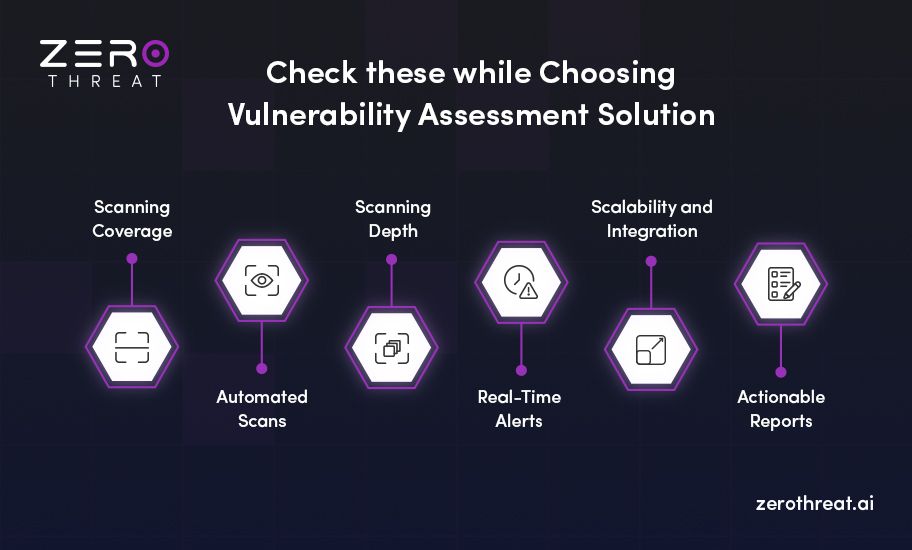
Scanning Coverage
The vulnerability scanner you choose should be able to scan beyond the OWASP top ten and offer comprehensive coverage, including the CWE top 25. It should also scan web apps for more complex vulnerabilities like zero-day, business logic errors, out-of-band vulns, etc.
Automated Scans
Make sure that the scanning tool you choose offers automation to efficiently manage security testing, reduce manual efforts, and provide auto-generated remediation reports. This will save time and reduce the burden on your team, and they can test faster as well.
Scanning Depth
Avoid tools that offer surface-level scanning and cannot crawl protected resources. The best vulnerability assessment tools also offer credentialed scanning that can analyze protected web pages or resources with due authenticated access. It helps discover deeply hidden vulnerabilities.
Real-Time Alerts
The tool should offer instant alerts to your team as vulnerabilities are detected when integrated into the development workflow. Immediate alerts will enable your team to take prompt actions before a hacker can exploit the vulnerabilities, helping you strengthen web app security.
Scalability and Integration
Top vulnerability assessment tools are built to meet scalability needs as your infrastructure grows. They are capable of scanning applications, whether you scan one or hundreds. Additionally, it should be easily integrated with other security tools and in DevOps.
Actionable Reports
Make sure the vulnerability assessment tool offers actionable remediation reports with risk prioritization to help development teams promptly fix issues. Besides, the tool should also offer remediation steps and code fixes to remediate vulnerabilities faster.
Go Beyond Traditional Scanning with ZeroThreat
Cyber threats evolve as hackers leverage different tactics, techniques, and procedures (TTPs) for attacks. Hence, continuous security assessment with real-time detection is crucial to tackle these emerging threats, enabling you to catch vulnerabilities before they even get exploited by hackers.
ZeroThreat goes beyond traditional vulnerability scanning and offers next-gen DAST (Dynamic Application Security Testing) combined with automated pentesting. It thoroughly analyzes your web apps and APIs for thousands of vulnerabilities, prioritizes them, and generates AI-powered remediation reports.
It provides detailed reports that help development teams to perform quick and effective mitigation of vulnerabilities. With continuous vulnerability assessment through scheduled scanning, ZeroThreat enables organizations to stay ahead of evolving threats. Apart from premium features, it also offers a free tool that you can use with a free sign-up.
Identify Critical Vulnerabilities without Technical Skills and Zero Configuration to Rapidly Fix Issues in Apps Check for Vulnerabilities
To Wrap Up
Vulnerability assessment is not optional; it is vital to protect your digital infrastructure from hackers. However, how successful this process directly depends on the vulnerability assessment software you use. Making a comparison between the different options you have can help you understand the pluses and minuses of each tool, narrowing down the choices.
Moreover, scanning coverage, accuracy, reporting capabilities, and compliance testing are some essential factors that you must consider for a proper vulnerability scanner comparison. The comparison of the top 5 vulnerability assessment tools we have covered in this blog can help you make a good choice.
These tools are compared on different factors and highlight their key strengths and weaknesses. You must begin by assessing your requirements and then pick the tool that aligns with those needs.
Frequently Asked Questions
Which is the best tool for vulnerability assessment?
The best vulnerability assessment tools used by security professionals, developers, and DevOps teams include:
- ZeroThreat
- Burp Suite
- OWASP ZAP
- Acunetix
- OpenVAS
- Nessus
- Snyk
- Wireshark
Which are the most common types of vulnerability assessment tools?
What are the free vulnerability assessment tools?


Explore ZeroThreat
Automate security testing, save time, and avoid the pitfalls of manual work with ZeroThreat.