 ZeroThreat Wins Bronze Stevie® Award in Tech Startup of the Year Read more

All Blogs
From CVE Found to CVE Fixed: How ZeroThreat's Retest Feature Confirms Your Patch Actually Worked

Quick Overview: Fixing a vulnerability is not enough; you should be able to verify that the fix actually worked. This blog breaks down how ZeroThreat’s targeted issue Retest feature replaces manual guesswork with proof-based automated validation. It covers the difference between full scans and targeted retests, step-by-step instructions for verifying single or multiple flaws, and how this feature accelerates CI/CD pipelines.
Patching a CVE and patching it correctly are two different things. Security teams close tickets, mark findings as resolved, and move on only to discover in the next pentest cycle that the same vulnerability is still exploitable, just slightly harder to reach.
If this keeps happening, your application will be vulnerable even after fixing. That’s where ZeroThreat's instant issue Retest vulnerability feature comes in handy to close that gap: after a fix is deployed, the platform re-executes the original attack path against the patched endpoint and returns a verified result within minutes.
In this blog, we’ll explain how to use ZeroThreat’s Retest feature for testing specific and multiple vulnerabilities, why proof-based exploit revalidation matters more than a status change in a tracker, and what it means for security teams trying to reduce the time between "CVE found" and "CVE confirmed fixed."
Stop guessing if your patch worked and verify exploitable fixes instantly with ZeroThreat. Sign Up Now!
ON THIS PAGE
- What is Vulnerability Retesting?
- The Problem ZeroThreat’s Retest Solves: Patches That Look Fixed but Aren't
- Why a Full Re-Scan Is Not the Same as a Retest
- How to Retest a Specific Vulnerability Using ZeroThreat?
- How to Retest Multiple Vulnerabilities Using ZeroThreat?
- How Long Does a Patch-to-Verification Cycle Typically Take Without Retesting?
- How ZeroThreat's Instant Issue Retest Works
- What the ZeroThreat Retest Does Not Do
- Why Proof-Based Retesting Matters More Than Status Tracking
- CVE Retesting: The Specific Case for Disclosed Vulnerabilities
- How ZeroThreat Handles CVE Coverage Before and After a Patch
- What This Means for DevSecOps Teams Running CI/CD
- Retesting as Part of a Continuous Security Posture
- Conclusion
What is Vulnerability Retesting?
Vulnerability retesting is the process of re-running the exact attack sequence used to confirm a finding, after a fix has been applied, to verify that the vulnerability is no longer exploitable. It is not a re-scan of the full application. It is a targeted, evidence-based check against the specific endpoint, parameter, and payload that produced the original proof of exploitability.
Each vulnerability tested will show one of the following outcomes:
- Passed: The issue is no longer exploitable; your fix is working as intended.
- Failed: The vulnerability still exists and may need a revised patch.
This clear separation makes it easy for the developer to know which vulnerability still needs fixing and provides the flexibility to retest that specific vulnerability.
The Problem ZeroThreat’s Retest Solves: Patches That Look Fixed but Aren't
Applying a security patch is only half the work done; ensuring it actually remediates the flaw is the real challenge. Developers often assume a fix is successful and then finds the same vulnerability exploitable due to incomplete patches or missed edge cases.
ZeroThreat’s retest vulnerability feature addresses these hidden risks by providing:
- Targeted Validation: Instead of assuming success, it triggers a live test using the original payload to confirm if the flaw is truly "Passed".
- Efficiency Over Latency: Eliminates the need to wait for a time-consuming full application scan just to verify a single finding.
- Instant Feedback: Provides immediate clarity on whether a vulnerability is still active, allowing for rapid iteration on Critical and Medium risks.
The purpose of this feature is to provide you with a precise, automated vulnerability verification process. It ensures that your security team only moves forward when an issue is actually non-exploitable.
Why a Full Re-Scan Is Not the Same as a Retest
A full re-scan covers the entire attack surface. That is useful for discovering new vulnerabilities. It is not efficient for confirming a specific fix, because the scanner will traverse the application broadly rather than retrying the exact request sequence that triggered the original finding.
Targeted retesting replays the specific proof of exploitation with the same headers, the same payload, the same session context against the security issue you want to test and provides with a precise verdict on whether that specific is no longer exploitable (Pass) or vulnerability still exists (Fail).
Don’t let hidden vulnerabilities fool you. Use AI-driven pentesting to reveal every active exploit now. Detect Exploitable Flaws
How to Retest a Specific Vulnerability Using ZeroThreat?
If you’ve fixed a particular issue and want to check if the patch worked, you can trigger a live test for that vulnerability. Here is a step-by-step process to do that:
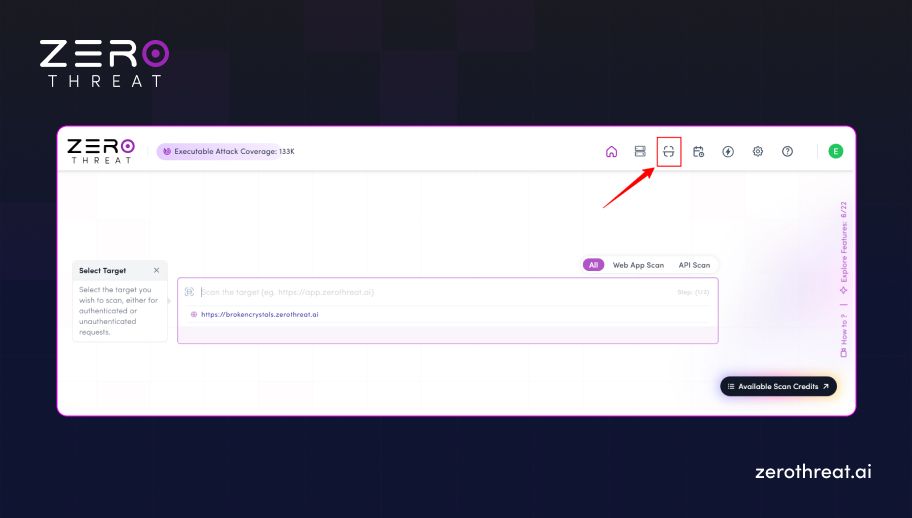
Step 1: Log in to ZeroThreat and click on the “Scans” section available at the top.
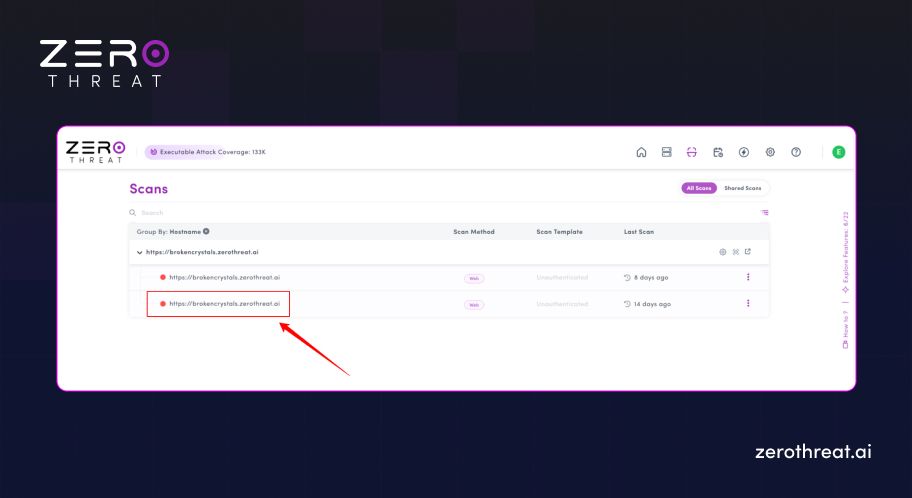
Step 2: Open the relevant Scan Report from which you want to test the specific vulnerability.
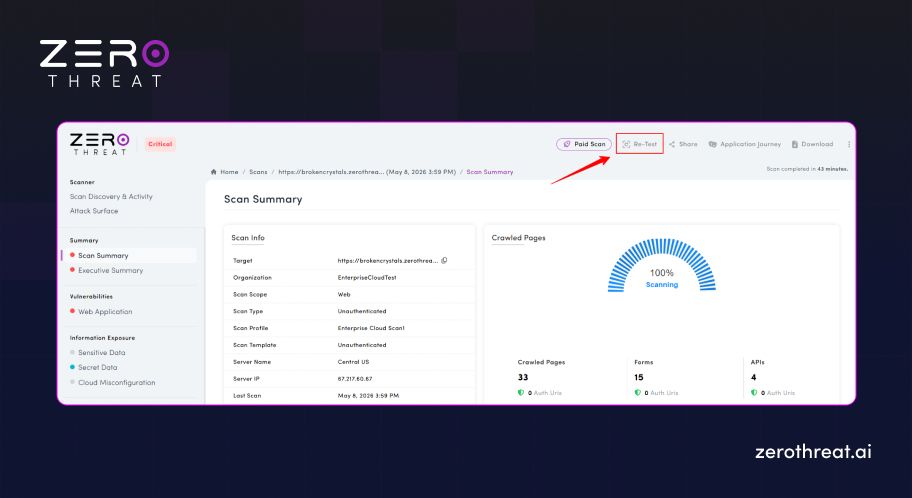
Step 3: Click on the “Re-Test” button available in the header section of reports page.
Step 4: Select one of the vulnerabilities you want to retest and click on the specific request.
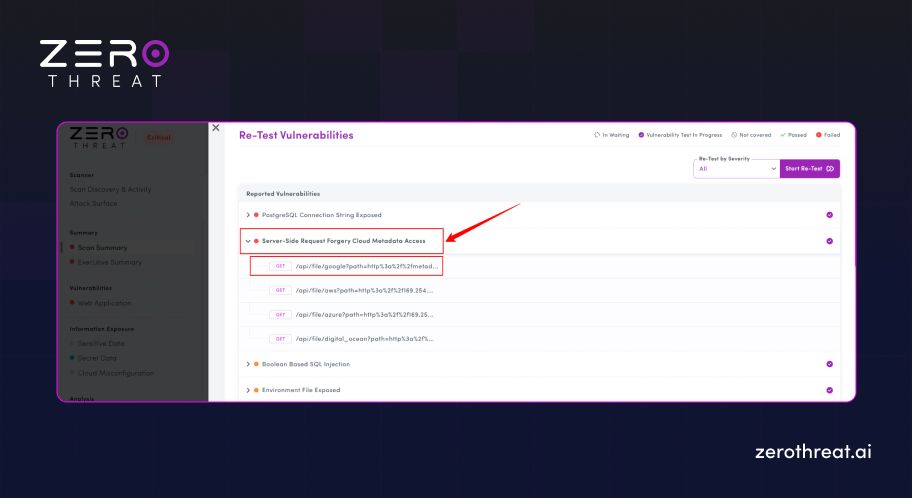
Step 5: After that, you will get a new window opened with the “Re-test Vulnerability” button available in the top right corner.
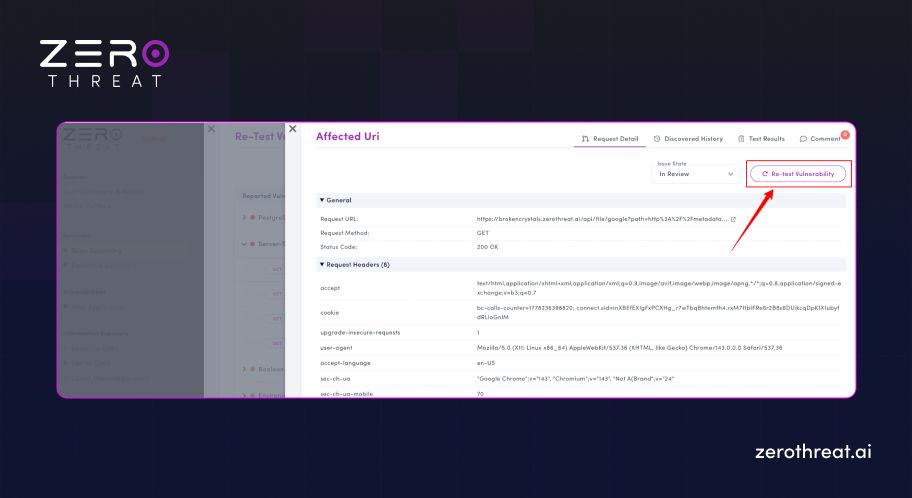
Step 6: Wait around for a minute for the test to complete, and you will find the results in the "Test Results".
How to Retest Multiple Vulnerabilities Using ZeroThreat?
ZeroThreat allows you to select multiple vulnerabilities that you want to retest without testing the full application. Here is how you can retest more than one vulnerability:
Step 1: Log in to ZeroThreat and click on the “Scans” section available at the top.
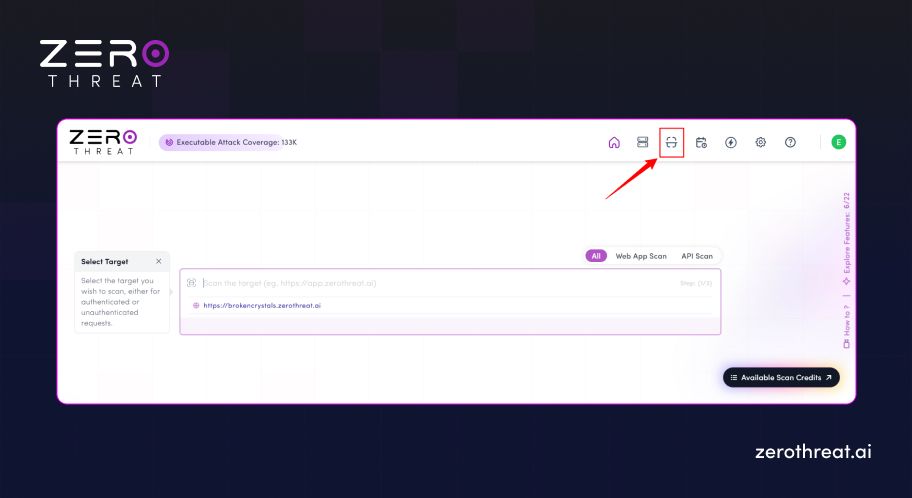
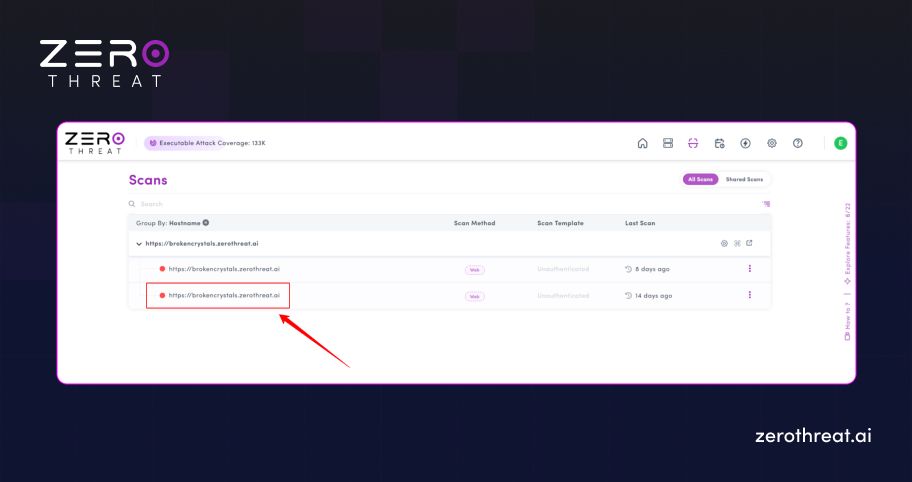
Step 2: Open the relevant Scan Report from which you want to test the specific vulnerability.
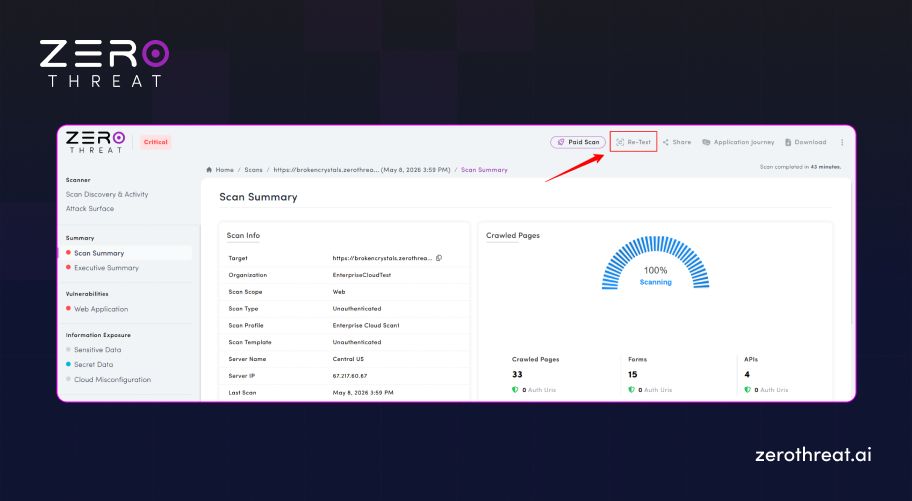
Step 3: Click on the “Re-Test” button available in the header section of the reports page.
Step 4: Click on the drop-down menu and select “Custom” to choose multiple vulnerabilities.
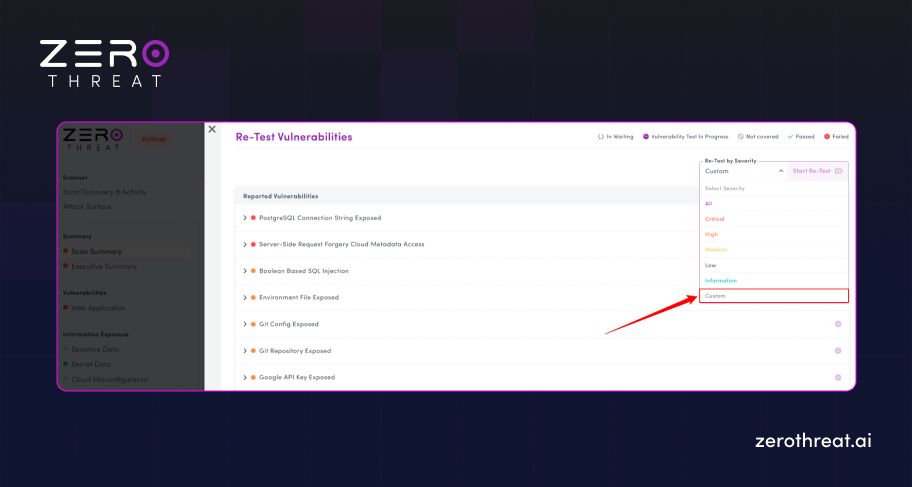
Step 5: Select the vulnerabilities that you want to perform a retest on.
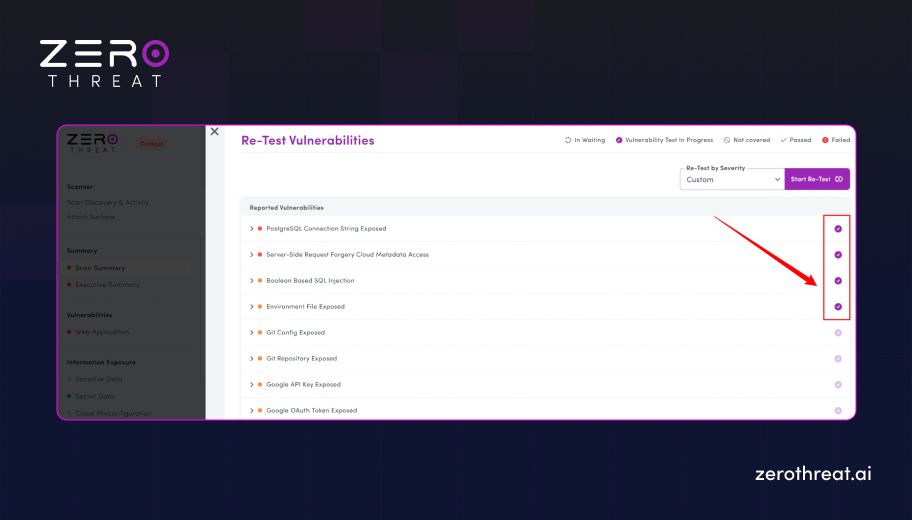
Step 6: Wait around for 1-2 minutes for the test to complete, and you will find the results in the "Test Results".
How Long Does a Patch-to-Verification Cycle Typically Take Without Retesting?
Without a dedicated retest capability, the verification cycle depends on when the next scheduled assessment falls. For teams relying on quarterly manual pentests, that window can be 60 to 90 days. For teams running DAST on a weekly or monthly cadence, it is still days or weeks. During that interval, the application is running with an unverified fix. That means the team thinks the vulnerability is resolved but actually it’s not.
Explore flexible pricing built for teams validating vulnerabilities and retesting fixes at scale. Check Out Pricing
How ZeroThreat's Instant Issue Retest Works
Once ZeroThreat validates exploitability with proof of impact, the exploit context and validated attack workflow are preserved with the finding. When the issue is marked as fixed, analysts can trigger a retest directly from the finding or scan record.
The platform then re-executes the original exploit logic and attack path against the live target to verify whether the issue remains exploitable.
The Three-Step Retest Flow
1. Finding is confirmed with proof. ZeroThreat's AI engine validates the threat finding before it reaches the report. The analyst receives not just the vulnerability classification, but the specific request sequence and the evidence of impact: exposed data, demonstrated privilege escalation, or confirmed injection point. This is the same attack path the retest will replay.
2. Developer applies the fix. The finding's proof-of-exploit details give the developer a precise description of what the attack did and where. This is more actionable than a scanner output that says "SQL injection detected at /api/users." The developer knows exactly which endpoint, which parameter, and which payload produced the exploitable result.
3. Analyst triggers the retest. After the fix is deployed, the analyst initiates the retest from the finding record. ZeroThreat replays the original attack sequence against the patched endpoint, production-safe, and returns a verified result: exploitable (the fix did not hold) or not exploitable (the fix closed the path). The result is appended to the finding record with a timestamp, creating an auditable trail.
What the ZeroThreat Retest Does Not Do
The retest does not re-scan the full application. It does not check whether a fix introduced a new vulnerability elsewhere. It does not substitute for periodic broad coverage testing. Its job is narrow: confirm that this specific finding is no longer exploitable via this specific attack path.
For teams that need post-fix assurance on a newly introduced endpoint or a significant code change, a full scan or targeted scope test is the right approach. The retest is for patch verification, not discovery.
Why Proof-Based Retesting Matters More Than Status Tracking
Most security testing platforms track status: open, in progress, resolved, accepted. That status reflects what a human entered into the tracker, not whether the underlying vulnerability is still present.
Proof-based retesting replaces human validation with verified execution. The fix is not marked resolved because the developer said it was. It is marked resolved because the platform ran the attack, and it did not succeed.
This distinction matters in three specific scenarios.
- Compliance Evidence: GDPR , PCI DSS, and ISO 27001 audits increasingly require evidence of remediation, not just records of discovery. A retest result with a timestamp and a verified "no longer exploitable" outcome is a stronger audit artifact than a closed ticket. Teams can attach the retest result directly to their compliance report.
- Third-Party Reporting: Security teams that deliver findings to clients or report to a board need to answer "how do we know the fix worked?" with something more than "the developer confirmed it." A retest result provides that answer.
- Regression Detection: Patches sometimes hold initially and break later, after a deployment or dependency update. Teams that retest at deployment and then retest again at the next scan cycle have visibility into regression.
CVE Retesting: The Specific Case for Disclosed Vulnerabilities
When a CVE (Common Vulnerabilities and Exposures) is publicly disclosed and ZeroThreat's interpreter-driven vulnerability intelligence maps it to active detection logic, the platform can test for that specific CVE against the target application. If the application is vulnerable, the finding includes proof of exploitability: the CVE identifier, the affected endpoint, and the demonstrated impact.
After the fix is applied, for example, a dependency update, a security configuration change, or a WAF rule, the retest re-executes the CVE-specific attack path. The result confirms whether the applied fix actually closes the vector the CVE exploited, not just whether the vulnerable package version has been removed from the manifest.
This is a meaningful difference. A developer who updates a library version can confirm the package is no longer in the dependency tree. What they cannot easily confirm without execution is whether the fix addresses the specific exploit path in their application's context. Retesting answers that question with a live execution result.
How ZeroThreat Handles CVE Coverage Before and After a Patch
ZeroThreat's real-time CVE mapping brings newly disclosed vulnerabilities into active detection logic within hours of disclosure. When a CVE is added to the platform's coverage, teams with an active scan scope can immediately check whether their application is exposed.
After a patch is applied, the retest executes the same CVE-specific check. The combination of fast initial detection and fast post-fix verification means the window between disclosure, discovery, patching, and verified closure is measured in hours and days, not in quarterly assessment cycles.
What This Means for DevSecOps Teams Running CI/CD
For teams integrating ZeroThreat into CI/CD pipelines, the retest capability fits naturally into the deployment gate workflow. A finding flagged in a scan can block a pipeline stage. After the developer fixes the issue and pushes a new build, the retest can be triggered as part of the deployment verification step, clearing the gate when the vulnerability is confirmed closed.
This removes the common friction point where security findings create deployment blockers that are not resolved quickly because the verification cycle is too slow or too expensive. The retest produces a result in minutes, which means the pipeline can resume without waiting for a manual review cycle.
ZeroThreat's CI/CD integrations support this workflow across common pipeline environments, with the retest result surfaced in the same interface where the original finding was flagged.
Retesting as Part of a Continuous Security Posture
A single pentest engagement, however thorough, captures the application's security posture at one point in time. Modern applications change continuously: new endpoints are added, dependencies are updated, authentication flows are modified. Vulnerabilities that did not exist at the time of the last assessment can appear with the next deployment.
ZeroThreat's retesting capability is one component of the broader shift toward continuous security verification. It handles the specific job of post-fix validation. Periodic broad scans handle discovery across the changing surface. CVE intelligence handles newly disclosed risks. Together, these functions replace the point-in-time pentest model with coverage that tracks the application as it actually evolves.
For teams currently relying on automated pentesting to replace or supplement periodic manual engagements, the retest capability is particularly important: it means the platform that found the vulnerability can also confirm the fix, without requiring a separate manual verification step or a new engagement.
Enough with manual verification. Reach out to see how we automate your security. Contact Us
Conclusion
Closing a CVE ticket is not the same as closing the vulnerability. ZeroThreat's instant issue retest feature bridges that gap by re-executing the original proof of exploitability after a fix is deployed, returning a verified result in minutes, and creating an auditable record of confirmed remediation.
For security teams under compliance pressure, DevSecOps teams running continuous deployments, and analysts responsible for delivering verified findings rather than status reports, ZeroThreat’s Retest feature turns "we think the patch worked" into "we know it did."
See how the Retest workflow fits into a live scan: start a free trial at ZeroThreat and run your first scan with no configuration required.
Frequently Asked Questions
How is a vulnerability retest different from running a full scan again?
A full scan tests the entire application scope for new and existing vulnerabilities. A retest is targeted: it replays the specific attack sequence that confirmed the original finding, against the specific endpoint and parameter, to determine whether that exact exploit path is still open. It is faster, more precise, and purpose-built for post-fix verification rather than discovery.
Can ZeroThreat retest CVE-specific findings after a patch is applied?
How long does a retest take?
Does a retest result count as audit evidence for compliance frameworks?
What happens if the retest shows the patch did not hold?


Explore ZeroThreat
Automate security testing, save time, and avoid the pitfalls of manual work with ZeroThreat.