 ZeroThreat Wins Top InfoSec Innovators 2026 Award for Penetration Testing Read more

All Blogs
Quick Overview: Workflow-aware application security testing tests an application's real, multi-step user journeys because the most damaging flaws surface between steps: a privilege that carries over, an approval that can be skipped, a transaction that can be replayed. This guide covers why page-centric scanners miss these, how workflow-aware engines map journeys and validate exploits, and how to run it continuously in CI/CD.
Fifteen years ago, testing a web application meant crawling a list of URLs and firing payloads at each one. The app was a collection of pages. If a page was safe, the app was mostly safe. That model is gone.
Today's applications are journeys, not pages. A user signs up, verifies email, assumes a role, moves money, uploads a document, triggers an approval, and hands off to a third-party integration, often across a single-page front end talking to dozens of APIs behind the scenes. The security-relevant behavior lives in the transitions: what state carries forward, which check runs at step four but not step two, whose permissions apply after a role switch.
Attackers understand this intuitively. They don't look for a broken page; they look for a broken sequence. And that's precisely the blind spot of tools built to test one request at a time. A scanner that sees each endpoint in isolation has no way of knowing that step three trusts a value step one was supposed to validate.
This guide is a complete, practitioner-level walkthrough of workflow-aware application security testing, what it is, why traditional tooling misses workflow-based vulnerabilities, how workflow-aware engines actually work under the hood, the specific attack classes they uncover, and how to build the practice into a modern release pipeline.
By the end, you'll understand not just the concept, but the engineering behind testing an application the way a real attacker experiences it: as a living, stateful set of paths to abuse.
Every workflow you don't test becomes an opportunity for attackers. Start securing them today. Start Testing Free
On This Page
- Why Modern Applications Demand Workflow-Aware Security Testing
- What is Workflow-Aware Application Security Testing?
- The Anatomy of Modern Application Workflows
- Why Traditional Security Testing Misses Workflow-Based Vulnerabilities
- How Workflow-Aware Security Testing Maps Real User Journeys
- Understanding Attack Paths Hidden Within Application Workflows
- Security Risks That Only Emerge Across Multi-Step Workflows
- Key Capabilities of an Effective Workflow-Aware Platform
- Best Practices for Resilient Workflow-Aware Programs
- How ZeroThreat Enables Workflow-Aware Testing
- Conclusion
Why Modern Applications Demand Workflow-Aware Security Testing
Modern applications demand workflow-aware security testing because their security-critical logic now lives in multi-step user journeys, but not individual pages. So, any test that examines pages in isolation structurally cannot see the vulnerabilities that only exist across a sequence of actions.
The shift from page-centric to workflow-driven applications didn't happen overnight, but its security consequences are stark. In a classic server-rendered app, each page was a self-contained unit of logic. Access control, input validation, and state were largely bound to that page. A tester who covered every page covered most of the risk.
SPAs, microservices, and API-first architectures dismantled that assumption. State is now smeared across the client, the session, and a fan-out of backend services. A single "Approve payout" click might traverse an auth service, a ledger API, a fraud check, and a webhook, each trusting the last. The unit of logic is no longer the page. It's the journey.
This is why user journeys have become the new attack surface. Every transition is a place where a permission can leak, a check can be skipped, or a value can be tampered with before the next service consumes it. The most valuable operations in any business are all multi-step by nature. Which means the highest-impact vulnerabilities are, almost by definition, workflow vulnerabilities.
What is Workflow-Aware Application Security Testing?
Workflow-aware application security testing is a security testing approach that understands and executes an application's real end-to-end user journeys. It helps to detect vulnerabilities that only appear in the interaction between steps rather than within any single request.
The definition hinges on one word: context. A workflow-aware engine doesn't just know that an endpoint exists, but it knows when in a journey that endpoint is called, who is calling it, what state preceded it, and what the application expects to happen next. That contextual model is what lets it reason about abuse.
It rests on a few core principles:
- State is first-class. The engine maintains session, auth tokens, and application state exactly as a real user's browser would, so each request is made in a legitimate context.
- Sequences are the test unit. The thing being probed is a path of actions, not a lone endpoint, because the vulnerability lives in the path.
- Intent is modeled. The engine forms an understanding of what the workflow is supposed to do, then systematically probes every deviation an attacker might force.
- Findings are proven, not guessed. A candidate flaw is confirmed by actually driving the exploit through the workflow, not inferred from a response signature.
It's worth being precise about what this is not. Workflow-aware security testing is not browser scripting, and it is not workflow automation. In fact, it discovers journeys, reasons about them, and adapts its probing based on what the application does, a distinction we'll unpack in detail later in this guide.
From login to checkout, let AI test what traditional scanners overlook. Explore AI Security
The Anatomy of Modern Application Workflows
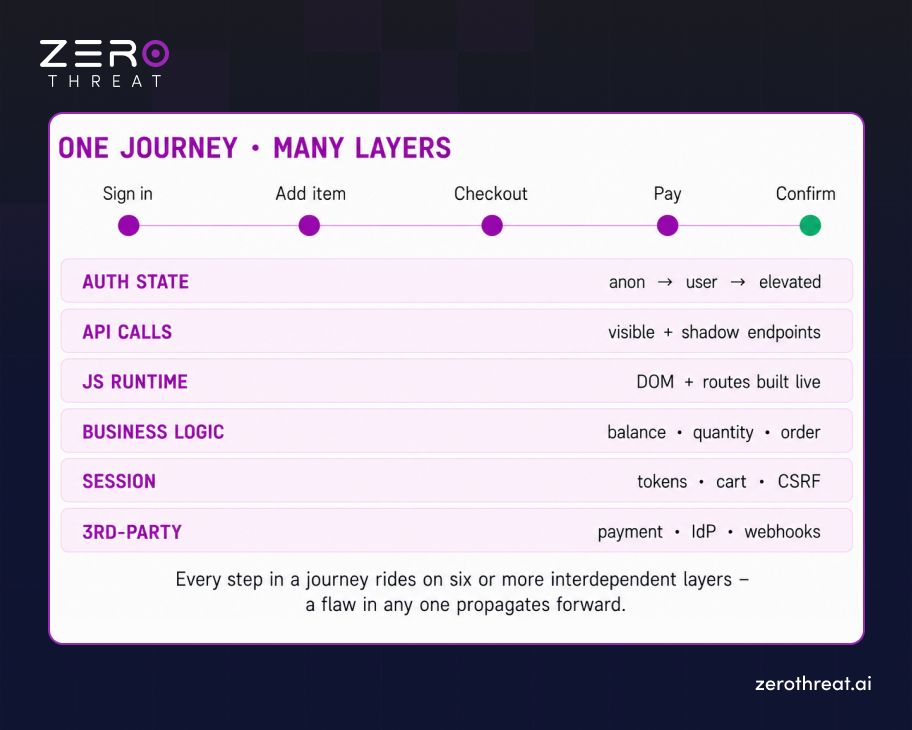
A modern application workflow is composed of layered, interdependent elements, each of which can silently alter security assumptions for every step that follows.
To test workflows you have to understand what they're made of. A single "user completes a purchase" journey is really a stack of moving parts, any one of which can become the pivot point of an attack:
- Authentication States: Anonymous, authenticated, elevated, expired, the same endpoint behaves differently depending on which state the request arrives in.
- Role Transitions: A user who becomes an admin, or an admin who impersonates a user, changes the entire permission surface mid-journey.
- API Interactions: The visible UI is a thin skin over many backend calls, including endpoints never linked from any page. Testing them requires seeing the traffic the workflow generates. This is the same surface covered by dedicated API security testing.
- JavaScript Execution: Modern front ends build the DOM, resolve routes, and construct requests at runtime. If your tool can't execute JS, it can't see most of the workflow.
- Business Logic: The rules that make an operation valid are enforced (or not) across steps.
- Session Context: Tokens, cookies, CSRF values, and cart or draft state persist and evolve as the journey advances.
- Dynamic Navigation: Where you can go next often depends on where you've been, a conditional graph, not a static sitemap.
- Third-party Integrations: Payment processors, identity providers, and webhooks introduce trust boundaries the application assumes are safe.
The critical insight: these elements are not independent. A change in authentication state alters which business rules apply; a role transition changes which APIs respond; a client-side route change triggers a new fan-out of backend calls. Security lives in the interplay, and interplay is exactly what page-by-page testing cannot represent.
Why Traditional Security Testing Misses Workflow-Based Vulnerabilities
Traditional security testing misses workflow-based vulnerabilities because conventional scanners test requests in isolation and cannot maintain the state, sequence, or business context required to reach a flaw that only exists across multiple steps.
Legacy dynamic scanners were engineered for a page-centric world. Their core loop is: crawl a URL, mutate its inputs, compare the response to a signature. That loop is excellent at finding reflected injection on a form field. It is structurally incapable of finding a flaw that requires being in the right state, at the right step, having done the right prior actions. Here's specifically where they break down:
- Multi-step Transactions: A scanner that treats each request independently can't complete a five-step transaction, so it never reaches the vulnerable final step.
- Conditional Execution Paths: When "what happens next" depends on prior choices, a stateless crawler explores the wrong branches, or none at all.
- Stateful Applications: Without preserving tokens and evolving session state, requests are rejected or land in an invalid context, producing noise instead of findings.
- Hidden APIs: Endpoints reachable only after certain actions never appear in a static crawl, so they're never tested. Surfacing them is a core goal of proper vulnerability scanning built for modern apps.
- Client-side Rendering: If the tool doesn't execute JavaScript, the entire single-page front end is invisible, and with it, most of the real request surface.
- Business Process Validation: A scanner has no model of what the workflow is meant to do, so it can't recognize when a rule has been broken. So, the response looks perfectly valid.
The result is a dangerous illusion of coverage. A traditional scan can return a clean, green report while every high-impact, logic-layer path remains completely untested, because the tool never had the machinery to walk those paths in the first place. This is the gap that mature web application security testing is built to close.
How Workflow-Aware Security Testing Maps Real User Journeys
Workflow-aware security testing maps real user journeys by driving the application in a full browser, discovering reachable states, correlating the API traffic each action generates, and preserving session context throughout. It builds a live model of the journey graph that it then probes for abuse.
This is the first place where the engineering gets deep. Mapping a journey is not crawling a sitemap; it's reconstructing behavior. A capable workflow-aware engine assembles the map through several coordinated mechanisms:
- Workflow Discovery: The engine drives the application like a user to reveal reachable states rather than relying on a static link list.
- State Tracking: Auth level, session data, and application context are tracked at every node, so the engine always knows the exact state a given action executes in.
- Request Correlation: Each UI action is tied to the backend API calls it triggers, mapping the visible journey onto the invisible request surface beneath it.
- Session Preservation: Tokens, cookies, and CSRF values are carried forward so deep steps are reached in a legitimate, authenticated context.
- Workflow Branching: Conditional paths are explored as distinct branches of the journey graph.
- API Extraction: Endpoints, parameters, and payload shapes are harvested from real traffic, including shadow APIs never linked in the UI.
- Dynamic Navigation: Because routes are built at runtime, the engine follows the application wherever its JavaScript actually leads, not where a static parser guessed.
The output of this phase is not a list of URLs. It's a stateful model of the application's journeys, which include a graph of nodes (states), edges (actions), and the API surface behind each, that becomes the substrate for everything that follows. You cannot attack a workflow you haven't mapped, and you cannot map one you can't drive.
Understanding Attack Paths Hidden Within Application Workflows
A workflow attack path is a sequence of individually-permitted actions that, chained together, produce an unauthorized outcome. This means the vulnerability is not in any single step but in the fact that the steps can be combined in an order or context the application never intended to allow.
Once you have a journey graph, you can reason about it the way an attacker does, as a set of paths to abuse. This is where workflow-awareness pays off, because the most damaging attacks in modern applications are chains, not single flaws:
- Chained Vulnerabilities: A low-severity info leak at step one supplies the identifier that makes an access-control gap at step four exploitable. Neither is critical alone; together they're a breach.
- Privilege Transitions: A permission granted for one step is never revoked, so it carries into a later step where it should not apply.
- Workflow Abuse: Steps executed out of order, repeated, or skipped entirely bypass a control the application assumed would always run first.
- Business Logic Exploitation: The application enforces the rule it was told to, but the rule itself allows an outcome the business never intended.
- Cross-workflow Attack Paths: State created in one journey (a draft, a token, an approval) is consumed by a different journey that trusts it without re-validating.
None of these are visible to a tool that evaluates one request at a time, because each individual request is, by design, allowed. The exploit is the composition. Finding it requires an engine that holds the whole path in view and asks: what happens if I do these legitimate things in an illegitimate combination?
Choose a plan built for modern applications, but not legacy scanning. Compare Plans
Security Risks That Only Emerge Across Multi-Step Workflows
Multi-step workflow risks are vulnerability classes that cannot be triggered or even detected within a single request. In fact, they require establishing state across several interactions first. That’s is why they dominate real-world breach post-mortems yet rarely appear in conventional scan reports.
Some of the highest-impact vulnerability classes in modern applications are, by their nature, multi-step. They don't exist in one request; they exist in the relationship between several. The most consequential include:
| Workflow risk | Why it needs multiple steps | Real-world impact |
|---|---|---|
| Business logic flaws | Requires valid state built over prior steps before the flawed rule is reachable | Fraud, revenue loss |
| Workflow bypass | A control at step 2 is skipped by jumping to step 4 in a valid session | Unauthorized actions |
| Multi-step authorization failure | Access check runs early but not on the sensitive later step | Data exposure |
| Transaction manipulation | A value set in one step is tampered before a later step consumes it | Financial loss |
| Approval process abuse | Self-approval or replay across the request → approve → execute chain | Governance failure |
| Checkout / payment manipulation | Price or quantity altered between cart, checkout, and payment steps | Direct theft |
| Cross-role privilege escalation | Role state from one context reused where it shouldn't apply | Full account takeover |
Notice the pattern: every one of these requires the tester to be somewhere on a journey before the flaw is even reachable. That prerequisite is precisely what separates workflow-aware testing from everything that came before it.
Key Capabilities of an Effective Workflow-Aware Security Testing Platform
Not every tool that claims "workflow testing" actually delivers it. The following capabilities are the non-negotiable building blocks, and they're most valuable when they reinforce each other rather than existing as isolated features:
- Workflow Discovery: Automatically reveals real user journeys instead of requiring you to enumerate them by hand.
- Adaptive Execution: Adjusts its path based on how the application actually responds, rather than replaying a fixed script.
- JavaScript Understanding: Executes and reasons about client-side code, so single-page applications are fully in scope.
- API Correlation: Ties every UI action to its underlying API calls, exposing the real backend surface.
- State Awareness: Knows the exact auth and session state each request executes in.
- Context Preservation: Carries tokens, cookies, and workflow state across every step without breaking the session.
- Exploit Validation: Confirms a finding by driving the actual exploit, which is the foundation of proof-based, false-positive-free results.
- Continuous Learning: Re-maps journeys as the application changes so coverage doesn't decay between releases.
Best Practices for Building Resilient Workflow-Aware Security Programs
Tooling is necessary but not sufficient. A resilient workflow-aware program is as much about focus and process as it is about the engine. These enterprise-tested practices consistently separate programs that catch real attack paths from those that generate reports no one trusts:
- Prioritize Business-critical Workflows First: Money movement, access grants, and data export deserve the deepest coverage, that's where impact concentrates.
- Test Across Multiple User Roles: The same journey tested as an anonymous user, a standard user, and an admin reveals authorization gaps invisible from any single role.
- Validate Workflow Integrity After Every Release: Treat journey security as a continuous property, not a point-in-time audit that decays the moment code changes.
- Combine UI and API Testing: The workflow you see in the UI and the request surface underneath must both be in scope, since attackers freely cross between them.
- Continuously Expand Workflow Coverage: As the application grows, untested new journeys are exactly where the next logic flaw will live.
How ZeroThreat Enables Workflow-Aware Application Security Testing
ZeroThreat enables workflow-aware application security testing by driving real application journeys through a browser-based engine, discovering APIs and workflows dynamically, and validating business-critical attack chains with proof-based results. This helps security and application teams to get exploitable paths, not a list of unvalidated warnings.
ZeroThreat is built as an application-aware AI pentesting platform, which means workflow-awareness isn't a bolt-on feature, but it's the foundation. In practice, that shows up as:
- Real application journeys
- Adaptive workflow execution
- Dynamic API discovery
- Business-critical attack chain analysis
- Proof-based exploit validation
- Continuous workflow testing in CI/CD
Experience security testing that follows your users—not just your URLs. Schedule a Demo
Conclusion
The application security problem has quietly changed shape. The question is no longer "is this page safe?", it's "can this journey be abused?" As applications became stateful, API-driven, and workflow-centric, the vulnerabilities that matter most retreated into the spaces between steps, out of reach of any tool built to test one request at a time.
Workflow-aware application security testing is the response to that shift. By driving real journeys, holding state, correlating the API surface beneath the UI, and proving exploitability end-to-end, it tests applications the way attackers experience them, as living paths to compromise, not static collections of pages. That's not a marginal improvement in coverage; it's coverage of an entire class of risk that page-centric tooling structurally cannot see.
For teams shipping modern applications, the practical implication is direct: if your testing can't complete a multi-step, authenticated, business-critical workflow and probe it for abuse, your most important attack paths are going untested, no matter how green the report looks.
Frequently Asked Questions
Is workflow-aware testing the same as using Playwright or Selenium?
No. Playwright and Selenium are automation frameworks that replay a fixed, human-authored path to verify it still works. Workflow-aware security testing autonomously discovers journeys, reasons about their security intent, and adapts its probing to find abuse the script author never anticipated.
What vulnerabilities does workflow-aware testing find that others don't?
How is workflow-aware testing different from traditional DAST?


Explore ZeroThreat
Automate security testing, save time, and avoid the pitfalls of manual work with ZeroThreat.