 ZeroThreat Wins Bronze Stevie® Award in Tech Startup of the Year Read more

All Blogs
The Staging Environment Security Blind Spot: What Your Tests Are Missing
Quick Overview: Staging environments often look secure, but they miss real-world risks. This blog explains why staging testing fails to detect critical vulnerabilities, the gaps between staging and production, common issues that go unnoticed, and how to detect them using production-safe security testing approaches.
A staging environment can look “production-ready,” yet still miss the very vulnerabilities that break your application in the real world. The reason is simple. Staging is only an approximation of the real scenario. It cannot fully replicate real traffic, real data, or real user behavior at scale.
Even well-built staging setups have gaps that can leave space for detecting vulnerability. And above all, high-volume traffic, concurrency issues, and long-running edge cases are difficult to simulate, which means critical flaws often remain hidden until deployment.
The staging security testing relies on synthetic or limited datasets, while production runs on unpredictable user inputs and live interactions. This difference is exactly why vulnerabilities such as broken access control, business logic flaws, and runtime misconfigurations appear only after deployment.
If your security testing stops at staging, you are not validating real-world risk. You are validating assumptions. And that gap is where most critical vulnerabilities survive.
In this blog, we are going to talk in detail about why testing only in staging is not enough and discuss how shifting to a production-safe security testing approach can help you safeguard your application. With that said, let’s get started!
Stop relying on staging assumptions and uncover real-world security gaps instantly today. Start for FREE
On This Page
- Why Staging Environments Miss Critical Security Vulnerabilities
- Common Vulnerabilities Staging Security Testing Actually Misses
- Staging vs Production Security Testing: A Reality Check
- Real-World Examples of Vulnerabilities Missed in Staging
- ZeroThreat for Production-Safe Security Testing: The Real Validation
- Wrapping Up: Shifting Towards Production-Safe Security Testing
Why Staging Environments Miss Critical Security Vulnerabilities
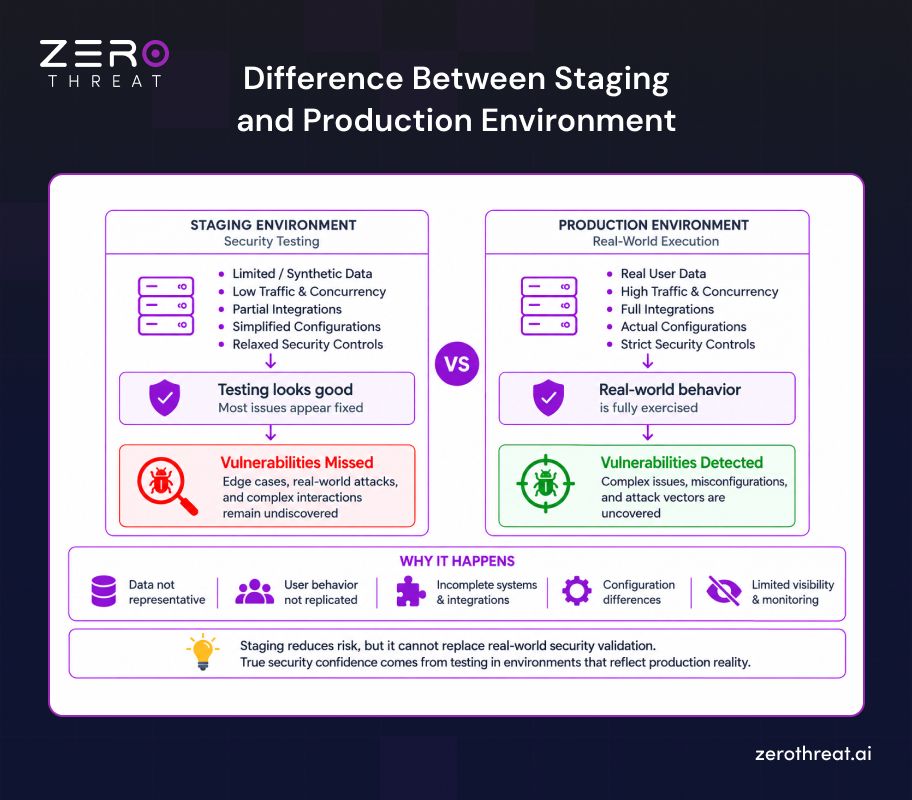
Staging environments are designed to mimic production, but they rarely achieve full parity. Differences in infrastructure, configurations, and versions create gaps that affect how applications behave. These mismatches often lead to inaccurate test results and missed vulnerabilities.
Another major limitation is the inability to replicate real-world traffic and user behavior. Staging typically relies on synthetic or limited datasets, while production handles unpredictable user interactions at scale. As a result, edge-case vulnerabilities and performance-driven security issues remain undetected.
Security coverage in staging is also incomplete due to missing integrations and reduced observability. Third-party services, APIs, and network conditions often differ, which creates blind spots in testing. Some attack paths only emerge when full system dependencies interact in production environments.
Plus, security teams allow experimentation, relaxed controls, and perform shorter test cycles in the staging environment. This creates a gap between the security findings and actual security, increasing the chances of vulnerabilities being present in production.
Here is an image that clearly answers why staging security testing misses critical vulnerabilities, why it happens, and how production testing provides real security insight.
Common Vulnerabilities Staging Security Testing Actually Misses
Staging security testing catches a lot, but not everything. Vulnerabilities tied to real traffic, live user behavior, and production-grade configurations routinely slip through and get deployed in the live environment.
Here are some of the common flaws that remain undetected in the staging environment:
Broken Access Control
Broken access control vulnerabilities are often missed in staging because role hierarchies and permission models are simplified. In production, complex user roles and edge cases expose privilege escalation paths or IDOR flaws that staging datasets and test scenarios fail to simulate accurately.
Business Logic Flaws
Business logic vulnerabilities rarely surface in staging because they depend on real user workflows. Production users interact unpredictably, combining actions in ways that bypass validations. These flaws often remain invisible in controlled staging tests with predefined and limited execution paths.
API Authorization Issues
APIs behave differently under real integrations. Staging environments often use mocked services or limited API flows, which hides authorization gaps. In production, full system interactions can expose broken authentication, token misuse, or insecure direct object references.
Race Conditions
Race conditions are difficult to detect in staging due to limited traffic and concurrency. Production systems handle high volumes of simultaneous requests, which can trigger timing-based vulnerabilities, inconsistent state changes, or transaction conflicts that staging environments cannot realistically reproduce.
Configuration Drift Issues
Security configuration mismatch between staging and production leads to missed vulnerabilities. Differences in infrastructure, environment variables, or security controls create gaps. These inconsistencies often result in issues that pass staging validation but fail or become exploitable after deployment.
Third-Party Integration Risks
Staging environments often exclude or partially configure third-party services. This leads to incomplete security testing of payment gateways, authentication providers, or external APIs. In production, these integrations introduce real attack surfaces, including data leakage and unauthorized access risks.
Staging vs Production Security Testing: A Reality Check
| Aspect | Staging Security Testing | Production Security Testing |
|---|---|---|
| Environment Accuracy | Approximates production setup | Reflects the exact live environment |
| Data Realism | Uses synthetic or anonymized data | Tests against real user data and actual data flows |
| Traffic Conditions | Simulated or low-volume traffic | Real concurrent users and live traffic patterns |
| Configuration Fidelity | Subject to configuration drift | Tests the exact config your users interact with |
| Third-Party Integrations | Sandbox or mock API endpoints | Live endpoints with real authentication and responses |
| Attack Surface Coverage | Limited to what staging exposes | Covers the full, active attack surface |
| Business Logic Testing | Based on scripted, simplified flows | Exposed through authentic user behavior |
| Vulnerability Chaining | Vulnerabilities tested in isolation | Reveals how flaws interact under real conditions |
| Session and Auth Testing | Low user volume, basic session activity | Full session complexity across concurrent users |
| Security Findings Relevance | May include false positives from config gaps | All findings are directly applicable to production |
| Compliance Validation | Pre-deployment checkpoint only | Validates security posture in the state auditors assess |
| Missed Vulnerability Risk | High — gaps persist into production | Low — issues are caught where they actually exist |
Why Use Both?
Staging helps prevent vulnerabilities from reaching customers, while production testing catches issues related to live traffic and configuration, such as unexpected API issues or unauthorized access to live systems.
Run a production-safe pentest that reveals exploitable vulnerabilities in your live application. Pentest My App
Real-World Examples of Vulnerabilities Missed in Staging
Many high-profile data breaches originate from subtle misconfigurations that never appeared during pre-production cycles. These incidents prove that even rigorous staging tests fail to detect vulnerabilities and provide a full view of security posture.
New Relic Staging Breach
In late 2023, attackers used stolen employee credentials to enter the New Relic staging environment. The actors executed search queries and exfiltrated diagnostic logs over several weeks. This event highlighted how weak access controls in non-production tiers can expose customer usage patterns and sensitive configurations.
Amadeus Logic Vulnerability
A security researcher found a critical flaw in the Amadeus booking system during 2019. By simply changing a web parameter, unauthorized users could access or modify airline reservations. This logic error slipped through staging because traditional scanners only check for technical bugs rather than functional intent.
Twilio S3 Bucket Leak
The 2020 Twilio breach was caused by a silent configuration drift in an S3 bucket. Improper permissions allowed attackers to access personal data for years before discovery. This incident proves that even temporary adjustments for testing can grant unintended public access if staging and production environments diverge.
ZeroThreat for Production-Safe Security Testing: The Real Validation
ZeroThreat enables security teams to perform production-safe testing by validating real-world attack paths without the risk of downtime or data corruption. This AI-driven tool bridges the gap between staging and live environments, allowing organizations to detect critical vulnerabilities like BOLA and broken access control in their final deployment state.
Here is how ZeroThreat makes production-safe testing possible:
- Context-Aware Workflow Analysis: ZeroThreat analyses authentication state, user roles, and request sequences before testing begins, ensuring security checks run only where valid.
- Non-Intrusive Validation: Instead of running destructive exploits, ZeroThreat confirms whether a vulnerability is exploitable using controlled, read-only, or reversible techniques that do not modify live data.
- Controlled Payload Execution: Payloads are selected based on endpoint behavior and application responses. Anything designed to cause instability or irreversible side effects is excluded from production scans.
- Validated Findings Only: Vulnerabilities are reported only after AI-driven validation confirms exploitability and impact, cutting false positives and unnecessary remediation effort.
- Rate Controls and Execution Safeguards: Scan activity is rate-limited and automatically adjusted to prevent performance impact on live environments.
- Environment and Tenant Isolation: Every scan runs in an isolated execution context, keeping testing activity and results fully contained within the intended target.
Need a custom strategy for securing your application? Speak with our security experts. Contact Us
Wrapping Up: Shifting Towards Production-Safe Security Testing
Staging environments are useful, but they do not reflect real-world risk. Differences in configurations, data, and integrations create gaps that hide vulnerabilities. Security testing that stops at staging often validates assumptions, not actual exposure.
To close this gap, security validation must move closer to real runtime conditions. Production environments reveal how applications behave under real traffic, real users, and full integrations. That’s where complex vulnerabilities, business logic flaws, and security misconfigurations happen.
The solution to this problem is to use a tool that can safely test your application like an attacker. ZeroThreat’s AI-powered penetration testing tool does that by simulating real-attacker behavior while maintaining production safety. It helps teams continuously detect exploitable vulnerabilities, validate security posture, and move beyond staging limitations without risking system stability.
Frequently Asked Questions
What is the best way to safely test security in a production environment?
The best approach involves using non-intrusive, read-only automated scanning tools that respect system limits. Implement context-aware workflows and controlled payloads to verify exploitability without causing data corruption or downtime. This method provides high-signal risk validation while fully preserving user experience and system stability.
Is staging environment testing enough for security compliance?
How does environment drift create security blind spots?
Related Articles
Explore ZeroThreat
Automate security testing, save time, and avoid the pitfalls of manual work with ZeroThreat.