 ZeroThreat Wins Top InfoSec Innovators 2026 Award for Penetration Testing Read more

All Blogs

Quick Summary: Phishing is a notorious cyberattack technique that causes heavy losses to organizations and individuals. An understanding of this threat, its types, and ways to detect it is crucial to ensure robust cybersecurity. This blog will help you understand phishing attacks and their types to enable you to make informed decisions.
When it comes to creating a cybersecurity strategy for their organizations, CISOs or security teams must consider diverse attack vectors that could pose a potential threat. One of those attack vectors includes phishing, which is a critical cybersecurity challenge for organizations today.
Phishing is a kind of scamming scheme that involves tricking victims into installing malware or divulging their sensitive information. It involves using social engineering techniques to dupe victims into doing unwarranted actions.
Attackers use different types of phishing methods to lure victims and steal their sensitive information. Get complete information about phishing, its types, and tips for mitigation in this blog.
One phished login shouldn't compromise your entire application. Test your defenses today, no cost Do a Scan Now
Table of Contents
- What is a Phishing Attack?
- How Does a Phishing Attack Work?
- Types of Phishing Attacks
- Impact of Phishing Attacks on Businesses
- How to Detect a Phishing Attack?
- How Organizations Can Prevent Phishing Attacks
- To Wrap Up
What is a Phishing Attack?
A phishing attack is a form of social engineering where someone impersonates a trusted source, such as a bank, a colleague, or a well-known brand, to trick you into handing over sensitive information or approving a harmful action. It relies on manipulation, not malware or exploits. The attacker's real goal is simple: get you to click, share, or approve something you normally wouldn't.
Phishing remains the most common entry point for cyberattacks today. Estimates show over 3.4 billion phishing emails are sent worldwide every single day, which makes email the primary channel attackers rely on to reach victims.
What attackers usually go after includes:
- Login credentials and account passwords
- Financial details like card numbers or banking logins
- Access to internal business systems through stolen credentials
- Personal data used later for identity theft
Attackers don't need advanced tools to pull this off. They need a believable pretext and a distracted user. That's exactly why phishing keeps topping breach reports year after year, and why every organization needs defenses built around real attacker behavior, not just awareness training alone.
How Does a Phishing Attack Work (With Email Phishing Example)
A phishing attack follows a structured process designed to deceive users into revealing sensitive information or performing actions that benefit the attacker. While the delivery method may vary, most phishing attacks rely on social engineering, fake web pages, and credential theft to compromise accounts, devices, or business systems.
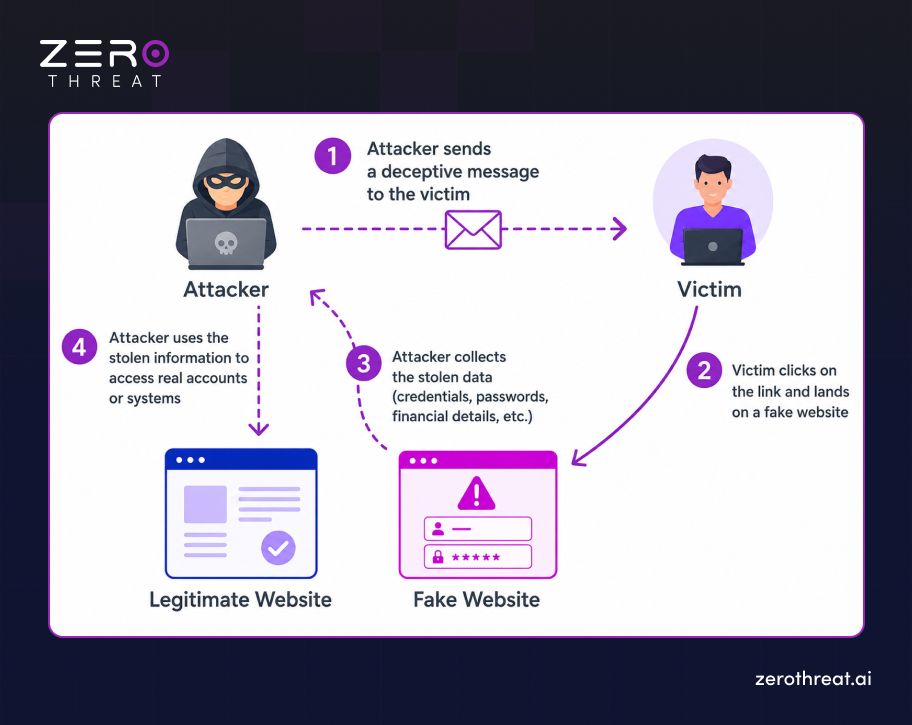
Step 1: Attacker sends a phishing email
The attacker crafts a message that impersonates a trusted brand or contact, using urgency or fear as a pretext, then delivers it straight to the victim's inbox.
Step 2: Victim clicks and lands on the phishing website
The victim clicks the embedded link and gets redirected to a spoofed website built to look identical to a real, trusted login page.
Step 3: Attacker collects the victim's credentials
Once the victim enters their username and password on the fake page, that data gets captured and sent straight to the attacker in real time.
Step 4: Hacker uses those credentials to access a real website
The attacker takes the stolen login details and signs into the victim's actual account on the legitimate platform, gaining unauthorized access to it.
A stolen password is only step one for attackers. Discover what they can reach next. Start Automated Pentesting
Types of Phishing Attacks
Attackers use a wide range of tactics in an attempt to launch a successful phishing attack. So, this attack uses different threat vectors. The following are the different types of phishing attacks.
Email Phishing
This is the most common phishing attack today. An attacker sends emails to victims that seem to come from a legitimate source. The attacker includes a persuasive message that lures victims into entering sensitive information or downloading a malicious file.
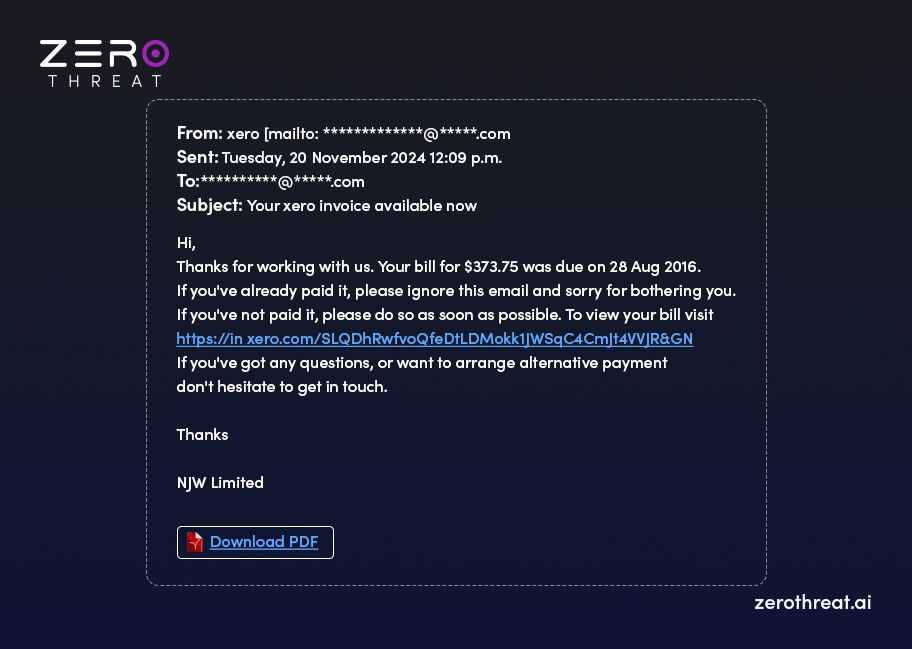
The email sent by the attacker is fake and contains malicious links or attachments that cause security issues when victims click or download them. The attacker can get the victim’s sensitive data like credit card numbers, account information, etc, or load malware like ransomware on his/her system.
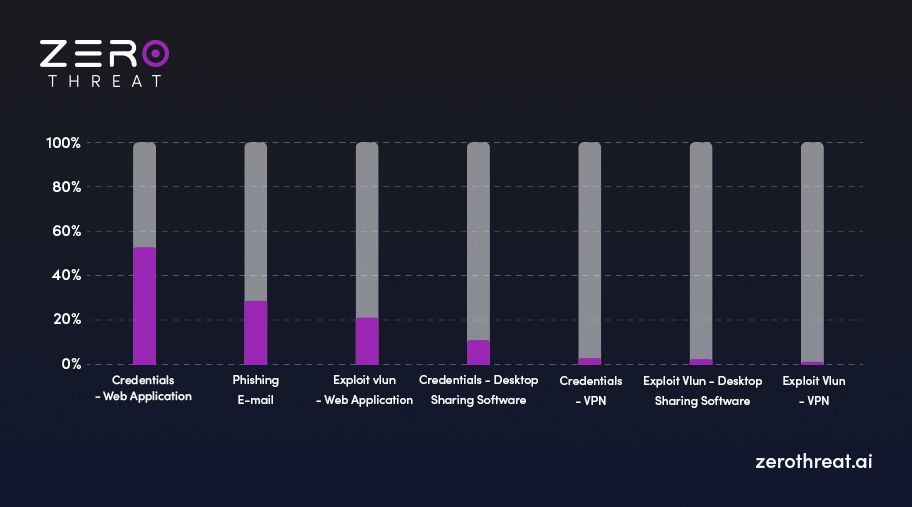
The following is the graphical representation of the different ways attackers use to launch cyberattacks or cause a data breach. As you can see in the image below, Email phishing is the second most common attack vector utilized by attackers to fulfill their malicious objectives.
Spear Phishing
In this method, an attacker targets a specific type of victim or group whose information, such as name, position, contact details, etc., has already been gathered. Often, the attacker attempts to steal the login credentials of a victim through a spear phishing attack.
The attacker sends a personalized email or text message that seems legitimate, creating a sense of fear or urgency to take a dubious action. The victim is lured into providing sensitive information by clicking a link. The attacker can manipulate a victim to perform an action like transferring money.
Whaling
This is a kind of phishing attack that aims to target executives or high-profile people in an organization. Since these individuals possess highly sensitive or confidential information or have deep access to a network, they are a big target for attackers to get high-value information.
Therefore, the attacker designs whaling attacks to lure such individuals into divulging sensitive information that can lead to unauthorized access or huge business loss. For example, one of the founders of Levitas, a hedge fund company based in Australia, fell prey to whaling with a fraudulent Zoom link that resulted in a loss of $800,000.
Smishing and Vishing
Attackers are now leveraging new lines of communication to trick victims into divulging sensitive information. Smishing or SMS phishing is a type of phishing attack in which the attacker sends fraudulent text messages to victims. The attacker includes a malicious link or file in the text message, just like an email.
Vishing (voice call phishing) is a kind of phishing scam in which attackers use fake calls to lure victims into revealing sensitive information. In this case, the attacker poses as a legitimate organization to defraud victims or threaten them.
For example, scammers could pretend to be a government official, a policeman, a shipper, customer support personnel, or anybody else like this to trick victims into divulging information.
Angler Phishing
In this type of Phishing attack, social media becomes the playground for attackers. They exploit the trust people have in legitimate social media accounts of organizations that they have engaged with. The attacker can forge a legitimate account with similar names and profile pictures.
For example, the attacker can use a fake social media handle that seems legitimate, like “@pizzahutcustomercare” to dupe victims into revealing sensitive information on the pretext of providing support or help.
Attackers can use cloned websites, fake URLs, fake posts, and other stuff on social media to trick victims into revealing sensitive information.
Impact of Phishing Attacks on Businesses
Phishing attacks can disrupt business operations, expose sensitive data, and cause significant financial and reputational damage. As phishing techniques continue to evolve, organizations of every size must understand their potential impact and strengthen their cybersecurity defenses.
- Financial Losses: Phishing attacks can lead to unauthorized transactions, ransomware payments, wire transfer fraud, and recovery costs, resulting in substantial financial losses for businesses.
- Data Breaches and Information Theft: Stolen credentials can give attackers access to sensitive customer data, intellectual property, financial records, and confidential business information, increasing the risk of large-scale data breaches.
- Business Disruption: Compromised accounts and malware infections can interrupt critical operations, delay business processes, reduce employee productivity, and cause costly downtime across the organization.
- Reputational Damage: A successful phishing attack can weaken customer trust, harm brand reputation, and negatively affect long-term business relationships, especially if sensitive customer information is exposed.
- Regulatory and Compliance Risks: Organizations that fail to protect sensitive data may face penalties under regulations such as GDPR, HIPAA, PCI DSS, or ISO 27001, along with increased legal and audit costs.
- Account Takeover and Unauthorized Access: Attackers often use stolen credentials to compromise email accounts, cloud applications, and enterprise systems, enabling lateral movement and further cyberattacks within the network.
- Higher Incident Response Costs: Recovering from a phishing attack often requires forensic investigations, system restoration, password resets, legal support, security upgrades, and employee awareness training, increasing overall cybersecurity expenses.
How to Detect a Phishing Attack?
These days, phishing attacks have become more challenging because attackers are using novel techniques to carry out these attacks. Preventing phishing attacks requires multi-dimensional cybersecurity measures comprising detection of vulnerabilities, employee awareness, and regular network monitoring. The following points provide the signs to detect phishing attacks.
Style of Message
Inconsistency and inappropriate use of language and tone are the vital signs of phishing attacks. So, the unusual tone or language that you cannot expect from the sender should be an indicator of something amiss. You should carefully check your email or message before taking action.
Urgency or Threat
You should consider threats or urgency in messages/emails with skepticism. Phishing attackers use this technique of creating fear or urgency to encourage the recipients to take action in a hurry without scrutinizing the contents of the email or message.
Linguistic Errors
Grammatical mistakes and misspellings are another sign of possible phishing emails. Mostly, organizations use spell-checkers for outgoing emails to ensure they are free of grammatical errors and spelling mistakes. Hence, emails with these kinds of issues should raise suspicion.
Inconsistent Sources
Mismatched domain names in URLs and email addresses are another sign of a phishing attack. You should check previous emails to verify the sender’s domain. If there is any inconsistency, it should raise suspicion. Hovering over a link can provide more information that can help avoid the potential risks.
Request for Sensitive Details
Phishing attacks ask for sensitive information like account number, credit/debit card number, etc. Plus, these attacks take victims to another page, which is fake and created by an attacker. The page includes login forms with various fields asking for personal information or credentials. They are also signs of phishing methods.
How Organizations Can Prevent Phishing Attacks: Best Practices
Preventing phishing attacks requires layered defenses that combine technology, process, and employee awareness. No single control stops every attempt, but the right combination reduces risk significantly. Let’s check out some tips to help prevent phishing attacks.
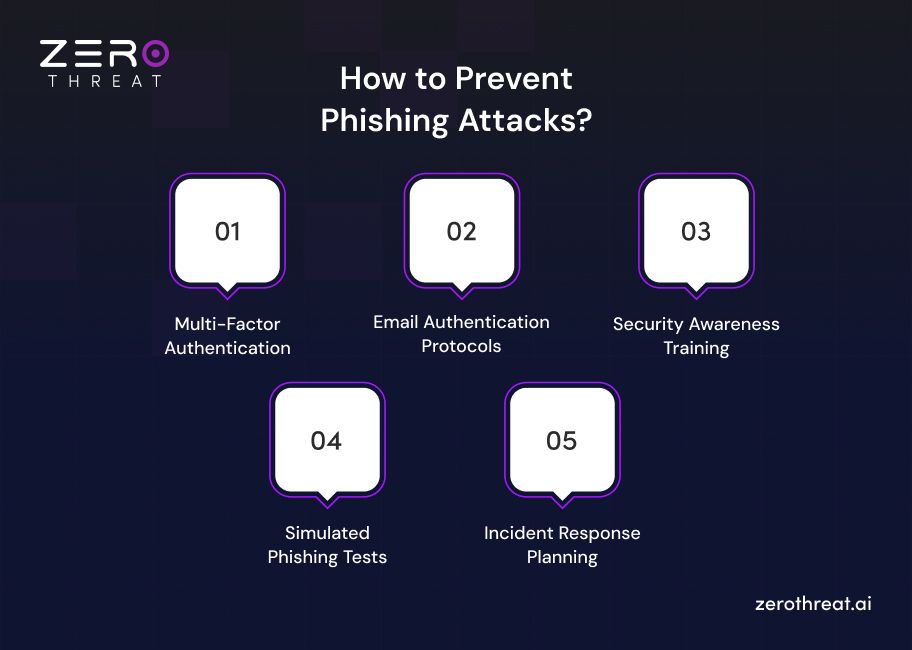
Multi-Factor Authentication
MFA stops attackers from using stolen credentials alone. Even if a phishing page captures a password, the attacker still needs the second authentication factor, which blocks most account takeover attempts immediately.
Email Authentication Protocols
SPF, DKIM, and DMARC verify that incoming email actually originates from the domain it claims. Configuring DMARC at enforcement level prevents attackers from spoofing your trusted business domains convincingly.
Security Awareness Training
Regular, scenario based training teaches employees to spot urgency tactics, suspicious links, and impersonation attempts. Organizations with mature training programs consistently report lower successful phishing click rates.
Simulated Phishing Tests
Running internal phishing simulations identifies which employees or departments need additional training. It also measures real world readiness instead of relying on assumptions about awareness levels.
Incident Response Planning
A documented, rehearsed incident response plan speeds up containment once a phishing attack succeeds. Faster detection and response directly reduce financial loss and data exposure during an active breach.
Not sure how phishing risk maps to your specific application? Talk to our security team directly. Get in Touch
To Wrap Up
Phishing is quite dangerous from a security and privacy point of view as attackers primarily target critical data of an organization. There are many kinds of risks from this cyber threat if remains unaddressed. You need a multi-faceted approach to prevent such threats.
Detection and prevention of security weaknesses is an integral part of this strategy that requires a robust tool, ZeroThreat. As an AI-powered web and API security testing tool, it helps uncover flaws and misconfigurations that go unnoticed by security teams.
It helps strengthen your security posture to prevent threats from social engineering and many other types of cyberattacks. It can effectively detect a wide range of CVEs with near-zero false positives. You can leverage it to detect zero-day exploits and out-of-band vulnerabilities that most tools fail to identify.
Take a free tour of this tool to learn how it can benefit your battle against cybersecurity threats.
Frequently Asked Questions
Which phishing attacks are the most common?
Email phishing, spear phishing, smishing, and vishing are the most common types of phishing methods used by attackers to steal sensitive information from victims.
What are the different stages of phishing attacks?
How is smishing different from vishing?

Explore ZeroThreat
Automate security testing, save time, and avoid the pitfalls of manual work with ZeroThreat.