 ZeroThreat Wins Top InfoSec Innovators 2026 Award for Penetration Testing Read more

All Blogs
Decoding Directory Traversal Attack: What is It and How It Occur?

Quick Summary: What if someone can bypass your security controls and access server directories that only admins or webmasters have access to? This is why directory traversal is considered dangerous in cyber security, as it can allow bad actors to penetrate your server resources. Get complete information about this threat vector with this article and enlighten yourself on how to protect your digital assets. Stay informed and protect yourself.
Cybercriminals don’t have a single technique to breach security. They use a wide range of methods and techniques to conduct successful cyberattacks. Path traversal or directory traversal exploit is one of those weapons in their arsenal.
With this kind of technique, cybercriminals can access sensitive files on a server by breaking out of the root folder. They reach files that only web server owners can access, such as .htaccess, authorization, and configuration files.
Defending against such kind of threat is very important to protect your server and web applications. In case of a successful attack, cybercriminals can get access to your crucial server resources and do severe damage.
Your protection starts right from the coding level by ensuring proper input validation. In addition, you can leverage AI-driven automated pentesting for identifying and fixing vulnerabilities in your web apps as early as possible.
Let’s dive deep into the article to learn more about the directory/path traversal attack and ways to contain this threat.
Think your application is protected? Test your app for hidden vulnerabilities before they get exploited. Start Validating Risk
Table of Contents
- What is Directory Traversal Attack?
- Examples of How a Directory Traversal Attack Takes Place
- How Does a Directory Traversal Attack Work?
- Common Directory Traversal Attack Techniques
- How are Directory Traversal Vulnerabilities Formed?
- How Does Path Traversal Attack Impact You?
- Top 7 Tools to Detect Directory Traversal Vulnerabilities
- What Can You Do to Prevent Directory Traversal?
- To Wrap Up
What is Directory Traversal Attack?
A directory traversal attack is a web security flaw that allows threat actors to access restricted files, directories, and source code outside the intended web root folder. There are many other terms used for this, like “dot-dot-slash", “backtracking”, and “directory climbing”. Path traversal is another popular term used for this.
When the attack is successful, cybercriminals can gain access to sensitive data and execute arbitrary commands on the server. When it comes to critical web app security risks, directory traversal is like OWASP Top 10. It is not on that list, though.
Let’s understand this with an analogy of a hotel. Each guest in a hotel has a separate room that they can access through room keys. Obviously, one guest cannot access another guest’s room because the key won’t work. But what if a bad guest finds a way to access the keys of other guests?
The bad guest will easily enter the room of others by using the respective key without permission. Similarly, a cybercriminal can manipulate file references that use (“../”) or dot-dot-slash to expose and reach directories and files above the root folder.
There are access controls to prevent any user from circumventing the root directory. Then how does it happen? Let’s understand it in the next section.
Examples of How a Directory Traversal Attack Takes Place
There are various techniques used to perform a path traversal attack including manipulating URL parameters and relative path traversal. A cybercriminal can manipulate parameters of variables that reference file paths in web apps. By manipulating the variables, the malicious actor can move up the server directory and traverse other files.
It works like an SQL injection attack where a malicious script is supplied as user input. Similarly, path traversal works by inserting a string consisting of sequences “../” for Linux and “..\” for Windows systems. By replacing this with parameters of path reference variables, files and directories beyond the root directory are accessed.
Let’s understand it with directory traversal attack examples.
1st Example:
The following URL shows how users can access resources on the web server:
http://example_site.com/receive-files.jsp?file=sampledocument.pdf
http://example_site.com/some-page.php?home=test.html
http://example_site.com/sample-page.asp?page=index.html
Now in the above example URLs, variables like ‘file’, ‘home’, and ‘page’ can be manipulated by replacing the parameter values with strings like “../some_dir/” to access directories beyond the root.
Like
http://example_site.com/receive-files.jsp?file=../../../sample dir/some file
This will result in:
http://some_site.com/../../../sample dir/some file
Providing access to the directory above the web root.
2nd Example:
This example is presented on Wikipedia. Let’s see what it shows.
Below is the code of a PHP application:
<?php $template = 'red.php'; if (isset($_COOKIE['TEMPLATE'])) { $template = $_COOKIE['TEMPLATE']; } include "/home/users/phpguru/templates/" . $template;The potential attack will take place with the below HTTP request:
GET /test.php HTTP/1.0 Cookie: TEMPLATE=../../../../../../etc/passwdIt will generate a server response as follows:
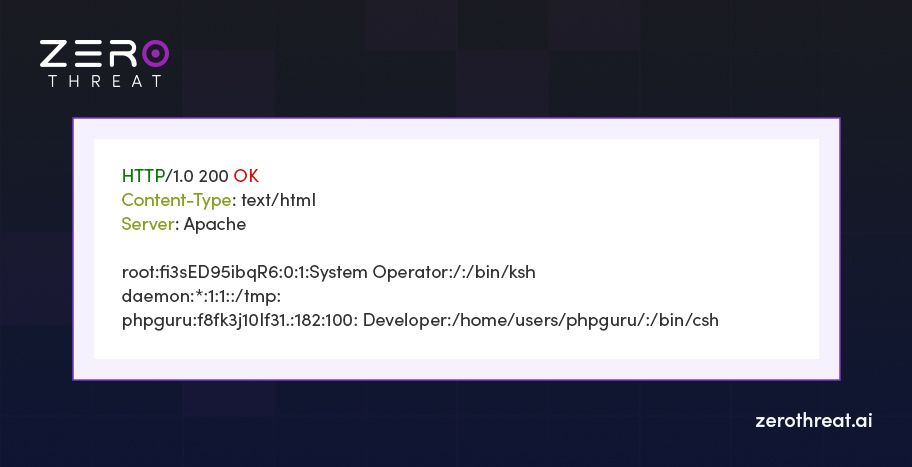
It causes the ’include()’ function to fetch a Unix password file after traversing the root directory due to the repeated characters ”../” after /home/users/phpguru/templates/
3rd Example:
It is an example of absolute path traversal. In this kind of attack tactic, the bad actor can insert absolute paths to access specific directories.
Check the below URLs:
http://example_site.com/test.php?f=item_list
http://example_site.com/test.cgi?f=4
http://example_site.com/test.asp?f=text
They can be exploited by inserting absolute paths like:
http://example_site.com/test.php?f=/var/www/html/get.php
http://example_site.com/test.cgi?f=/var/www/html/admin/get.inc
http://example_site.com/test.asp?f=/etc/passwd
A cybercriminal can also use guesswork if an error is thrown after inserting such path parameters to access other directories.
Manual testing misses what AI catches instantly. See AI-driven automated pentesting find real traversal flaws. Run Advanced Pentest
How Does a Directory Traversal Attack Work? (Simplified Overview)
A directory traversal attack works when an application accepts unvalidated user input in file paths, letting attackers manipulate directory references to access files stored outside the intended web root.
- Crafting the Malicious Input: The attacker builds a payload using sequences like ../../../etc/passwd or its encoded form %2e%2e%2f to target restricted files.
- Injecting the Payload: The attacker submits this input through a vulnerable parameter such as a file name, URL query, or upload field the application trusts.
- Application Processing the Request: Without proper input validation, the application resolves the path literally and treats the traversal sequence as a legitimate file request.
- Bypassing the Web Root: The path traversal sequence pushes the request outside the intended directory, reaching system files or configuration data never meant to be exposed.
- Unauthorized File Access: The application returns the contents of the targeted file, exposing sensitive data like credentials, source code, or system configuration details.
- Escalating the Attack: With access to critical files, the attacker can read sensitive information, execute arbitrary code, or pivot toward deeper system compromise.
Common Directory Traversal Attack Techniques
Attackers use several distinct methods to bypass file path restrictions and access unauthorized data. Each technique exploits weak input validation differently, making it critical to understand every variation before building effective defenses.
Dot-Dot-Slash (../ or ..\)
The dot-dot-slash technique uses relative path traversal sequences such as ../ on Unix-based systems or ..\ on Windows to move up the directory hierarchy. If the application fails to validate user input, attackers may access sensitive files outside the intended directory.
Absolute Path Injection
Absolute path injection occurs when an attacker provides a complete file system path instead of a relative one. If the application accepts and processes the supplied path without proper validation, it may expose sensitive files, configuration data, or system resources stored elsewhere on the server.
Null Byte Injection (%00)
Null byte injection is an older technique that appends the %00 character to manipulate how applications interpret filenames or file extensions. While modern programming languages and frameworks largely prevent this behavior, legacy applications may still be vulnerable if they lack secure input handling.
URL Encoding & Double Encoding
Attackers often encode traversal sequences, such as converting ../ into %2e%2e%2f, to bypass input validation and web application filters. Some also use double encoding to evade poorly configured security controls, increasing the likelihood that malicious requests reach the server unchanged.
How are Directory Traversal Vulnerabilities Formed?
Directory traversal vulnerabilities create a security hole that enables a cybercriminal to traverse directories as well as read and write them on a server. It is among the top web app security risks that can cause severe damage. Such vulnerabilities occur in case of insufficient input validation in web applications. As a result, the web application processes user requests without checking for properly formatted data. The following are the different types of flaws that invite such threats.
- Failing to check relative path: Using a relative path is a frequent directory traversal exploit that cybercriminals use. They append it to a variable parameter that gets executed if the parameter is not properly sanitized. After this, arbitrary files on the server can be read.
- Using file extension validation only: It is a popular way to overcome the challenge. However, it cannot ensure protection against whether the parameter is accessing files of another format. Plus, it is possible to bypass it by appending a file with a Null byte.
- Escaping “../”: Replacing or escaping only the “../” or dot-dot-slash in the string is not also a solution to this problem. It can be circumvented through encoding. For example,
“http://www.test.com/document?=../../../temp/sample.txt”can be encoded to“http://www.test.com/document?=../../../temp/sample.txt?%252e%252e/%252e%252e/%252e%252e/temp/sample.txt”
Enterprise-grade security testing doesn't need an enterprise-sized budget. View Pricing
How Does Path Traversal Attack Impact You?
A cybercriminal can traverse other parts of your web server after gaining access to the root directory. They may execute arbitrary files as well as read and write other files. They can manipulate configuration files to gain complete access to the server and edit the Access Control List (ACL) to modify access policies.
The following are the possible threats from a path traversal attack:
- Data Leak: Your company’s proprietary information or other sensitive data can be leaked when restricted files are accessed.
- Malware Threat: A cybercriminal may install a malicious file or malware like ransomware.
- System Failure: Such an attack can cause disruptions to your services when important files are modified or deleted.
- Bigger Attack: A cybercriminal can plan a bigger and more damaging attack like infecting the complete network to reach other users and injecting malware to do espionage.
- Financial Loss: It can result in financial loss by accessing critical data like passwords and doing unauthorized transactions.
Top 7 Tools to Detect Directory Traversal Vulnerabilities
Top Tools Attackers use multiple tools and techniques to identify and exploit directory traversal vulnerabilities. Let’s look at the list of common tools that attackers exploit.
1. ZeroThreat
ZeroThreat is an AI-powered automated pentesting platform that continuously tests web applications and APIs for real exploitable vulnerabilities. It validates attack paths instead of reporting theoretical findings, helping security teams identify directory traversal flaws with greater accuracy and prioritize remediation based on actual risk.
2. Burp Suite
Burp Suite is a widely used web application security testing platform that combines manual and automated testing capabilities. Its proxy, crawler, and vulnerability scanner help security professionals identify input validation weaknesses, including directory traversal vulnerabilities, during application security assessments.
3. OWASP ZAP
OWASP ZAP is a free and open source web application security testing tool designed for developers and security professionals. It provides automated scanning, spidering, forced browsing, and active testing to detect directory traversal and other common web application vulnerabilities.
4. DotDotPwn
DotDotPwn is a dedicated directory traversal fuzzing tool designed to identify path traversal vulnerabilities across web applications and network services. It generates intelligent traversal payloads to test how applications handle file path manipulation and unauthorized file access attempts.
5. FFuF
FFuF is a fast and flexible web fuzzing tool widely used for directory discovery, parameter fuzzing, and endpoint enumeration. Security professionals use it to uncover hidden resources and identify potential directory traversal weaknesses through customized wordlists and payloads.
6. Wfuzz
Wfuzz is a versatile web application fuzzing tool that automates testing by injecting payloads into URLs, headers, cookies, and parameters. Its flexible payload-traversal handling helps security testers identify input validation flaws that may expose directory traversal vulnerabilities.
7. DirBuster
DirBuster is a multithreaded directory and file discovery tool that brute forces hidden paths using extensive wordlists. By revealing undisclosed files and directories, it helps security teams identify exposed resources that could increase the risk of directory traversal attacks.
What Can You Do to Prevent Directory Traversal?
Now you know how dangerous it can be when a cybercriminal gains access to the root folder and traverses beyond that. However, you can mitigate the risks when you follow some effective directory traversal attack prevention tactics.
- Sanitize User Input: Make sure every input is sanitized and validated before processing it. Check if the input contains non-permitted strings or special characters like “../” to prevent unauthorized directory access.
- Use a Whitelist: Instead of restricting all kinds of wrong inputs, you can use a whitelist that comprises the input types that you may want to allow.
- Use Inputs Cautiously for Files: You can avoid using user inputs to access files. If that’s not possible, there must be strict input validation techniques to prevent users from traversing directories.
- Normalize the Path: Normalizing the path can help you prevent this attack because it removes path traversal sequences. It is a built-in feature of many programming languages like PHP that offers the
‘realPath()’function for it. - Zero Trust Architecture: You must adopt a least privilege paradigm like zero trust that strictly manages access control. It works on the “zero trust” principle, ensuring every user gets the least privilege possible. It prevents unauthorized access to data.
- Updated Software: Regularly updating your software and server also helps you to keep security risks at bay.
- Security Testing: Regular web app security testing is also an effective way to prevent cyber threats. It helps to uncover potential loopholes and fix them as early as possible.
Looking for a smarter way to secure your applications? Let experts at ZeroThreat help you out. Get Expert Guidance
To Wrap Up
Web apps are more susceptible to cyberattacks because they are exposed to the web. Cybercriminals use different methods to gain unauthorized access to web apps and steal data. In many cases, they can even access root server files in which a directory traversal vulnerability is an ideal attack vector.
Moreover, with best coding practices and continuous threat monitoring, you can mitigate such risks. However, you can take another step in ensuring robust security with ZeroThreat’s web application pentest tool. It helps you uncover all kinds of web app & API vulnerabilities, and server misconfigurations.
With ZeroThreat, you can detect vulnerabilities like OWASP Top 10, out-of-band, and more in just minutes with 99.9% accuracy. Plus, it is a developer-friendly platform; that means you need no configuration to setup.
So, what are you waiting for? Try it for free and start discovering, prioritizing, and fixing vulnerabilities well in advance.
Frequently Asked Questions
What are some consequences of a directory traversal attack?
It can cause the following problems:
- Data leak
- Server failure
- Financial loss
- Malware injection
- File corruption
How can directory traversal vulnerability be detected?
What is the best way to defend against directory traversal threats?
How to defend against directory traversal attacks?


Explore ZeroThreat
Automate security testing, save time, and avoid the pitfalls of manual work with ZeroThreat.