 ZeroThreat Wins Top InfoSec Innovators 2026 Award for Penetration Testing Read more


All Blogs
Black Box Penetration Testing: Benefits, How It Works, and Best Practices

Quick Overview: This guide explains black box penetration testing in clear terms. You will learn what it is, how it differs from white box and gray box testing, what it can uncover, and how the testing process works. It also covers the advantages and limitations, when to use it, and best practices for running an effective test.
Attackers do not ask for your architecture diagram. They do not get your source code or a test account either. They start with a domain name, an IP range, and skills to find loop holes.
Black box penetration testing recreates that exact view, and the outside is where the risk exists. Mandiant's M-Trends 2026 report found that exploits were the most common way into a network for the sixth year in a row, accounting for 32% of intrusions. And with AI entering the picture, speed makes it worse. The median time between initial access and a hand-off to a second threat group fell from more than 8 hours in 2022 to just 22 seconds in 2025.
Your scans and code reviews cover what your team already knows about. A black box test goes after what it does not: the forgotten subdomain, the exposed API endpoint, the workflow that can be abused in ways nobody planned for.
So what does an outsider with zero inside knowledge actually find? This guide explains what black box penetration testing is, how the process works, and what it can and cannot uncover. It also covers how to run a test that gives you real answers instead of a report that sits in a folder.
Every new release changes your attack surface. Start testing it like an attacker would. Start Pentesting Free
On This Page
- What is Black Box Penetration Testing?
- When to Use Black Box Penetration Testing?
- Black Box vs White Box vs Gray Box Penetration Testing
- What Black Box Penetration Testing Can Uncover
- Black Box Penetration Testing Process: How it Works
- Advantages and Limitations of Black Box Pentesting
- Can Black-Box Testing Find Business Logic Vulnerabilities?
- Best Practices for an Effective Black Box Penetration Test
- To Wrap Up
What is Black Box Penetration Testing?
Black box penetration testing is an authorized security assessment where the tester attacks a target with no prior knowledge of its internal design. There is no source code, no architecture documentation, and usually no privileged access. The tester starts with what a real outside attacker would have, such as a domain name, an IP range, or a company name, and works from there to find and exploit weaknesses.
The name comes from treating the target as a "black box." The tester can see what goes in and what comes out, but not what happens inside.
Everything the tester learns comes from probing the target from the outside. In practice, that means:
- Discovering exposed assets such as subdomains, open ports, and API endpoints
- Identifying technologies and versions from responses and system behavior
- Testing exposed functionality for flaws such as injection, broken authentication, and access control failures
- Exploiting confirmed weaknesses in a controlled way to show real impact
Example: A tester is given only the domain of a web application. After registering a standard user account, they find an API endpoint that returns order details. They change the order ID in the request and receive another customer's data. With no code or documentation, the tester has proven a broken access control flaw that any external user could exploit.
"Black box" describes how much the tester knows, not which tools they use. Black box testers combine a business-aware AI pentesting tool with manual techniques.
It is also not the same as vulnerability scanning. A scanner detects potential weaknesses, usually through automation. A black box penetration test goes further. It validates those weaknesses, exploits them where the rules of engagement allow, and shows what an attacker could actually reach.
When to Use Black Box Penetration Testing?
Use black box penetration testing when you need to know how an external attacker, with no inside knowledge, could break into your systems. It works best in these situations:
- Before launching an internet-facing web application, API, or service
- After major changes, such as a new release, migration, or infrastructure update
- To test your external attack surface, including exposed assets, services, and endpoints
- To meet compliance requirements that call for regular penetration testing, such as PCI DSS
- To assess third-party or vendor systems where source code and documentation are not available
- To check detection and response, since a realistic outside attack shows whether your team notices it
- When source code is unavailable, as with legacy or commercial software
It is not the best choice when the goal is deep coverage of internal logic, code-level flaws, or authenticated workflows. White box or gray box testing fits those cases better.
One exposed endpoint, one weak login, one chain. Find attack paths before attackers do. Pentest My Application
Black Box vs White Box vs Gray Box Penetration Testing
The three approaches differ in one way: how much the tester knows about the target before testing begins.
| Factor | Black Box | Gray Box | White Box |
|---|---|---|---|
| Tester knowledge | None | Partial | Full |
| Access provided | None, or public information only | Limited, such as a standard user account or basic documentation | Source code, architecture diagrams, configurations, and admin credentials |
| Attacker simulated | External attacker | User with valid access, or an attacker who has gained a foothold | Insider or a full security audit |
| Testing depth | Surface-level to moderate | Moderate to deep | Deepest |
| Code-level flaws | Rarely found | Sometimes found | Most likely to be found |
| Time required | Moderate to high (reconnaissance takes time) | Moderate | High (large volume of code and design to review) |
| Best for | Testing external exposure and real-world attack paths | Testing authenticated workflows and access controls | Thorough security review before or during development |
Which Pentesting Approach to Choose: Black or White or Gray Box
- Pick black box to see what an outsider can reach.
- Pick gray box to test what a logged-in user can abuse.
- Pick white box for the deepest coverage. Many security programs combine more than one approach.
What Black Box Penetration Testing Can Uncover
Black box penetration testing uncovers weaknesses that an external attacker can find and exploit without inside knowledge. These include exposed assets, misconfigurations, and vulnerabilities in the web applications, APIs, and network services reachable from outside.
Targets It Can Assess
- Web applications: login flows, forms, sessions, and user-facing features
- APIs: REST, GraphQL, and other exposed endpoints
- External networks: open ports, services, and internet-facing hosts
- Cloud-exposed assets: public storage, exposed services, and internet-facing cloud resources
Weaknesses It Can Uncover
| Category | What It Can Reveal |
|---|---|
| Injection flaws | SQL injection, cross-site scripting (XSS), and command injection in exposed inputs |
| Broken authentication | Weak or default credentials, poor session handling, and missing brute-force protection |
| Broken access control | IDOR and BOLA flaws, and access to other users' data or restricted functions |
| Security misconfigurations | Exposed admin panels, open ports, verbose error messages, and unnecessary services |
| Sensitive data exposure | Exposed backup files, leaked keys in client-side code, and weak transport encryption |
| Outdated components | Software versions identified from outside that carry known vulnerabilities |
| Business logic flaws | Workflow abuse that is visible through the interface, such as skipped steps or price manipulation |
| Forgotten attack surface | Unknown subdomains, shadow APIs, and unmanaged internet-facing assets |
Black box testing can also show how a few of these weaknesses chain together into a larger compromise, such as an exposed endpoint leading to account takeover.
What it finds is limited by what the tester can reach from outside. Flaws buried deep in code or behind restricted access may stay hidden, which is why the process behind the test matters, and the next section covers it.
Black Box Penetration Testing Process: How It Works
A black box penetration test moves through five stages: scoping, reconnaissance, vulnerability discovery, exploitation, and post-exploitation analysis. The tester starts with no internal knowledge and builds a picture of the target one stage at a time. Documenting and reporting the results is covered in its own section later in this guide.
This flow follows the logic of established frameworks. PTES, for example, splits an engagement into seven phases, from pre-engagement interactions through reporting. Black box testing uses the same sequence, but the tester has to discover everything from the outside.
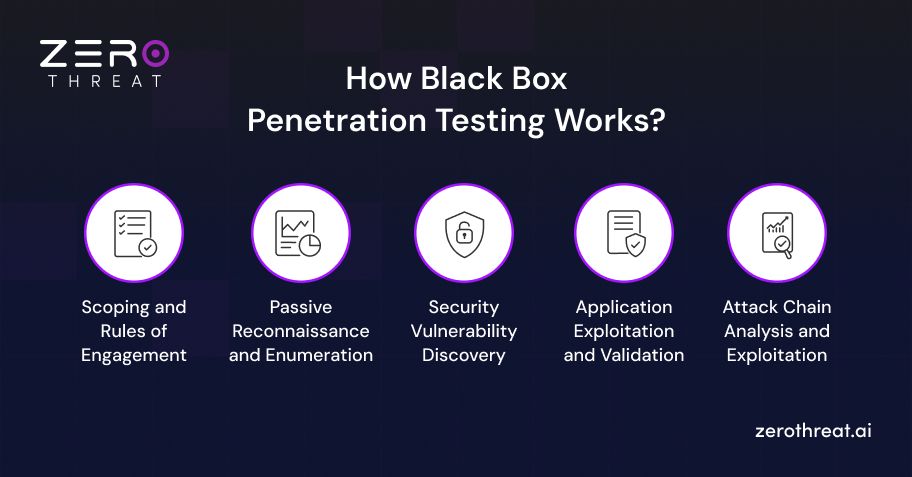
1. Scoping and Rules of Engagement
"Black box" describes what the tester knows about the system, not whether the client is involved. Before any testing starts, both sides agree on:
- Which targets are in scope, such as domains, IP ranges, applications, and APIs
- Testing windows and permitted techniques
- Off-limits systems and actions, such as denial-of-service testing
- Emergency contacts and how critical findings are escalated during the test
- Written authorization to test
Output: Signed authorization and a clear boundary. Without written authorization, the same activity is unauthorized access.
2. Passive Reconnaissance and Enumeration
The tester maps what is exposed, using only what an outsider could access.
- Passive reconnaissance: collects information from public sources such as DNS records, certificate transparency logs, search engines, and public code repositories, without touching the target directly.
- Active enumeration: interacts with the target to identify live hosts, open ports, running services, technologies and versions, and application endpoints.
Output: Map of the external attack surface. Finding an asset is not the same as finding a vulnerability.
3. Security Vulnerability Discovery
The tester examines the mapped assets for weaknesses. Automated scanning gives breadth. Manual testing covers what scanners often miss, such as access control and logic flaws. Typical checks include:
- Testing inputs for injection flaws
- Reviewing authentication and session handling
- Testing authorization by changing object identifiers and user roles
- Flagging misconfigurations and outdated components
Output: List of suspected weaknesses. These are candidates, not confirmed vulnerabilities. Detection alone does not prove exploitability.
4. Application Exploitation and Validation
The tester attempts to exploit each candidate in a controlled way, within the rules of engagement. This removes false positives and shows what each flaw allows, such as access to another user's data. Evidence is captured for every confirmed issue.
Validation confirms that a weakness is real. Exploitation shows its impact. Both stay within the agreed limits, and the tester avoids disrupting live services.
Output: Confirmed vulnerabilities with proof of impact.
5. Attack Chain Analysis and Exploitation
After gaining access, the tester checks how far it reaches, within scope:
- What data can be accessed?
- Can privileges be escalated?
- Can the foothold lead to other systems?
This stage shows how weaknesses combine. A low-severity information leak, paired with weak access control, can become a critical compromise. The tester stops at the agreed limits and removes any test accounts or files created during the engagement.
Output: Realistic view of business impact and the attack paths behind it.
Wondering what automated pentesting costs? Check the pricing and pick your starting point. Check Pricing
Advantages and Limitations of Black Box Pentesting
Black box pentesting shows what an outside attacker can actually reach, but it cannot see inside the system. That trade-off defines both its strengths and its gaps.
Advantages
- Realistic attacker view: Mirrors how an external attacker would approach the target
- Unbiased testing: No inside knowledge, so no assumptions about what is "secure"
- No code or documentation needed: Works even when internal access is unavailable
- Exposed attack surface: Reveals forgotten or unmanaged assets, such as unknown subdomains and shadow APIs
- Proven exploitability: Confirmed findings show real impact, not just theoretical risk
- Defense check: Shows whether security controls and monitoring detect an outside attack
- Low client effort: Needs little preparation beyond scope and authorization
Limitations
- Limited depth: Flaws buried in code or internal logic can stay hidden
- Partial coverage: Only what the tester can reach and discover from outside gets tested
- Time-intensive reconnaissance: Much of the effort goes into discovery before testing begins
- Restricted access: Features behind authentication or privileged roles may go untested
- Less precise root cause: Findings often lack code-level detail for developers
- Skill dependent: Results vary with tester experience and methodology
Many teams pair black box testing with gray box or white box testing to close these gaps. The next section covers how to run an effective black box test.
Can Black-Box Testing Find Business Logic Vulnerabilities?
Yes, black-box testing can find business logic vulnerabilities, but only those that are visible and exploitable through the application's interface or API. Testers can spot flaws such as skipped checkout steps, price manipulation, and coupon abuse by altering requests and workflows.
Coverage is limited because the tester does not know the intended business rules. Automated scanners also struggle here, since logic flaws have no fixed signature. Finding them takes manual testing and a clear understanding of how the application is supposed to behave.
Gray box testing improves results by giving the tester user roles and workflow details. For complex applications, combining both approaches gives the best coverage.
Best Practices for an Effective Black Box Penetration Test
An effective black box test depends as much on preparation and follow-through as on the testing itself. These six practices cover the full engagement, from planning to ongoing testing.
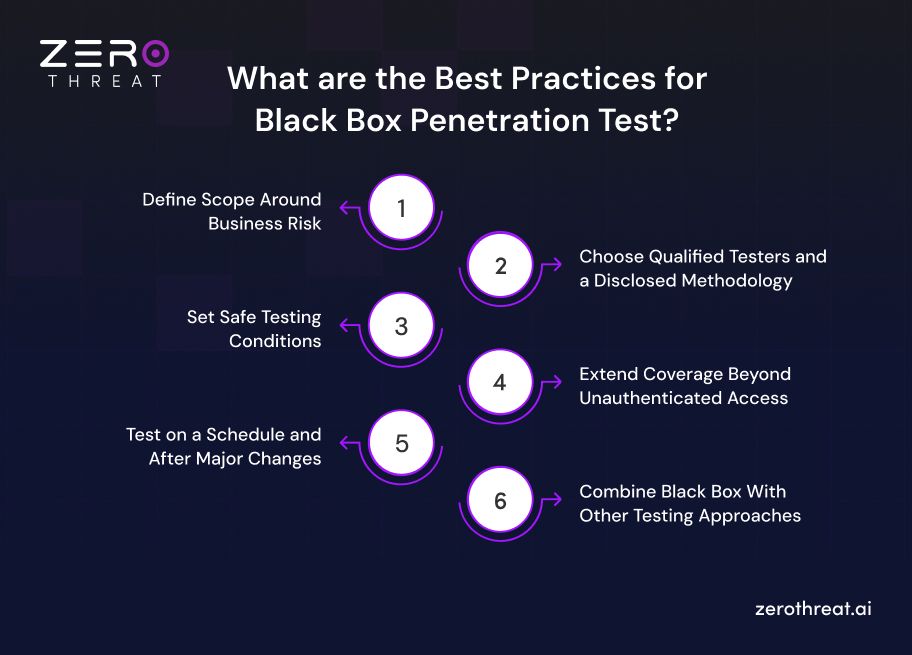
1. Define Scope Around Business Risk
Why it matters: Assets left out of scope go untested, and attackers do not respect scope documents.
How to apply it:
- List the applications, APIs, and data stores that matter most to the business first
- Include internet-facing assets that teams tend to forget, such as old subdomains and staging sites
- Document exclusions, such as third-party systems, and check the provider's testing policy before including them
- Agree on a success question, such as "Can an outsider reach customer data?"
2. Choose Qualified Testers and a Disclosed Methodology
Why it matters: The tester gets no inside information, so the quality of the results depends heavily on their skill.
How to apply it:
- Ask which named testers will work on the engagement. Look for hands-on credentials such as OSCP or CREST, and treat certifications as a baseline, not proof of quality.
- Ask which methodology they follow. PCI DSS expects an industry-accepted one, such as NIST SP 800-115, the OWASP Testing Guide, or PTES.
- Confirm that manual testing leads and scanners only support it
- Ask how critical findings are reported during the test, not just at the end
3. Set Safe Testing Conditions
Why it matters: Production gives the most realistic results but carries risk, while staging is safer but may differ from production.
How to apply it:
- Choose the environment deliberately, and test production only when staging does not reflect it
- Schedule intrusive tests in low-traffic windows
- Rule out denial-of-service testing unless it is explicitly agreed
- Name emergency contacts on both sides and agree on how to pause the test
- Verify backups before testing begins
- Decide who is told. To test detection, brief only a small group. Otherwise, inform the security team so they do not escalate test traffic as a real incident.
4. Extend Coverage Beyond Unauthenticated Access
Why it matters: A pure black box test stops at the login screen. Many access control and logic flaws only appear after login.
How to apply it:
- Run the unauthenticated test first to see the true external exposure
- Add a second phase with test accounts for each user role
- Use dedicated accounts with synthetic data, never real customer accounts
- Remove all test accounts and artifacts when testing ends
5. Test on a Schedule and After Major Changes
Why it matters: One test is a snapshot. Every release and infrastructure change can alter the external attack surface.
How to apply it:
- Test at least once a year. PCI DSS sets this as a minimum and adds testing after significant changes.
- Trigger extra tests after major releases, migrations, and new internet-facing services
- Time the test after development stabilizes but before launch, so fixes fit the schedule
6. Combine Black Box With Other Testing Approaches
Why it matters: Black box shows the outside view only. Depth and internal coverage need other methods.
How to apply it:
- Follow up with gray box or white box testing for high-risk applications
- Run automated dynamic scanning between pentests for continuous coverage, since scanning supports penetration testing but does not replace it
- Use black box findings to decide where deeper testing should focus
Black box testing needs no inside access. Start testing your web apps and APIs with just a click. Create Free Account
To Wrap Up
Black box penetration testing shows your security the way an attacker sees it: from the outside, with no inside knowledge. That view helps uncover exposed assets, misconfigurations, and exploitable flaws that internal reviews often miss.
It will not replace deeper testing, but it answers the question that matters first: what can an outsider actually reach? For the best results, define a clear scope, test after major changes, and pair it with gray box or white box testing for deeper coverage.
ZeroThreat's AI penetration testing helps you test web apps and APIs from an attacker's perspective. It can detect vulnerabilities based on business context and provide you with prioritized remediation steps based on the risk impact of vulnerabilities, reducing overall security efforts.
Sign up for free to see how ZeroThreat can strengthen your security posture.
Frequently Asked Questions
What is the importance of black box testing in cybersecurity?
The tester evaluates an application without knowing the internal structure and access to source code in black box testing. So, the tester can perform real-world attacks imitating an attacker’s behavior to expose vulnerabilities. It offers more reliable test results that help mitigate cyber risks effectively.
What are the different types of penetration tests?
Is black box testing illegal?


Explore ZeroThreat
Automate security testing, save time, and avoid the pitfalls of manual work with ZeroThreat.