 ZeroThreat Wins Bronze Stevie® Award in Tech Startup of the Year Read more

All Blogs
Vulnerability Scanning: How It Works, Types, and What Scanners Miss

Quick Overview: Vulnerability scanning is one of the most important security practices for identifying weaknesses before attackers can exploit them. This guide explains how vulnerability scanning works, the different types of scans organizations use, what modern scanners can detect, where traditional scanners fall short, common scanning challenges, best practices for effective coverage, and how to close the gap between reported findings and real-world exploitability.
Vulnerability scanning is the automated process that identifies security weaknesses in web applications, APIs, and networks before attackers find them. It crawls an application's attack surface, sends test inputs to every discovered endpoint, and compares responses against a database of known vulnerability signatures and behavioral patterns. The result is a prioritized list of findings by severity, so security teams can address exploitable flaws first.
The volume of new vulnerabilities makes this non-negotiable. The NVD recorded 48,185 new CVEs in 2025, roughly 131 per day, a 20.6% year-on-year increase. Vulnerability exploitation surged 34% in 2025 to become the second most common breach vector, appearing in 20% of all breaches according to the Verizon 2025 Data Breach Investigations Report. As organizations struggle to keep pace with this expanding attack surface, continuous vulnerability scanning has become a foundational security practice for identifying and prioritizing risk before vulnerabilities are exploited.
This guide covers what vulnerability scanning is and how it works, the five standard scan types and what each one misses, a 7-step generic scanning process with verification checkpoints, the scanner behavior gap that causes most false confidence, and the best practices that separate routine scanning from effective security coverage.
Build a stronger security posture by identifying security threats with 99.9% accuracy. Try Free Assessment
Table of Contents
- What Is Vulnerability Scanning?
- How Vulnerability Scanning Works?
- What Vulnerability Scanners Miss: The Scanner Behavior Gap
- Types of Vulnerability Scans: Coverage, Gaps, and When to Use Each
- The Vulnerability Scanning Process: 7 Steps with Verification Checkpoints
- What Vulnerability Scanning Detects?
- How Often Should Vulnerability Scanning Run?
- Challenges in Vulnerability Scanning
- Vulnerability Scanning Best Practices
- Start Scanning for Vulnerabilities
What Is Vulnerability Scanning?
Vulnerability scanning is an automated security process that identifies weaknesses in web applications, APIs, networks, and IT systems by sending test inputs and analyzing responses against a database of known vulnerability signatures and behavioral patterns. It produces a prioritized list of findings by severity so security teams can remediate exploitable flaws before attackers reach them. Modern vulnerability scanners go beyond pattern matching to validate whether findings are genuinely exploitable, which eliminates false positives and produces only actionable results.
A vulnerability is any flaw that reduces the confidentiality, integrity, or availability of a system below the organization's risk threshold. Vulnerabilities arise from misconfigured access controls, unpatched software components, improper encryption implementations, weak authentication mechanisms, and business logic errors in application code. Vulnerability scanning targets all of these categories in a single automated pass.
Vulnerability Scanning vs Vulnerability Assessment vs Penetration Testing
These are not interchangeable terms. Vulnerability scanning is automated identification of known weakness patterns. A vulnerability assessment adds human analysis to prioritize and contextualize scanner findings. Penetration testing is a manual, adversarial engagement where a tester attempts to exploit vulnerabilities and chain findings into an attack path. Automated scanning and agentic pentesting platforms like ZeroThreat bridge the first and third categories by validating exploitability automatically.
How Vulnerability Scanning Works
Vulnerability scanners operate by crawling a target's attack surface, sending test inputs to every discovered endpoint, and comparing responses against a database of vulnerability signatures. The crawl phase determines what the scanner can see. The test phase determines what it can find. The validation phase determines what it reports.
Legacy scanners stop at the test phase: if a response matches a known vulnerability pattern, the finding is reported without further confirmation. This produces false positives, where a pattern match triggered, but no real vulnerability exists. Agentic scanning adds a third phase: the scanner attempts to confirm exploitability before raising a finding, so every reported vulnerability comes with evidence of real impact.
The Crawl Coverage Problem
A scanner can only test what it can see. A crawler that cannot authenticate to the application sees only the public surface. A crawler that cannot render JavaScript misses all endpoints in single-page applications built with React, Angular, or Vue. A scanner relying on an uploaded API specification only tests the documented endpoints and misses shadow APIs, deprecated versions, and internal endpoints left accidentally exposed.
ZeroThreat's AI-driven crawler handles all three cases: it authenticates via recorded login flows, renders JavaScript-heavy pages natively, and discovers endpoints through active crawling rather than spec file parsing. This means the scanner's test coverage matches the real attack surface rather than the documented one.
What Vulnerability Scanners Miss: The Scanner Behavior Gap
The table below maps five specific scenarios that appear in real application security assessments. For each one: what the scanner reports, what actually happened in the application, and what a security team needs to know to act on it correctly. This is the gap between scanner output and real security posture.
| Scenario | What the Scanner Reports | What Actually Happened | What a Security Team Needs to Know |
|---|---|---|---|
| Authenticated endpoint returns 200 for unauthenticated request | No vulnerability flagged (status is expected) | Broken access control: unauthenticated users can access protected data | Unauthenticated scans miss broken auth entirely. Authenticated scanning required. |
| SQL injection payload returns 500 error | Error flagged as potential SQLi | May be a handled exception, not a real injection point | Exploitability must be confirmed. ZeroThreat's agentic layer validates before reporting. |
| Outdated library version detected in HTTP headers | Informational flag: outdated component | May or may not be exploitable depending on how the library is used | Version detection is not the same as exploitability. Contextual analysis matters. |
| Business logic endpoint accepts 10,000 coupon redemptions per minute | No vulnerability flagged (200 response, valid inputs) | Unrestricted resource consumption / business logic abuse (OWASP API4 / API6) | Pattern-matching scanners cannot detect logic abuse. Behavioral testing required. |
| CORS wildcard on API endpoint | Misconfiguration flagged | Real cross-origin data theft risk if combined with sensitive endpoint | CORS misconfiguration severity depends on what data the endpoint exposes. Context matters. |
The pattern across all five scenarios is the same: scanner output is a starting point, not a security verdict. A 200 response is not authorization. A flagged error is not a confirmed injection. A severity classification on a finding tells you the potential impact if the vulnerability is real and exploitable; it does not confirm that it is. The validation layer is what converts scanner noise into actionable findings.
How ZeroThreat closes the validation gap
ZeroThreat's vulnerability scanner validates exploitability before any finding reaches your report. The platform confirms each finding with evidence: the request that triggered the vulnerability, the response that confirmed it, and what data or access was exposed. Findings that cannot be confirmed as exploitable are not reported. This is why ZeroThreat achieves 99.9% detection accuracy with near-zero false positives.
5 Types of Vulnerability Scans: Coverage, Gaps, and When to Use Each
The type of vulnerability scan determines what attack surface is tested. Choosing the wrong type for the application context produces coverage gaps that look complete on paper but leave real vulnerabilities undetected.
| Scan Type | What It Covers | What It Misses | When to Use It |
|---|---|---|---|
| Network Vulnerability Scan | Open ports, running services, OS versions, firewall rules, unpatched network components, weak protocols (Telnet, FTP, SMBv1), SSL/TLS configuration | Application-layer vulnerabilities, business logic, authentication flows inside applications | Infrastructure and perimeter security reviews; data center and cloud network audits; compliance checks (PCI DSS network scanning requirements) |
| Web Application Scan | OWASP Top 10, SQL injection, XSS, CSRF, broken authentication, security misconfiguration, insecure deserialization, sensitive data exposure across HTTP/S endpoints | API-specific vulnerabilities not surfaced through the web UI, internal services not reachable from the browser surface | All web applications before release; post-deployment validation; regular scheduled coverage on public-facing applications |
| Host-Based Scan | Installed software versions, local configuration files, system patches, user privilege settings, local services, file permissions on the host OS | Network-layer exposures, runtime application behavior, external attack paths | Server hardening audits; compliance validation for CIS benchmarks; post-provisioning checks on new infrastructure |
| API Vulnerability Scan | REST, GraphQL, gRPC, SOAP endpoints; OWASP API Top 10; shadow and zombie APIs; broken object authorization (BOLA/BFLA); rate limiting gaps | Non-API web application surfaces; business logic that spans API and UI layers simultaneously | Any application with an API surface; mandatory before production for API-heavy architectures; microservices environments |
| Cloud and Configuration Scan | Cloud service misconfigurations (S3 bucket policies, IAM roles, security groups), container image vulnerabilities, Kubernetes configuration issues, exposed cloud storage, misconfigured serverless functions | Application-layer vulnerabilities inside running code, runtime authentication flows | Cloud infrastructure audits; DevSecOps pipelines scanning IaC before deployment; post-migration security reviews |
Authenticated vs Unauthenticated Scanning: The Practical Difference
Authentication level is not a scan type, but it determines how much of any scan type's target surface is actually reachable. An unauthenticated scan tests what is visible without a login. An authenticated scan tests everything, including dashboards, admin panels, user data, and business logic flows that require a session.
The practical rule: any application with a login flow should default to authenticated scanning. Broken Object Level Authorization (BOLA), Broken Function Level Authorization (BFLA), broken session management, and business logic flaws all require authentication to detect. An unauthenticated scan of an application where 90% of the functionality requires login is a scan of 10% of the real attack surface.
The Vulnerability Scanning Process: 7 Steps with Verification Checkpoints
The steps below describe a complete vulnerability scanning cycle, from defining scope through confirming remediation. Each step includes a verification checkpoint that prevents common execution failures.
| Step | Phase | What Happens | What to Verify |
|---|---|---|---|
| 1 | Target Definition | Define scope: which assets, URL ranges, and subdomains are in scope. Configure the technology stack so the scanner generates stack-specific remediation guidance. | Scope matches the real attack surface, not just documented URLs. Include shadow APIs and deprecated subdomains. |
| 2 | Target Authorization | Confirm you are authorized to scan the target. Most scanners require placing a verification file at the root domain or adding a DNS TXT record before scanning begins. | Verification file is publicly accessible or DNS record has propagated. Do not proceed without confirmed authorization. |
| 3 | Reconnaissance and Crawling | Scanner crawls the application to build an endpoint inventory. Coverage depends on the scanner's ability to authenticate, render JavaScript, and follow API calls to map shadow endpoints. | Crawl coverage includes authenticated paths. Confirm that dynamic pages (React, Angular, Vue) were rendered and crawled, not skipped. |
| 4 | Vulnerability Detection | Scanner sends test inputs to each discovered endpoint across all parameter types: GET/POST/PUT/DELETE, headers, cookies, query parameters, request body fields. | All endpoint categories are tested, not just the documented happy path. Confirm coverage includes API endpoints if the application has them. |
| 5 | Exploitability Validation | Responsible scanners validate potential findings for real exploitability before including them in the report. Scanners without this step report every pattern match as a finding. | False positive rate should be low. Every reported finding should include evidence: the request, the response, and what was exposed. |
| 6 | Severity Classification | Findings are classified by severity (Critical, Medium, Low, Informational) based on exploitability and impact. CVSS v4.0 is the current scoring standard. EPSS scores indicate the probability of a given CVE will be exploited in the wild within 30 days. | Do not treat all Critical findings equally. Check EPSS alongside CVSS to separate actively weaponized findings from theoretical ones. Critical findings require immediate remediation. |
| 7 | Remediation and Retest | Development team applies fixes. Retest each vulnerability individually after the fix is applied to confirm remediation, rather than running a full rescan. | Do not mark a finding as resolved without a confirmed retest. A fix applied to one code path may not close the same vulnerability class across all entry points. |
The step most teams skip is step 7. Remediation without retesting is an assumption. A developer who applies a fix to the SQL injection entry point in one endpoint has not necessarily closed the same vulnerability class in other endpoints that accept the same parameter type. Retesting confirms the specific fix. A follow-up full scan confirms the fix did not introduce new issues.
Ready to see what your current scanner misses? Run an intelligent scan now. Perform a Scan
What Vulnerability Scanning Detects
Modern web application scanners detect the OWASP Top 10 and beyond: SQL injection, cross-site scripting (XSS), cross-site request forgery (CSRF), broken authentication, sensitive data exposure, security misconfiguration, insecure deserialization, and XML external entity injection (XXE). Beyond signature-based detection, intelligent scanners identify workflow-level vulnerabilities: authentication bypass through request manipulation, privilege escalation through parameter tampering, and race conditions in multi-step transactions.
API Vulnerabilities
API vulnerability scanning covers the OWASP API Security Top 10: Broken Object Level Authorization (BOLA), Broken Authentication, Broken Object Property Level Authorization, Unrestricted Resource Consumption, Broken Function Level Authorization (BFLA), Unrestricted Access to Sensitive Business Flows, Server-Side Request Forgery (SSRF), Security Misconfiguration, Improper Inventory Management, and Unsafe Consumption of APIs.
BOLA is the most exploited API vulnerability, accounting for approximately 40% of all API attacks, and it is also the hardest to detect with pattern-matching scanners. Detecting BOLA requires testing the same endpoint with multiple authenticated user tokens and comparing what data is returned for each, a capability that requires behavioral testing rather than pattern matching.
Network and Configuration Vulnerabilities
At the network and configuration layer, vulnerability scanning identifies open ports running unnecessary services, outdated software packages with known CVE identifiers, misconfigured SSL/TLS (expired certificates, weak cipher suites, deprecated protocol versions), mail server configuration issues, cloud service misconfigurations, and exposed sensitive data in responses or headers.
Informational severity findings in the network category, particularly exposed credentials, internal paths, and technology fingerprints, deserve the same remediation urgency as higher-severity findings. An exposed API key in a response header is a direct credential theft risk regardless of its technical severity classification.
How Often Should Vulnerability Scanning Run?
Scan frequency should match deployment frequency, not a calendar. An organization deploying code daily and scanning quarterly is leaving each deployment’s code untested for up to 90 days. The correct model is continuous scanning aligned to the deployment pipeline.
Compliance Minimum Requirements
PCI DSS v4.0 requires external vulnerability scanning at least quarterly and after every significant system change. Internal scanning frequency is determined by the organization's risk assessment. HIPAA requires regular technical security evaluations but does not specify a scan interval. ISO 27001 requires organizations to manage vulnerabilities on an ongoing basis without mandating specific frequency. NIST SP 800-115 recommends continuous monitoring including regular automated scanning.
Compliance minimums are floors, not targets. An organization that scans quarterly to meet PCI DSS is meeting the requirement while leaving 89 days of untested changes between each scan window.
Recommended Scanning Cadences by Context
- Active development teams (daily deployments): CI/CD-integrated scans on every commit to staging; full authenticated scan on every production deployment; weekly baseline scan on all production targets.
- Stable applications (monthly deployments): Authenticated scan after each deployment; scheduled weekly scans to catch configuration drift and newly disclosed CVEs; quarterly full assessment.
- Regulated environments (healthcare, finance, PCI): Comply with the framework's mandated schedule as the floor; add CI/CD integration for every deployment; maintain a documented scan history for audit evidence.
- Third-party APIs and integrations: Scan after each integration update; monitor for CVEs in third-party components used by integrations; test trust boundaries between your application and third-party API responses.
Challenges in Vulnerability Scanning
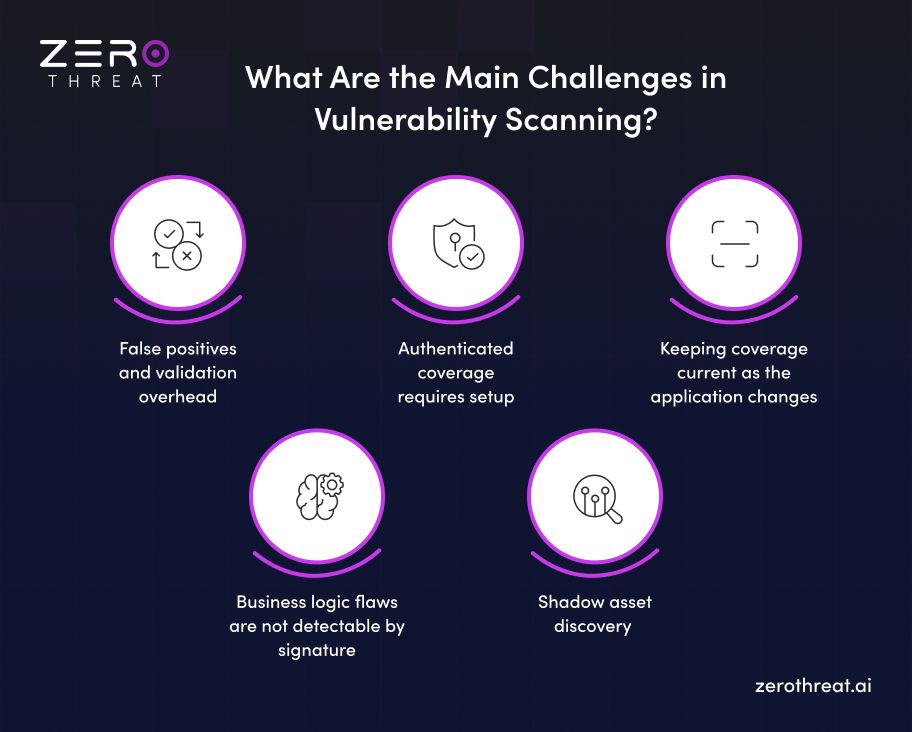
False positives and validation overhead
Legacy DAST tools report every pattern match as a potential vulnerability. A medium-complexity web application might return 300-500 findings from a single scan, requiring analysts to triage each one to determine whether it represents a real vulnerability or a false positive. At that scale, analysts spend more time on triage than on remediation.
Authenticated coverage requires setup
Authenticated scanning requires capturing a login flow, managing session state, and handling token expiry across scan sessions. For applications using MFA, SSO, or CAPTCHA, the setup requires a different scan method than standard credential-based authentication. Teams that skip authenticated setup because it takes effort are testing the wrong 10% of their application surface.
Keeping coverage current as the application changes
Every new endpoint, parameter change, or authentication flow update can introduce new attack surface. A scan profile built three months ago may no longer match the application's current state. CI/CD integration addresses this by triggering scans automatically after changes. Manual scan schedules without deployment triggers leave gaps that scale with development velocity.
Business logic flaws are not detectable by signature
Business logic vulnerabilities do not match any CVE signature. An application that allows 10,000 coupon redemptions per minute is functioning exactly as its code specifies. The vulnerability is the absence of a rate limit that prevents automated abuse. Detecting this requires behavioral testing that simulates the attack, not pattern matching against a known flaw database.
Shadow asset discovery
Assets not in the official inventory are not in the scan scope. Shadow APIs, deprecated endpoint versions, test environments accessible from production, and internal services accidentally exposed to the internet are all off-scope for scanners that rely on manual target definition. Active crawling that discovers the full endpoint surface before defining scope is the correct approach. A scanner given an OpenAPI spec only tests what the spec declares; an active crawler follows every link, every API call, every redirect, and every JavaScript-injected route to build its own map of what actually exists.
Invest in a vulnerability scanner that delivers validated evidence, not just endless lists of alerts. View Pricing
Vulnerability Scanning Best Practices
The table below maps seven specific practices to why they matter technically and how ZeroThreat implements each one. Generic best practice lists without implementation specifics are not actionable.
| Practice | Why It Matters | How ZeroThreat Implements It |
|---|---|---|
| Always run authenticated scans as default | 80-90% of critical vulnerabilities (BOLA, BFLA, session flaws) live behind login. Unauthenticated scans miss most of the real attack surface. | Chrome Recorder Extension captures login flows once. Stored sequences replay automatically for every scheduled and CI/CD-triggered scan. |
| Define your technology stack before scanning | Stack-specific remediation is more actionable than generic fix advice. PHP SQL injection is fixed differently than Node.js injection. | Target Configuration allows tech stack declaration. ZeroThreat generates stack-aware remediation guidance for every finding. |
| Scan in staging first, production second | Automated scans generate substantial request volume and can create database entries, trigger emails, and execute test transactions. | Use Production Safe Scan mode when live-environment testing is required. It prevents destructive operations during scanning. |
| Integrate scans into CI/CD pipelines | Point-in-time scanning catches yesterday's code. CI/CD integration catches the vulnerability in the commit that introduced it. | Enterprise plan supports GitHub Actions, GitLab CI, Azure DevOps, and Azure Pipelines. Scans trigger automatically on commit. |
| Retest every fix individually | A fix applied to one code path may not cover all entry points for the same vulnerability class. Retesting confirms actual remediation. | ZeroThreat's retest function validates individual vulnerabilities without requiring a full rescan. |
| Review informational findings, not just Critical | Informational findings often contain exposed secrets, internal paths, and technology fingerprints that attackers use for reconnaissance. | ZeroThreat's secret scanning identifies exposed API keys, passwords, PII, and access tokens under the Information Exposure category. |
| Schedule scans to align with deployment cycles | Vulnerabilities introduced in a Friday release should be caught before Monday morning, not in next quarter's assessment. | Scheduled scans can be configured weekly, monthly, or on custom cadences. Example: Saturday 2 AM scan after Friday deployment windows. |
Need a tailored security solution for your specific tech stack and regulatory requirements? Contact Us
Start Scanning for Vulnerabilities
Vulnerability scanning is not a checkbox activity. The difference between a scanner that reports pattern matches and a scanner that confirms exploitability is the difference between a triage queue and an action plan. Every finding in a proof-based report represents a real vulnerability with real evidence of impact.
ZeroThreat covers web app and API vulnerability scanning with authenticated scans, shadow asset discovery, agentic exploitability validation, and compliance-ready reporting mapped to HIPAA, PCI DSS, ISO 27001, GDPR, and OWASP. Scans complete in minutes, not hours.
Frequently Asked Questions
What is a CVE and how does vulnerability scanning use it?
A CVE (Common Vulnerabilities and Exposures) is a unique identifier assigned to a publicly disclosed security vulnerability. CVEs are maintained by MITRE and published in the National Vulnerability Database (NVD) with severity scores, affected products, and remediation guidance. Vulnerability scanners compare what they find in your environment against CVE databases to identify whether a known vulnerable version of a component is present. A scanner that identifies Apache version 2.4.49 running on a server checks it against CVE-2021-41773 (a path traversal and RCE vulnerability in that specific version) and flags it if found. The quality of a scanner's CVE coverage depends on how current its database is and how accurately it identifies installed versions.
Can vulnerability scanning cause downtime or break production systems?
What is the difference between DAST and vulnerability scanning?
How do you prioritize which vulnerabilities to fix first?
Does vulnerability scanning cover third-party and open-source components?


Explore ZeroThreat
Automate security testing, save time, and avoid the pitfalls of manual work with ZeroThreat.