 ZeroThreat Wins Bronze Stevie® Award in Tech Startup of the Year Read more

All Blogs
Progressive Web App (PWA) Security Testing: Complete Guide
Quick Overview: Progressive Web Apps offer a seamless web experience, but their unique architecture introduces security challenges that need focused testing. This guide explains PWA security testing, common vulnerabilities, key testing areas, and security differences from traditional web apps. It also covers practical best practices, testing considerations, and a concise checklist for securing PWAs against exploits.
A PWA can feel like a simple website, but behind that smooth experience sits a much broader security surface. Service workers, browser storage, caching, APIs, and offline functionality all create new places for vulnerabilities to hide.
What this means is, PWAs requires focused security testing, else your web app might get attacked and you won't even know it.
In 2025, service workers were used by about 19% of websites, while PWA technologies continued to expand across the web. At the same time, more than 2 billion web application attacks were detected during 2025, showing how heavily exposed modern applications remain.
That makes PWA security testing more than a routine vulnerability scan. It requires examining how each component behaves under attack. This guide explains the key risks, testing areas, best security practices, and top application security testing tools you can use to strengthen PWA security.
Stop relying on static tools and start validating real-world PWA exploit paths today. Start Testing Free
On This Page
- TL;DR: PWA Security Testing Checklist
- What is Progressive Web App (PWA) Security Testing?
- Common Vulnerabilities Found in Progressive Web Apps
- PWA Security vs Traditional Web App Security
- How Does a PWA Architecture Work from a Security Perspective?
- Key Areas to Test Security in Progressive Web App (PWA)
- Top 5 PWA Security Testing Tools
- Best Practices for Securing Progressive Web Apps Against Exploits
- To Wrap Up
TL;DR: PWA Security Testing Checklist
- Enforce mandatory HTTPS across all application routes to enable secure Service Worker registration.
- Validate Service Worker script scopes to prevent unauthorized path interception and domain takeover.
- Audit client-side storage mechanisms like IndexedDB and Cache Storage for unencrypted sensitive data.
- Implement strict Content Security Policy headers to block unauthorized script execution and resource loading.
- Verify web app manifest JSON files to restrict application scope, startup parameters, and icon origins.
- Encrypt offline data queues using Web Crypto APIs to neutralize request replay and parameter tampering attacks.
- Authenticate push notification channels using Voluntary Application Server Identification (VAPID) protocols.
- Sanitize all asynchronous REST and GraphQL API inputs to defend against injection vulnerabilities.
- Configure Cross-Origin Resource Sharing (CORS) rules to block unauthorized cross-domain resource access.
- Run continuous security testing with DOM execution support to catch dynamic client-side logic flaws.
What is Progressive Web App (PWA) Security Testing?
Progressive Web App (PWA) security testing is the process of identifying and validating security weaknesses in web applications that use PWA technologies. It examines the application, browser interactions, APIs, service workers, storage, and other components that handle user data.
Unlike conventional web applications, PWAs can continue working offline and interact with browser features through service workers and caching mechanisms. Security testing therefore evaluates whether these capabilities introduce risks such as unauthorized access, data exposure, insecure caching, or malicious script execution.
PWA security testing typically combines vulnerability scanning, manual security testing, penetration testing, and code analysis. Testers inspect service worker behavior, cache policies, API requests, authentication controls, client-side logic, and stored data to identify exploitable weaknesses.
Effective PWA testing validates whether a weakness can affect confidentiality, integrity, or availability. This helps development teams prioritize real risks and strengthen the overall security of their Progressive Web Apps.
Common Vulnerabilities Found in Progressive Web Apps
Progressive Web Apps can introduce security risks through service workers, browser storage, caching, content policies, push notifications, and offline functionality. Misconfigurations in these components can expose sensitive data or enable unauthorized actions.
Service Worker Exploitation
Service workers operate between the browser and network, making them a critical PWA attack surface. Poorly secured workers can intercept requests, modify responses, or serve malicious content. Attackers may exploit vulnerable service worker logic to manipulate application behavior, steal data, or maintain persistent access.
Manifest File Misconfiguration
The PWA manifest controls application metadata, icons, display behavior, and launch settings. Incorrect configuration can expose unnecessary information or create security weaknesses. Developers should validate manifest properties and ensure application URLs, scopes, and related resources cannot be manipulated to redirect users to untrusted destinations.
Insecure Client-Side Storage
PWAs commonly use localStorage, IndexedDB, Cache Storage, and other browser-based mechanisms to retain application data. Storing sensitive information without adequate protection can expose authentication tokens, personal data, or application secrets if client-side vulnerabilities such as XSS are exploited.
CSP Misconfiguration
A weak or incorrectly configured Content Security Policy (CSP) can reduce protection against cross-site scripting and other code injection attacks. PWAs should define restrictive script sources, avoid unnecessary unsafe directives, and regularly review CSP rules as application functionality and third-party dependencies change.
Push Notification Abuse
Push notifications can become an attack vector when notification subscriptions, payloads, or server-side authorization are poorly protected. Attackers may abuse exposed endpoints to send unwanted notifications, manipulate notification content, or target users with phishing messages. Secure subscription management and strict server-side validation are essential.
Insecure Offline Data Sync
Offline functionality allows PWAs to store and synchronize data when connectivity returns. Weak synchronization logic can create authorization gaps, duplicate transactions, or unauthorized data changes. Security testing should validate queued requests, synchronization workflows, conflict handling, and server-side authorization when offline data is submitted.
Cache Poisoning Attacks
PWA caching can serve previously stored responses without contacting the origin server. If cache rules are improperly implemented, attackers may influence cached content and cause malicious responses to be delivered to users. Testing should examine cache keys, response validation, cache scope, and service worker caching logic.
Validate your Progressive Web Apps security against 130K+ attack vectors using advanced pentest tool. Test My Web App
PWA Security vs Traditional Web App Security
PWA security and traditional web app security share core principles such as secure coding, access control, and vulnerability testing. However, PWAs introduce additional browser-based components, including service workers, offline storage, caching, and manifests, which expand the security testing scope.
| Security Aspect | PWA Security | Traditional Web App Security |
|---|---|---|
| Architecture | Includes service workers and offline capabilities | Primarily server-client architecture |
| Service Workers | Requires service worker security testing | Usually not applicable |
| Data Storage | Tests Cache Storage, IndexedDB, and local storage | Mainly focuses on server-side storage |
| Caching | Requires cache and offline response validation | Primarily server-side or browser caching |
| Attack Surface | Browser, service worker, APIs, storage, and server | Browser, APIs, server, and application logic |
| Offline Functionality | Tests offline data handling and synchronization | Generally not applicable |
| Update Mechanism | Managed by service worker lifecycle and versioning | Handled entirely through server-side deployment |
| Manifest Security | Requires PWA manifest configuration testing | Not applicable |
| Testing Focus | Web vulnerabilities plus PWA-specific components | Web vulnerabilities and application components |
How Does a PWA Architecture Work from a Security Perspective?
A PWA relies on HTTPS, browser security controls, service workers, caching, storage, APIs, and web app manifests. Each component introduces security considerations that must be evaluated during PWA security testing.
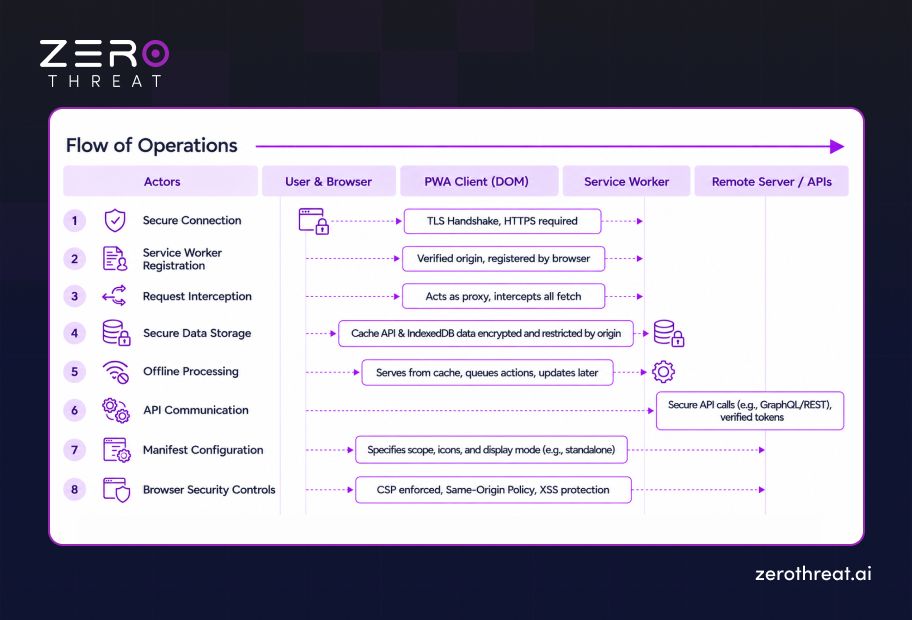
1. Secure Connection
A PWA operates within a secure context, typically over HTTPS. Service workers require secure contexts because powerful browser capabilities must be protected from network-based attacks such as man-in-the-middle (MITM) attacks.
2. Service Worker Registration
The browser registers the service worker against the application's origin and defined scope. The worker is then downloaded, installed, and activated. Security testing should verify its origin, scope, script integrity, and lifecycle behavior.
3. Request Interception
Once active, the service worker can intercept navigation and resource requests before communicating with the network. Testers examine this behavior for unauthorized request modification, insecure response handling, malicious redirects, and unintended resource access.
4. Secure Data Storage
PWAs can use browser storage and Cache Storage to support offline functionality. These mechanisms are isolated by origin, but applications must still avoid unnecessarily storing sensitive information and should validate how stored data is accessed.
5. Offline Processing
When connectivity is unavailable, the service worker can serve cached resources and support offline application behavior. Security testing checks whether cached responses, queued operations, and offline workflows could expose sensitive information or bypass server-side security controls.
6. API Communication
When the PWA reconnects, it communicates with backend APIs to retrieve or synchronize application data. Security testing evaluates API authentication, authorization, input validation, CORS configuration, and whether intercepted requests can be manipulated.
7. Manifest Configuration
The web app manifest defines how the PWA appears and behaves when installed. Testers review properties such as start_url, application scope, and referenced resources to identify unsafe configurations or unexpected application behavior.
8. Browser Security Controls
The browser enforces security boundaries such as the same-origin policy and Content Security Policy. These controls restrict cross-origin access and help reduce content injection risks, making their configuration an important part of PWA security testing.
Scale PWA security testing confidently with plans designed for evolving application attack surfaces. Explore Pricing Plans
Key Areas to Test Security in Progressive Web App (PWA)
The key areas of PWA security testing cover service workers, client-side storage, APIs, caching, offline functionality, authentication, and security configurations to identify vulnerabilities across the application’s attack surface. Here is a dive into each of them to understand what needs to be tested:
Service Worker Security
Test service worker registration, scope, lifecycle, scripts, and request interception. Review whether an attacker could manipulate the worker or its responses. Validate that service worker logic cannot expose sensitive resources, bypass security controls, or persist malicious behavior within the application.
Cache Storage Security
Examine Cache Storage and service worker caching rules for sensitive information, unauthorized content, and stale responses. Verify that authentication data and private application responses are not cached improperly. OWASP recommends testing whether sensitive information remains accessible through browser-side caching.
Client-Side Storage
Inspect localStorage, sessionStorage, IndexedDB, cookies, and other browser storage mechanisms for sensitive data. Check whether authentication tokens, session identifiers, personal information, or application secrets are unnecessarily exposed. OWASP specifically highlights client-side storage as an important security testing area.
Authentication Controls
Test login workflows, session management, token handling, logout behavior, and authentication state across online and offline scenarios. Verify that cached application states or client-side mechanisms cannot allow users to access protected resources after authentication expires or changes.
Authorization Controls
Evaluate whether users can access functions, data, and API resources beyond their assigned permissions. Test authorization consistently across the PWA interface, service worker requests, offline operations, and backend APIs because client-side restrictions alone should never enforce access control.
API Security
Test the APIs that support PWA functionality for authentication flaws, broken access control, injection, excessive data exposure, and insecure CORS policies. Map application requests and parameters to identify entry points that could expose backend functionality or sensitive data.
Offline Functionality
Assess how the PWA behaves when network connectivity is unavailable. Test cached pages, queued requests, locally stored data, and synchronization workflows. The goal is to identify situations where offline functionality could expose sensitive information or allow security controls to be bypassed.
Data Synchronization
Test how locally stored changes are synchronized with backend systems after connectivity returns. Review request validation, authorization, conflict handling, duplicate transactions, and data integrity. Weak synchronization logic can create opportunities for unauthorized modifications or inconsistent application states.
Manifest Security
Review the web app manifest and its security-sensitive properties, including application scope, start_url, icons, and referenced resources. Check whether misconfigured URLs or scopes could expand the application's effective attack surface or redirect users toward untrusted resources.
Content Security Policy
Evaluate the Content Security Policy and other browser security headers protecting the PWA. Check for overly permissive directives, unsafe script sources, and unnecessary exceptions. Strong browser-side controls can reduce the impact of cross-site scripting and related client-side attacks.
Push Notification Security
Test push subscription management, notification endpoints, payload handling, and authorization controls. Verify that attackers cannot trigger unauthorized notifications, manipulate notification content, or abuse notification services for phishing. Server-side validation should remain enforced regardless of client-side notification behavior.
Cross-Origin Security
Review CORS policies, cross-origin requests, embedded resources, and interactions with external domains. Verify that trusted origins are explicitly defined and that sensitive APIs do not accept unauthorized origins. Improper cross-origin configuration can expose application data or expand the PWA attack surface.
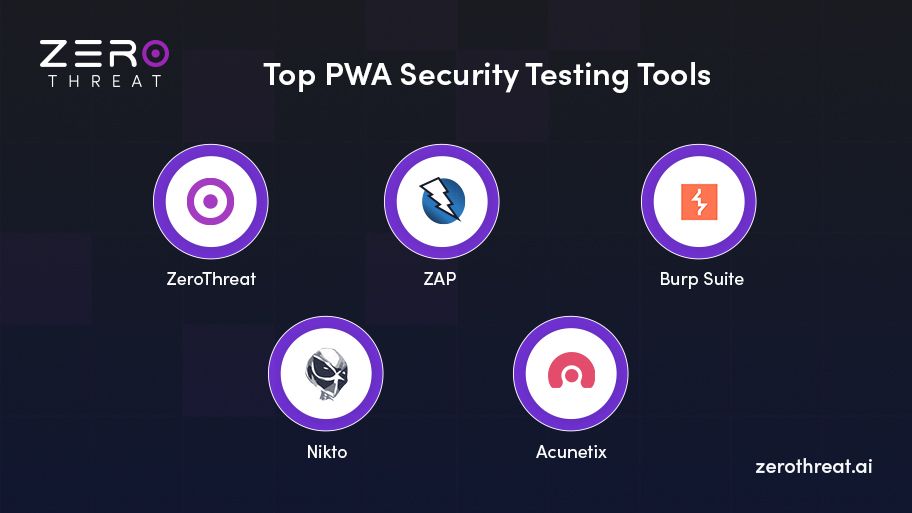
Top 5 PWA Security Testing Tools
As we have already seen, testing progressive web applications differs from traditional web-based or native apps. So, you cannot use conventional security testing or AppSec tools to test progressive web applications. It requires specialized tools with advanced features, which we have mentioned below. The following is a list of the top five PWA security testing tools.
1. ZeroThreat
ZeroThreat is a AI-powered automated pen testing tool that offers extensive security testing for web apps and APIs. ZeroThreat smartly scans JavaScript-heavy applications with a next-gen crawler, including Progressive Web Apps and Single Page Applications (SPAs).
10X faster scanning, AI-driven remediation reports, newr-zero false positives, and 99.9% accuracy make ZeroThreat stand out from other AppSec tools. It leverages out-of-band security testing to discover vulnerabilities that most tools cannot detect. It tests apps for 130K+ vulnerabilities.
2. ZAP
ZAP or Zed Attack Proxy is also a powerful and open-source tool to detect vulnerabilities in web applications. AppSec teams can leverage this tool for both automated and manual security testing to uncover a wide range of vulnerabilities including OWASP top 10.
ZAP also offers proxy and script-based scanning to perform hacker-style attacks. Additionally, it offers active and passive scanning to detect vulnerabilities like broken authentication, SQL injection, XSS, and more.
3. Burp Suite
Burp Suite is a popular web application vulnerability scanner that offers both automated and manual testing. It works as a proxy between a browser and a server to intercept traffic and modify it to identify issues.
It offers a comprehensive suite of security testing tools - interceptor, comparer, repeater, decoder, sequencer, etc. With the pro version, you can perform active scanning to test and detect vulnerabilities in real time. Extensions are the unique features of Burp Suite that allow users to integrate additional features.
4. Nikto
Nikto is a command-based tool for vulnerability scanning. It automatically scans applications, including PWAs, and generates a detailed report highlighting the critical vulnerabilities discovered during the test. It is suitable to discover known vulnerabilities, misconfigurations, and outdated components.
It scans applications for 6000+ vulnerabilities and complements other tools to offer comprehensive security assessment. Nikto scans applications for a wide range of vulnerabilities and effectively discovers OWASP top 10 and other common weaknesses.
5. Acunetix
Acunetix is a commercial vulnerability scanner for web apps that identifies known and complex vulnerabilities precisely. It is a powerful tool that scans applications for 7000+ vulnerabilities and covers progressive web app security testing.
It is suitable for identifying vulnerabilities in complex web applications such as single-page applications and PWAs with a user-friendly interface. Acunetix offers automated and deep scanning to uncover critical security vulnerabilities.
Best Practices for Securing Progressive Web Apps Against Exploits
Securing a Progressive Web App requires protecting its browser-based components, network communication, stored data, and application configuration. These practices help reduce exploitable weaknesses across the PWA attack surface.
Enforce HTTPS Everywhere
Serve the entire PWA over HTTPS and redirect insecure HTTP requests to HTTPS. Secure transport protects application traffic from interception and tampering. HTTPS is also required for service workers outside specific local development scenarios, making it fundamental to secure PWA functionality.
Scope Service Workers Tightly
Restrict service worker scope to only the application paths that require it. A broader scope can give a compromised worker control over additional application resources. Review registration paths, scope settings, and intercepted requests to prevent unintended resource access.
Implement Strong CSP Headers
Deploy a restrictive Content Security Policy (CSP) to control which scripts, styles, frames, and other resources the PWA can load. Avoid unnecessary unsafe directives and regularly review allowed sources. A strong CSP can significantly limit the impact of cross-site scripting attacks.
Encrypt Client-Side Storage
Avoid storing sensitive information in browser storage unless it is necessary for application functionality. When sensitive data must be stored, apply appropriate encryption and access controls. Review localStorage, IndexedDB, Cache Storage, and other client-side mechanisms for unnecessary data exposure.
Validate Manifest File Settings
Review PWA manifest properties such as start_url, scope, icons, and related resource references. Ensure these values point only to trusted application resources. Proper validation helps prevent configuration errors that could expand the application's attack surface or create unexpected navigation behavior.
Secure Push Notification Channels
Protect push notification subscriptions, endpoints, and payloads with strong authentication and authorization controls. Validate notification requests on the server and prevent unauthorized subscription access. This reduces the risk of notification abuse, phishing campaigns, malicious payloads, and unauthorized messages being delivered to PWA users.
Sanitize Offline Sync Data
Validate and sanitize data collected while the PWA operates offline before synchronizing it with backend systems. Apply server-side input validation, authorization, and integrity checks when queued requests are processed. This helps prevent injection attacks, data manipulation, and unauthorized changes during offline synchronization.
Audit Third-Party Dependencies
Regularly review JavaScript libraries, frameworks, plugins, and external packages used by the PWA. Identify outdated or vulnerable dependencies through software composition analysis and dependency scanning. Removing unnecessary packages and addressing known vulnerabilities reduces the risk of supply chain attacks and client-side exploitation.
Regularly Update Service Workers
Keep service worker scripts updated and maintain a controlled deployment process for changes. Remove outdated versions and verify that new workers are correctly installed and activated. Regular updates help address security vulnerabilities, reduce exposure to outdated code, and maintain secure PWA behavior.
Explore a smarter way to test PWAs, APIs, and complex application workflows continuously. Book a Demo
To Wrap Up
Progressive Web App security depends on protecting every component that enables its functionality. Service workers, APIs, browser storage, caching, offline synchronization, and manifest configurations can each introduce weaknesses when they are not properly secured.
Effective PWA security testing goes beyond conventional vulnerability scanning. It examines how these components behave under real attack conditions and verifies whether identified weaknesses can expose data, bypass controls, or affect application integrity.
A strong approach combines automated security testing with targeted validation of service workers, client-side storage, API security, authentication, offline workflows, and browser security controls. Regular testing also helps identify vulnerabilities introduced through code, configuration, or dependency changes.
Security should remain part of the PWA development lifecycle rather than a final checkpoint. Continuous testing, secure configurations, timely updates, and disciplined data protection help maintain resilient PWAs as their functionality and attack surface changes.
Frequently Asked Questions
Why is PWA security testing important?
PWA security testing evaluates complex client-side architectures to expose hidden entry points before attackers can exploit them. Traditional security scans often miss background script execution flaws, local cache exposure, and logic errors within client-side proxies.
Comprehensive testing protects sensitive user data, prevents persistent session hijacking, and ensures compliance across modern web environments.
What are the main PWA security risks?
How to secure PWA offline data?
Can DAST tools test Progressive Web Apps?
How do you secure a web app manifest file?
What should be the frequency of PWA security testing?
Related Articles


Explore ZeroThreat
Automate security testing, save time, and avoid the pitfalls of manual work with ZeroThreat.