 ZeroThreat Wins Top InfoSec Innovators 2026 Award for Penetration Testing Read more

All Blogs

Quick Overview: Securing PHP applications requires more than fixing vulnerabilities after they appear. This guide explains why PHP security matters, highlights the most common security issues, covers practical security best practices, explores effective methods to test PHP applications for vulnerabilities, and answers key questions to help you build and maintain secure, resilient web applications.
PHP remains one of the most widely used server-side programming languages for building dynamic websites and web applications. A survey by W3techs has found 70.5% websites all across the world are powered by PHP.
However, there are some unresolved issues about PHP’s vulnerabilities that adversely influence the entire architecture of websites and PHP web apps. From SQL injection and cross-site scripting to insecure file uploads and authentication flaws, security weaknesses in PHP applications can expose sensitive data and disrupt business operations if left unaddressed.
Building secure applications requires more than writing functional code. It demands secure development practices and continuous security testing.
To eliminate PHP vulnerabilities, we have diligently curated some of the best PHP security practices that not only ensure that the website is risk-free but following these practices also keep all the possible security risks at bay. We'll also learn about the methods you can use to test PHP application and how ZeroThreat's next-gen PHP vulnerability scanner can make ensuring security easy.
Shield your PHP applications from critical vulnerabilities with instant, automated exploit validation pentest. Secure My App Now
Table of Contents
- Why PHP Web Application Security Matters
- Common Security Issues in PHP Web Applications
- Nine Best PHP Security Practices to Follow
- Methods to Test PHP Applications for Security Vulnerabilities
- How ZeroThreat Helps Secure PHP Web Applications
- Summing Up
Why PHP Web Application Security Matters
PHP web application security matters because PHP powers a major share of websites and business applications. Its widespread adoption also makes it a frequent target for attackers looking to exploit coding flaws, outdated components, and insecure configurations to gain unauthorized access.
A single vulnerability can expose sensitive customer data, disrupt business operations, or damage an organization's reputation. Common threats such as SQL injection, cross-site scripting (XSS), broken authentication, and insecure file handling can lead to costly security incidents if left unaddressed.
Strong PHP security practices help developers reduce attack surfaces throughout the application lifecycle. Secure coding, timely dependency updates, proper input validation, secure session management, and regular vulnerability assessments work together to prevent exploitable weaknesses before they reach production.
Security is also essential for maintaining customer trust, meeting compliance requirements, and supporting long-term application reliability. By making PHP web application security an ongoing priority instead of a one-time task, organizations can better defend against evolving threats and keep their applications resilient.
Common Security Issues in PHP Web Applications
PHP web applications face persistent threats from flawed input handling, weak authentication, and environment misconfigurations. Knowing these common security issues helps developers implement targeted defenses and prevent severe data breaches.
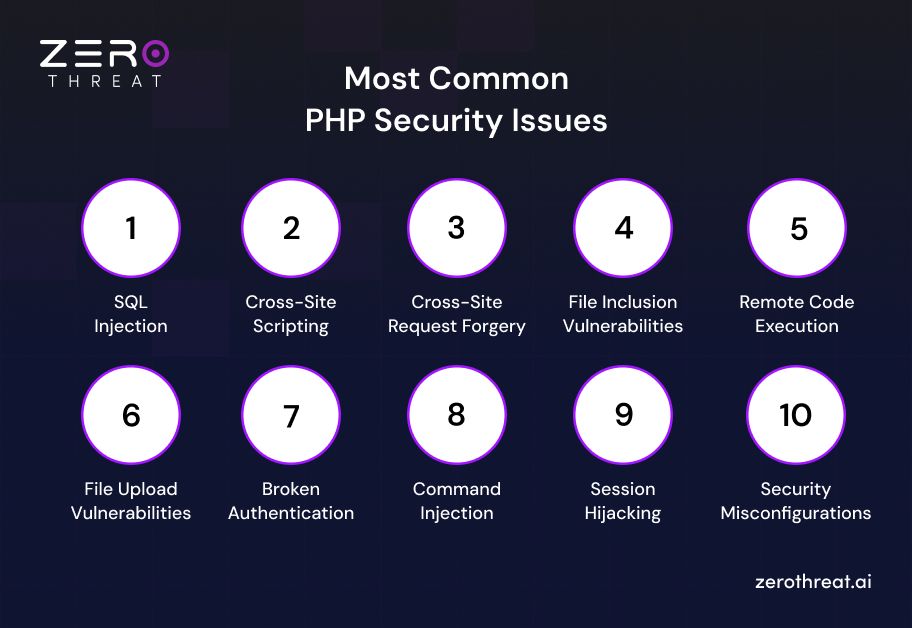
SQL Injection (SQLi)
- How it Works: SQL injection occurs when an application inserts untrusted user input directly into database queries. Attackers manipulate query parameters to read, modify, or delete sensitive data, bypass authentication, or execute unauthorized database commands, often because input validation and query parameterization are missing.
- The Fix: Use prepared statements and parameterized queries with PDO or MySQLi. Never interpolate raw user input directly into SQL statements, and enforce strict input validation across your data access layer.
Cross-Site Scripting (XSS)
- How it Works: Cross-site scripting happens when a PHP application displays unsanitized user input in a web page. Malicious JavaScript executes in the victim's browser, allowing attackers to steal session cookies, manipulate page content, or perform actions on behalf of authenticated users.
- The Fix: Sanitize and escape all output before rendering it in the browser using context-aware functions like htmlspecialchars(). Implement a strict Content Security Policy (CSP) header to restrict execution of untrusted scripts.
Cross-Site Request Forgery (CSRF)
- How it Works: Cross-site request forgery tricks an authenticated user into submitting unwanted requests to a trusted application. If the application cannot verify the request's origin, attackers can trigger sensitive actions such as changing account settings or initiating unauthorized transactions.
- The Fix: Generate unique, cryptographically secure anti-CSRF tokens for every user session. Validate these tokens on every state-changing POST, PUT, or DELETE request, and enforce SameSite attribute settings on session cookies.
File Inclusion Vulnerabilities (LFI / RFI)
- How it Works: File inclusion vulnerabilities arise when PHP applications load files based on untrusted user input without proper validation. Attackers may access sensitive local files through Local File Inclusion (LFI) or execute malicious remote files through Remote File Inclusion (RFI) in insecure environments.
- The Fix: Disable allow_url_include in your php.ini configuration. Avoid passing user input directly into file inclusion functions, and maintain a strict allowlist of authorized file paths using fixed directory mapping.
Remote Code Execution (RCE)
- How it Works: Remote code execution occurs when attackers exploit insecure PHP code to run arbitrary commands on the server. Weak input validation, unsafe file uploads, vulnerable dependencies, or insecure system function calls can give attackers complete control over the application environment.
- The Fix: Disable dangerous PHP functions such as eval(), exec(), passthru(), and system() in your configuration. Enforce strict input validation, sanitize all external parameters, and avoid dynamic code execution entirely.
File Upload Vulnerabilities
- How it Works: File upload vulnerabilities occur when a PHP application accepts user-uploaded files without proper validation. Attackers can upload malicious scripts, executable files, or disguised payloads that may lead to unauthorized access, malware distribution, or complete server compromise if executed.
- The Fix: Validate file extensions against a strict allowlist and verify MIME types. Rename uploaded files using random identifiers, store them outside the web root, and restrict execution permissions on upload directories.
Broken Authentication
- How it Works: Broken authentication happens when weaknesses in login mechanisms, password management, or session handling allow attackers to impersonate legitimate users. Poor password policies, predictable credentials, and insecure authentication workflows can result in unauthorized access to sensitive accounts.
- The Fix: Implement strong password hashing using password_hash() with PASSWORD_ARGON2I or PASSWORD_BCRYPT. Enforce multi-factor authentication, set strict rate limiting on login endpoints, and secure account recovery mechanisms.
Command Injection
- How it Works: Command injection occurs when a PHP application passes untrusted user input to operating system commands without proper validation. Attackers can inject additional commands to execute unauthorized actions, access sensitive files, or gain control over the underlying server.
- The Fix: Avoid passing user input directly into system execution functions. Use built-in PHP functions instead of shell calls, or sanitize inputs using escapeshellarg() and escapeshellcmd() when system commands are unavoidable.
Session Hijacking
- How it Works: Session hijacking allows attackers to steal or reuse valid session identifiers to impersonate authenticated users. Stolen session cookies obtained through insecure transmission, cross-site scripting, or predictable session IDs can provide unauthorized access to user accounts.
- The Fix: Regenerate session IDs after login using session_regenerate_id(true). Enforce Secure and HttpOnly flags on session cookies, set the SameSite attribute, and always transport session traffic exclusively over encrypted HTTPS connections.
Security Misconfigurations
- How it Works: Security misconfigurations occur when PHP applications, web servers, databases, or supporting infrastructure are deployed with insecure default settings. Exposed debug information, unnecessary services, excessive permissions, or outdated software create opportunities for attackers to exploit known weaknesses.
- The Fix: Disable verbose error display by setting display_errors = Off in php.ini. Turn off unnecessary modules, restrict file system permissions, keep server software patched, and enforce production-ready security headers across the server.
Your PHP codebase might already have exploitable flaws. Run a scan with ZeroThreat and find out. Run Free PHP Scan
Nine Best PHP Security Practices to Follow
Explore these nine fail-safe PHP security practices to eliminate vulnerabilities from roots and build 5X stronger encryption for your websites or apps.

1. Optimize SSL Certificates for HTTPS
Using SSL certificates is instrumental for PHP security as it ensures secured data transmission between the client-side and server side.
To make it easier for you all to understand, SSL certificates are like digital passports for websites. They enable a safe and secure connection between PHP website and users’ browsers. We can address this connection as HTTPS.
HTTPS encrypts the data that is exchanged between websites and users, and it also ensures that no one is able to fetch the exchanged data.
When users visit your website, their browser first verifies the SSL certificate of your website and then considers they are actually connecting with a bonafide URL and not an imposer who will exploit their data.
Thus, an SSL certificate along with HTTPS ensures complete security of the data shared between your website and users visiting it.
2. Update PHP Version Uniformly
To minimize the chances of PHP vulnerabilities, updating PHP versions regularly is important, making the website or web app secure and scalable.
With every version, the latest security patches are released with unique ways to beat vulnerabilities and fix bugs that were found in the previous version. Thus, it is quite imperative for organizations to keep updating PHP versions regularly to mitigate the risk of compromising confidential data and other PHP security flaws.
3. Escaping Output
If we talk about eliminating cross-site scripting (XSS), escaping output is sure-fire PHP security practice to follow. Escaping output ensures that the displayed data, whether its user-generated content or other dynamic data, is encoded before being rendered in the browser.
Escaping output converts potential harmful characters like <,>, and &, into their HTML entity equivalents and neutralizes every attempt made to inject malicious scripts into web pages.
By implementing escaping output, PHP developers can reduce the risk of cross-site scripting vulnerabilities relatively with robust encryption.
4. Implement Cross-site Request Forgery (CSRF) Protection
Implementing CSRF protection in your PHP code helps you rest assured that every action performed on your website belongs to a bonafide source.
Basically, cross-site request forgery’s job is to safeguard logged-in users from sneaky attackers who manipulate users to perform risky tasks like making unwanted purchases or changing passwords unnecessarily.
This PHP security practice is attained by including a unique token with every request or form submission. If the user is performing any sensitive task like transferring money, your website’s PHP code verifies that the token of the respected request matches the expected session; only then is it allowed to proceed.
This is how CSRF protection works for both users and the platform by preventing potential vulnerabilities.
5. Limit File Uploads
What if you allow users to upload anything of their choice, that too without taking care of file type or size? What do you think the results will be? It will overwhelm your website’s server, which could probably lead to data exploitation as any file could possibly contain malicious scripts or viruses.
With limited file uploads, the chances of security issues related to file-upload flexibility are dramatically lower.
First, you can set a specific size limit for every file; for example, 5mb is the maximum limit. Implementing this will ensure your server does not bog down due to heavy file uploads.
Secondly, you cannot allow any type of file within a set limit to be uploaded; deciding on file type is also requisite, like JPG and PNG. Uploading other types of executable files can harm websites.
By putting such limitations into practice, the invasion of any PHP vulnerability or other flaw is pretty tough.
6. Keep Dependencies Updated
Dependency files are external libraries or frameworks that your PHP website or app relies on. Keeping them updated improves their performance and ensures that PHP code remains secure and reliable.
Regular updates and the latest version installations make it easier to patch vulnerabilities that were countered even in previous versions.
7. Handle Error Messages Attentively
Handling error messages is something you should never avoid; otherwise, it makes room for attackers to exploit sensitive information about your app’s inner workings.
Whenever any error occurs, PHP automatically generates error messages containing information about your code, database structure, or server configuration. This information can be misused to the core by fetching details about potential vulnerabilities that have taken place in code and attackers can plan to act accordingly.
The best practice is to ensure that only required information is present into error messages, which is enough for the concerned people to fix them. Meanwhile, logging detailed error messages enables developers to diagnose issues without having to compromise the security of the application.
8. Use Security Headers
Using security headers is a proactive measure to improve the security of a web app or website.
Security headers are small pieces of code that the server sends to the browser alongside web pages. The purpose of security headers is to provide instructions to browsers on how to manage certain aspects of the web page, like content security policies and frame options.
With these headers, you can beef up the security of your websites or apps by controlling the browser’s behavior with their content. This substantially reduces the risks of malicious activities like XSS, clickjacking, and content sniffing.
9. Regular Security Audits
Last but not least, consider doing regular security audits in order to identify and address PHP security vulnerabilities in your websites or apps at the initial stage.
With a comprehensive examination of your PHP code, server configurations, entire security posture, you can not only fetch potential PHP security flaws, but you can also revamp the already existing architecture with modern security measures.
Moreover, security audits involve multiple techniques, like code review, penetration testing, and vulnerability scanning, to assess the robustness of your defenses. These techniques not only help you fix the existing PHP security issues, but also enable you to stay ahead of emerging malicious activities.
Enterprise-grade PHP security testing shouldn't break your budget. Compare plans built for you. Explore Plans
Methods to Test PHP Applications for Security Vulnerabilities
Testing PHP applications for vulnerabilities requires a combination of assessment techniques that identify coding flaws, configuration weaknesses, and exploitable attack paths. Using multiple testing methods helps organizations strengthen application security and reduce the risk of real-world attacks.
Manual Code Review
Manual security code review examines the PHP source code to identify insecure coding practices, logic flaws, weak input validation, improper authentication, and unsafe function usage. It helps developers detect vulnerabilities early, improve code quality, and address security issues before the application reaches production.
Advanced Vulnerability Scanning
Vulnerability scanners inspect PHP applications for known security weaknesses, outdated software components, insecure configurations, and common OWASP vulnerabilities. Regular scanning helps security teams detect issues early and maintain continuous visibility into the application's security posture.
Automated Penetration Testing
Automated penetration testing simulates real attacks against your running PHP application, scanning for SQLi, XSS, CSRF, and misconfigurations at scale. It validates exploitability, not just theoretical risk, giving you accurate results fast. This method scales across large applications without manual bottlenecks.
Dynamic Application Security Testing
Dynamic Application Security Testing (DAST) evaluates a running PHP application from an attacker's perspective. It detects vulnerabilities such as SQL injection, cross-site scripting, authentication weaknesses, and security misconfigurations without requiring access to the application's source code.
How ZeroThreat Helps Secure PHP Web Applications
Modern PHP applications require continuous security testing to keep pace with frequent code changes, evolving attack techniques, and expanding attack surfaces. ZeroThreat helps organizations identify and validate exploitable vulnerabilities through AI-powered automated penetration testing that goes beyond traditional vulnerability scanning.
ZeroThreat simulates real attacker behavior to test authentication flows, session management, business logic, APIs, and application workflows. It safely validates vulnerabilities such as SQL injection, cross-site scripting, command injection, and access control flaws while reducing false positives through proof-based exploit validation.
The platform also supports authenticated security testing, JavaScript-heavy applications, production-safe scanning, and continuous testing within CI/CD pipelines. These capabilities enable development and security teams to identify security gaps earlier and strengthen PHP applications without interrupting normal development or production environments.
With evidence-backed findings, AI-driven remediation guidance, and compliance-ready reporting, ZeroThreat helps organizations prioritize real security risks instead of theoretical issues. This allows teams to remediate vulnerabilities faster, improve application resilience, and maintain a stronger security posture throughout the software development lifecycle.
Got questions about securing your PHP application? Our security experts are ready to help. Get in Touch
Summing Up
PHP web application security is an ongoing process that requires secure coding, timely updates, and continuous testing. Addressing vulnerabilities early helps reduce the attack surface, protect sensitive data, and build applications that remain resilient against evolving cyber threats.
Combining security best practices with regular vulnerability assessments and penetration testing provides stronger protection than relying on periodic checks alone. A proactive approach helps identify exploitable weaknesses sooner, supports compliance efforts, and improves the overall security posture of PHP applications.
For teams looking to strengthen PHP application security with continuous, AI-powered testing, ZeroThreat provides a practical way to identify and validate real security risks before attackers do.
So, what are you waiting for? Sign up with ZeroThreat and start securing your PHP applications from day zero.
Frequently Asked Questions
How often should you update the PHP version?
Update PHP as soon as a stable supported release or security patch becomes available. Running a supported PHP version ensures you receive security fixes, performance improvements, and protection against newly disclosed vulnerabilities. Regular updates also reduce the risk of exploiting known CVEs.
What are the top PHP security testing tools?
What is the ideal way of checking PHP security?
Which is a secure method to encrypt passwords in PHP?
How can SQL injection be prevented in PHP?
How often should PHP applications be security tested?
How to keep PHP dependencies secure?

Explore ZeroThreat
Automate security testing, save time, and avoid the pitfalls of manual work with ZeroThreat.