 ZeroThreat Wins Bronze Stevie® Award in Tech Startup of the Year Read more

All Blogs
WordPress SQL Injection: Common Vulnerabilities, How to Detect, and Ways to Prevent
Quick Overview: This blog explains what WordPress SQL Injection is, how attackers exploit it, and the damage it can cause. It also outlines practical ways such as input validation, parameterized queries, and regular updates, to prevent SQL injection in WordPress.
WordPress powers more than 43% of all websites on the internet, making it the go-to platform for bloggers and eCommerce alike. Its flexibility, vast plugin ecosystem, and ease of use have made it one of the best CMS platforms.
But popularity comes at a price. WordPress sites are a constant target for hackers, and one of the most dangerous threats they face is SQL injection (SQLi). It is also one of the OWASP top 10 security vulnerabilities, which indicates how severe SQLi can be. Factually speaking, a single SQL injection flaw can give attackers direct access to your database, exposing sensitive data such as login credentials and payment details.
Now you might ask, how do I protect my website from such an attack? Well, worry not, we’ll cover the best ways to secure WordPress websites from SQL injection. But before we begin with that, let’s understand the common vulnerabilities that lead to SQL injection and how you can detect them. Keep reading to uncover everything you need to know about SQL injection along with best practices to prevent it.
Use AI-powered Vulnerability Scanner to Detect SQLi and Other Security Threats Scan Now
On This Page
- What is WordPress SQL Injection?
- How Does WordPress SQL Injection Work?
- Common Vulnerabilities that Lead to SQL Injection in WordPress
- How to Detect SQL Injection Attacks in WordPress?
- Ways to Secure WordPress Websites from SQL Injection (6 Methods)
- Bonus Method: Use ZeroThreat to Secure Your Websites
- Impact of SQL Injection on WordPress Websites
- Best Practices for WordPress Database Security
- Wrapping Up
What is WordPress SQL Injection?
SQL injection, also known as SQLi, is a web attack that lets an attacker change the SQL your web app sends to its database. It happens when user input is mixed into a database query without proper checks. That lets the attacker read, modify, or delete data they shouldn't see.
SQL injection in WordPress works in a similar pattern. WordPress works on MySQL and MariaDB databases via the $web API, plugins, themes, custom code, or even REST endpoints. If any of those places build SQL with raw user input, they can become vulnerable to WordPress security. As per expert developers, plugins and custom theme code are the most common reasons behind the SQL injection vulnerability.
I once fixed a site where a small theme file used a GET parameter directly in a query. The code looked like this (vulnerable):
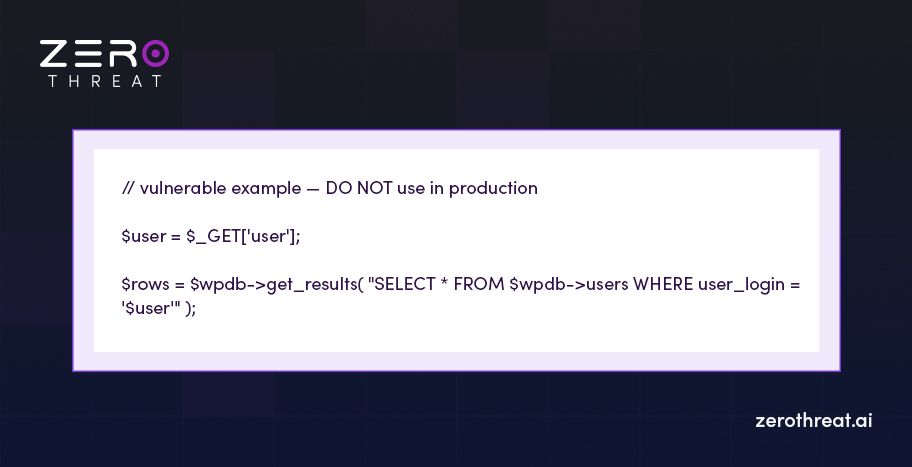
Why this breaks: any text sent by the user becomes part of the SQL. An attacker can change the query logic and force the database to return or delete data.
A safe fix uses WordPress’s prepared statements:
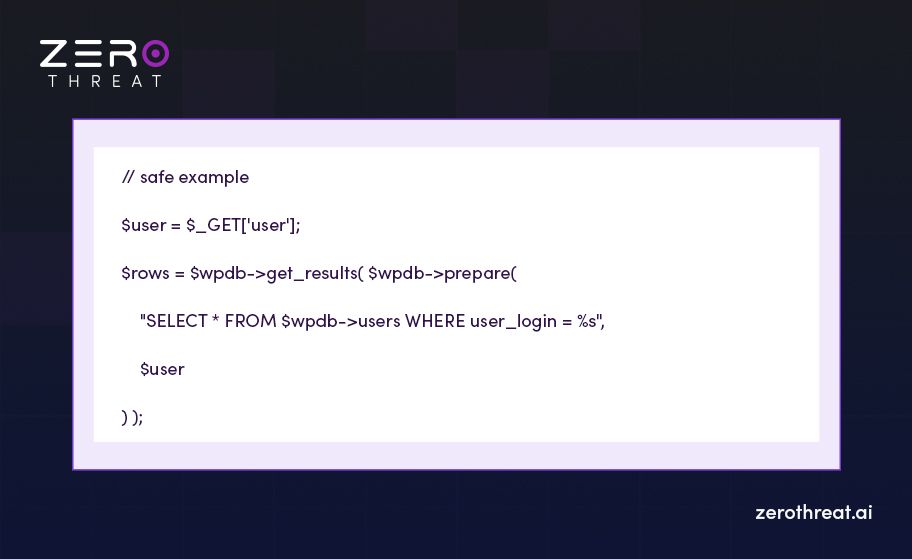
$wpdb->prepare() (or parameterized queries in other frameworks) separates data from SQL. That stops user input from being interpreted as SQL code. Now that we have understood what SQL injection is with an example, let’s jump to how it works.
How Does WordPress SQL Injection Work?
At its core, an SQL injection attack works by slipping malicious SQL code into a normal query. WordPress uses SQL to manage databases, which includes fetching posts, logging users in, pulling comments, and saving plugin data. If the application doesn’t clean or validate user input before sending it to the database, attackers can hijack the query and tamper with the database.
WordPress expects clean input like a username or an ID. But if an attacker types SQL commands instead of a name, and the code simply plugs that into the query, the database will execute the attacker’s command. That’s where the attack starts, which can expose sensitive information, delete data, or even create new ones.
Example of WordPress SQL Injection in Action
Let’s say a vulnerable plugin has a search feature that runs SQL like this:
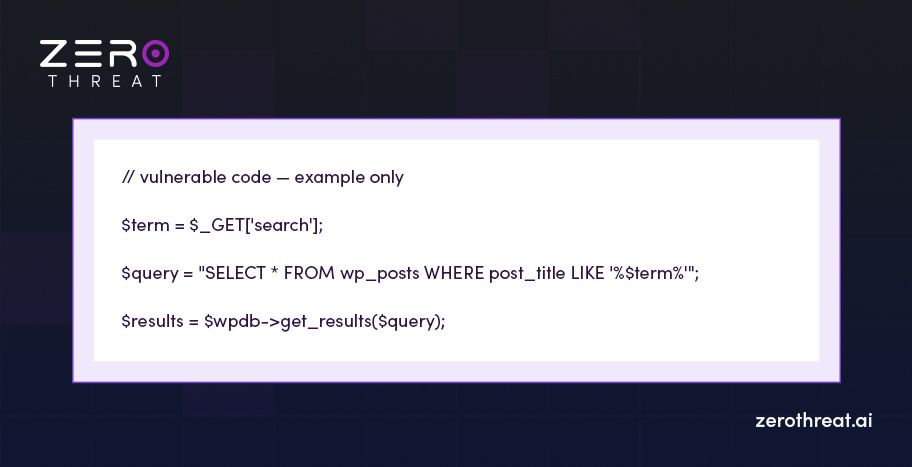
This looks safe, but it’s highly vulnerable. If a user types test into the search box, it works fine. But an attacker could enter:
' OR '1'='1That small input changes the SQL to:
SELECT \* FROM wp\_posts WHERE post\_title LIKE '%%' OR '1'='1%'The condition '1'='1' is always true. So, instead of just returning posts with the word “test,” the query dumps every record in the posts table. And with slight changes, an attacker can get access to data, inject a fake one, or even delete it.
Common Vulnerabilities that Lead to SQL Injection in WordPress
Most SQL injection attacks on WordPress come from weak points introduced by plugins, themes, or poorly written custom code. These vulnerabilities open the door for attackers to inject malicious SQL commands into your site.
Here are the most common open doors you need to watch for:
- Outdated or poorly coded plugins: Third-party plugins are the biggest source of WordPress SQL injection vulnerabilities. Developers sometimes skip input sanitization or fail to use prepared statements.
- Vulnerable themes: Custom themes that build SQL queries directly with user input often become an easy entry point for an attacker.
- Direct database queries without $wpdb->prepare(): Writing raw SQL queries in WordPress without parameterization leaves the database exposed.
- Unvalidated form inputs: Login forms, search boxes, or contact forms that don’t validate or escape user input allow attackers to inject malicious SQL.
- Exposed URL parameters: Query strings like ?id=5 in a URL can be tampered with if the code inserts them directly into SQL queries.
- Unpatched WordPress installations: Running an outdated WordPress core or ignoring security patches increases the risk of attackers exploiting known SQL injection flaws.
Each of these weak spots can turn into a serious WordPress SQL injection attack if left unchecked. But if you make sure no vulnerable endpoint is left open, security against SQL injection is maintained.
How to Detect SQL Injection Attacks in WordPress?
Identifying an SQL injection in WordPress is not simple. Attackers are good at keeping their tracks hidden. Still, there are red flags that often show up when your site is being exploited. Spotting these signs early can help you prevent a WordPress SQL injection attack.
Here are the common signs of an SQL injection attack:
- Unexpected database errors: If you suddenly see SQL-related error messages like “Unknown column” or “syntax error in SQL query”, it could be a failed injection attempt.
- Strange or missing content: Posts, pages, or user records may get deleted or appear altered without your input. Sometimes, injected data can be identified if it is gibberish.
- Unusual admin accounts: The attacker may create new administrator profiles, which you can see in your WordPress dashboard. It is a classic sign of a database compromise.
- Sudden website redirects: Visitors being redirected to spammy or malicious sites from your website also indicate that there is injected code in your database tables.
- Slow or unresponsive site: A flood of malicious SQL queries can overload your server, leading to performance issues.
- Suspicious log activity: Requests with odd parameters in URLs (like id=1 OR 1=1) showing up in access logs point directly to SQL injection testing.
If you see any of the above signs in your WordPress site, there is a high chance of an SQL injection attack. Now, many of you will ask, what if we close the door of vulnerable points? Yes, you can surely do that. Let’s find out how in the next section.
Detect All Types of Vulnerabilities in Your WordPress Website with a Single Click Let’s Do This
Ways to Secure WordPress Websites from SQL Injection (6 Methods)
Securing WordPress websites can be done in many ways, with the easiest option available being to use a plugin. Here we have discussed complex to easy methods which you can implement to ensure security.
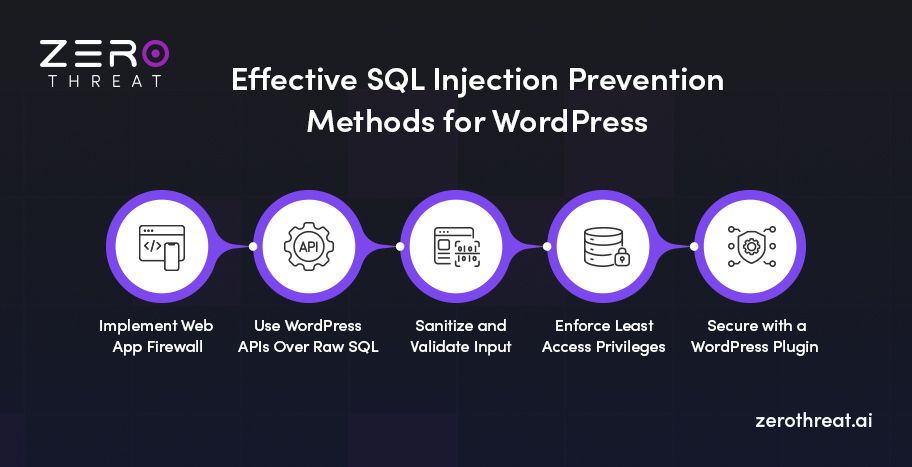
Method 1: Implement Web Application Firewall (WAF)
A Web Application Firewall (WAF) acts like a shield between your WordPress site and the internet. It filters every request before it reaches your server. The firewall blocks malicious payloads such as SQL injection attempts, cross-site scripting, and brute force logins.
For WordPress users, there are two main types of WAFs:
- Cloud-based WAFs like Cloudflare, Sucuri, or StackPath. These filter traffic at the DNS level before it even touches your hosting server.
- Plugin-based WAFs like Wordfence or MalCare. These can be installed in your WordPress environment to monitor requests against known SQL injection vulnerabilities.
The implementation is straightforward. If you go with a cloud WAF, you’ll typically just point your domain’s DNS to the provider and enable the firewall rules. For plugin-based solutions, install the plugin, enable its firewall settings, and configure protection levels (for example, “extended protection” in Wordfence). Some WAFs also provide detailed logs so you can spot and block repeated injection attempts.
Method 2: Use WordPress APIs Over Raw SQL
Use WordPress’s built-in APIs instead of hand-rolled SQL. The API functions (WP_Query, get_posts, WP_User_Query, wp_insert_post, etc.) build and sanitize the SQL for you. That reduces the simple mistakes that lead to a WordPress SQL injection. From experience, replacing raw queries with API calls cuts exposure and makes maintenance easier.
How to implement:
- Replace raw SELECTs with WP_Query / get_posts.
- Use WP_User_Query for user lookups and WP_Comment_Query for comments.
- For inserts/updates use wp_insert_post(), wp_update_post(), update_user_meta(), or $wpdb->insert() (which prepares values).
- For REST endpoints use register_rest_route() with args that include sanitize_callback and validate_callback.
- Always sanitize incoming values with sanitize_text_field(), absint(), etc., before passing to APIs.
Prefer using WordPress APIs for data access because they minimize developer error and reduce the risk of WordPress SQL injection. And if you don’t have any other option but to use raw SQL, make sure to take parameterized input.
Method 3: Sanitize and Validate Input
In my experience, while auditing WordPress sites, most injection points come from unchecked form fields, URL params, or REST inputs. If you make sure every value entering your code is the type you expect, attackers lose the easiest way to change your SQL.
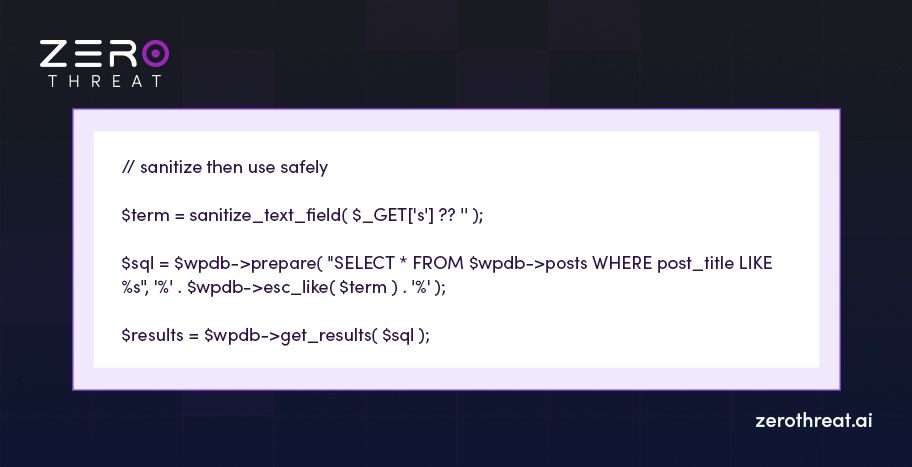
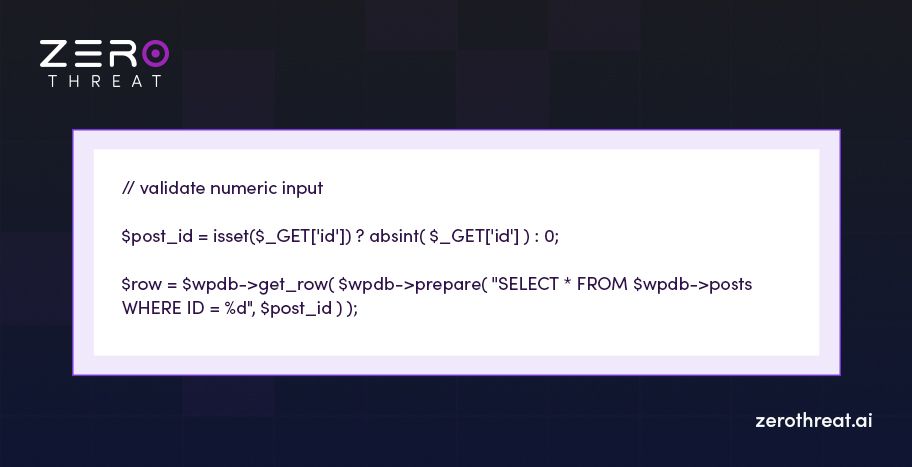
You can use WordPress helper functions to sanitize and validate common types (text, email, int, URL). After sanitizing, always pass values into prepared statements or WP APIs; don’t rely on escaping alone.
Practical patterns and code:
1. For text input (search, name)
2. Numeric ID (use whitelist for integers)
3. Email and URL
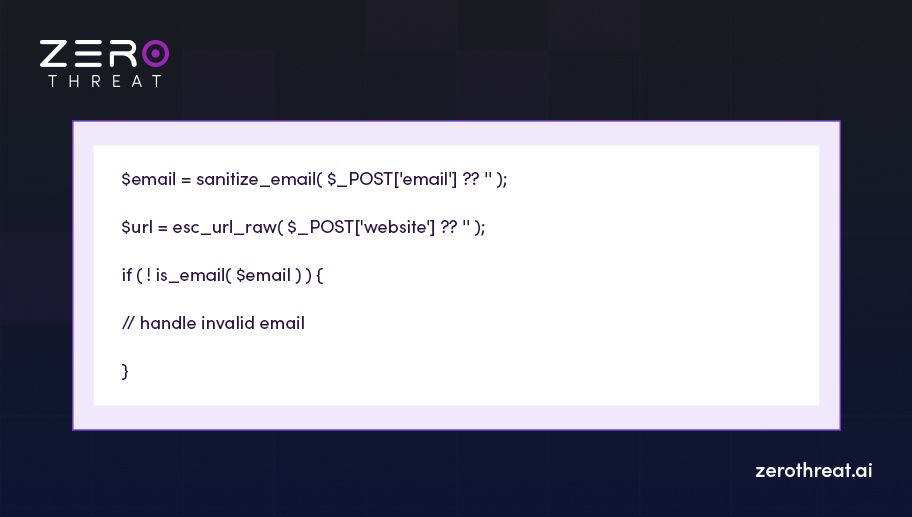
Sanitize and validate every incoming value on the server, then use prepared statements or WordPress APIs. This simple practice will help you prevent most SQL injection risks.
Method 4: Enforce Least Access Privileges
Give your WordPress database user only the rights it actually needs. If an attacker manages a WordPress SQL injection, limited DB privileges reduce the things they can do. They might read a few rows, but they won’t be able to drop tables, create new users, or write files if the DB user doesn’t have that permission.
How to implement:
- Run SHOW GRANTS FOR 'wp_user'@'localhost'; to see what the site account can do.
- Limiting privileges to SELECT, INSERT, UPDATE, and DELETE is enough for day-to-day work.
- Create a restricted user (example commands):
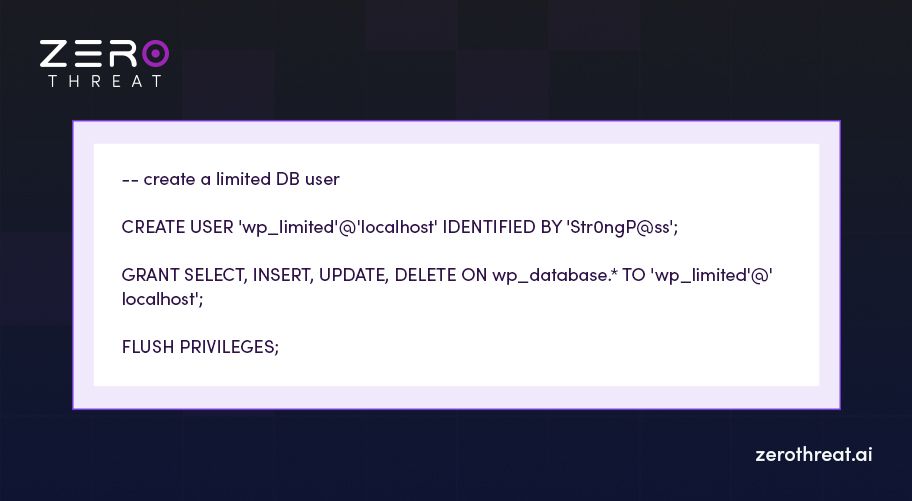
- Limit access to localhost or a specific host/IP. Avoid unexpected hosts like '%'.
- Keep DB credentials in wp-config.php and restrict file permissions so only the webserver user can read them.
- Schedule periodic audits (SHOW GRANTS) and remove any privileges no longer required.
Limiting database privileges to the bare minimum reduces the attack surface of an SQL injection on your website.
Method 5: Secure with a WordPress Plugin
A good security plugin is the quickest way to add multiple layers of security. It can help you implement multi-factor authentication, give you a WAF, and more. That reduces risk by blocking common SQLi payloads and notifying you when something odd happens.
How to implement:
- Choose from reputable plugins like Wordfence, Sucuri, or MalCare.
- Always take a full backup (files + DB) before installing security software.
- Install and activate the security plugin you selected.
- Turn on the WAF feature to block common SQL injection payloads and known exploit patterns.
- Scan for malware, suspicious DB entries, and known vulnerable plugins/themes.
- Turn on settings like: disable file editor, REST access restrictions, and database error suppression.
- Enable brute-force protection and IP rate limiting to stop repeated SQLi probes.
Install and configure a trusted WordPress security plugin to add immediate security. But don’t forget to pair it with secure coding and regular scans for full protection.
Method 6: Keep WordPress Updated
Keeping WordPress core, themes, and plugins up to date is one of the most effective ways to prevent SQL injection in WordPress. Patches often close known vulnerabilities, including SQLi flaws in third-party code.
How to implement:
- Always take a full backup (files + database) before updating.
- Test updates in staging or a local replica before you push to production.
- Make updating a routine: weekly for plugins/themes, and as soon as critical core patches arrive.
- If you want auto updates for everything, do it only with reliable backups and monitoring.
- Schedule vulnerability scans for commonly known vulnerable reasons and versions.
By keeping WordPress and other tools updated, you can make sure no vulnerabilities are present in the core, plugins, and themes.
Bonus Method: Use ZeroThreat to Secure Your Websites
Building a secure site isn’t just about fixing vulnerabilities after they appear. It’s about preventing them in the first place. That’s exactly what ZeroThreat is designed for. It’s a security testing platform built on zero trust architecture. That means it tests every request, input, and workflow with precision. This results in an application that is secure and resistant to OWASP top 10 vulnerabilities.
Here’s how you can get started with ZeroThreat in just a few steps:
- Sign up on ZeroThreat: Create your free account directly on the ZeroThreat website.
- Add your website: Enter your WordPress site URL or the application you want to test.
- Run a security scan: ZeroThreat automatically performs dynamic application security testing (DAST) to detect SQL injection vulnerabilities and other weaknesses.
- Review and Fix: Get a detailed report of issues, including possible SQL injection entry points, and apply the recommended fixes.
With ZeroThreat, you can scan your WordPress site, find vulnerabilities, and secure it against SQL injection and other cyberattacks before they happen.
Impact of SQL Injection on WordPress Websites
SQL injection is the second most critical vulnerability in WordPress. So, there is no way you should let it slide by. Here are some of the impacts an SQL injection can have on your site.
Data Breach and Theft
An SQL injection exploit can give attackers direct access to your database. That means customer data like emails, usernames, and even hashed passwords could be stolen. For eCommerce sites, the risk is even higher, since payment details and personal records may be exposed.
Website Defacement
Attackers don’t always steal; sometimes, they just want to disrupt. By using raw SQL queries, they can alter your site’s content or inject malicious scripts. This can lead to broken pages, spammy links, or even offensive material showing up on your homepage. This can damage user trust instantly.
Full Site Takeover
If left unchecked, a WordPress SQL injection vulnerability can allow hackers to create new admin accounts or escalate their privileges. The result? They can completely lock you out of your own dashboard, install backdoors, and take control of your site.
Search Engine Blacklisting
Google and other search engines quickly flag compromised websites. If your WordPress site gets hit by an SQL injection attack, your site could end up blacklisted. This downgrades your SEO efforts and may drive away visitors with browser security warnings.
Reputational Loss
The worst impact of all is when your brand loses its reputation. Once the customer has provided you with the data and knows it’s being breached, they won't trust your site’s security. For most businesses, recovering their reputation is the most challenging part of all.
Best Practices for WordPress Database Security
The WordPress database holds user accounts, posts, settings, and sometimes even customer data. If an attacker breaks into it through an SQL injection, the impact can be severe. But with the right practices followed, you can protect your site's data from getting exposed.
- Use a Strong Database Prefix: Change the default wp_ prefix during setup to make it harder for attackers to guess your table names.
- Enforce Strong Database Credentials: Always use a complex username and password for your database. Avoid “root” or other defaults.
- Limit Database User Privileges: Assign only the permissions your WordPress site needs. Don’t give write or admin rights unless required.
- Keep WordPress and Plugins Updated: Outdated code often creates vulnerabilities. Updates may patch database-related flaws that hackers target.
- Use SSL/TLS for Database Connections: Encrypt connections between WordPress and your database server. This prevents attackers from intercepting queries.
- Monitor Database Activity: Track unusual queries or spikes in database requests. Early detection often stops SQL injection attempts.
- Implement Input Validation: Validate and sanitize all user inputs before they touch the database. This blocks malicious SQL code from sneaking in.
- Use Parameterized Queries: Always rely on prepared statements or WordPress APIs. Parameterized queries stop attackers from injecting custom SQL commands.
Secure Your Website Before the Attackers Steal the Data Start for Free
Wrapping Up
WordPress powers a huge share of the internet, which makes it both a strength and a weakness. The popularity of WordPress attracts constant attention from attackers. A single SQL injection vulnerability can put customer data and your reputation at risk. But with preventative measures such as regular updates, input validation, and parameterized queries, you can reduce exposure.
Furthermore, you can use the CMS vulnerability scanner by ZeroThreat, which can help you detect weaknesses quickly. It allows you to stay ahead of attackers and ensure your site is fully secure.
Frequently Asked Questions
How serious is WordPress SQL injection?
SQL injection on a WordPress website is quite serious. An SQL injection can give attackers direct access to your WordPress database. That means sensitive data, admin accounts, and even your entire site could be hijacked. In most cases, the damage is financial and reputational, cutting off user trust.
What is the best defense against a WordPress SQL injection attack?
Can SQL injection be used to bypass WordPress logins?
What is a blind SQL injection in WordPress, and why is it dangerous?
What are the risks if a WordPress SQL injection attack is successful?
How often should WordPress websites be tested for SQL injection vulnerabilities?



Explore ZeroThreat
Automate security testing, save time, and avoid the pitfalls of manual work with ZeroThreat.