 ZeroThreat Wins Top InfoSec Innovators 2026 Award for Penetration Testing Read more

All Blogs
SaaS Security Best Practices: How to Protect Your SaaS Applications

A SaaS application can be secure today and become an attack path tomorrow. Every new user, API, integration, and permission adds another way in, and the numbers back that up. The Cloud Security Alliance found that 63% of organizations reported external data oversharing, while 56% said employees upload sensitive data to unauthorized SaaS applications.
That risk doesn't sit still either. Some reports show a 300% increase in SaaS breaches between September 2023 and 2024, a sign of just how fast SaaS environments are becoming a preferred target for attackers.
Put those two trends together, and the takeaway is clear. SaaS security can no longer mean protecting login credentials and calling it done. It has to cover identities, APIs, customer data, tenant boundaries, integrations, and application workflows across the entire SaaS lifecycle, not just the point where a user logs in.
This guide breaks down the SaaS security best practices that address these exact risks, helping SaaS teams build a stronger, more resilient security posture as your SaaS footprint keeps expanding.
Join growing SaaS teams securing their applications with AI-powered testing that takes minutes to start. Launch My Free Trial
Table of Contents
- What is SaaS Security?
- SaaS Security vs Cloud Security
- Why is SaaS Security Important?
- SaaS Security Best Practices to Defend Against Cyberattacks
- SaaS Security Shared Responsibility Model
- Common SaaS Security Mistakes to Avoid
- Top SaaS Cyber Security Solutions to Mitigate the Risks
- ZeroThreat for SaaS Application Security Testing
- Wrapping Up
What is SaaS Security?
SaaS security refers to the practices, technologies, and controls used to protect cloud-based software, customer data, identities, applications, and infrastructure from unauthorized access, attacks, and security breaches.
It covers multiple security layers, including identity and access management, data protection, API security, application security, tenant isolation, cloud configuration, and secure integrations. The goal is to protect both the SaaS provider and its customers.
SaaS security also focuses on securing the way applications are developed, deployed, and operated. This includes secure coding, vulnerability management, security testing, continuous monitoring, logging, and incident response across the application lifecycle.
A strong SaaS security program reduces exposure to threats such as account takeover, data leakage, broken access controls, API abuse, and business logic attacks. It also helps organizations maintain customer trust and meet applicable security and compliance requirements.
SaaS Security vs Cloud Security
Cloud security protects the entire cloud stack, including infrastructure, networks, and storage. SaaS security focuses specifically on identity, application logic, APIs, tenant isolation, configuration, and third-party integrations within hosted software.
| Aspect | SaaS Security | Cloud Security |
|---|---|---|
| Scope | Application layer: user access, data, configuration, integrations | Full stack: compute, storage, network, and infrastructure |
| Primary owner | Customer for identity, access, and data governance | Split between cloud provider and customer, depending on service model |
| Core focus | Identity and access management, API security, tenant isolation, misconfiguration | Network segmentation, workload protection, infrastructure hardening |
| Attack surface | User accounts, OAuth tokens, third-party app integrations, shared tenancy | Virtual machines, containers, storage buckets, network perimeters |
| Common risks | Over-permissioned accounts, shadow SaaS, insecure APIs, data leakage through integrations | Misconfigured cloud storage, insecure network rules, weak IAM at the infrastructure level |
| Example concern | An OAuth-connected app with excessive scopes accessing customer data | A publicly exposed S3 bucket or unrestricted security group |
| Governing model | Vendor secures the app, customer governs access and data | Shared responsibility model varies by IaaS, PaaS, or SaaS |
Why is SaaS Security Important?
SaaS security is essential for protecting customer data, applications, identities, and business operations from unauthorized access, data breaches, application attacks, and security failures.
1. Protects Sensitive Customer Data
SaaS platforms often process sensitive information such as personal data, business records, credentials, and financial information. Strong access controls, encryption, secure data storage, and data protection measures help prevent unauthorized exposure and reduce the impact of data breaches.
2. Prevents Unauthorized Access
Weak authentication and authorization can allow attackers to compromise accounts or access resources they should not control. MFA, role-based access control, session security, and least-privilege access help ensure that users can access only the resources they are authorized to use.
3. Secures APIs and Application Workflows
APIs connect SaaS applications with users, services, and external systems. Poorly secured APIs can expose sensitive data or functionality. SaaS security helps identify issues such as broken access control, excessive data exposure, insecure endpoints, and flaws in application workflows.
4. Protects Multi-Tenant Environments
Multi-tenancy allows multiple customers to use the same SaaS platform while keeping their data and resources isolated. A failure in tenant isolation can result in cross-tenant data exposure. Strong authorization controls and tenant-aware security testing help prevent these risks.
5. Reduces Application-Level Attack Risks
SaaS applications can contain vulnerabilities that attackers exploit through real user workflows. Security testing helps uncover issues such as injection flaws, insecure authentication, privilege escalation, business logic vulnerabilities, and broken access controls before they become serious security incidents.
6. Secures Third-Party Integrations
SaaS platforms commonly depend on payment providers, identity services, cloud platforms, APIs, plugins, and other external integrations. Each connection can introduce additional attack paths. Reviewing permissions, authentication flows, data exchange, and integration security helps reduce third-party risk.
7. Maintains Customer Trust and Compliance
Security incidents can damage customer confidence and create regulatory or contractual consequences. A mature SaaS security program supports security requirements across data protection, access management, vulnerability management, monitoring, and incident response while helping organizations demonstrate responsible security practices.
Prevent threats, stay compliant, and scale your SaaS safely. No expertise is needed! Secure My SaaS App
12 SaaS Security Best Practices to Defend Against Cyberattacks
SaaS security best practices help protect applications, customer data, identities, APIs, and cloud environments from unauthorized access and evolving threats while supporting secure development, continuous testing, and regulatory requirements.
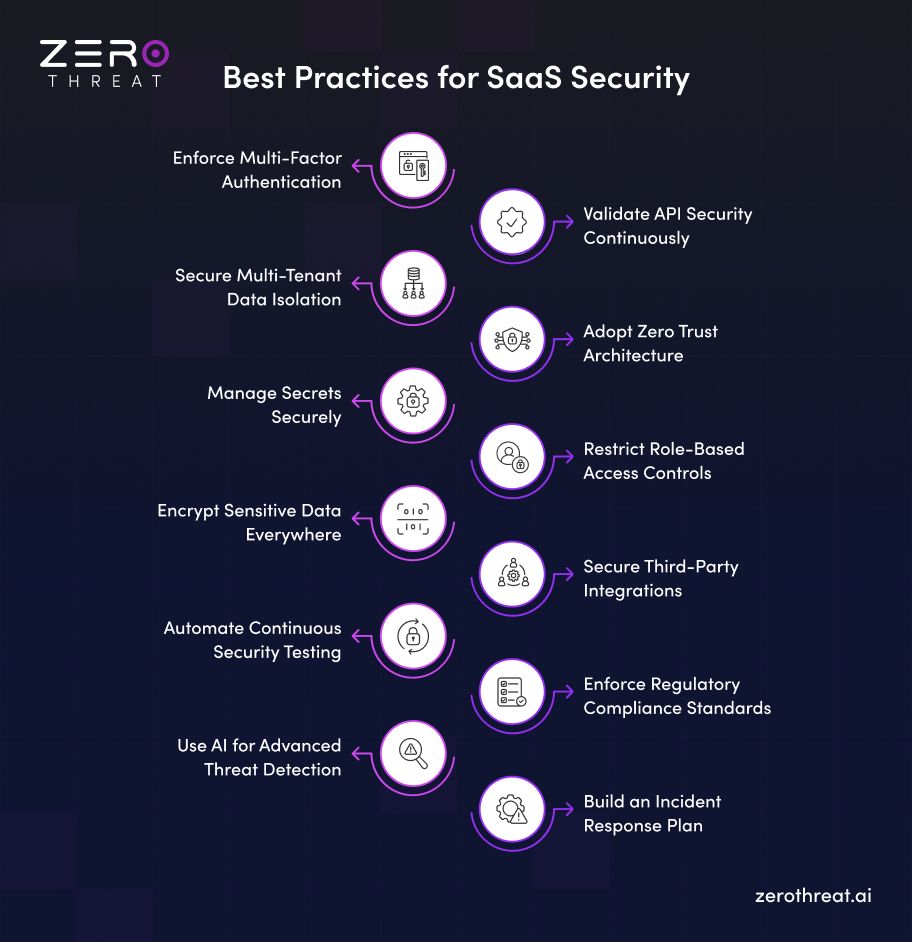
Enforce Multi-Factor Authentication
Require multi-factor authentication for users, administrators, and privileged accounts to reduce the risk of credential-based attacks. Combining passwords with authenticator apps, security keys, or biometric verification adds another layer of identity protection and helps prevent account takeover when credentials are compromised.
Validate API Security Continuously
Continuously test and monitor APIs for authentication flaws, broken authorization, excessive data exposure, injection vulnerabilities, and insecure endpoints. Regular API security testing helps identify weaknesses as APIs change and ensures that sensitive SaaS functionality and customer data remain protected against evolving attack techniques.
Secure Multi-Tenant Data Isolation
Maintain strict isolation between customer environments so one tenant cannot access another tenant's data or resources. Enforce tenant-aware authorization, validate object-level permissions, and test cross-tenant access paths regularly to reduce the risk of data leakage and unauthorized resource access.
Adopt Zero Trust Architecture
Apply Zero Trust principles by continuously verifying identities, devices, users, and access requests instead of automatically trusting internal or authenticated users. Least-privilege access, continuous verification, network segmentation, and strong authorization controls help reduce lateral movement and limit unauthorized access within SaaS environments.
Manage Secrets Securely
Store API keys, database credentials, tokens, and encryption keys in dedicated secrets management systems instead of source code or configuration files. Apply strict access controls, rotate credentials regularly, and monitor secret usage to reduce credential exposure and prevent attackers from exploiting compromised secrets.
Restrict Role-Based Access Controls
Implement role-based access control (RBAC) to ensure users receive only the permissions required for their responsibilities. Define granular roles, review privileges regularly, remove unnecessary access, and apply least-privilege principles to reduce unauthorized actions and limit the impact of compromised accounts.
Encrypt Sensitive Data Everywhere
Encrypt data at rest and in transit using strong, current algorithms like AES-256 and TLS 1.3 with forward secrecy. Weak or outdated encryption leaves sensitive data readable if attackers intercept traffic or access storage. Proper key management, including rotation and secure storage, keeps encryption effective against evolving cryptographic attacks.
Secure Third-Party Integrations
Assess the security of third-party applications, APIs, plugins, identity providers, and cloud services connected to your SaaS platform. Review permissions, authentication mechanisms, data-sharing practices, and vendor security controls regularly to reduce supply chain risks and prevent compromised integrations from creating new attack paths.
Automate Continuous Security Testing
Integrate automated security testing throughout the SaaS development lifecycle to identify vulnerabilities before they reach production. Combine vulnerability scanning, DAST, API security testing, and automated penetration testing with CI/CD workflows to continuously validate application security as code, configurations, and features change.
Enforce Regulatory Compliance Standards
Align SaaS security controls with applicable regulatory and industry requirements such as SOC 2, ISO 27001, GDPR, HIPAA, and PCI DSS. Maintain appropriate access controls, data protection, security monitoring, documentation, and audit trails to support compliance while strengthening the overall security posture.
Use AI for Advanced Threat Detection
Use AI-driven security tools to analyze application behavior, identify suspicious patterns, correlate security signals, and detect emerging threats. AI can help security teams discover complex attack paths and prioritize potential risks faster, while supporting continuous monitoring and more efficient security operations.
Build an Incident Response Plan
Create a documented incident response plan that defines how your SaaS team detects, contains, investigates, and recovers from security incidents. Assign clear responsibilities, establish communication procedures, preserve relevant logs and evidence, and conduct regular incident response exercises to improve organizational readiness.
SaaS Security Shared Responsibility Model
The SaaS shared responsibility model divides security responsibilities between the provider and the customer. The provider secures the application and underlying service, while users remain responsible for secure access, configurations, data handling, and account management.
SaaS Provider’s Responsibilities
SaaS providers are responsible for securing the application, infrastructure, and services that support their platform. This includes protecting customer environments from vulnerabilities and maintaining appropriate security controls across the SaaS stack.
Key responsibilities include:
- Application security: Identify and remediate vulnerabilities in application code, dependencies, and services.
- Infrastructure security: Protect servers, networks, databases, containers, and cloud resources supporting the SaaS platform.
- Data protection: Apply encryption, secure storage, backup, and data protection controls.
- Identity security: Secure authentication mechanisms, session management, and privileged access.
- Tenant isolation: Prevent unauthorized access between customer environments in multi-tenant architectures.
- Security monitoring: Detect suspicious activity and respond to security incidents.
Providers should also conduct regular security testing, maintain vulnerability management processes, and communicate relevant security incidents or changes to customers.
SaaS User’s Responsibilities
SaaS users are responsible for securing how their organization accesses and uses the platform. Even when the provider maintains strong application security, poor customer-side security practices can expose accounts, data, and business workflows.
Key responsibilities include:
- Access management: Apply least privilege, RBAC, and MFA across user accounts.
- Credential security: Protect passwords, API keys, tokens, and other authentication secrets.
- Data management: Control what sensitive information is stored, shared, and processed through the platform.
- Configuration security: Review security settings, permissions, integrations, and connected applications.
- User awareness: Train employees to recognize phishing, credential theft, and other account-based threats.
- Monitoring: Review account activity and investigate unusual access or configuration changes.
Organizations should regularly review their SaaS security posture and ensure internal controls align with their risk, compliance, and data protection requirements.
Find the right plan for your team and start scaling SaaS security without stretching your budget. Explore Plans
Common SaaS Security Mistakes to Avoid
Even strong security programs fail when basic mistakes go unaddressed. Recognizing these common SaaS security gaps helps organizations close vulnerabilities before attackers exploit them.
- Relying only on passwords: Using passwords without MFA increases exposure to credential theft, phishing, brute-force attacks, and account takeover.
- Ignoring API security: Treating APIs as trusted interfaces can leave authentication, authorization, input validation, and sensitive data exposed to attackers.
- Overlooking tenant isolation: Failing to test tenant boundaries can allow unauthorized cross-tenant access to customer records, files, or application resources.
- Excessive user privileges: Granting users unnecessary permissions increases the impact of compromised accounts and creates opportunities for privilege escalation.
- Hardcoding secrets: Storing API keys, tokens, or credentials in source code or configuration files increases the risk of accidental exposure and credential abuse.
- Skipping continuous testing: Relying on occasional security assessments can leave newly introduced vulnerabilities, API flaws, and application changes undetected between testing cycles.
- Neglecting third-party risk: Unreviewed integrations, vendors, and connected services can introduce additional attack paths and weaken the security of the SaaS environment.
- Treating compliance as security: Meeting compliance requirements alone does not guarantee strong security against application vulnerabilities, business logic attacks, or evolving threats.
- Ignoring security monitoring: Without effective logging and monitoring, teams may miss suspicious authentication activity, abnormal API requests, and indicators of compromise.
- Lacking an incident response plan: Without defined response procedures, teams may struggle to contain breaches, investigate incidents, communicate effectively, and restore affected SaaS services.
Top SaaS Cyber Security Solutions to Mitigate the Risks
SaaS cybersecurity solutions help organizations identify misconfigurations, control cloud access, protect sensitive data, and continuously monitor SaaS environments for security risks and compliance gaps.

SaaS Security Posture Management (SSPM)
SSPM solutions continuously assess SaaS applications for security misconfigurations, excessive permissions, weak authentication, compliance gaps, and risky settings. They help security teams maintain visibility across SaaS applications, enforce security policies, identify configuration drift, and reduce exposure caused by poorly secured SaaS environments.
Cloud Access Security Broker (CASB)
A CASB provides visibility and security controls between users and cloud services. It helps organizations enforce access policies, detect unauthorized SaaS usage, monitor cloud activity, and protect sensitive information through capabilities such as threat detection, data security, access control, and compliance monitoring.
Cloud Security Posture Management (CSPM)
CSPM tools continuously identify security risks and misconfigurations across cloud infrastructure and services. They can detect exposed storage, excessive permissions, insecure network configurations, and compliance violations, helping security teams improve cloud security posture and reduce infrastructure-level attack surfaces.
Data Loss Prevention (DLP)
DLP solutions help prevent sensitive information from being accidentally or intentionally exposed through SaaS applications, endpoints, and cloud services. They identify and classify sensitive data, enforce protection policies, monitor data movement, and block unauthorized sharing or transmission based on organizational security requirements.
ZeroThreat for SaaS Application Security Testing
ZeroThreat transforms SaaS application security testing by delivering AI-powered, automated penetration testing with 99.9% accuracy. It simulates real-world attacker workflows safely across live applications, eliminating noise and reducing reliance on manual testing effort.
Modern SaaS platforms require deep security checks for multi-tenant isolation, authenticated user roles, and complex single sign-on flows. ZeroThreat effortlessly crawls single-page applications and tests complex session behaviors across multi-factor authentication, OAuth, and role-based permissions without tedious manual setup.
The platform automatically maps the entire attack surface, uncovering shadow APIs, broken object-level authorization (BOLA), and business logic vulnerabilities. Validating over 130,000 real-world attack paths, it detects hidden security gaps that static code scanners routinely miss.
By integrating ZeroThreat seamlessly into CI/CD pipelines, engineering teams can run automated security scans in 0.5 to 2 hours. It provides developer-friendly fix guidance and audit-ready compliance reporting for PCI DSS, HIPAA, and GDPR.
Book a live walkthrough and see exactly how ZeroThreat fits into your SaaS security workflow. Get in Touch
Wrapping Up
SaaS security is not a one-time setup. It requires continuous attention across identity management, access control, data protection, and every integration connected to your growing application ecosystem.
The organizations that stay protected treat these best practices as ongoing habits, not checklist items. Strong authentication, least privilege access, encryption, and continuous testing work together to close gaps before attackers find them.
Building this level of protection does not require a large security team. ZeroThreat automates SaaS security testing with AI-driven precision, helping you catch vulnerabilities early. Try for free and see the difference.
Frequently Asked Questions
How to secure a SaaS application?
Secure a SaaS application by protecting authentication, authorization, APIs, application workflows, customer data, and tenant boundaries. Continuous vulnerability scanning, penetration testing, secure development practices, and monitoring help identify and reduce security weaknesses.
What are the biggest SaaS security risks?
How often should SaaS applications be security tested?
Is SaaS security the responsibility of the provider or customer?
Explore ZeroThreat
Automate security testing, save time, and avoid the pitfalls of manual work with ZeroThreat.