 ZeroThreat Wins Top InfoSec Innovators 2026 Award for Penetration Testing Read more


All Blogs

Quick Overview: This guide compares free and paid pentesting tools to help you choose the right one. It explains what each option is, their key advantages and limitations, and when to use or avoid them. It also covers the factors that matter most, a step-by-step selection process, and a side-by-side comparison table for quick reference at the start.
Proactive cybersecurity is a predominant choice for organizations today. This allows them to stay ahead of cyber criminals by regularly identifying and resolving potential weaknesses. However, this wouldn’t be possible without an AI pentesting tool that security teams and developers use to detect even complex vulnerabilities with accuracy.
But when it comes to choosing these tools, they face the dilemma of free vs paid penetration testing tools. Probably, you are in a similar dilemma and looking for a detailed comparison to make the right choice. Worry not!
This blog covers both free and paid pen test tools in detail and provides a comparison to help you make an informed choice. So, keep reading to get out of your dilemma.
Free tools hand you findings. See what changes when your tool hands you validate proof. See the Difference
On This Page
- Free vs Paid Pentesting Tools: Quick Comparison
- What is a Penetration Testing Tool?
- What are Free Penetration Testing Tools?
- Free Pentesting Tools: Key Advantages and Limitations
- When to Use and Not to Use Free Pentesting Tools
- What are Paid Penetration Testing Tools?
- Paid Pentesting Tools: Key Advantages and Limitations
- When to Use and Not to Use Paid Pentesting Tools
- Key Factors to Consider When Choosing a Pentesting Tool
- Paid vs Free Penetration Testing Tools: Choose the Right Option
- To Wrap Up
Free vs Paid Pentesting Tools: Quick Comparison
Free and paid pentesting tools differ mainly in how much work they take off your team. This table compares them across the dimensions that matter most when choosing between them.
| Factor | Free Pentesting Tools | Paid Pentesting Tools |
|---|---|---|
| Cost | No license fee, but setup and maintenance take team time | Subscription or license fee that often grows with scope |
| Setup and maintenance | Handled by your team | Largely handled by the vendor |
| Coverage | Usually focused on one area, so full coverage needs several tools | Broader coverage across web applications, APIs, and infrastructure |
| Automation | Limited, with more manual operation | High, from discovery through validation |
| Accuracy and validation | Findings usually need manual validation | Often includes built-in validation to reduce false positives |
| Reporting | Basic and rarely compliance-ready | Detailed reports with evidence and remediation guidance |
| Scalability | Harder to run across many applications and releases | Built for scheduled, repeatable testing at scale |
| Support | Community forums and documentation | Dedicated vendor support, often with service-level agreements |
| Updates | Vary by project | Delivered regularly by the vendor |
| Customization | High, especially with open-source tools | Limited, particularly with closed-source products |
| Best suited for | Learning, targeted manual testing, and skilled teams on tight budgets | Compliance, continuous testing, and teams with limited pentesting expertise |
What is a Penetration Testing Tool?
A penetration testing tool is software that helps security testers simulate real attacks against an application, network, or system to find vulnerabilities and check whether they can be exploited. It handles the repetitive and technical parts of a test, such as discovering assets, sending crafted requests, analyzing responses, and recording evidence, so testers can focus on judgment and impact.
What Penetration Testing Tools Do
Most tools cover one or more of these jobs:
- Discovery and Mapping: Finding hosts, open ports, services, endpoints, and the overall attack surface.
- Vulnerability Detection: Testing inputs, authentication, sessions, and configurations for known and common weakness patterns.
- Validation and Exploitation: Confirming that a finding is real and, where authorized, demonstrating its impact in a controlled way.
- Evidence and Reporting: Capturing requests, responses, and proof so findings can be reproduced and fixed.
What are Free Penetration Testing Tools?
A free penetration testing tool is a security testing tool you can use without paying a license fee. They usually come in one of three forms:
- Open-Source Tools: Built and maintained by a community, with publicly available source code that anyone can use, inspect, and modify.
- Community Editions: Limited versions of commercial products, offered at no cost with fewer features, lower scan limits, or no vendor support.
- Free Tiers and Trials: Hosted or commercial tools that are free within usage caps or for a limited period.
They cover the same broad categories as paid tools, including network discovery, web application and API testing, and exploitation frameworks. What differs is how much of the work the tool does for you.
Free Pentesting Tools: Key Advantages and Limitations
Free pentesting tools offer low-cost access to proven testing capabilities and a lot of flexibility, but they shift the work of setup, validation, and reporting onto your team. The right call depends on how much skilled time you have to spend.
Key Advantages
- No License Cost: Teams can start testing without budget approval.
- Transparent and Customizable: Open-source code can be inspected, extended, and scripted.
- Strong Community Support: Active user communities provide plugins, guides, and fixes.
- Good for Learning: Ideal for building hands-on pentesting skills.
- Flexible for Targeted Tasks: Works well for specific checks such as port scanning or request manipulation.
- No Vendor Lock-in: Tools can be swapped or combined freely.
Key Limitations
- Hidden Time Cost: Setup, configuration, and maintenance fall on your team.
- Limited Automation: Many tools need manual operation and expert input.
- Narrow Coverage: Each tool tends to cover one area, so full coverage needs several tools.
- Manual Validation: Testers must confirm findings and filter out false positives themselves.
- Basic Reporting: Reports are minimal and rarely compliance-ready.
- Weak Scalability: Hard to run consistently across many applications or on every release.
- Limited or No Support: Troubleshooting depends on community help, not a service-level agreement.
- Inconsistent Updates: Maintenance varies by project and can lapse.
These gaps are where paid tools usually step in, so the next section covers what they offer and what to watch for.
When to Use and Not to Use Free Pentesting Tools
Use free pentesting tools when skilled people, a limited scope, and a tight budget are the main factors. Avoid them when you need scale, compliance-ready evidence, or dependable support.
When to Use Free Pentesting Tools
- Learning and Training: Free tools suit students and junior testers who want hands-on practice with real attack techniques in lab environments without any licence cost.
- Targeted, Manual Testing: Experienced testers can use free tools for specific checks such as port scanning or request manipulation, where their own expertise drives the test.
- Early-Stage or Low-Risk Applications: Small teams with simple applications and limited budgets can use free tools for baseline checks before investing in broader coverage.
- Supplementing Paid Tools: Free tools can add a second opinion or fill niche gaps that a primary commercial tool does not cover well in practice.
When Not to Use Free Pentesting Tools
- Compliance-Driven Testing: Free tools rarely produce audit-ready reports or evidence, so teams facing regulatory or customer security requirements usually need stronger documentation and traceability.
- Continuous Testing at Scale: Running free tools across many applications or every release demands heavy scripting and upkeep, which quickly outweighs the savings on licensing.
- Limited In-House Expertise: Without testers who can configure tools, validate findings, and filter false positives, results become noisy and critical issues may go unconfirmed or unnoticed.
- Complex or Business-Critical Applications: Apps with multi-step workflows, heavy API use, or sensitive data need deeper, validated coverage than most single free tools provide.
- Need for Dependable Support: When production testing is at stake, community forums cannot match dedicated vendor support with service-level agreements and guaranteed response times.
If these limits apply to your situation, paid tools are the next option to evaluate. So, the following section covers what they offer and what to watch out for.
Free tools find. Paid tools scale. AI pentesting validates, reports, and keeps retesting. Explore AI Pentesting
What are Paid Penetration Testing Tools?
Paid penetration testing tools are commercial security testing products that you license through a subscription or a one-time purchase, usually with vendor support, regular updates, and built-in reporting. They typically come in a few forms:
- Commercial Desktop or Professional Editions: Full-featured versions of tools that testers install and operate themselves, often building on a free community edition.
- Automated Testing Platforms: Software that runs discovery, testing, and validation with limited manual effort, often delivered as a hosted or self-managed platform.
- Enterprise Suites: Broader products that combine testing with scheduling, team collaboration, dashboards, and integrations.
Paid tools cover the same categories as free ones, including network, web application, and API testing. The difference is how much the product handles for you: broader coverage, automation, validation, ready-made reports, and a vendor responsible for fixes and updates.
A paid tool is still software, not a pentest in itself. It supports the testing process but does not replace skilled judgment, especially for complex business logic and unusual attack paths. The licence also does not guarantee quality, so features and claims still need to be verified against your own applications.
Paid Pentesting Tools: Key Advantages and Limitations
Paid pentesting tools offer broader coverage, automation, and vendor backing, but they add licence costs and still need verification against your own applications.
Key Advantages
- Broader Coverage: A single product often tests web applications, APIs, and infrastructure.
- Automation: Discovery, testing, and validation run with far less manual effort.
- Scalability: Testing can run across many applications and on every release.
- Fewer False Positives: Built-in validation helps confirm findings before they reach your team.
- Ready-Made Reporting: Reports include evidence, severity, and remediation guidance, often mapped to compliance needs.
- Vendor Support: Dedicated help and service-level agreements back production use.
- Regular Updates: New vulnerability checks and fixes are delivered consistently.
- Workflow Integration: CI/CD, ticketing, and collaboration tools connect with less custom work.
Key Limitations
- License Cost: Subscriptions can become expensive as applications, users, or scans grow.
- Vendor Dependence: Switching tools later can mean migrating workflows, data, and reports.
- Uneven Quality: Capabilities and marketing claims vary, so each tool needs testing on your own applications.
- Not a Full Pentest: Automation does not replace skilled testers for complex business logic and unusual attack paths.
- Less Customization: Closed-source tools offer fewer ways to modify or inspect how tests work.
- Onboarding Effort: Setup, authentication configuration, and team training still take time.
When to Use and Not to Use Paid Pentesting Tools
Use paid pentesting tools when you need scale, compliance-ready evidence, or dependable vendor support. Avoid them when your needs are small, your budget is tight, or you expect a tool to replace skilled testers.
When to Use Paid Pentesting Tools
- Compliance-Driven Testing: Paid tools produce audit-ready reports with evidence and remediation guidance, helping teams meeting regulatory, customer, or certification requirements document their security testing consistently.
- Continuous Testing at Scale: Automation and scheduling let teams test many applications and every release without maintaining custom scripts, keeping coverage consistent as the environment grows.
- Limited In-House Expertise: Built-in validation and guided remediation help smaller security teams and developers act on findings without needing deep pentesting skills to interpret every result.
- Complex or Business-Critical Applications: Applications with authenticated workflows, heavy API use, or sensitive data benefit from deeper, validated coverage and a vendor accountable for accuracy and updates.
- DevSecOps Workflows: Native CI/CD and ticketing integrations send findings into developer workflows, so issues are caught and fixed during development instead of after release.
When Not to Use Paid Pentesting Tools
- Learning and Practice: License costs are hard to justify for students and beginners, and free tools give more hands-on exposure to how attacks and testing techniques actually work.
- Small, Simple, Low-Risk Applications: Teams with a few simple applications and no compliance pressure may find that subscription costs outweigh the value of the extra automation and reporting.
- Highly Customized Testing: Closed-source tools limit customization, so experienced testers who need to modify techniques or script unusual attack paths may be better served by open tools.
- Replacing a Full Penetration Test: Automation does not replace skilled testers for complex business logic and novel attack paths, so a tool alone is not a complete penetration test.
- Buying on Vendor Claims Alone: Capabilities and accuracy vary widely between vendors, so a tool should be tested against your own applications before you commit to a contract.
Budget approved or still deciding? See which plan matches the way you test. See Pricing Plans
Key Factors to Consider When Choosing a Pentesting Tool
Choose a pentesting tool by matching its capabilities to your team's skills, your application's complexity, and your testing needs, not by price alone. The factors below follow the order most teams evaluate them: who runs the tool, what it tests, how often, and what it costs to sustain.
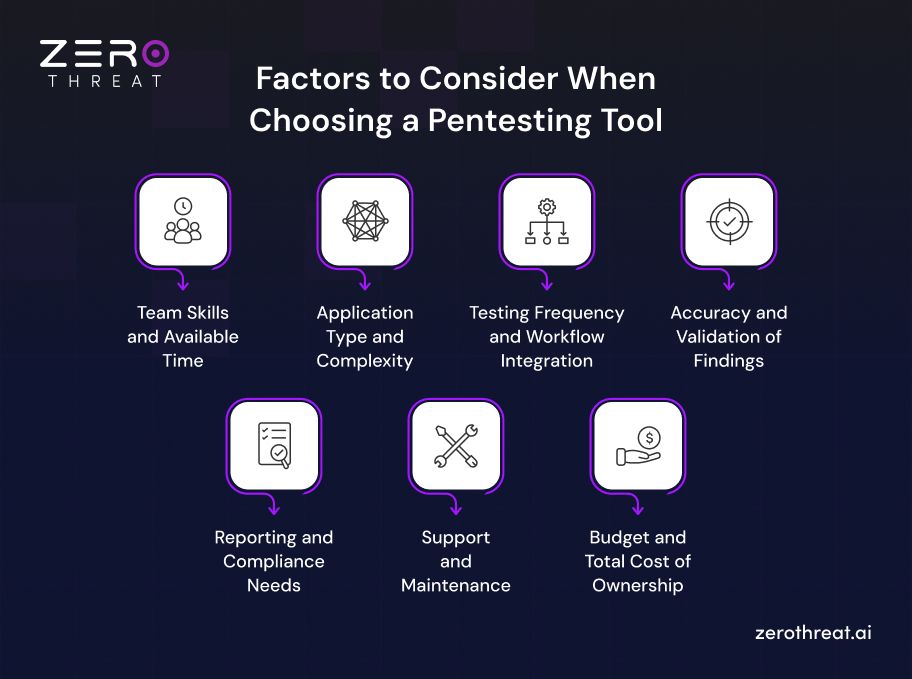
1. Team Skills and Available Time
Free tools reward experienced testers who can configure them, validate findings, and write reports. If your team is small or new to pentesting, a tool that automates validation and guides remediation will save more time than a free license saves money.
2. Application Type and Complexity
Check that the tool covers your actual attack surface, including web applications, APIs, and authenticated workflows. Applications with multi-step logins, role-based access, or heavy API use need deeper coverage than a tool built for simple, public pages can provide.
3. Testing Frequency and Workflow Integration
An annual test can tolerate manual effort, but testing every release cannot. If you ship often, prioritize scheduling, automation, and CI/CD integration so findings reach developers during development, with issues tracked in the tools they already use.
4. Accuracy and Validation of Findings
A tool that floods your team with false positives wastes the time it was meant to save. Look for evidence-backed findings and validation that confirms exploitability, then run the tool against your own application to verify its accuracy before committing.
5. Reporting and Compliance Needs
If audits or customers require proof of testing, reports need evidence, severity ratings, and remediation guidance. A report supports compliance efforts but does not make you compliant, so confirm what your frameworks expect as evidence before choosing.
6. Support and Maintenance
Consider who fixes problems and keeps vulnerability checks current. Free tools rely on community help and uneven updates, while paid tools typically include dedicated support and regular updates. Reliable help matters most when you test production systems.
7. Budget and Total Cost of Ownership
Compare the full cost, not just the licence. Free tools cost setup, maintenance, and skilled hours. Paid tools cost subscriptions that grow with scope. The better option is whichever demands less combined money and time for your needs.
Paid vs Free Penetration Testing Tools: Choose the Right Option
Choose between free and paid pentesting tools by defining what you need to test, comparing it against your team's capacity, and trialing shortlisted tools on your own application before committing. The six steps below turn the factors above into a decision.
1. Define Your Scope and Testing Goals
List the applications, APIs, and environments you need to test, and why. A learning lab, a pre-release check, and a compliance audit call for very different tools. Clear goals prevent you from buying too much or settling for too little.
2. Assess Your Team's Skills and Capacity
Be honest about who will run the tool. Experienced testers can handle setup, validation, and reporting on free tools. If your team is small or developer-led, estimate how many hours per month you can realistically spare for tool upkeep.
3. Rank Your Must-Have Requirements
Pick the three or four factors that matter most, such as authenticated testing, CI/CD integration, or audit-ready reports. Treat these as pass or fail criteria. Any tool that misses a must-have is out, whether it is free or paid.
4. Shortlist and Trial Against Your Own Application
Select two or three candidates, including at least one free and one paid option, and test them on a staging copy of your application. Compare coverage, false positives, setup time, and report quality. Only test systems you are authorized to test.
5. Calculate the Real Cost of Each Option
Use trial results to estimate total cost. For free tools, add hours spent on setup, validation, and reporting. For paid tools, add subscription growth as scope expands. Compare the combined cost of money and time, not the license price.
6. Decide, Then Review as Your Needs Change
Choose free, paid, or a combination, such as free tools for targeted manual checks and a paid platform for scheduled coverage. Revisit the decision when your application count, release pace, or compliance obligations change. Neither replaces manual testing for complex business logic.
Your next release shouldn’t ship on guesswork. Run an AI pentest that proves what’s exploitable. Get Started Now!
To Wrap Up
Free and paid pentesting tools solve the same problem in different ways. Free tools offer flexibility and zero license cost, but depend on skilled people. Paid tools offer automation, validation, and support, but add subscription costs.
Neither option is better in every situation. Free tools suit learning, targeted manual testing, and experienced teams with limited budgets. Paid tools suit compliance needs, frequent releases, complex applications, and teams without deep pentesting expertise.
The right choice comes from your own context. Define your scope, assess your team's capacity, rank must-have requirements, then trial shortlisted tools on your own application and compare the true cost in money and time.
You can get 10X better results in security testing by leveraging ZeroThreat’s AI pentesting tool that allows you to conduct free pentests faster and detect vulnerabilities with 99.9% accuracy at zero cost.
With easy integration into the development environment, you can leverage this tool to conduct pentests within your DevOps workflow. Ready to get started? Try now for free
Frequently Asked Questions
What are the benefits of free pen test tools over paid ones?
Free pen test tools remove license costs, offer open-source transparency, and allow deep customization through scripts and plugins. They also avoid vendor lock-in and suit hands-on learning. For experienced testers running targeted checks such as port scanning or request manipulation, they give strong control without subscription cost.
When should I prefer a free pentesting tool over a paid one?
How to pick an option between free and paid pentesting tools?
Can free penetration testing tools be used in CI/CD?


Explore ZeroThreat
Automate security testing, save time, and avoid the pitfalls of manual work with ZeroThreat.