 ZeroThreat Wins Bronze Stevie® Award in Tech Startup of the Year Read more

All Blogs

Quick Overview: Clickjacking remains one of the most deceptive threats on the web today. This blog breaks down what a clickjacking attack is, how attackers manipulate hidden elements to hijack clicks, and the common techniques used, including likejacking, cookiejacking, filejacking, and cursorjacking. It also covers the real impact of these attacks and practical prevention tips to secure your website.
A single misplaced click can hand your account to a stranger. That is the quiet danger of clickjacking, an attack that stays hidden on websites you trust every day.
Researchers found that almost two thirds of the top banking sites and 70% of the top 10 most visited websites had no countermeasures against clickjacking attacks, leaving millions of users exposed without realizing it. More recently, a 2025 disclosure revealed clickjacking flaws in major password managers, putting roughly 32.7 million active installations at risk of credential theft.
Clickjacking is a persistent, evolving threat that targets the trust you place in familiar interfaces. If you don't detect it with an advanced vulnerability scanner, it can cost millions to you and your users.
This guide breaks down exactly how clickjacking attacks exploit interface layers, how attackers structure their payloads, and the essential prevention steps needed to secure web assets effectively.
Clickjacking hides in plain sight. Catch it before attackers exploit your users. Get Started Free
Table of Contents
- What is a Clickjacking Attack?
- How Does a Clickjacking Attack Work?
- Common Types of Clickjacking Attacks
- What are the Different Techniques of Clickjacking Attack?
- What is the Impact of Clickjacking?
- How to Prevent Clickjacking Attacks?
- To Wrap Up
What is a Clickjacking Attack?
Clickjacking is a web security attack where an attacker tricks a user into clicking something different from what they actually see on screen. A hidden malicious layer sits beneath the visible interface.
Also called UI redressing, this technique relies on deceptive interface design and embedded iframes. Attackers overlay transparent or disguised elements over legitimate buttons, links, or forms to hijack genuine user intent.
In this attack, the victims believe they are interacting normally with a trusted website, while their clicks silently trigger unauthorized actions like account changes, fund transfers, or permission grants.
Clickjacking exploits trust in visual interfaces, not just code flaws. That makes it a constant risk for any website handling logins, payments, or other sensitive user actions.
How Does a Clickjacking Attack Work?
A clickjacking attack works by overlaying an invisible frame over a legitimate web page to trick users into executing hidden actions. Attackers manipulate the visual interface to hijack user clicks unknowingly.
Here is the step-by-step process of how an attacker executes a clickjacking attack:
Recreate this image (Title: Step-by-step Process to Clickjacking Attack)
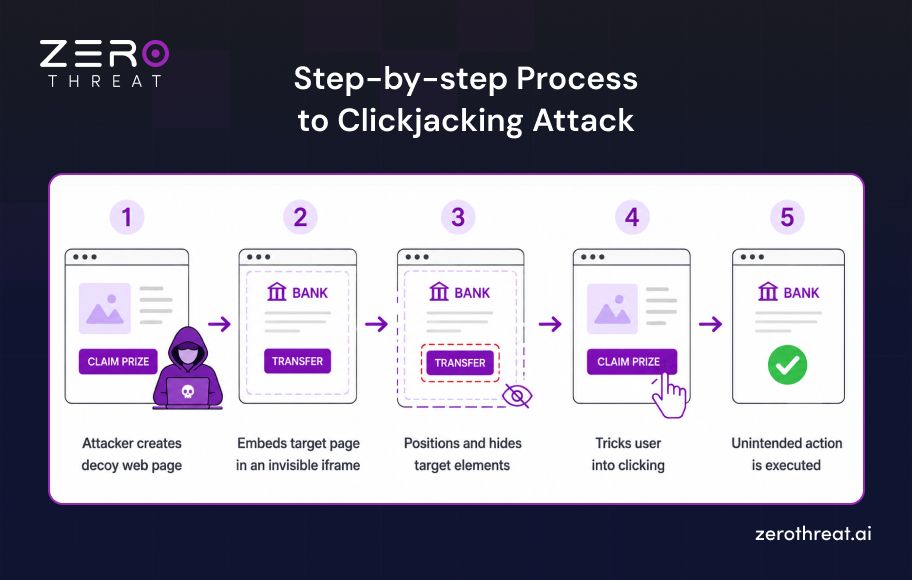
1. Creating the Decoy Web Page
The attacker builds an attractive, harmless-looking website designed to lure target users. This page contains engaging elements, such as a fake prize claim button, a play button for a video, or an appealing survey link.
2. Embedding the Target Page in an Inline Frame
Inside the decoy site, the attacker uses an HTML <iframe> element to load a legitimate, sensitive target application. The target page is usually a banking portal, a social media platform, or an account management dashboard where the user is already authenticated.
3. Positioning and Hiding the Target Elements
Using CSS positioning, the attacker aligns the sensitive button on the hidden target page precisely over the decoy page's visible button. The attacker then sets the opacity of the target <iframe> to zero, making it completely transparent to the user.
4. Tricking the User into Clicking
The attacker uses phishing, malicious ads, or social engineering to drive traffic to the decoy site. When a user visits the page and clicks the visible decoy button, the browser registers the click on the invisible layer positioned above it instead.
5. Executing Unintended Actions
Because the user is actively logged into the target application, the browser sends valid session cookies along with the click request. The application executes the action, such as transferring funds, changing account credentials, or granting authorization permissions, completely without the user's consent.
Clickjacking exploits gaps manual testing overlooks. Let automated pentesting close them fast. Run AI-Powered Pentesting
Common Types of Clickjacking Attacks
Clickjacking attacks can target different browser interactions, from social media engagement to sensitive files and session data. Common techniques include likejacking, cookiejacking, filejacking, and cursorjacking, each manipulating user interactions differently.
Here is an overview of each type:
1. Likejacking
Likejacking tricks users into clicking a hidden social media control while they believe they are interacting with visible content. The hidden action may generate a like, follow, or share on the attacker's behalf. This technique primarily abuses social media interactions and user trust rather than directly compromising the application.
2. Cookiejacking
Cookiejacking uses deceptive user interactions to expose or obtain browser cookies containing session-related information. If sensitive cookies are accessible through vulnerable client-side functionality, an attacker may attempt to capture authentication data and potentially impersonate the victim. Secure cookie attributes and proper session management help reduce this risk.
3. Filejacking
Filejacking tricks a user into interacting with a file-selection interface when they believe they are performing another action. The attacker may attempt to manipulate the selected file or gain access to sensitive local files through vulnerable browser functionality. Modern browser security restrictions limit these attacks, but secure application design remains important.
4. Cursorjacking
Cursorjacking manipulates the apparent position or behavior of the user's mouse cursor so it does not match the actual click location. The victim may believe they are clicking one interface element while the browser registers the click elsewhere. This technique can make clickjacking attacks more deceptive and difficult for users to recognize.
What are the Different Techniques of Clickjacking Attack?
There are different types of techniques attackers use to launch clickjacking attacks. The following are the key techniques used today.
Hidden Overlay
In this technique, an attacker uses a tiny iframe that can be placed under the mouse cursor. It is quite small and could be 1x1 pixel in size. It is not visible to the victim; when clicked, he/she is redirected to a malicious web page. As a result, the victim could lose sensitive data or load malicious software.
Cropping
In this technique of clickjacking, an attacker overlays only a few elements of a legitimate web page with malicious page elements. For example, the attacker can replace the text of a button with another language, change hyperlinks to redirect to malicious pages, or modify content with misleading information.
Scrolling
In this technique of clickjacking, an attacker will create a genuine pop-up or dialog box containing a button slightly off the screen. The pop-up or dialog box seems innocuous, but the button redirects a victim to a malicious web page. However, this technique may not work if the victim has a pop-up blocker or ad-blocker.
Drag and Drop
This is a kind of clickjacking technique that goes beyond clicking. In this technique, victims have to perform additional actions like filling out forms. This seems a legitimate process, but the attacker captures the information once a victim fills out the form, resulting in data compromises. The attacker aims to get sensitive information from victims without their knowledge.
Transparent Overlay
It is the most used clickjacking technique. In this method, an attacker covers a malicious page with a legitimate page. So, the attacker tries to disguise the malicious page as a legitimate one. But when a victim clicks on a webpage element, the malicious page loads underneath.
The attacker creates an invisible iframe for this where the legitimate page is loaded. The victim doesn’t have an idea that there is a malicious page underneath and loses sensitive information.
Enterprise-grade protection doesn't have to cost enterprise money. See which plan fits you. Check Out Pricing
What is the Impact of Clickjacking?
Clickjacking can cause unauthorized actions, expose sensitive information, and compromise user trust by manipulating legitimate web interactions through deceptive interfaces and hidden controls.
- Unauthorized Actions: Attackers can trick authenticated users into triggering unintended actions, including account changes, transactions, or permission updates.
- Sensitive Information Exposure: Clickjacking can potentially reveal confidential information when combined with other browser or application vulnerabilities.
- Account Compromise: Manipulated interactions may help attackers alter security settings or perform actions within an already authenticated account.
- Financial Fraud: Targeted banking or payment interfaces can expose users to unauthorized financial actions when sensitive controls are successfully manipulated.
- Reputation and Trust Damage: Successful attacks can undermine user confidence when legitimate applications are abused to perform actions without clear user intent.
One notable case saw Facebook pay a security researcher $7,500 in 2012 for discovering a severe clickjacking vulnerability that could have tricked users into liking pages or subscribing to an attacker's profile, showing how even major platforms remain exposed to this risk.
How to Prevent Clickjacking Attacks?
Clickjacking seems innocuous, but it is dangerous in reality. It can allow attackers to steal sensitive data like credit card information, bank details, PIIs, etc. So, preventing this threat vector is crucial to protect your data. The following are some ways to protect your clickjacking.

Prevent Framing
You can implement a policy to prevent the republishing or reframing of a website’s content on any other website or inside an HTML container. This policy is known as CSP (Content Security Policy) and works as a primary defense against clickjacking attacks. Once CSP is implemented, it will permit only specific resources like CSS and JavaScript, which are applicable to the client browser.
This method can prevent clickjacking by minimizing the possibility of inserting content into a web page. It can prevent the attacker from tampering with a web page’s content.
Use SAMEORIGIN for X-Frame-Options
This is included in the header of a webpage and enables a browser to determine whether a web page can be rendered in a frame or not. With this method, you can help prevent attackers from forcing browsers to render your web page in HTML elements like <iframe>, <frame>, <object>, or <embed>.
X-Frame-Options has two directives: “DENY” and “SAMEORIGIN” that enable you to control the rendering of your web pages on other web pages. Use the “SAMEORIGIN” directive to prevent clickjacking attacks, as it ensures that the contents of your web pages are not embedded into any other site.
Use a Framebuster
Website framing is the real cause of clickjacking. Attackers can frame your website on another website to achieve their malicious agenda. Hence, it is one of the key web application security threats posing challenges in front of organizations. You can benefit from a preventive technique like restricting the website’s framing capabilities. You can leverage frame-breaking scripts or frame-busting via the web browser to ensure client-side protection.
Check Clickjacking Vulnerability
Another method for clickjacking prevention is conducting a security assessment to discover respective vulnerabilities. By discovering and remediating clickjacking vulnerability, you can mitigate this risk and prevent attackers from gaining unauthorized access to your content. It is a robust technique for protecting your web application against potential cybersecurity risks.
Not sure where your website stands against clickjacking? Talk to our security team. Connect With Us
To Wrap Up
Clickjacking exploits the user's trust in familiar interfaces by disguising legitimate controls and redirecting clicks toward unintended actions within a framed application.
Effective prevention starts with controlling how pages can be framed. CSP frame-ancestors, X-Frame-Options, and properly configured SameSite cookies provide important layers of protection.
Regular security testing should also verify these controls across sensitive workflows. Combining secure headers, session protections, and performing continuous vulnerability scanning helps prevent deceptive interactions from becoming successful attacks.
Frequently Asked Questions
Is clickjacking still a threat?
Yes. Clickjacking remains a relevant web application security risk when sensitive pages can be framed by untrusted websites. Modern defenses such as CSP frame-ancestors and X-Frame-Options significantly reduce exposure, but misconfigurations can still leave applications vulnerable.
What is UI redressing?
What is the difference between clickjacking and CSRF?
What is X-Frame-Options?
How does CSP prevent clickjacking?
What is the frame-ancestors directive?
How to test for clickjacking vulnerabilities?


Explore ZeroThreat
Automate security testing, save time, and avoid the pitfalls of manual work with ZeroThreat.