 ZeroThreat Wins Top InfoSec Innovators 2026 Award for Penetration Testing Read more

All Blogs
Quick Overview: Choosing a DAST tool requires looking beyond basic vulnerability scanning. This guide covers 9 practical evaluation tips, including detection accuracy, false positives, API and SPA coverage, authenticated scanning, CI/CD integration, scalability, reporting, compliance, pricing, and vendor support. It also highlights common selection mistakes and provides a practical checklist for comparing DAST solutions.
Software vulnerabilities remain a major entry point for cyberattacks. Verizon's 2026 Data Breach Investigations Report found that 31% of breaches started with software vulnerabilities, highlighting why application security testing needs to be a regular part of development.
A robust DAST tool helps DevSecOps teams identify security weaknesses by testing running applications from an attacker's perspective. It can uncover issues such as SQL injection, cross-site scripting (XSS), and broken access control without requiring access to source code.
However, not every DAST tool offers the same level of protection. Some struggle with authenticated workflows, modern APIs, or JavaScript-heavy applications. Others generate too many false positives, making it harder to prioritize real risks.
So, how do you choose the right DAST tool for your applications? This guide covers nine practical evaluation tips to help you compare solutions, avoid common selection mistakes, and make an informed decision.
Put your evaluation checklist to the test with a free ZeroThreat scan in minutes. Run a Free Scan
On This Page
- TL;DR - The DAST Tool Evaluation Checklist
- What is a DAST Tool and Why Does Choosing the Right One Matter?
- How to Choose a DAST Tool: Practical Evaluation Checklist
- Common Mistakes when Choosing a DAST Solution
- Top DAST Tools for Security Testing: Quick Glance
- Wrapping Up
TL;DR - The DAST Tool Evaluation Checklist
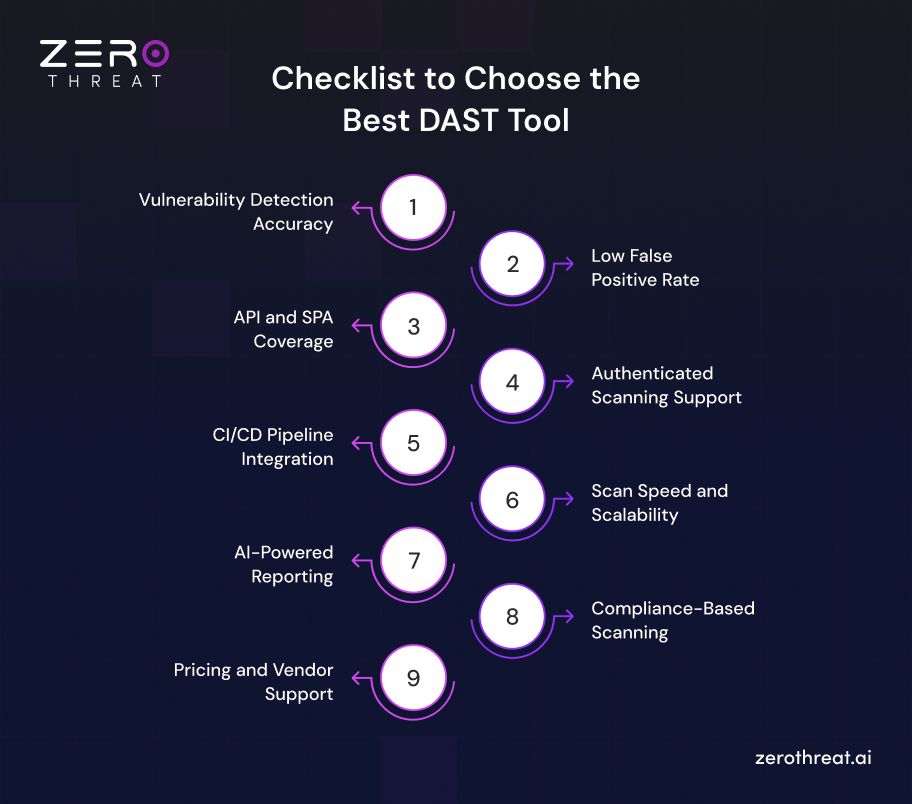
Choosing a DAST tool gets easier when you judge every option against the same criteria. The checklist below sums up the nine factors covered in this guide. Use it to shortlist tools quickly and to spot gaps before you commit.
- Pick a tool that detects real, exploitable vulnerabilities across the OWASP Top 10 and OWASP API Security Top 10.
- Prefer proof-based findings that keep false positives low and save developers from triage time.
- Confirm that it can scan REST and GraphQL APIs and JavaScript-heavy single-page applications.
- Check that it supports authenticated scanning, including SSO, OAuth 2.0, MFA, and multiple user roles.
- Make sure it integrates with your CI/CD pipeline and ticketing tools, so scans run on every build.
- Look for fast, scalable scans that fit frequent releases and a growing application portfolio.
- Choose clear, AI-assisted reports that prioritize risks and give developers practical fix guidance.
- Verify it maps findings to compliance frameworks like PCI DSS, HIPAA, SOC 2, and ISO 27001.
- Compare total cost, including pricing model, onboarding, and vendor support, not just the license fee.
What is a DAST Tool and Why Does Choosing the Right One Matter?
A DAST (Dynamic Application Security Testing) tool tests an application while it is running. Instead of reviewing source code, it interacts with the application from the outside and looks for exploitable security weaknesses. Common findings include SQL injection, cross-site scripting (XSS), broken authentication, security misconfigurations, and other runtime vulnerabilities.
A DAST tool typically crawls an application, identifies accessible attack surfaces, sends security test requests, and analyzes the responses. Modern solutions can also support authenticated scanning, APIs, JavaScript-heavy applications, and complex user workflows.
However, not every DAST tool provides the same level of coverage or accuracy. Some tools may struggle with authenticated areas, modern application architectures, APIs, or multi-step workflows. Others may generate large numbers of false positives that require security teams to spend additional time validating results.
The right tool should fit the way your applications are built, tested, and deployed. When evaluating a DAST solution, look beyond basic vulnerability scanning. Consider detection coverage, accuracy, application support, CI/CD integration, scalability, reporting, remediation guidance, and deployment requirements.
A well-chosen DAST tool can help security teams identify runtime vulnerabilities earlier, validate security controls continuously, and integrate application security testing into the development lifecycle without creating unnecessary operational overhead.
How to Choose a DAST Tool: Practical Evaluation Checklist
Choosing a DAST tool comes down to how accurately it finds real vulnerabilities, how well it covers your apps and APIs, and how easily it fits your workflow. Use this checklist to compare options.
Vulnerability Detection Accuracy
Detection accuracy shows how reliably a DAST tool finds exploitable flaws in a running application. A tool that misses real issues gives your team a false sense of security.
Check for:
- Coverage of the OWASP Top 10 and OWASP API Security Top 10
- Detection of injection flaws, cross-site scripting (XSS), broken access control, and SSRF
- Support for multi-step attack flows and business logic testing
- Proof-based findings that confirm exploitability
Ask vendors for benchmark results or run the tool against intentionally vulnerable apps like OWASP Juice Shop or DVWA. Then compare its findings with the flaws you already know exist.
Low False Positive Rate
A high false positive rate slows remediation and erodes developer trust. When every alert needs manual triage, real vulnerabilities get buried in the noise.
Look for:
- Automated validation that confirms a finding before reporting it
- Clear proof of exploit, such as request and response evidence
- Severity scoring with context, like CVSS
- Options to suppress known false positives
During a trial, track the ratio of confirmed findings to reported findings. Fewer, verified results help security and engineering teams focus on the risks that actually matter.
API and SPA Coverage
Modern applications rely on REST and GraphQL APIs and on JavaScript frameworks like React, Angular, and Vue. Traditional crawlers often miss these attack surfaces.
Confirm the tool can:
- Import OpenAPI, Swagger, or Postman collections
- Crawl single-page applications using a headless browser
- Test GraphQL endpoints and WebSocket traffic
- Handle dynamic routes and client-side rendering
Weak crawling leaves part of your attack surface untested. Ask how the tool discovers endpoints and how it reports scan coverage afterward.
Authenticated Scanning Support
Many serious vulnerabilities sit behind a login. A DAST tool that only scans public pages will miss broken access control, privilege escalation, and session management flaws.
Check that the tool supports:
- Form-based, token-based, OAuth 2.0, and SSO logins
- Multi-factor authentication workflows
- Session handling with automatic re-authentication
- Multiple user roles to test authorization boundaries
Test it against your real login flow. If setup is complex or sessions drop mid-scan, coverage of authenticated areas will suffer.
CI/CD Pipeline Integration
DAST delivers the most value when it runs continuously, not just before release. Integration decides whether scans fit naturally into your DevSecOps workflow.
Evaluate:
- Native plugins for Jenkins, GitHub Actions, GitLab CI, and Azure DevOps
- CLI and REST API access for automation
- Quality gates that fail builds on critical findings
- Ticket sync with Jira or similar tools
- Scan times that suit frequent builds
Smooth integration shifts security left. It also lets developers act on findings inside the workflow they already use.
Scan Speed and Scalability
Scan speed affects how often your team can test. A tool that takes hours per run will get skipped, especially in fast release cycles.
Look for:
- Parallel and distributed scanning across multiple targets
- Incremental scans that test only changed areas
- Configurable scan depth and scope
- Stable performance on large, complex applications
Also check that scans do not overload staging or production systems. Ask vendors how the tool performs across hundreds of applications, not just one. Scalable DAST keeps security testing consistent as your application portfolio grows.
AI-Powered Reporting
Reports decide how fast vulnerabilities get fixed. Raw scanner output often overwhelms developers, so clarity matters as much as detection.
Check whether the tool offers:
- Plain-language summaries of each vulnerability and its business impact
- Risk-based prioritization using severity and exploitability
- Step-by-step remediation guidance with code-level fixes
- Executive and developer report views
- Trend tracking across scans
AI-driven reporting cuts triage time and helps teams fix critical issues first. It also makes results easier to share with non-technical stakeholders.
Compliance-Based Scanning
Many teams run DAST to meet audit requirements. The right tool should map findings to the frameworks your organization must follow.
Confirm support for:
- PCI DSS, HIPAA, SOC 2, ISO 27001, and GDPR
- Findings mapped to the OWASP Top 10 and CWE
- Audit-ready reports that can be exported on demand
- Scheduled scans that create a consistent evidence trail
This saves hours of manual documentation during audits. It also shows regulators that vulnerability management is ongoing, not a one-time check.
Pricing and Vendor Support
The cheapest tool is not always the most cost-effective one. Total cost includes licensing, setup time, training, and the effort spent handling false positives.
Compare:
- Pricing models, such as per application, per scan, or per user
- Limits on scans, targets, or users at each tier
- Onboarding help and documentation quality
- Support response times and service level agreements (SLAs)
- Free trial or proof-of-concept options
Reliable vendor support keeps your program moving when issues come up. Choose a partner that stays useful long after the purchase.
Want accuracy without the noise? Discover how ZeroThreat's AI-powered DAST validates real, exploitable risks. Explore AI-Powered DAST
Common Mistakes When Choosing a DAST Solution
Many teams pick a DAST tool based on a demo or a price tag, then struggle with its months later. Knowing the most common mistakes upfront helps you avoid wasted budget, slow remediation, and gaps in your security coverage.
- Choosing a tool based on price alone instead of the total cost of ownership.
- Skipping proof of concept and trusting vendor demos without testing on your own applications.
- Ignoring false positive rates until developers stop trusting the scan results.
- Overlooking API, single-page application, and authenticated scanning support.
- Selecting a tool that does not integrate with your existing CI/CD pipeline and ticketing systems.
- Focusing on the number of vulnerabilities found instead of accuracy and actionable remediation guidance.
- Forgetting to check whether the tool supports the compliance frameworks your organization must meet.
Top DAST Tools for Security Testing: Quick Glance
Now that you know how to evaluate DAST software, here are some of the best DAST tools recommended by experts:
| Tool | DAST Coverage | API Support | Authenticated Testing | Automation | Deployment |
|---|---|---|---|---|---|
| ZeroThreat | Web apps, SPAs, microservices, runtime vulnerabilities, business logic | REST, GraphQL, SOAP, gRPC | Login flows, tokens, cookies, authenticated APIs | CI/CD, continuous testing, automated attack workflows | Cloud-based |
| ZAP | Active and passive scanning, web applications, AJAX, WebSockets | API through REST API, OpenAPI and add-ons | Authentication methods, sessions, browser authentication | API, Automation Framework, GitHub Actions, packaged scans | Open source, self-managed |
| Checkmarx | Web applications and APIs, runtime vulnerabilities, security flaws | Web APIs and application endpoints | Browser-recorded logins, 2FA, authentication flows | CI/CD integration and automated DAST | Cloud-based |
| Acunetix | Web applications, modern JavaScript apps, APIs, microservices | REST APIs and API-driven applications | Authenticated scanning and workflows | CI/CD, scheduled and incremental scanning | SaaS or on-premises |
| HCL AppScan | Web applications, SPAs, APIs, runtime vulnerabilities | Web APIs, REST APIs, Postman collections | Login recordings, multi-step configurations, client certificates | DevOps integration, automated scans | Cloud, on-premises, private cloud |
Checkmate all your application vulnerabilities with a scan that is 99.9% accurate results. Get Started Now!
Wrapping Up
Security testing is a crucial aspect of developing and releasing web applications that can resist cyberattacks. DAST tools automate testing and enable developers to detect and resolve vulnerabilities early before they hit the production environment.
These tools dynamically test applications at runtime, allowing them to detect more complex vulnerabilities that static code analysis tools fail to identify. Although there are a lot of tools for DAST scanning, ZeroThreat offers an edge in terms of better accuracy, speed, and in-depth assessments with its AI-powered capabilities.
As a next-gen DAST scanning platform, ZeroThreat is designed to streamline the workflow of modern development and security teams by automating and speeding up AppSec. It offers faster detection and prioritization of vulnerabilities, reducing the remediation time significantly.
With high-precision vulnerability detection and near-zero false positives, it is a critical tool for development and security teams in AppSec. Try It Now and check all its benefits!
Frequently Asked Questions
Why is a DAST tool important?
DAST tools play a vital role in SDLC by automating vulnerability detection and prioritization. Consequently, developers can fix vulnerabilities before a web app is deployed to production. It reduces testing time and speeds up app development and delivery.
What does a DAST scanner do?
What are the best tools for DAST?


Explore ZeroThreat
Automate security testing, save time, and avoid the pitfalls of manual work with ZeroThreat.